Proxmox VE 9.2 Is Out: Not Just a New Kernel, but a Cluster That Can Start Balancing Itself
Short version
Proxmox VE 9.2 was officially released on May 21, 2026. On the surface it is a platform refresh: Debian 13.5 Trixie, Linux kernel 7.0, QEMU 11.0, LXC 7.0, ZFS 2.4, and updated Ceph options. The more interesting story is operational: dynamic load balancing through CRS, safer HA maintenance with arm/disarm, a much stronger SDN fabric story, web-based custom CPU model management, and many smaller fixes around guests, storage, security, and automation.
If you run a single-node homelab, Proxmox VE 9.2 may not feel dramatic on day one. If you operate a multi-node cluster with HA resources, Ceph, software-defined networking, custom CPU compatibility requirements, Windows secure boot, external automation, or strict maintenance windows, this release deserves a careful read.
This article summarizes the official Proxmox VE 9.2 release and adds an operator’s view: what changed, what problem each change addresses, what to test before upgrading, and when it is reasonable to wait. All hostnames, addresses, cluster names, accounts, and command outputs are placeholders. No private environment details are included.
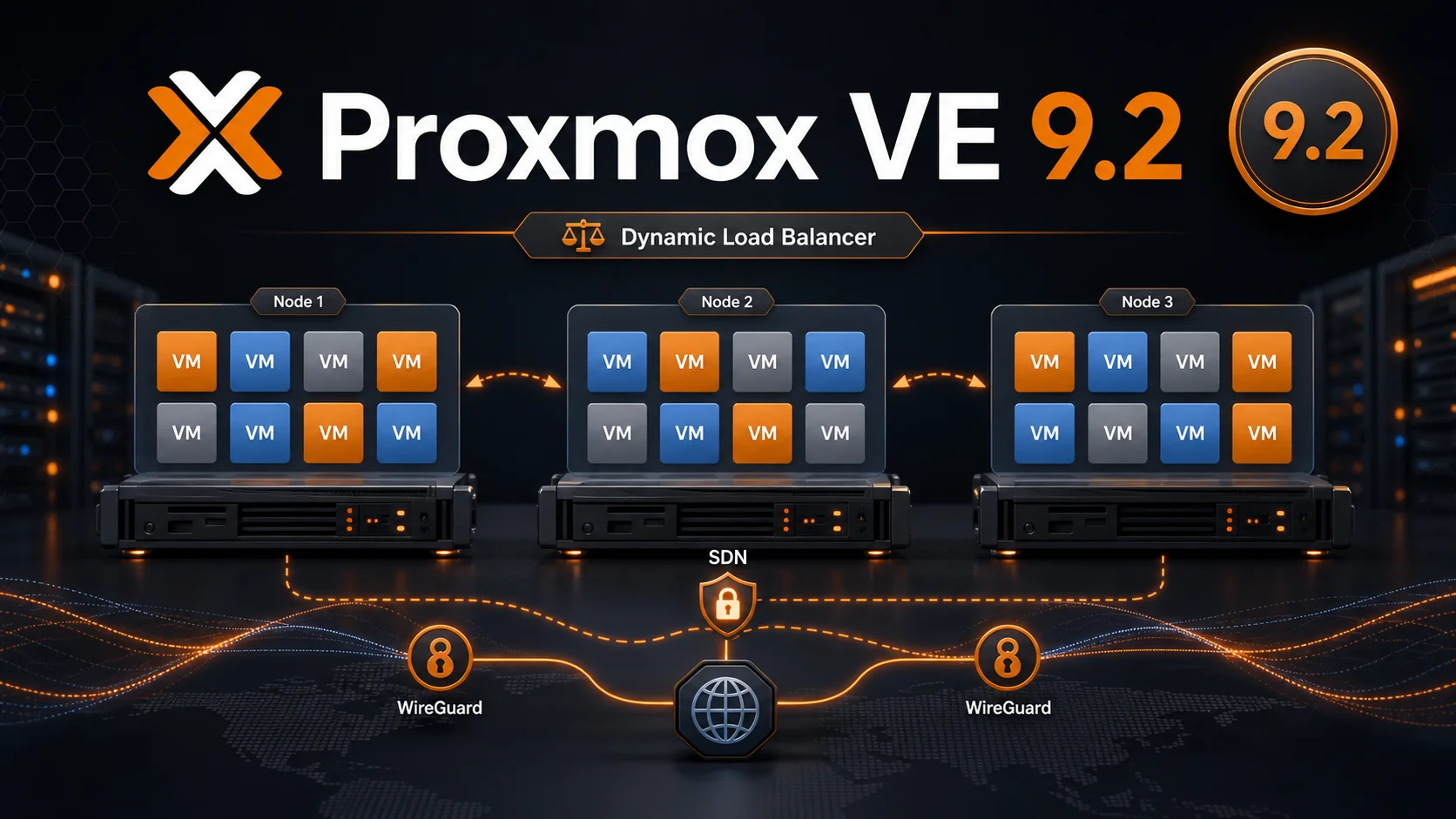
Figure 1: Generated editorial cover for this article. The 9.2 story is about moving resource placement, HA maintenance, and SDN fabric behavior closer to platform-level orchestration.
1. Why this release deserves its own article
Proxmox VE has become a common choice for homelabs, small private clouds, edge clusters, small business infrastructure, and self-hosted services. Its appeal is not only that it is open source. It packages KVM, LXC, software-defined storage, networking, a practical web UI, backup integration, clustering, and HA into a system that one operator can still understand.
But once a deployment grows from a single node into a long-running cluster, the problems become more serious.
- Node utilization drifts over time. One node becomes hot while another stays underused, but guests do not magically move to the best place.
- HA is useful during failures, but it can be too eager during maintenance. A planned network change can look like a node failure.
- SDN can do a lot, but EVPN, BGP, encrypted underlays, IPv6 underlays, and route filtering quickly become complex.
- Custom CPU models and CPU flags matter in mixed-generation clusters, yet they were not always easy to manage and compare from the web interface.
- A platform upgrade touches kernel, QEMU, LXC, ZFS, Ceph, Debian packages, storage, guest behavior, permissions, and external automation at the same time.
That is why Proxmox VE 9.2 is more than a minor version bump. It strengthens the operational layer of the PVE 9 series: dynamic balancing, HA maintenance control, SDN fabric features, custom CPU model management, UI improvements, API changes, and a modernized base stack.
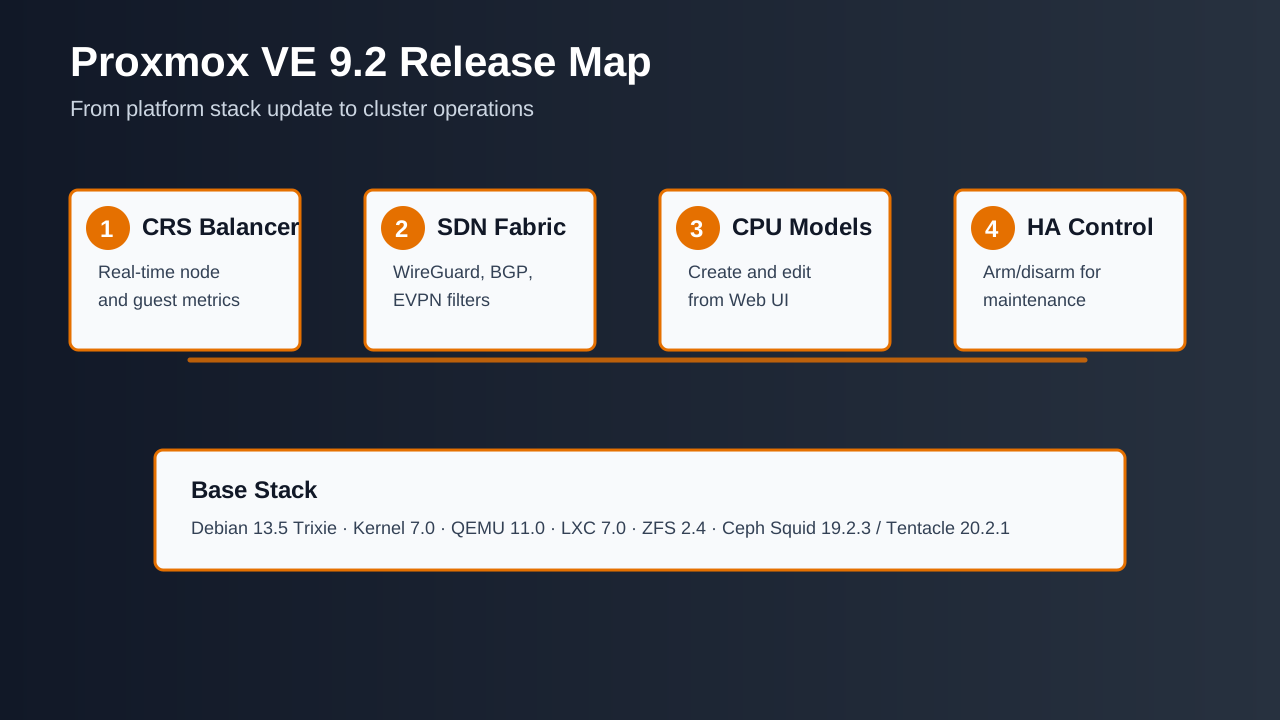
Figure 2: The release can be read in four layers: resource scheduling, network fabric, virtual hardware abstraction, and HA maintenance control. Underneath sits the refreshed Debian, kernel, QEMU, LXC, ZFS, and Ceph stack.
2. The base stack
According to the official roadmap and release announcement, Proxmox VE 9.2 was released on May 21, 2026. The base stack includes:
- Debian 13.5 Trixie.
- Linux kernel 7.0 as the new stable default.
- QEMU 11.0.
- LXC 7.0.
- ZFS 2.4.
- Ceph Squid 19.2.3.
- Ceph Tentacle 20.2.1, now available as a stable option and used as the default for fresh Ceph deployments.
For operators, each item has practical consequences.
Kernel 7.0 can bring better hardware support, newer drivers, security fixes, and networking improvements. It can also expose compatibility issues in third-party drivers, DKMS modules, vGPU setups, HBA passthrough, NIC passthrough, vendor tools, or older operational assumptions.
QEMU 11.0 affects the VM layer. The release notes include changes around custom CPU models, Windows certificate enrollment, TPM state snapshots, guest agent filesystem freeze control, migration behavior, OVMF, VBS-related CPU flags, and task logs. If you operate Windows Server workloads, secure boot, vTPM, OVMF, live migration, or guest-agent-aware backups, these details are worth reading.
LXC 7.0 affects containers. Proxmox VE 9.2 adds mount point options such as idmap and keepattrs, honors OCI image User metadata, and continues to warn about raw cgroup v1 entries. Modern containers benefit from stricter semantics; old containers should be tested.
ZFS 2.4 and Ceph 20.2.1 matter at the storage layer. The important Ceph detail is that new Ceph-free nodes or clusters default to Tentacle, while existing clusters remain tied to their current release path. That is the right behavior: new deployments can move forward, while existing Ceph clusters should follow a separate, controlled upgrade guide.
3. The headline feature: CRS dynamic load balancing
The most visible feature in 9.2 is the Dynamic Load Balancer. Proxmox places it at the top of the official highlights. It is based on the Cluster Resource Scheduler, or CRS. In the new dynamic scheduling mode, CRS can use real-time node and guest utilization metrics to balance HA-managed guests.
In plain language: the scheduler can now consider current load, not just static placement rules, and can automatically migrate HA-managed guests to reduce imbalance across the cluster.
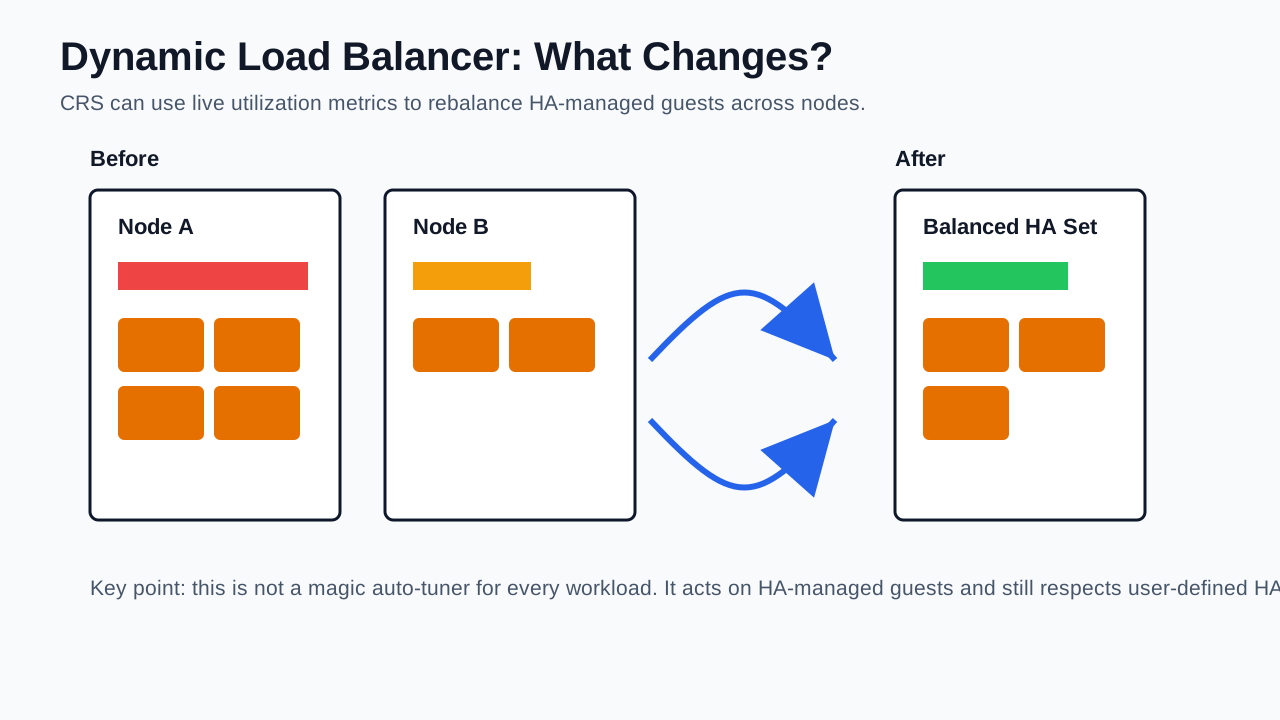
Figure 3: Dynamic balancing does not mean every VM moves freely. It acts on HA-managed guests and still respects user-defined HA rules.
This addresses a real cluster problem. Guest placement tends to drift. A cluster may start balanced, then backups, batch jobs, application growth, emergency migrations, node reboots, and storage behavior slowly make one node much busier than another. Administrators may know that some workloads should move, but they are not watching utilization charts all day. Even when they notice, they may hesitate to migrate during production hours.
The new balancer turns part of that judgment into a platform capability.
There are limits.
First, it is not a universal performance optimizer. The official notes describe it in the context of HA-managed guests.
Second, it still respects HA rules. If a workload must stay within a node group or follow affinity rules, the balancer is not supposed to ignore that intent.
Third, it needs tuning. Proxmox mentions configurable behavior and sensitivity in the HA panel or datacenter options. Too insensitive and it may not help. Too aggressive and it may migrate more often than you want. The safe approach is to test with low-risk HA resources before enabling aggressive behavior for critical databases.
My take: this is highly relevant for clusters that already use HA. It is not very relevant to single-node users. For non-HA clusters, it still shows where the platform is heading: more resource-aware placement.
4. HA arm/disarm: maintenance windows become explicit
HA exists to make decisions when something goes wrong. That is useful during failures, but stressful during planned maintenance. If you change cluster networking, move nodes, adjust switches, or do work that briefly affects heartbeat visibility, HA may interpret that as a failure.
Proxmox VE 9.2 introduces cluster-wide HA disarm and arm operations through new CRM commands: disarm-ha and arm-ha. Administrators can temporarily disarm the HA stack during planned maintenance to avoid unwanted actions such as fencing. HA resource states are preserved, and resources return to their previous state after maintenance is completed and HA is armed again.
This does not mean “turn HA off forever.” It gives maintenance intent a real platform state. A good runbook can now say: inspect resources, pause automatic rebalancing if needed, wait for migrations to finish, disarm HA for a planned operation, complete the operation, arm HA, and verify resource state.
The official known issues section includes one important warning: if the HA stack is disarmed while HA resources are still migrating, an upgrade from an older affected version can stall on pve-ha-manager package triggers. The workaround is to keep HA armed during the upgrade or wait until all migrations finish first. If an upgrade does get stuck, re-arming HA lets it continue. Enterprise repository users were not affected, and clusters that have not used the disarm feature are unaffected.
That warning belongs in every upgrade checklist. It is a reminder that a maintenance feature still has state, and state matters during package upgrades.
5. SDN moves further toward fabric management
The SDN improvements in Proxmox VE 9.2 are substantial. The official list includes:
- WireGuard as a new SDN fabric protocol.
- BGP as a new SDN fabric protocol.
- Route maps and prefix lists for BGP and EVPN filtering.
- Route redistribution for OSPF fabrics.
- More EVPN controller options, including multiple controllers, node restrictions, session types, and eBGP multihop.
- IPv6 underlay support for EVPN.
- Dry-run support for SDN configuration changes.
For a single-node user, this may sound distant. For multi-node, multi-site, edge, or routed environments, this is important.
A small cluster often starts with simple VLANs on one switch. That works until you need cross-site connectivity, routed underlays, encrypted tunnels, migration networks, EVPN, or precise route filtering. At that point, the platform needs to understand more than “bridge plus VLAN.”
WireGuard fabrics provide encrypted node-to-node tunnels that can be used as a secure underlay for VXLAN networks, migration networks, and cross-cluster connectivity. BGP fabrics provide a routed underlay model. Route maps, prefix lists, and EVPN filtering move the system from “it can reach” to “it can control exactly what is advertised and accepted.”
The dry-run feature is especially practical. Network changes are dangerous because a wrong apply can disconnect management access. A dry run does not eliminate risk, but it lets operators inspect generated configuration before applying it.
6. Custom CPU models in the web UI
Proxmox VE 9.2 adds web-based management for custom CPU models under Datacenter -> Guest Resources/Hardware. Administrators can create, edit, and remove custom CPU models from the web interface. The VM CPU flags selector also shows supported flags on each cluster node, making compatibility problems easier to detect before they cause migration failures.
This is more useful than it may sound.
The best CPU model is not always host. Host CPU mode exposes the most features and can offer the best performance, but it can reduce migration compatibility in mixed-generation clusters. A generic CPU model may migrate more reliably, but may hide features needed by a workload. Some databases, cryptographic workloads, Windows security features, nested virtualization workloads, and build systems require specific CPU capabilities.
Before this release, many of these decisions lived in CLI commands, config files, and operator memory. The new UI makes the tradeoff visible: performance, required features, and cross-node compatibility can be evaluated together.
If your cluster mixes different Intel or AMD generations, this is one of the first areas to inspect after upgrading.
7. VM, container, backup, and storage improvements
The changelog is long, but several groups of changes are broadly relevant.
For VMs, Proxmox VE 9.2 improves the Microsoft and Windows 2023 certificate enrollment workflow. In addition to the CLI command qm enroll-efi-keys, the procedure can now be done via the web interface and API. Windows UEFI CA 2023 and Microsoft KEK CA 2023 certificates are included. This matters for secure boot, Windows Server deployments, and future Windows guest defaults.
TPM state snapshots also improve. The release allows taking and removing live snapshots of VMs with TPM state on storages that support snapshots as volume chains. A limitation remains: the top-most snapshot cannot be removed while the VM is running. Operators should document that detail.
The QEMU guest agent option freeze-fs controls whether freeze and thaw commands are issued during backups, clones, replications, and snapshots. Older option names remain as aliases for compatibility. If you care about application-consistent backups, review guest agent behavior after upgrading.
For containers, LXC 7.0, per-mountpoint idmap, keepattrs, OCI User support, and cgroup v1 deprecation warnings point toward more modern container semantics. Old privileged containers, special bind mounts, and legacy cgroup assumptions should be tested.
For backup jobs, legacy API parameters starttime and dow are deprecated in favor of schedule and removed from API responses. External scripts that read backup job definitions should be checked.
Storage improvements include approximate size reporting for inactive qcow2 volumes on shared LVM, better storage error messages, a PBS storage identity API endpoint, Kerberos CIFS connection checks, safer OVF/OVA parsing through seccomp, and a fix for problematic OCI image reference parsing. These are not headline features, but they reduce operational friction.
8. Security and permissions
Proxmox VE 9.2 also includes several security and permission changes.
Dumping a cloud-init password now requires VM.Config.Cloudinit. Starting VMs after creation, restoration, or snapshot rollback now requires VM.PowerMgmt. Adding VMs or containers as HA resources during creation or restoration requires Sys.Console. Built-in roles may already cover the common paths, but custom roles and automation accounts need review.
VNC-related API endpoints received security fixes for scenarios where sufficiently privileged attackers could hijack VNC sessions or infer effective VNC passwords. External clients that connect directly to VNC ports opened by vncshell or vncproxy API endpoints may need to adapt to breaking changes.
Container security improves through seccomp filtering around AF_ALG sockets. Kernel-level fixes include AppArmor, DirtyFrag, Fragnesia, ssh-keysign-pwn, pintheft, and other local privilege escalation fixes. The point is simple: 9.2 is not just a feature release; it also tightens several security boundaries.
9. Who will feel the change most?
Single-node users will mostly notice the refreshed stack, better UI details, mobile interface improvements, task log improvements, and security fixes. That is useful, but not dramatic.
HA cluster users will notice much more. Dynamic balancing changes how HA-managed resources can be placed over time. HA arm/disarm changes how maintenance windows can be written into runbooks. Custom CPU model UI changes how migration compatibility is planned.
SDN-heavy users should test 9.2 early. WireGuard fabrics, BGP fabrics, route maps, prefix lists, EVPN IPv6 underlays, and dry-run support are direct improvements for routed and multi-site designs.
Automation-heavy users should inspect API and permission changes. Backup job fields, custom roles, cloud-init password access, VNC proxy behavior, SDN objects, and PBS storage identity can all affect external tooling.
10. Why these features are appearing now
The direction is clear: Proxmox VE is continuing to move from a friendly virtualization manager toward a more complete data center operating layer.
At first, users care about installation speed, VM and container creation, storage, backups, and the ability to drop into Debian when something breaks.
Then clusters appear. The questions become: where should guests run, how should failures be handled, how does storage span nodes, how does the network scale, and how does backup integrate with recovery?
Then the cluster grows more complex even if it remains small by enterprise standards. There may be multiple sites, edge nodes, mixed CPU generations, custom roles, API-driven automation, encrypted underlays, BGP routing, EVPN, auto-install workflows, and external control planes.
Dynamic CRS, SDN fabrics, custom CPU model management, and HA arm/disarm all move operational intent into the platform. Instead of leaving every rule in the operator’s head or in external scripts, the platform can understand more of the resource, network, HA, and hardware compatibility model.
11. The root cause: operations intent needs structure
Many infrastructure problems are not caused by the absence of a feature. They happen because operational intent is not expressed in a structured way.
A human knows that some VMs can move, some must stay in a node group, and some should not colocate. If that knowledge exists only in a runbook or in someone’s memory, the scheduler cannot act on it. Dynamic CRS gives the platform a way to combine utilization and HA rules.
A human knows that a network change is planned maintenance, not a node failure. HA does not know that unless the platform has an explicit state for it. HA arm/disarm provides that state.
A human knows which routes should be advertised, which prefixes should be filtered, which underlay should be encrypted, and which EVPN controller belongs on which nodes. If all of that lives in external FRR and WireGuard snippets, the virtualization platform cannot show or validate it. The expanded SDN model brings more of that intent into Proxmox VE.
A human knows that a VM needs certain CPU flags but must still migrate across a set of nodes. The custom CPU model UI and flag selector make that compatibility intent visible.
12. A practical upgrade checklist
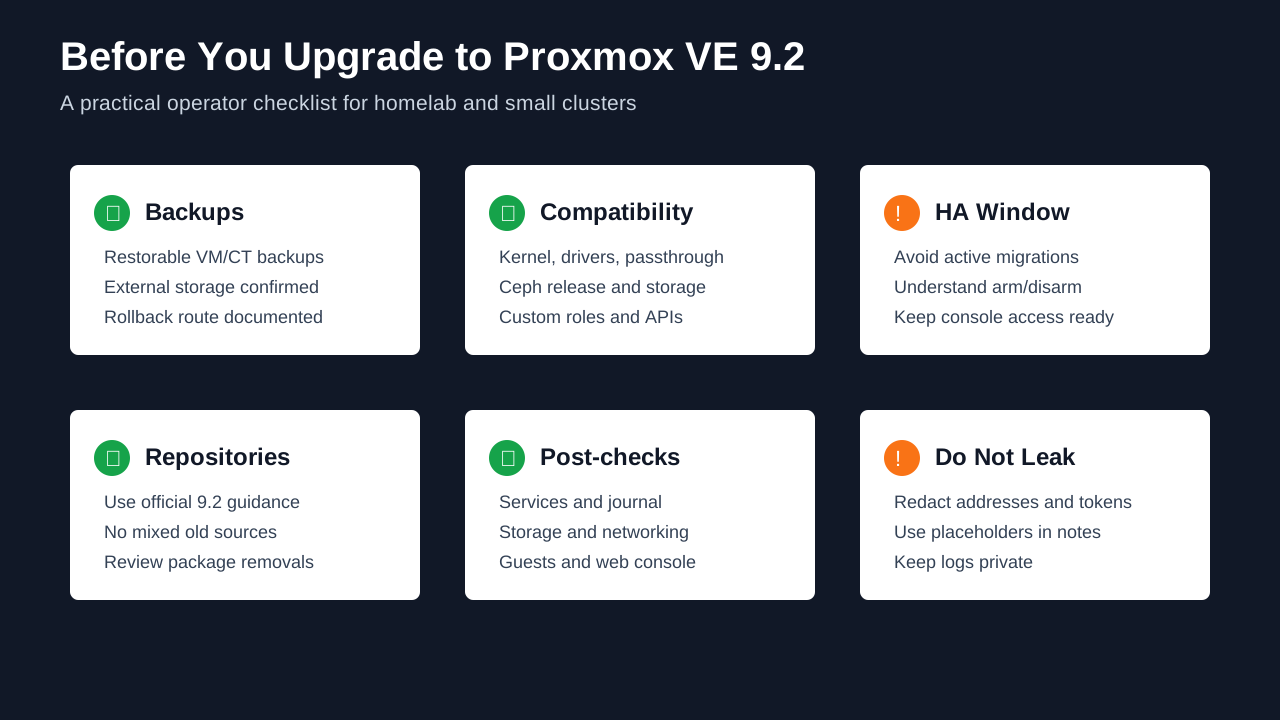
Figure 4: Do not treat 9.2 as just a version number. Backups, compatibility, HA state, repositories, post-checks, and redacted notes all matter.
If you are already on Proxmox VE 9.x, moving to 9.2 should normally be much simpler than the PVE 8 to PVE 9 major upgrade. Still, do not run it blindly.
First, confirm the current version and repositories:
pveversion -v
apt update
apt list --upgradable
Second, confirm backup and restore paths. Know where critical VM and CT backups are, whether they are readable, and whether representative restores have been tested.
Third, inspect HA state. If HA is enabled, check whether resources are migrating, whether automatic rebalancing is enabled, and whether the HA stack is armed or disarmed. Do not upgrade while HA is in a state you cannot explain.
Fourth, inspect Ceph. Existing Ceph clusters should not be pushed to Tentacle casually just because 9.2 makes it available. Follow the official Ceph upgrade guide separately.
Fifth, inspect special hardware and drivers: GPU passthrough, vGPU, HBA passthrough, NIC passthrough, DKMS modules, UPS USB HID devices, and vendor tools.
Sixth, inspect external automation: custom roles, API tokens, backup scripts, cloud-init password access, VNC proxy consumers, auto-install ISO pipelines, and SDN API users.
Seventh, upgrade a low-risk node first. Validate services, journal logs, storage, networking, migrations, backups, restores, and HA behavior before moving to the next node.
Eighth, keep records but redact them. Public notes should preserve command structure and error classes, not real hostnames, addresses, tokens, customer names, internal domains, or cluster identifiers.
13. Should you upgrade immediately?
For a single-node homelab already on PVE 9.x, upgrading after backups are confirmed is reasonable unless special hardware or third-party drivers are involved.
For a PVE 8.x host, do not treat this article as a full PVE 8 to PVE 9 upgrade guide. That is a major upgrade and requires the official upgrade documentation and pve8to9 checks.
For a multi-node cluster without HA, the direct value of dynamic balancing is limited, but the refreshed stack, SDN improvements, storage fixes, and security fixes still matter.
For a HA cluster, 9.2 is worth testing carefully. Dynamic balancing and HA arm/disarm are directly relevant, but they should first be evaluated with low-risk resources and conservative parameters.
For SDN-heavy users, build a test topology. WireGuard/BGP fabrics, route maps, prefix lists, EVPN IPv6 underlay, and dry-run support are valuable, but network changes should not be bundled into an uncontrolled production upgrade.
For production environments, upgrade for a reason: a bug fix, a required hardware capability, a security fix, an HA improvement, or an SDN feature you actually need. Prepare maintenance windows, backups, rollback paths, console access, monitoring, and alerts first.
14. Q&A
Q1: Is Proxmox VE 9.2 a major upgrade?
It is not the same type of major upgrade as PVE 8 to PVE 9, but it is a feature-rich release inside the PVE 9 series. HA, SDN, CRS, custom CPU models, Ceph defaults for fresh deployments, and the base stack all changed meaningfully.
Q2: Will dynamic load balancing move every VM automatically?
No. The official description is about HA-managed guests and user-defined HA rules still apply. Treat it as an HA/CRS scheduling improvement, not a global robot that moves every guest at will.
Q3: Does a single-node user need CRS dynamic balancing?
Not really. There is no cross-node placement problem on a single node. Single-node users should focus on kernel, QEMU, LXC, ZFS, security fixes, UI improvements, and backup compatibility.
Q4: Must existing Ceph clusters upgrade to Tentacle immediately?
No. Proxmox VE 9.2 makes Ceph Tentacle 20.2.1 a stable option and the default for fresh Ceph deployments. Existing clusters should follow a separate Ceph upgrade path and should not mix major Ceph changes into an uncontrolled PVE package upgrade.
Q5: Does HA arm/disarm replace disabling HA?
No. It gives planned maintenance a clear platform state. You still need to inspect resource state before and after maintenance, wait for migrations to finish, and verify that HA returns to the expected behavior.
Q6: What is the most common upgrade mistake?
Treating the environment as simpler than it is. Untested backups, active HA migrations, unsupported third-party drivers, external scripts depending on old API fields, missing permissions in custom roles, and unreviewed SDN changes are more dangerous than the package command itself.
Q7: Can I publish my upgrade logs as-is?
You should not. Upgrade logs often contain real node names, storage names, network identifiers, accounts, paths, token fragments, customer names, or internal domains. Keep the command shape and the error class, but replace environment identifiers before publishing.
15. Final thoughts
The easy headline for Proxmox VE 9.2 is “dynamic load balancing is here.” The better reading is broader: Proxmox is making resource placement, HA maintenance, SDN fabric design, CPU compatibility, automated installation, permissions, and the base virtualization stack more manageable from inside the platform.
For homelab users, that means a newer base and better day-to-day polish. For cluster operators, it means more active balancing and safer maintenance workflows. For SDN users, it means a stronger fabric model. For teams using Proxmox in production-like environments, it means the operational boundaries are becoming clearer.
Do not upgrade out of fear of missing out. Upgrade with a reason, a backup, a tested rollback path, and a checklist. That is how Proxmox VE 9.2 becomes more than a version number: it becomes a real improvement in maintainability.

Figure 5: Official Proxmox press/media asset, localized for this post to avoid depending on a remote image at render time.
References
- Official Proxmox press release: https://www.proxmox.com/en/about/company-details/press-releases/proxmox-virtual-environment-9-2
- Proxmox VE Release Notes & Roadmap: https://pve.proxmox.com/wiki/Roadmap#Proxmox_VE_9.2
- Proxmox VE downloads: https://www.proxmox.com/en/downloads
- QEMU 11.0 upstream changelog: https://wiki.qemu.org/ChangeLog/11.0
- LXC 7.0 LTS release discussion: https://discuss.linuxcontainers.org/t/lxc-7-0-lts-has-been-released/26612