Flagship-Class on 16GB VRAM: Run Qwen3.8-27B Locally on an RTX 5060 Ti
TL;DR
Qwen3.8-27B, open-sourced on August 14, 2026, is the strongest local model in the 27B class: natively multimodal (images and video in), a 262K context window, agentic coding scores roughly 3x its predecessor, and several benchmarks ahead of Claude Opus 4.6 Max — all under the Apache 2.0 license. Best of all, it is a dense pocket rocket: quantized, it fits entirely inside an RTX 5060 Ti 16GB, runs fully in VRAM, and generates at 30+ tok/s — fast enough for coding, document reading, and local agents.
This post does three things: explains — with everyday analogies — why a 27B model fits into 16GB of VRAM; provides one-click scripts for Windows 11, Ubuntu 26.04, and macOS 26 (run them yourself, or hand them to an AI agent); and finishes with a verification checklist and Q&A. No third-party paid services required; weights come only from the official repository.
Figure 1: Cover (self-made). 16GB of VRAM and a 27B model used to be “renter vs. landlord” — now they can finally move in together.
1. Background: Why everyone suddenly wants a 27B at home
On the evening of August 14, Alibaba’s Qwen team released the full weights of Qwen3.8-27B under Apache 2.0 — free for personal and commercial use. Within a week, the Hugging Face repo passed ten thousand likes, 1.7 million downloads in a month, and the community produced around 700 quantized variants.
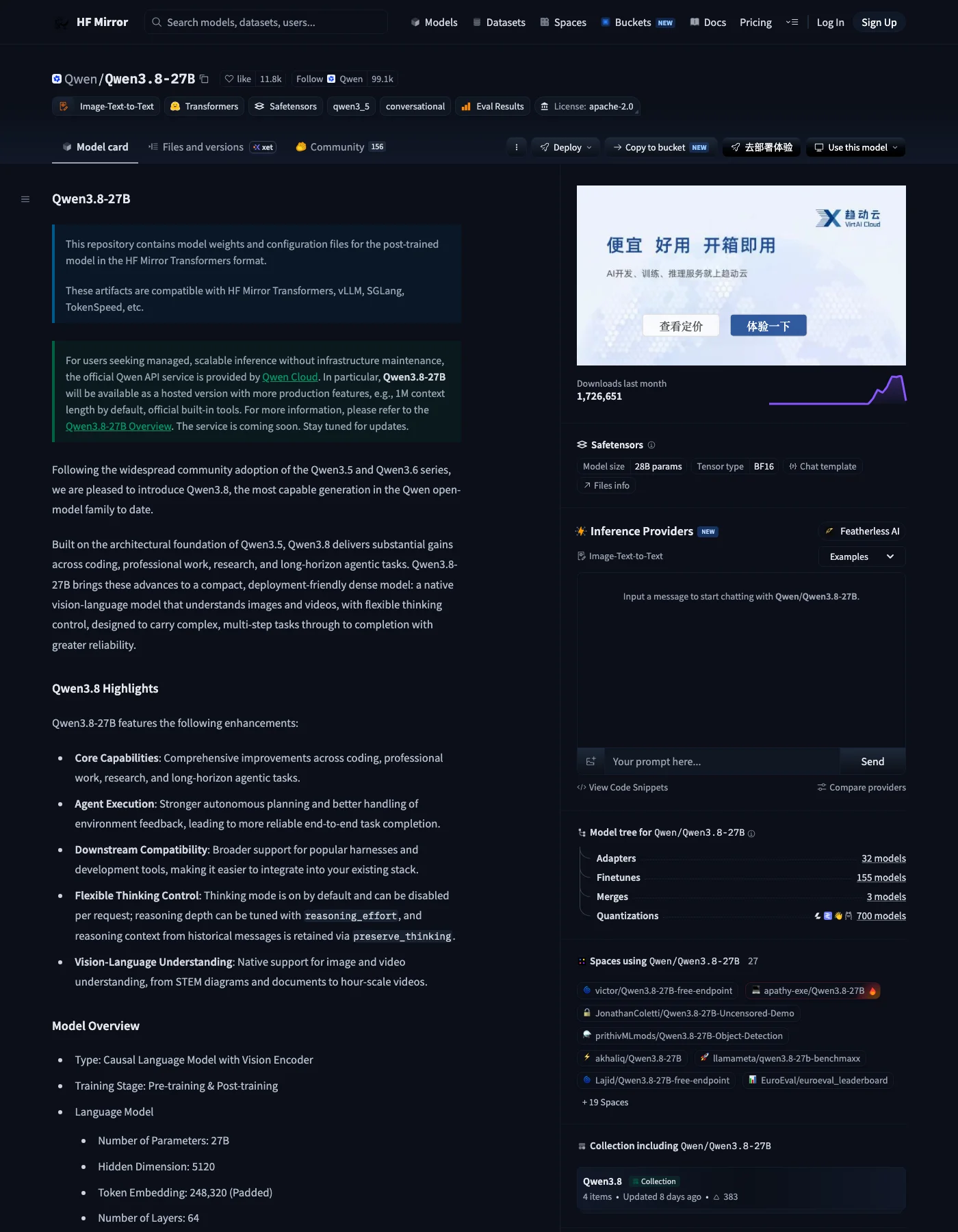
Figure 2: Real screenshot. The model card shows 28B BF16 weights, Apache 2.0, 1.72M monthly downloads and 700 quantizations — one week after release.
The most convincing lines from the official model card:
| Benchmark | Qwen3.8-27B | Qwen3.6-27B (prev.) | Opus 4.6 Max |
|---|---|---|---|
| Terminal Bench 2.1 (terminal agent) | 73.0 | 63.4 | 78.2 |
| SWE-bench Pro (real-world fixes) | 61.7 | 53.5 | 53.4 |
| DeepSWE 1.1 (deep coding agent) | 42.2 | 13.3 | – |
| LiveCodeBench v6 (competitive coding) | 90.3 | 83.9 | 88.8 |
| OSWorld (computer use) | 84.3 | 63.9 | 72.7 |
| AndroidWorld (mobile use) | 81.9 | 70.3 | 62.0 |
Bold cells are where the 27B underdog beats the flagship. DeepSWE jumping from 13.3 to 42.2 is like a grocery-getter hatchback winning stages at a factory-team rally.
Why run it locally instead of calling the API? Three reasons.
First, privacy. Company code, contracts, medical records, family photos — sending them to a cloud API is like handing your diary to a courier to read aloud. Running locally is hiring the chef to cook in your own kitchen: the ingredients never leave the house.
Second, cost. Qwen3.8-27B on OpenRouter is already cheap (about $0.40–0.45 per million input tokens), but agentic tasks are token shredders — one automated bug-fix loop easily burns a hundred thousand tokens. Local deployment is a one-time electricity bill, flat forever.
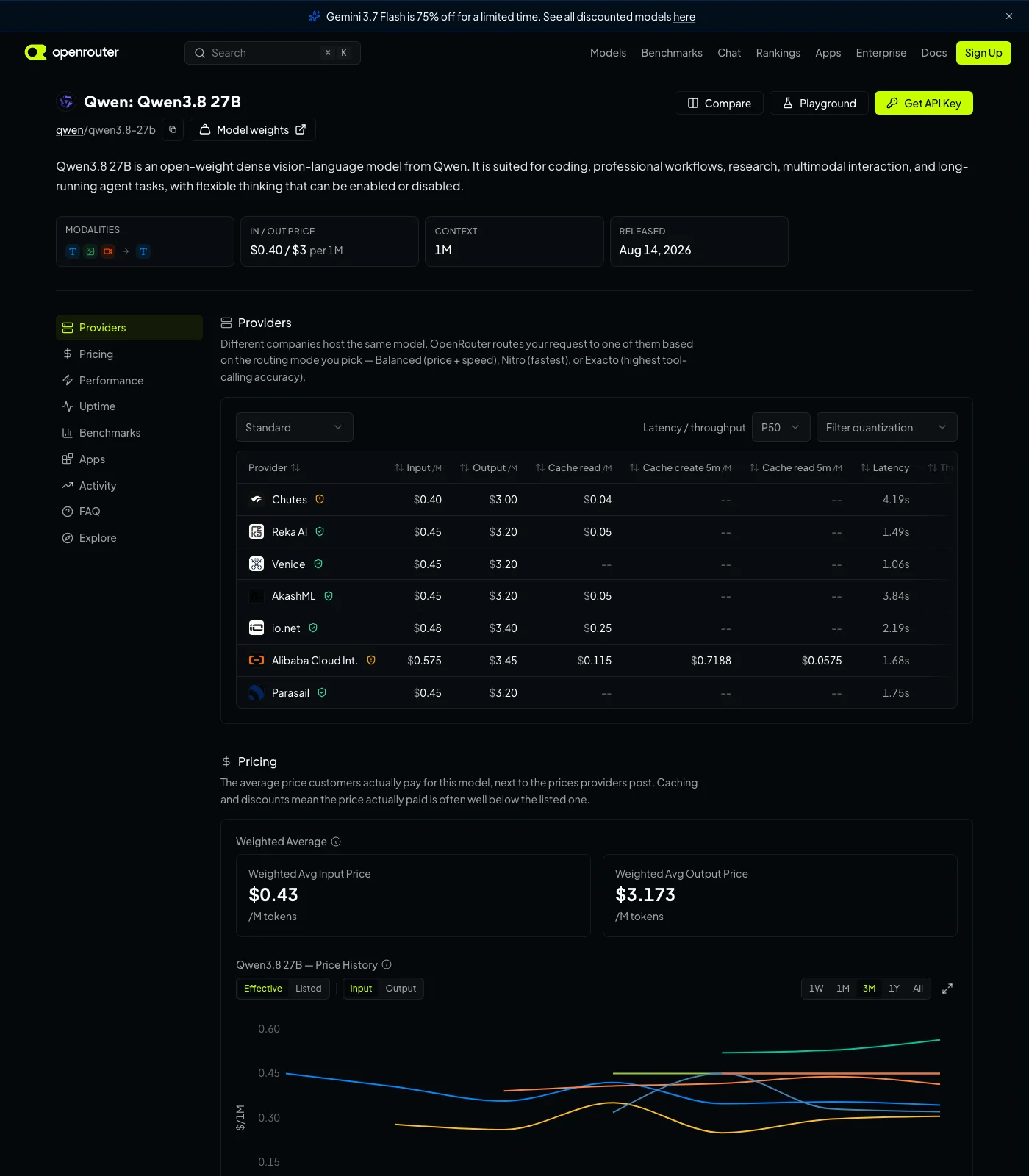
Figure 3: Real screenshot. Multiple providers already host it at roughly $0.40–0.45 input / $3.0–3.2 output per million tokens. Cheap — but heavy agent users still come out ahead with a local GPU.
Third, offline. Travel, intranets, network drills — a local model is always on duty.
Figure 4: Reference image (kingy.ai). The sweet spot for a 27B dense model happens to be “one mainstream gaming card”.
2. Symptoms: what actually goes wrong when you try
If you have tried running a 27B-class model on a home GPU before, you have probably met these three failure modes:
VRAM overflow. The model file is 17GB, your card has 16GB, and loading dies halfway with CUDA out of memory — like discovering the fridge is two centimeters wider than the front door on moving day.
CPU offload drag. You split the model between VRAM and system RAM, and generation slows to single digits: for every token, the GPU waits for data to crawl over from slow memory. Dense models suffer most — they run an “all hands on deck” policy where every parameter participates in every token, so any layer stuck in system RAM makes the whole team walk at its pace.
Download traps. Before the official weights even landed, Hugging Face had a crop of fake lookalike repos; and the same “Q4_K_M” label can differ by more than 2GB between publishers, with quality gaps to match.
All three symptoms are the same arithmetic problem. Let’s do the math.
3. Analysis: how a 27B fits into 16GB
3.1 Quantization: compressing a 4K Blu-ray to 1080p
Raw BF16 weights are about 27B parameters × 2 bytes ≈ 54GB — unthinkable on 16GB. But model weights have a convenient property: most of their “precision” is wasted, like measuring a cucumber with a micrometer.
Quantization compresses each weight from 16-bit floats down to 4, 3, or even 2-bit integers. In movie terms:
- Q8_0 (28.9GB) ≈ the 4K Blu-ray — pristine, but it won’t fit through the door;
- Q4_K_M (~16.5GB) ≈ 1080p — barely distinguishable, still a bit too wide for the doorway;
- IQ3_S (~12.0GB) ≈ 720p — a trained eye can tell, perfectly watchable, and crucially: it fits.
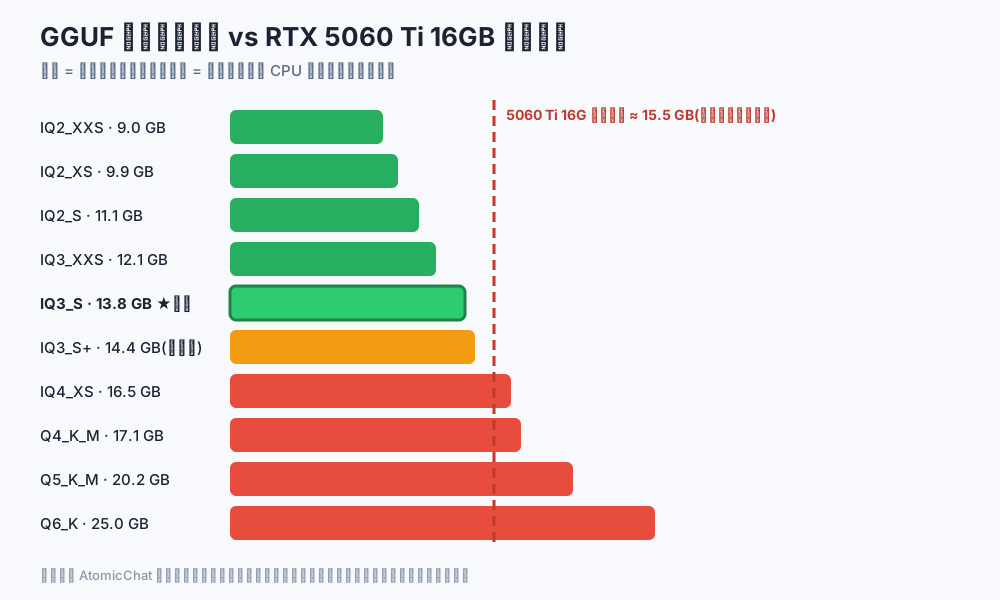
Figure 5: Self-made chart. Only bars left of the dashed line fit entirely in a 5060 Ti. IQ3_S (12.0GB) is the quality-per-GB winner; Q4_K_M (16.5GB) forces layers onto the CPU and speed falls off a cliff.
One more trap: a quant name is a recipe name, not a standard. Measured Q4_K_M builds for this model came out at 16.8GB (lmstudio-community), 19.0GB (ggml-org), and 17.1GB (AtomicChat) — same name, three different files. The rule: judge by file size and measured quality, not by name.
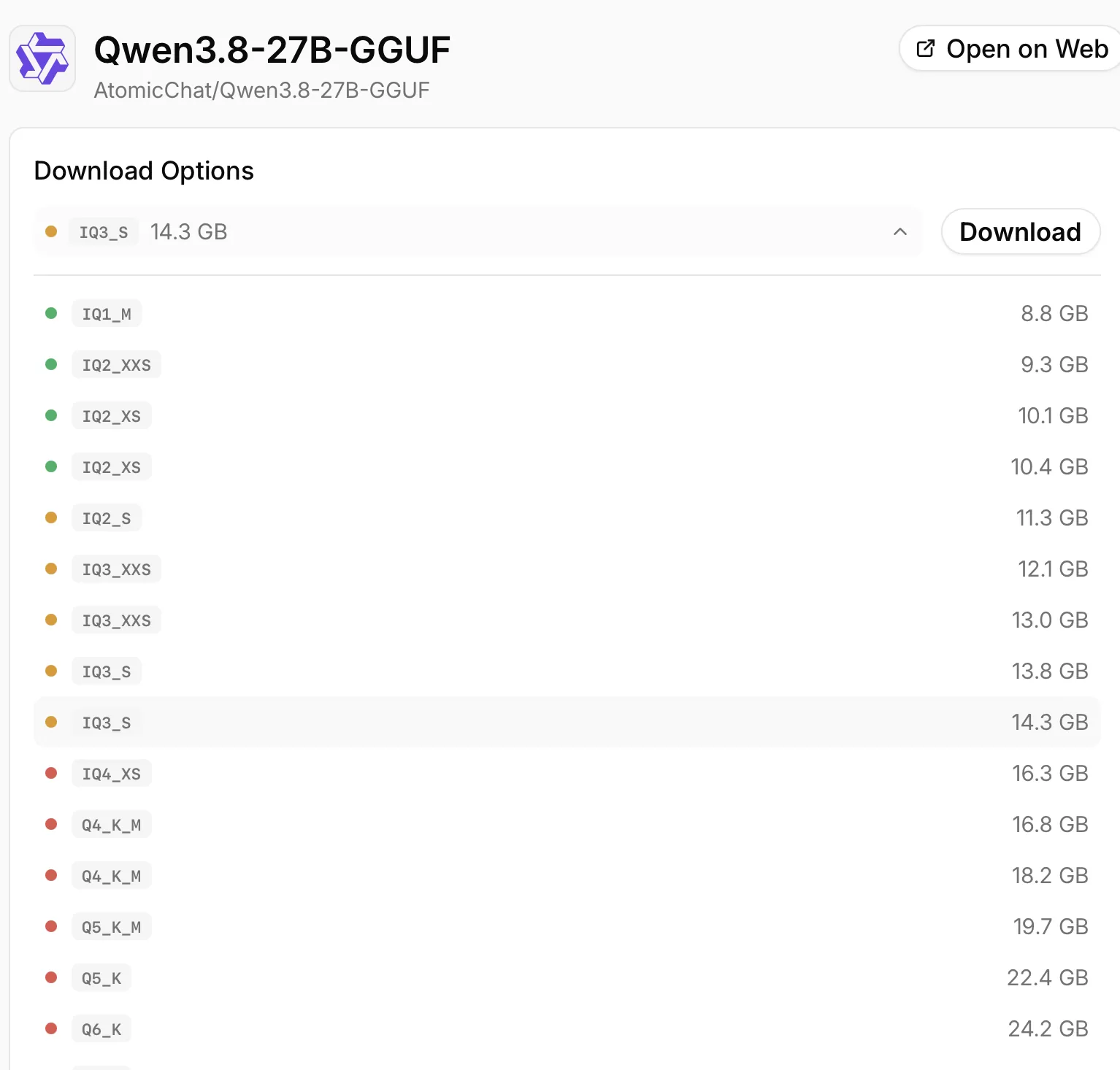
Figure 6: Real screenshot (Atomic Chat). Variants from 8.8GB to 24GB+ in a single repo, with colored dots marking how well each fits your device.
3.2 Hybrid attention: only 16 of 64 layers need sticky notes
The model file is only the first bill. The second is the KV cache — what the model spends to “remember” the conversation. In a conventional transformer, the cache grows with every token; at the full 262K context, the cache alone would be ~67GB, more than twice the model.
Qwen3.8-27B uses a hybrid layout: of its 64 layers, 48 are Gated DeltaNet (linear attention) and only 16 are Gated Attention (standard attention).
An analogy. Standard attention is like sticky notes on your desk: every exchange adds another note, and the desk (VRAM) fills up fast. Gated DeltaNet is a self-updating pen: each new word makes it rewrite the same summary card. One exchange or a hundred thousand — the number of cards never changes.
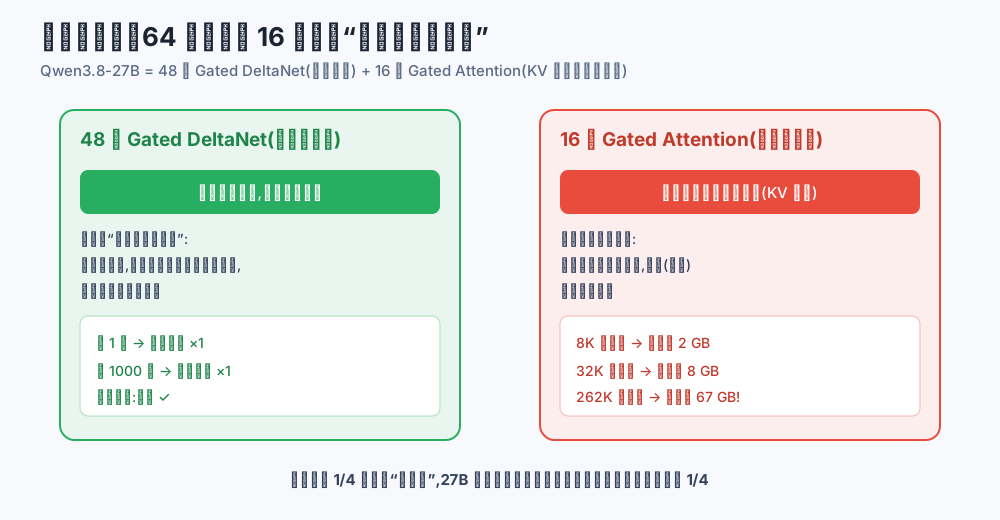
Figure 7: Self-made diagram. With only a quarter of the layers “posting sticky notes”, long-context memory pressure is about a quarter of a same-size traditional model.
Measured, the model keeps about 256KB of attention cache per token: ~2GB at 8K context, ~8GB at 32K. So after loading the 12GB IQ3_S into 16GB of VRAM, there is comfortable room for 8K–12K of context — enough for chats, papers, and single-file coding.
3.3 Thinking control: you decide how many times it checks its work
Qwen3.8-27B ships with thinking mode on by default and a three-position reasoning_effort dial (xhigh/medium/low). Think of it as exam strategy: use xhigh for the final big problem — full scratch work, checked three times; use low for multiple choice — glance and answer. Locally, this dial directly affects speed and how much conversation fits in memory, so the scripts below leave it easy to tweak.
4. Root cause: VRAM = body weight + desk size
Combining the two bills from section 3 gives the root equation of local deployment:
VRAM needed ≈ model file size (body weight) + KV cache (desk size) + OS headroom
A 5060 Ti 16GB gives you roughly 15.5GB usable (the Windows desktop eats a few hundred MB more). Plugging in:
- IQ3_S (12.0GB) + 8K context (~2GB) ≈ 14GB → comfortable, fully in VRAM;
- Q4_K_M (16.5GB) → overweight on its own; 2–4 layers must move to the CPU, and in a dense model every layer touches every token, so speed drops immediately.
The conclusion is clear: on a 5060 Ti 16GB, the right recipe is IQ3_S fully in VRAM + 8K context + KV cache at q8_0, not forcing Q4. For speed expectations, the sibling measurement helps: Qwen3.6-27B Q4_K_M hit about 40 tok/s on this exact card; Qwen3.8-27B is the same size and architecture family, so IQ3_S with MTP (multi-token prediction — guessing several tokens per step) should land in the 30–45 tok/s range — plenty for chat and agent work.
5. The fix: three one-click scripts
Same four-step flow on all three platforms, and every script defaults to a dry run (it only prints the plan). Add one switch to actually execute.
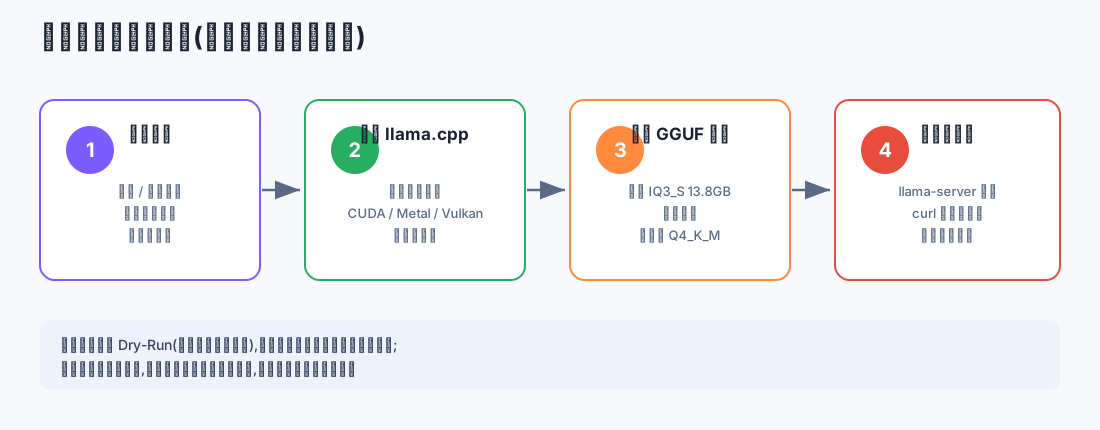
Figure 8: Self-made flowchart. Detect hardware → install llama.cpp → download the GGUF → launch and self-test — identical on all platforms.
Script notes:
- The default model is
UD-IQ3_S(12.0GB) from unsloth’s official repo — the best match for a 5060 Ti 16GB; for Q4_K_M with partial offload, change-QuanttoUD-Q4_K_M; - llama.cpp comes from the official GitHub Release prebuilt binaries, always the latest tag;
- Nothing else is installed, no system config is touched, no existing commands are overwritten;
- The default download source is Hugging Face; if your network cannot reach it, point
$HfBaseat a mirror.
5.1 Windows 11: PowerShell one-click script
Save as Install-Qwen38-Windows11.ps1, dry-run first:
powershell -ExecutionPolicy Bypass -File .\Install-Qwen38-Windows11.ps1
Then execute for real:
powershell -ExecutionPolicy Bypass -File .\Install-Qwen38-Windows11.ps1 -Install
Full script:
param(
    [switch]$Install,                 # omit = dry run only
    [string]$Quant  = "UD-IQ3_S",     # best for 5060 Ti 16GB; or UD-Q4_K_M
    [string]$Root   = "$HOME\qwen38-27b",
    [string]$HfBase = "https://huggingface.co",
    [switch]$WithVision               # add if you want image understanding
)

$ErrorActionPreference = "Stop"
$Repo      = "unsloth/Qwen3.8-27B-GGUF"
$ModelFile = "Qwen3.8-27B-$Quant.gguf"
$DryRun    = -not $Install

Write-Host "[*] Mode: $(if ($DryRun) { 'DRY-RUN (plan only)' } else { 'INSTALL' })"

# 1) Hardware check
$nvsmi = Get-Command nvidia-smi -ErrorAction SilentlyContinue
if ($nvsmi) {
    & nvidia-smi --query-gpu=name,memory.total --format=csv,noheader |
        ForEach-Object { Write-Host "[*] GPU: $_" }
} else {
    Write-Warning "nvidia-smi not found; please install the NVIDIA driver first."
}

# 2) Resolve the latest llama.cpp release tag
$rel  = Invoke-RestMethod "https://api.github.com/repos/ggml-org/llama.cpp/releases/latest"
$tag  = $rel.tag_name
$base = "https://github.com/ggml-org/llama.cpp/releases/download/$tag"
$zip    = "llama-$tag-bin-win-cuda-13.3-x64.zip"
$cudart = "cudart-llama-bin-win-cuda-13.3-x64.zip"
Write-Host "[*] llama.cpp: $tag"

if ($DryRun) {
    Write-Host "[plan] Download $base/$zip and $cudart into $Root\bin"
    Write-Host "[plan] Download model $ModelFile into $Root\models (~12GB, resumable)"
    Write-Host "[plan] Create $Root\run-qwen38.ps1 and run a generation self-test"
    Write-Host "[*] Dry run finished. Re-run with -Install to execute."
    exit 0
}

# 3) Install llama.cpp (CUDA prebuilt + CUDA runtime)
New-Item -ItemType Directory -Force -Path "$Root\bin", "$Root\models" | Out-Null
Invoke-WebRequest "$base/$zip"    -OutFile "$Root\$zip"
Invoke-WebRequest "$base/$cudart" -OutFile "$Root\$cudart"
Expand-Archive "$Root\$zip"    -DestinationPath "$Root\bin" -Force
Expand-Archive "$Root\$cudart" -DestinationPath "$Root\bin" -Force

# 4) Download the model (curl.exe -C - = resumable)
& curl.exe -L -C - -o "$Root\models\$ModelFile" "$HfBase/$Repo/resolve/main/$ModelFile"
if ($WithVision) {
    & curl.exe -L -C - -o "$Root\models\mmproj-F16.gguf" "$HfBase/$Repo/resolve/main/mmproj-F16.gguf"
}

# 5) Write the launcher
$lines = @('$ErrorActionPreference = "Stop"')
$lines += ('$Model = "' + "$Root\models\$ModelFile" + '"')
if ($WithVision) { $lines += ('$Mmproj = "' + "$Root\models\mmproj-F16.gguf" + '"') }
$visionArg = if ($WithVision) { '--mmproj $Mmproj ' } else { '' }
$lines += ('& "' + "$Root" + '\bin\llama-server.exe" --model $Model ' + $visionArg + '--n-gpu-layers 99 --ctx-size 8192 --cache-type-k q8_0 --cache-type-v q8_0 --host localhost --port 8080')
Set-Content -LiteralPath "$Root\run-qwen38.ps1" -Value $lines -Encoding UTF8

# 6) Self-test: generate 64 tokens; speed stats print at the end
& "$Root\bin\llama-cli.exe" --model "$Root\models\$ModelFile" `
    --n-gpu-layers 99 --ctx-size 4096 `
    -p "Introduce Shanghai in one sentence" -n 64 --no-conversation

Write-Host "[√] Done. Start the service anytime: powershell -File $Root\run-qwen38.ps1"
Write-Host "    Then open http://localhost:8080 in your browser to chat."
The server exposes an OpenAI-compatible API — point any client that accepts a custom base URL (NextChat, Cherry Studio, agent CLIs) at http://localhost:8080/v1.
5.2 Ubuntu 26.04: Bash one-click script
There is no official CUDA prebuilt for Linux, but the Vulkan build runs out of the box on NVIDIA’s proprietary driver with minimal overhead — no CUDA toolchain needed.
Save as install-qwen38-ubuntu2604.sh, dry-run first:
bash install-qwen38-ubuntu2604.sh
Then execute:
bash install-qwen38-ubuntu2604.sh --install
Full script:
#!/usr/bin/env bash
set -euo pipefail

INSTALL=0
QUANT="UD-IQ3_S"           # best for 5060 Ti 16GB; or UD-Q4_K_M
ROOT="$HOME/qwen38-27b"
HF_BASE="https://huggingface.co"
WITH_VISION=0

while [[ $# -gt 0 ]]; do
  case "$1" in
    --install)     INSTALL=1 ;;
    --quant)       QUANT="$2"; shift ;;
    --with-vision) WITH_VISION=1 ;;
    *) echo "unknown argument: $1" >&2; exit 2 ;;
  esac
  shift
done

REPO="unsloth/Qwen3.8-27B-GGUF"
MODEL_FILE="Qwen3.8-27B-${QUANT}.gguf"

echo "[*] Mode: $([[ $INSTALL -eq 1 ]] && echo INSTALL || echo 'DRY-RUN (plan only)')"

# 1) Hardware check
if command -v nvidia-smi >/dev/null; then
  nvidia-smi --query-gpu=name,memory.total --format=csv,noheader | sed 's/^/[*] GPU: /'
else
  echo "[!] nvidia-smi not found; install the NVIDIA proprietary driver (Vulkan included)." >&2
fi

# 2) Resolve the latest llama.cpp release tag
TAG=$(curl -fsSL "https://api.github.com/repos/ggml-org/llama.cpp/releases/latest" \
      | grep -m1 '"tag_name"' | cut -d'"' -f4)
PKG="llama-${TAG}-bin-ubuntu-vulkan-x64.tar.gz"
BASE="https://github.com/ggml-org/llama.cpp/releases/download/${TAG}"
echo "[*] llama.cpp: ${TAG} (vulkan prebuilt)"

if [[ $INSTALL -eq 0 ]]; then
  echo "[plan] Download ${BASE}/${PKG} and extract into ${ROOT}/bin"
  echo "[plan] Download model ${MODEL_FILE} into ${ROOT}/models (~12GB, resumable)"
  echo "[plan] Create ${ROOT}/run-qwen38.sh and run a generation self-test"
  echo "[*] Dry run finished. Re-run with --install to execute."
  exit 0
fi

# 3) Install llama.cpp
mkdir -p "${ROOT}/runtime" "${ROOT}/models"
curl -fSL "${BASE}/${PKG}" -o "${ROOT}/${PKG}"
tar -xzf "${ROOT}/${PKG}" -C "${ROOT}/runtime"
# The tarball's internal layout varies by version; auto-locate llama-server
BIN_DIR=$(dirname "$(find "${ROOT}/runtime" -name llama-server -type f | head -1)")
ln -sfn "${BIN_DIR}" "${ROOT}/bin"

# 4) Download the model (resumable)
curl -fSL -C - -o "${ROOT}/models/${MODEL_FILE}" \
  "${HF_BASE}/${REPO}/resolve/main/${MODEL_FILE}"
if [[ $WITH_VISION -eq 1 ]]; then
  curl -fSL -C - -o "${ROOT}/models/mmproj-F16.gguf" \
    "${HF_BASE}/${REPO}/resolve/main/mmproj-F16.gguf"
fi

# 5) Write the launcher
{
  echo '#!/usr/bin/env bash'
  echo 'set -euo pipefail'
  echo "ROOT=\"${ROOT}\""
  echo "ARGS=(--model \"\${ROOT}/models/${MODEL_FILE}\" --n-gpu-layers 99 --ctx-size 8192 --cache-type-k q8_0 --cache-type-v q8_0 --host localhost --port 8080)"
  if [[ $WITH_VISION -eq 1 ]]; then
    echo "ARGS+=(--mmproj \"\${ROOT}/models/mmproj-F16.gguf\")"
  fi
  echo 'exec "${ROOT}/bin/llama-server" "${ARGS[@]}"'
} > "${ROOT}/run-qwen38.sh"
chmod +x "${ROOT}/run-qwen38.sh"

# 6) Self-test: generate 64 tokens; speed stats print at the end
"${ROOT}/bin/llama-cli" --model "${ROOT}/models/${MODEL_FILE}" \
    --n-gpu-layers 99 --ctx-size 4096 \
    -p "Introduce Shanghai in one sentence" -n 64 --no-conversation

echo "[√] Done. Start the service anytime: ${ROOT}/run-qwen38.sh"
echo "    Then open http://localhost:8080 in your browser to chat."
5.3 macOS 26: Bash one-click script
Macs have no discrete GPU — they use unified memory, one pool shared by RAM and VRAM. A Mac with 24GB+ unified memory handles IQ3_S; 32GB+ can take Q4_K_M. Note that macOS caps GPU-addressable memory at about 75% by default, so a 24GB machine leaves the model roughly 18GB to work with.
Save as install-qwen38-macos26.sh, dry-run first:
bash install-qwen38-macos26.sh
Then execute:
bash install-qwen38-macos26.sh --install
Full script:
#!/usr/bin/env bash
set -euo pipefail

INSTALL=0
QUANT="UD-IQ3_S"           # 24GB unified memory; 32GB+ can use UD-Q4_K_M
ROOT="$HOME/qwen38-27b"
HF_BASE="https://huggingface.co"
WITH_VISION=0

while [[ $# -gt 0 ]]; do
  case "$1" in
    --install)     INSTALL=1 ;;
    --quant)       QUANT="$2"; shift ;;
    --with-vision) WITH_VISION=1 ;;
    *) echo "unknown argument: $1" >&2; exit 2 ;;
  esac
  shift
done

REPO="unsloth/Qwen3.8-27B-GGUF"
MODEL_FILE="Qwen3.8-27B-${QUANT}.gguf"

echo "[*] Mode: $([[ $INSTALL -eq 1 ]] && echo INSTALL || echo 'DRY-RUN (plan only)')"

# 1) Hardware check: Apple silicon + unified memory size
CHIP=$(sysctl -n machdep.cpu.brand_string 2>/dev/null || echo unknown)
MEM_GB=$(( $(sysctl -n hw.memsize) / 1024 / 1024 / 1024 ))
echo "[*] Chip: ${CHIP}, unified memory: ${MEM_GB} GB"
if [[ $MEM_GB -lt 20 ]]; then
  echo "[!] Under 20GB — consider a smaller quant (e.g. UD-IQ2_S) or a smaller model." >&2
fi

# 2) llama.cpp via Homebrew (Metal acceleration out of the box)
if ! command -v brew >/dev/null; then
  echo "[!] Homebrew not found; install it first: https://brew.sh" >&2
  exit 1
fi

if [[ $INSTALL -eq 0 ]]; then
  echo "[plan] brew install llama.cpp"
  echo "[plan] Download model ${MODEL_FILE} into ${ROOT}/models (~12GB, resumable)"
  echo "[plan] Create ${ROOT}/run-qwen38.sh and run a generation self-test"
  echo "[*] Dry run finished. Re-run with --install to execute."
  exit 0
fi

# 3) Install llama.cpp
brew install llama.cpp

# 4) Download the model
mkdir -p "${ROOT}/models"
curl -fSL -C - -o "${ROOT}/models/${MODEL_FILE}" \
  "${HF_BASE}/${REPO}/resolve/main/${MODEL_FILE}"
if [[ $WITH_VISION -eq 1 ]]; then
  curl -fSL -C - -o "${ROOT}/models/mmproj-F16.gguf" \
    "${HF_BASE}/${REPO}/resolve/main/mmproj-F16.gguf"
fi

# 5) Write the launcher (Metal: --n-gpu-layers 99 puts everything on the GPU)
{
  echo '#!/usr/bin/env bash'
  echo 'set -euo pipefail'
  echo "ROOT=\"${ROOT}\""
  echo "ARGS=(--model \"\${ROOT}/models/${MODEL_FILE}\" --n-gpu-layers 99 --ctx-size 8192 --cache-type-k q8_0 --cache-type-v q8_0 --host localhost --port 8080)"
  if [[ $WITH_VISION -eq 1 ]]; then
    echo "ARGS+=(--mmproj \"\${ROOT}/models/mmproj-F16.gguf\")"
  fi
  echo 'exec llama-server "${ARGS[@]}"'
} > "${ROOT}/run-qwen38.sh"
chmod +x "${ROOT}/run-qwen38.sh"

# 6) Self-test
llama-cli --model "${ROOT}/models/${MODEL_FILE}" \
    --n-gpu-layers 99 --ctx-size 4096 \
    -p "Introduce Shanghai in one sentence" -n 64 --no-conversation

echo "[√] Done. Start the service anytime: ${ROOT}/run-qwen38.sh"
echo "    Then open http://localhost:8080 in your browser to chat."
5.4 No terminal? The GUI route is one click too
If you would rather not touch a script at all, use a free local-model client (Atomic Chat, LM Studio, etc.): open the Models page, search Qwen3.8-27B-GGUF, pick a green-recommended quant, and click Download.
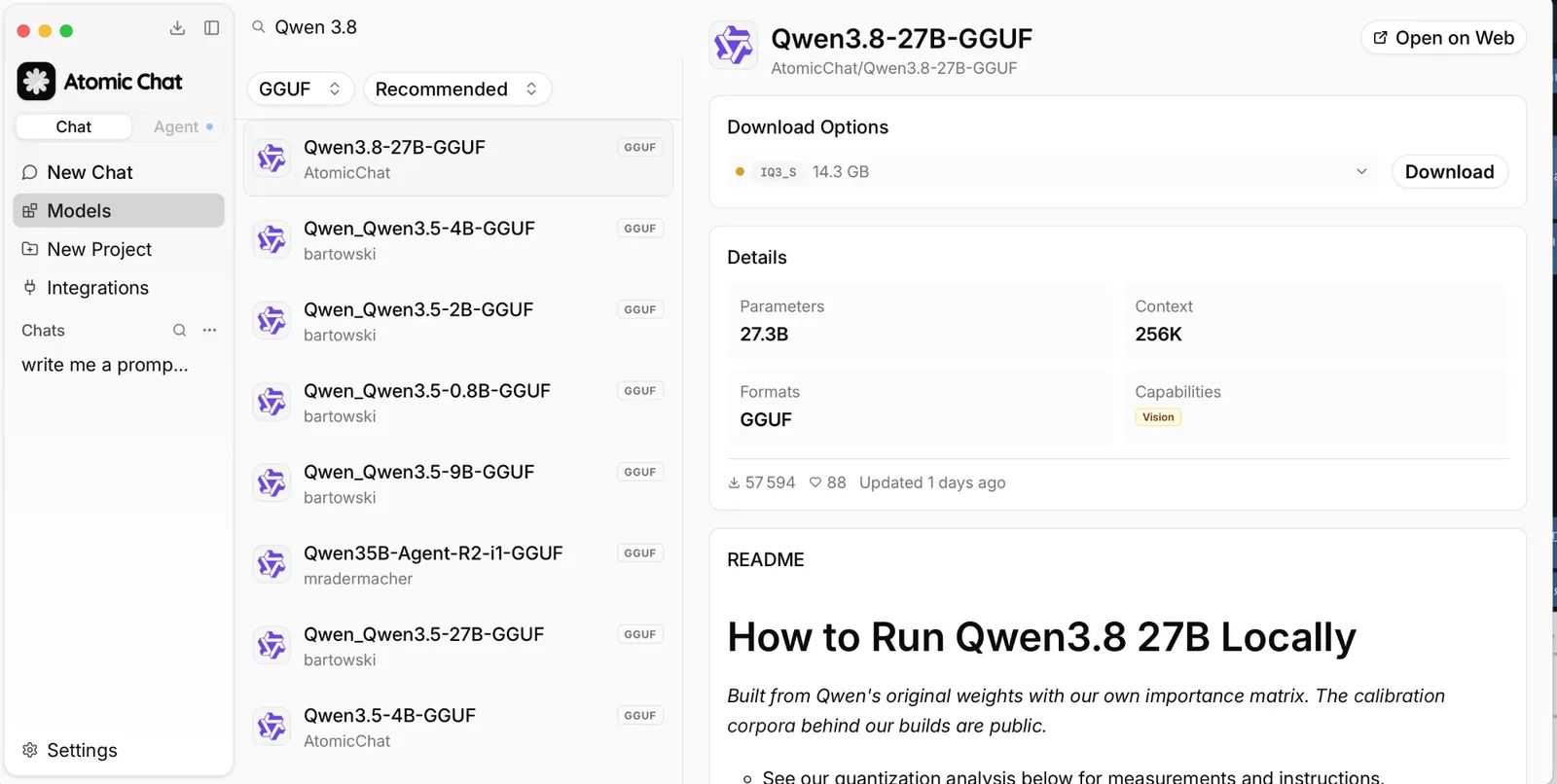
Figure 9: Real screenshot. The listing shows 27.3B parameters, 256K context, and the Vision capability badge.
Figure 10: Real screenshot. The downloader manages split GGUF files for you.
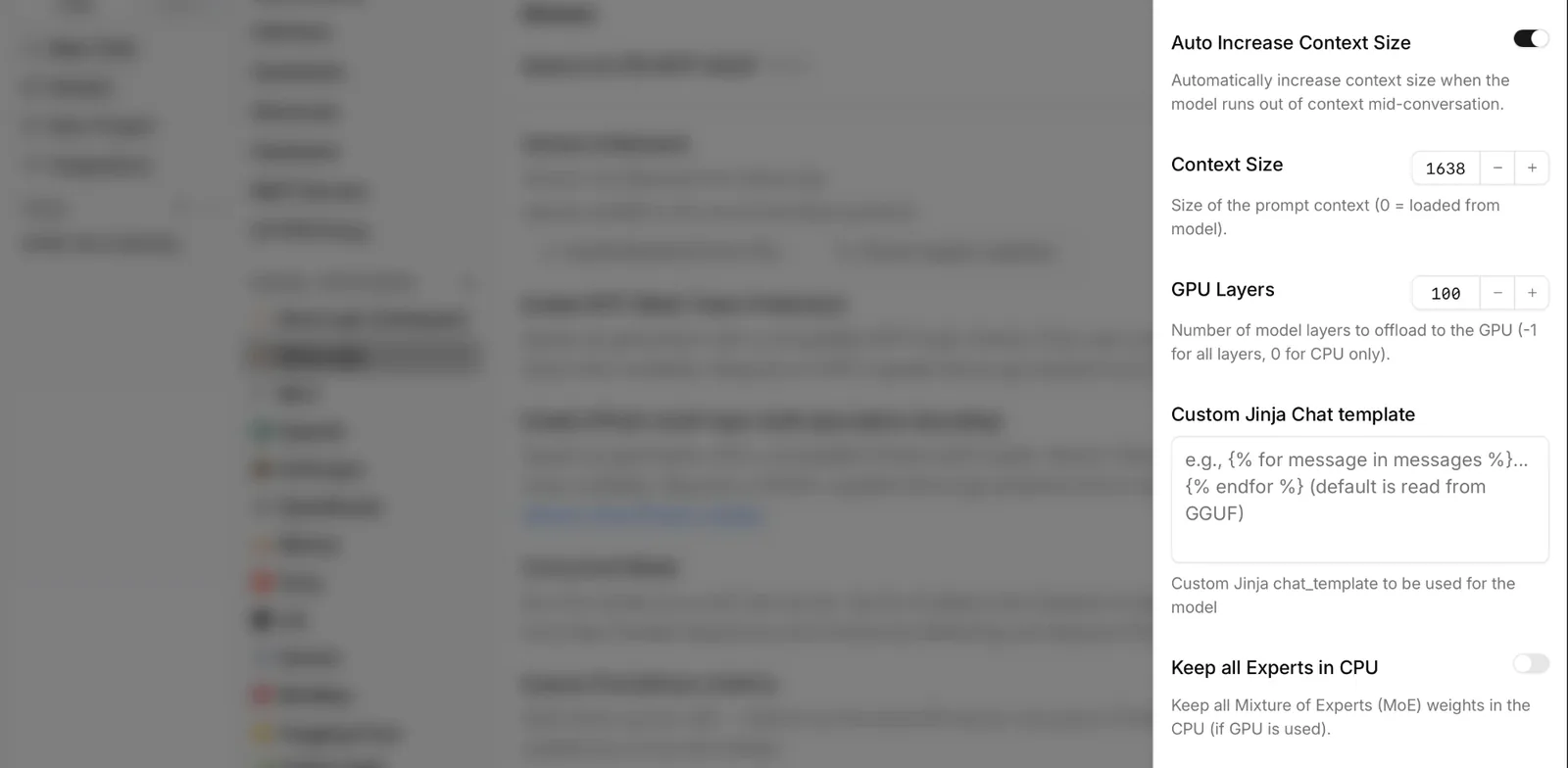
Figure 11: Real screenshot. Context length and GPU offload layers are adjustable here too — exactly the same knobs as in the scripts.
5.5 Agent auto-configuration: hand this post to your agent
If you use an agent tool like Kimi Code, Claude Code, or Codex, the laziest path is outsourcing the whole job. Paste this prompt into your agent:
Deploy a GGUF quantized build of Qwen3.8-27B on this machine:
1. Detect my GPU / unified memory first; confirm at least 14GB of usable VRAM;
2. Install llama.cpp from the official GitHub Release prebuilt binaries
   (win-cuda on Windows, ubuntu-vulkan on Ubuntu, brew on macOS);
3. Download the UD-IQ3_S quant (~12GB) from the official unsloth/Qwen3.8-27B-GGUF
   repo into ~/qwen38-27b/models/, with resumable downloads and retries;
4. Write a launcher ~/qwen38-27b/run-qwen38 with: --n-gpu-layers 99,
   --ctx-size 8192, --cache-type-k q8_0, --cache-type-v q8_0,
   --host localhost, --port 8080;
5. Start it, send one test message through the OpenAI-compatible endpoint,
   confirm the reply and report the generation speed;
6. Print the plan before every step; do not reinstall anything already present;
   do not touch system configuration.
When the agent finishes, ask it to show you the self-test output — only a llama_perf speed line proves the model is really running.
6. Verification: what “deployed” actually means
Whichever route you take, acceptance is three checks:
First, the startup log shows llama server listening with no CUDA error or out of memory; if VRAM overflows, lower --ctx-size to 4096 and retry.
Second, the self-test returns coherent text and the final stats show an eval rate above 25 tok/s on a 5060 Ti. Below 10 tok/s usually means the model is not fully on the GPU — check that --n-gpu-layers 99 took effect.
Third, http://localhost:8080 opens a working chat in the browser, and (with mmproj installed) the model correctly describes an uploaded image.
7. Q&A
Q1: What about the 8GB 5060 Ti? It works, but only with IQ2-class quants (~9–11GB) and a visible quality drop — fine for a test drive. An 8GB card pairs better with the 14B members of the Qwen family.
Q2: Does IQ3_S make the model “dumber”? Noticeably, but acceptably. On measured quant leaderboards, IQ3_S keeps about 92% top-1 agreement with the original — fine for chat, writing, and everyday coding. Heavy code-agent users should aim for 24GB+ cards and Q5/Q6.
Q3: Why not just use Ollama? You absolutely can — pulling a GGUF in Ollama is one command. This post uses vanilla llama.cpp for transparency (you can see exactly where every layer lives and what type the cache is), zero background services, and an easy mental model you can carry to any other tool.
Q4: Can I enable the full 262K context? Not on a 16GB home card. The KV cache alone would need ~67GB — that is server territory. Locally, 8K–32K covers 95% of daily scenarios.
Q5: Can it really see images and video?
Yes — that is what sets it apart from most local models. The GGUF route needs the extra mmproj file (add -WithVision / --with-vision to the scripts). Video support in llama.cpp is limited; for full video understanding, deploy with vLLM instead.
Q6: How do I enable MTP acceleration?
The model ships a multi-token-prediction head, and the repo includes a ready-made draft model MTP/mtp-Qwen3.8-27B-Q4_0.gguf (1.4GB). Load it per llama.cpp’s speculative-decoding docs for another speed bump. It costs 1GB+ of VRAM, so on a 5060 Ti get the base setup stable first.
Q7: How much quality do I lose versus the API? The API serves full-precision weights; local IQ3_S is compressed, and the gap shows mostly in the stability of complex reasoning. A practical split: run daily tasks locally, and only call the API when the local model fails the same hard problem twice.
Q8: What if the download breaks?
Every download command in the scripts is resumable (curl -C -) — re-run the same command and it picks up where it stopped. Also, fake lookalike repos appeared on Hugging Face before the official weights; stick to Qwen/Qwen3.8-27B and well-known publishers (unsloth, ggml-org, etc.).
8. Closing
The significance of Qwen3.8-27B is not any single score — it is that the entry ticket to flagship-class ability has dropped to a mid-range graphics card: it sees images, operates computers, runs hours-long agent loops, and never lets a courier peek at your diary. If a 5060 Ti 16GB is sitting in your machine, put it to work tonight.
Sources: the official Qwen3.8-27B model card (Hugging Face), AtomicChat’s “How to Run Qwen 3.8 27B Locally”, kingy.ai’s “Qwen3.8-27B Local Hardware Guide”, the OpenRouter model page, and community measurements on r/LocalLLaMA and r/ollama. Benchmarks are vendor-reported; independent verification is still in progress — test against your own workloads.