Stop Fighting Over the Remote: Use DSM Scheduled Tasks to Lock a Kids' Video Folder Automatically
Short version
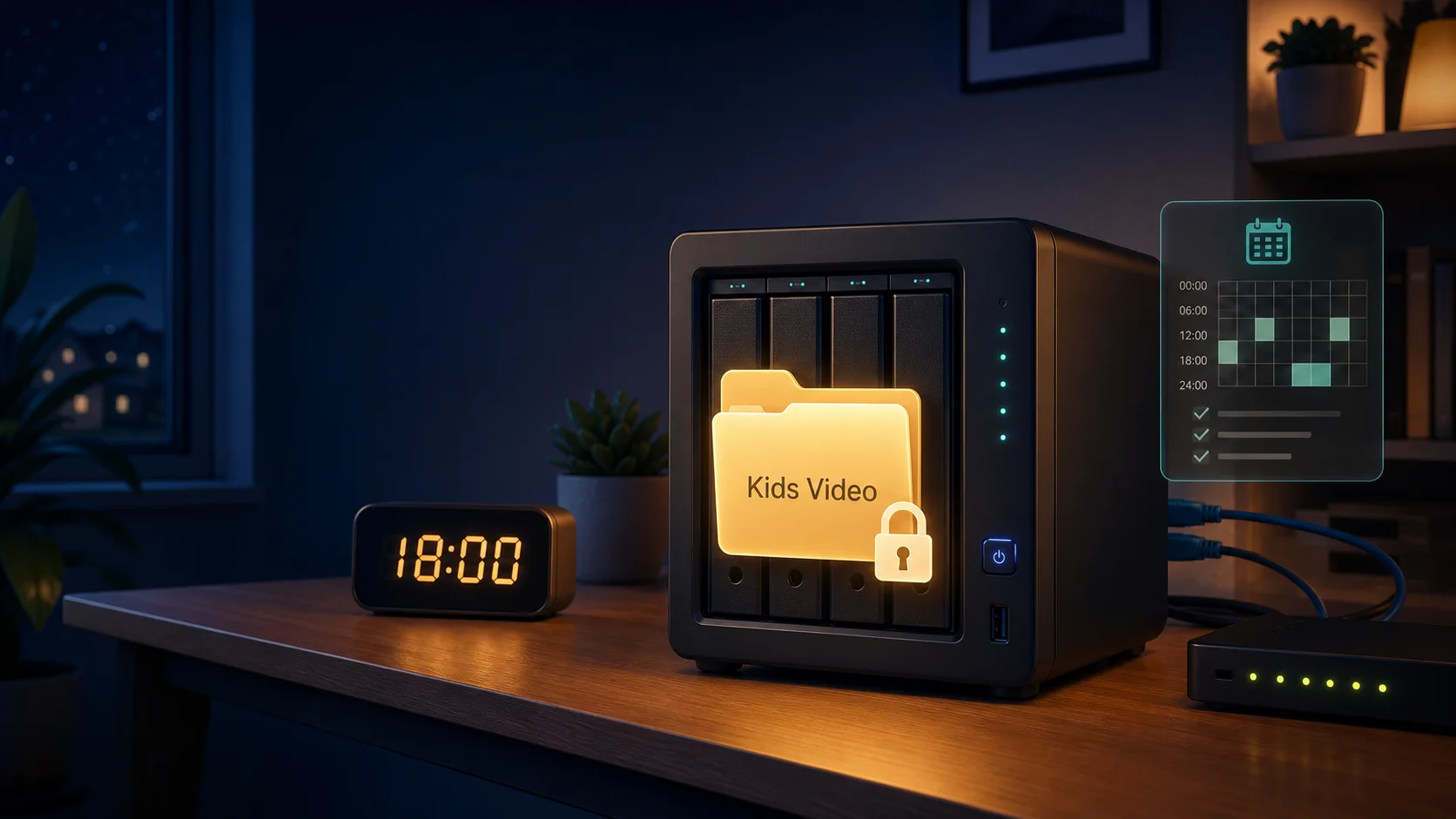
This is not an account lockout guide. The goal is narrower and cleaner: lock one kids’ video folder on a Synology DSM 7.2.1 NAS during selected hours, while leaving the account, password, homework folders, photo folders, and other shares alone. The script inserts one temporary
denyACL entry withsynoacltool, removes that entry during open windows, backs up the ACL before each change, and verifies the result after each operation.
The background: the NAS is useful, the video folder is the problem
Once a home NAS becomes the family’s storage center, it is no longer just a box of disks. Kids use it to view photos, sync tablet files, upload school material, and sometimes open the video folder. Most of that should remain available. The problem is the last part: when lunch, homework, dinner, or bedtime arrives, the cartoon folder still behaves like a 24-hour convenience store.
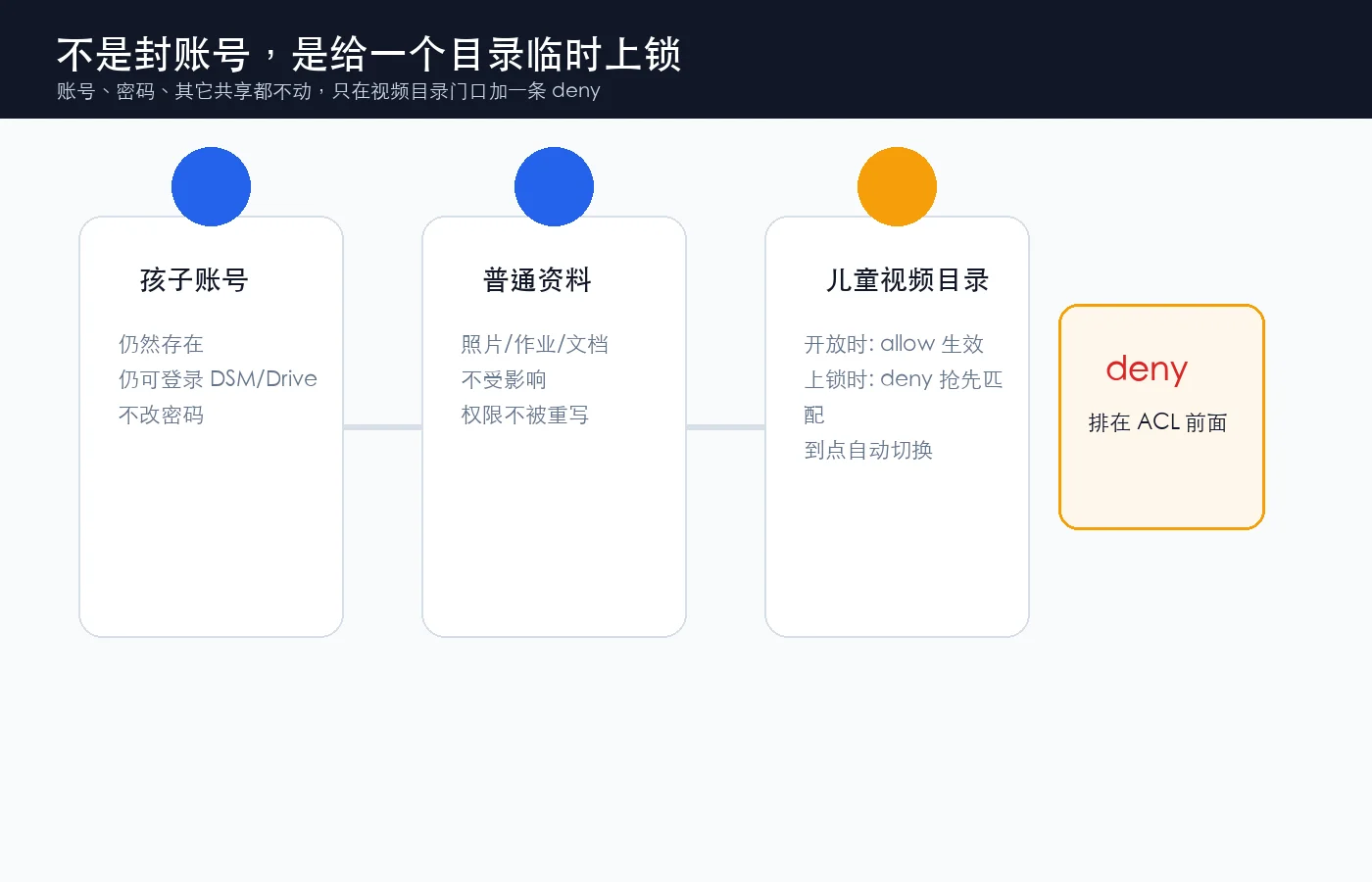
One common solution is account management: disable the child’s NAS account at night and enable it again in the morning. That works, but it is a blunt instrument. It is like taking away the house key because the snack cabinet should be closed. The better boundary is more precise: the child can still enter the house; only the snack cabinet is locked.
This post is based on a real DSM 7.2.1 script from a NAS. All real paths, groups, users, hostnames, and private addresses have been removed. What remains is the reusable pattern: a small NAS-side script, manual DSM Task Scheduler setup, and optional one-click deployers for Windows 11, Ubuntu 26.04, and macOS 26.
The visible pain: manual permission edits do not scale
At first this looks like a small manual task. Open DSM, go to the relevant folder or permission panel, remove read access for a group, then add it back later. After a few days, the cracks show.
First, the path is too deep. The DSM permission UI is not a pause button on a remote control. You need to find the right folder, the right user or group, the right advanced permission panel, and the right save button. Doing that once is fine. Doing it several times per day is friction.
Second, mistakes are easy. A real family NAS often has folders with similar names: kids’ videos, family videos, photos, homework, backups. When you are cooking dinner or leaving the house, a manual permission change can land on the wrong folder. One accidental click can turn into a fake sync problem the next morning.
Third, there is no reliable evidence trail. Was the folder locked at 18:00? Was it opened at 11:00? If the process depends on someone clicking through a UI, the next-day incident report is usually just “I think I did it.” A reliable system should leave a small audit trail: what changed, when it changed, whether the previous ACL was backed up, and whether the after-state matched expectations.
That is why the final design is a script with three verbs: lock, unlock, and status. Like elevator buttons, the interface is simple. The script handles the messy permission details underneath.
The root cause: DSM has scheduling and ACLs, but no “temporary folder curfew” switch
DSM gives you building blocks: shared-folder permissions, advanced ACLs, SSH, and Task Scheduler. What it does not give you is a single checkbox that says “deny this group from this one video directory between these hours.”
The script fills exactly that gap. It does not delete existing allow entries. It does not rewrite the full ACL list. It adds one temporary seal:
group:KIDS_GROUP:deny:rwxpdDaARWcCo:fd--
In everyday language, that says: the KIDS_GROUP group is denied access to this folder and its children. During an open window, the script removes that exact entry. The original allow rules are still there, so access comes back without rebuilding permissions.
Two details matter.
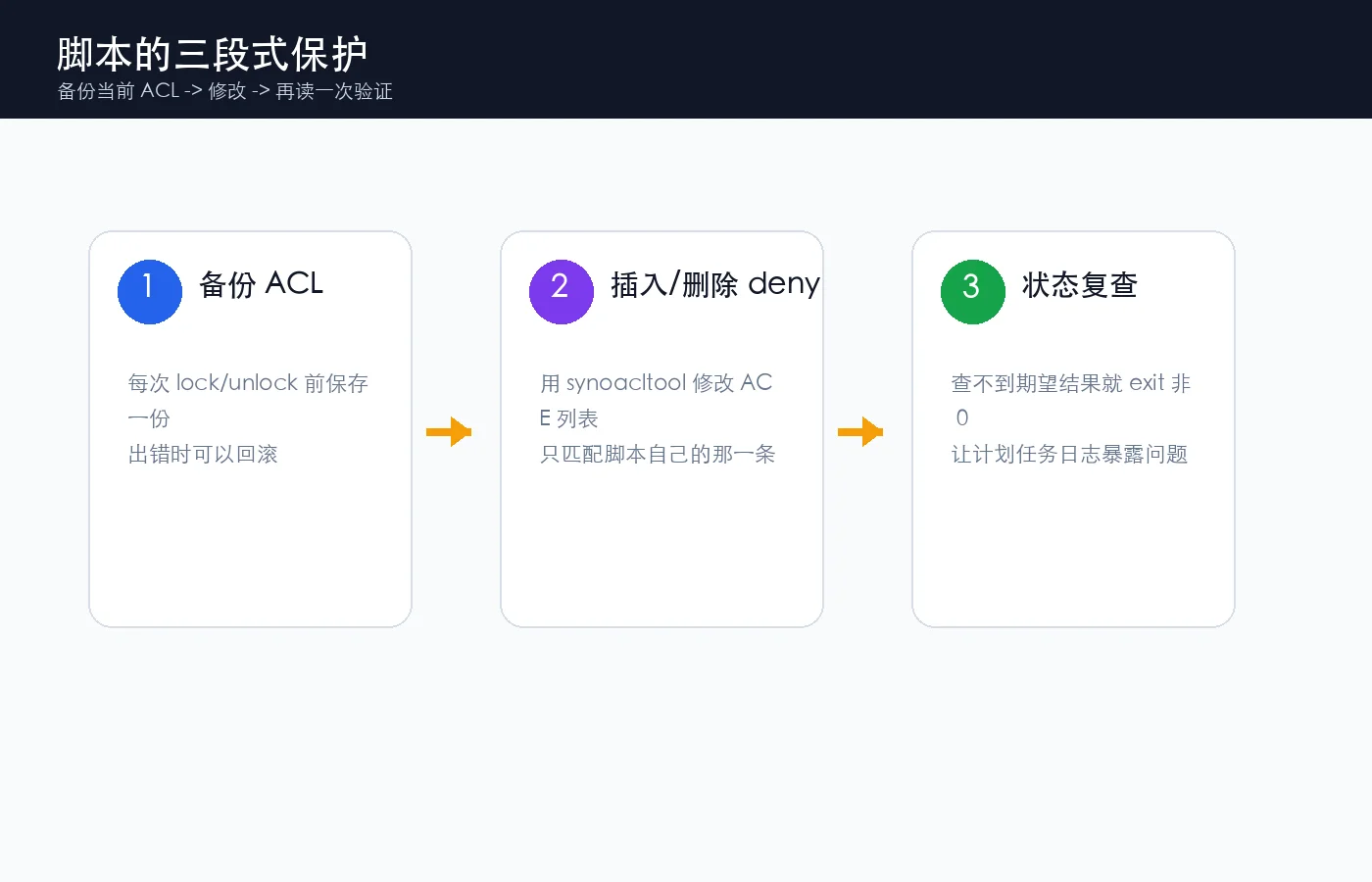
First, the script searches for the exact marker it added. It does not assume “delete ACE number 1 forever.” ACL indexes can move as other packages or users change permissions. The script reads the current ACL, finds the matching line, extracts the current index, and deletes that index only.
Second, the script backs up the current ACL before every lock and unlock. NAS permissions are not a toy. A backup file is the paper trail you want when something unexpected happens.
Real screenshots: what a healthy setup looks like
The next three screenshots come from real command output and have been sanitized. They keep the useful shape of the system without exposing private hostnames, full IP addresses, real directories, real users, or real groups.
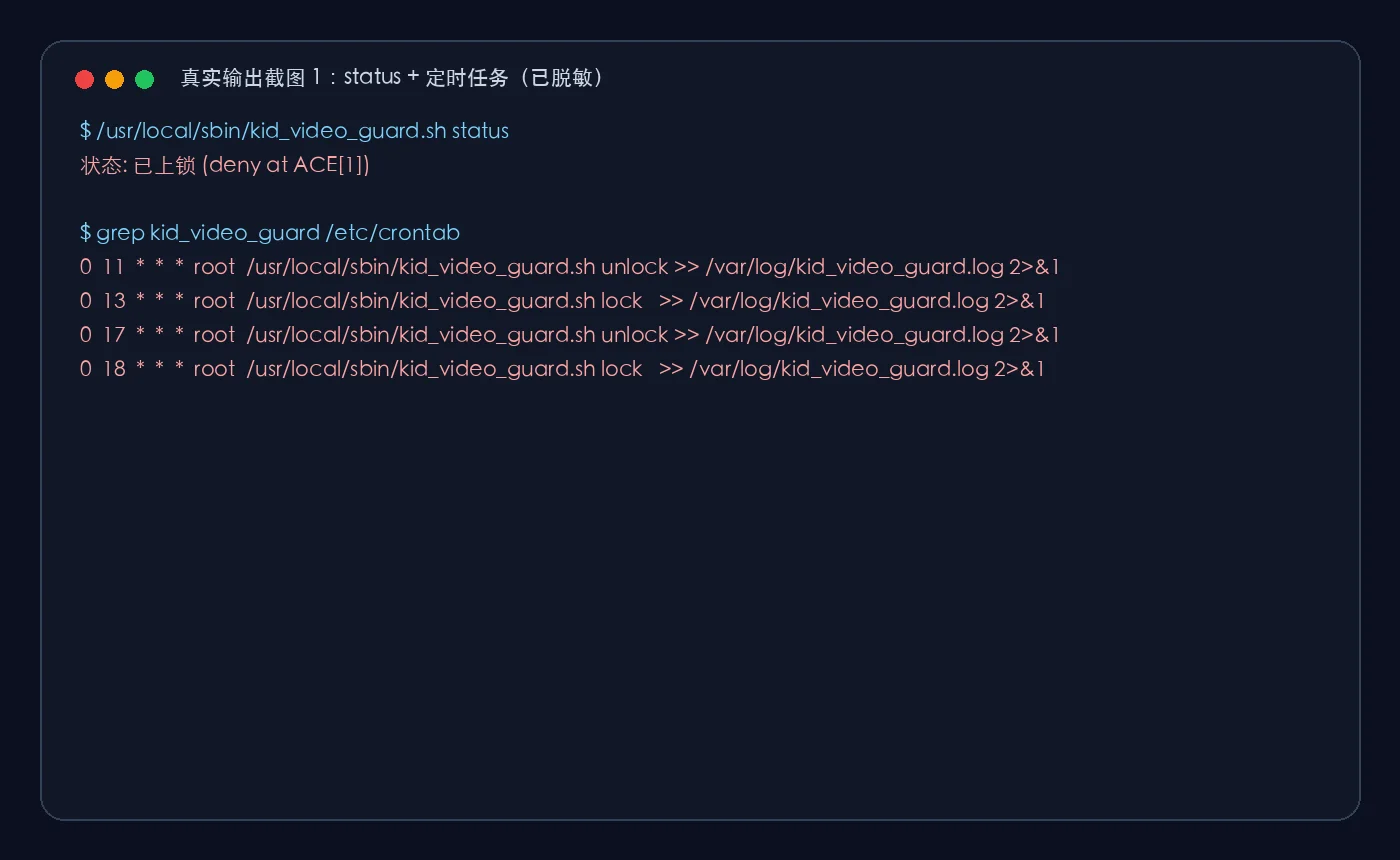
The first screenshot shows two things: the folder is currently locked, and four scheduled jobs exist. In the example, the folder opens at 11:00, locks at 13:00, opens at 17:00, and locks again at 18:00. You can choose your own windows.
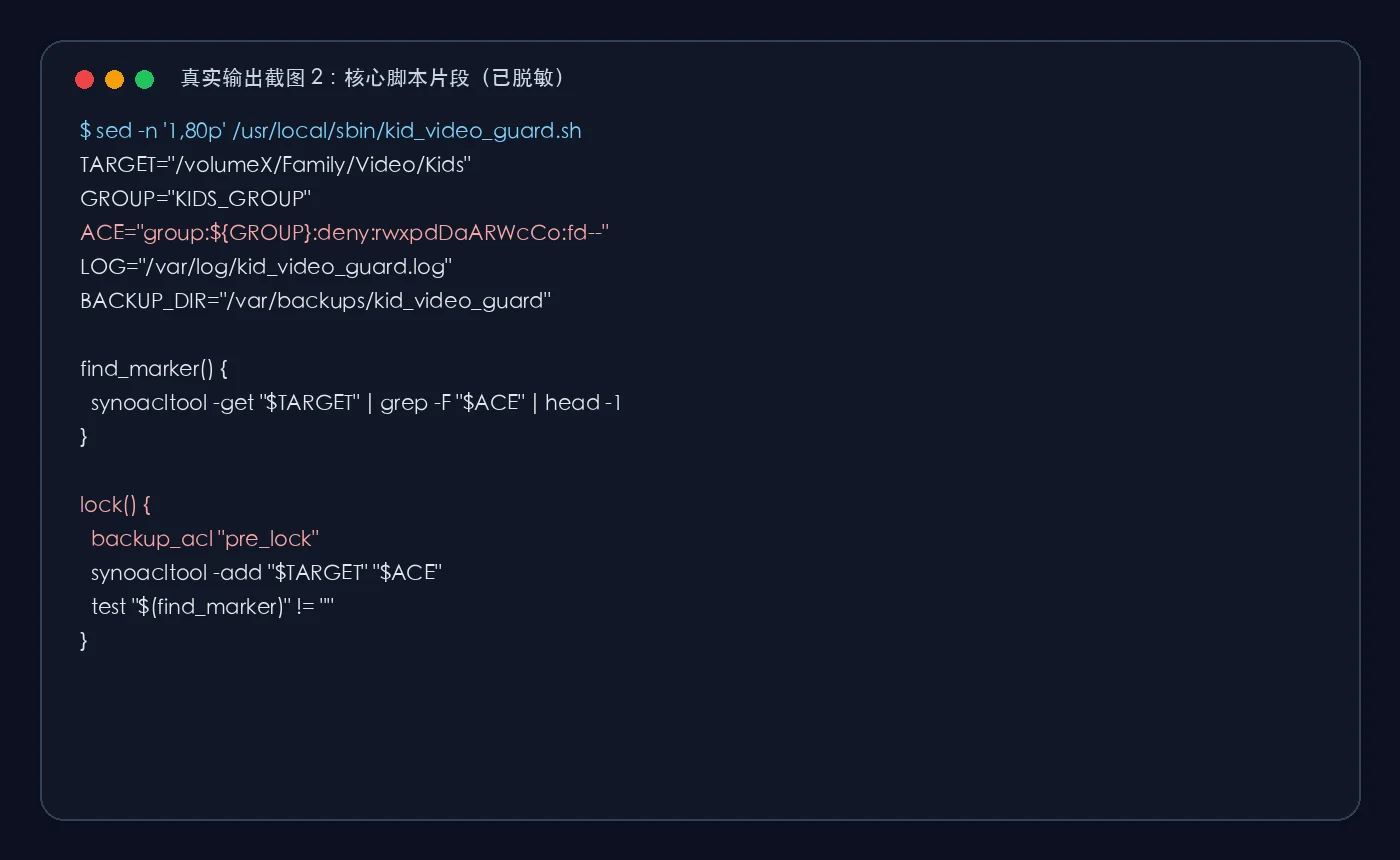
The second screenshot shows the two variables most people need to change: TARGET and GROUP. Everything else is mechanical.
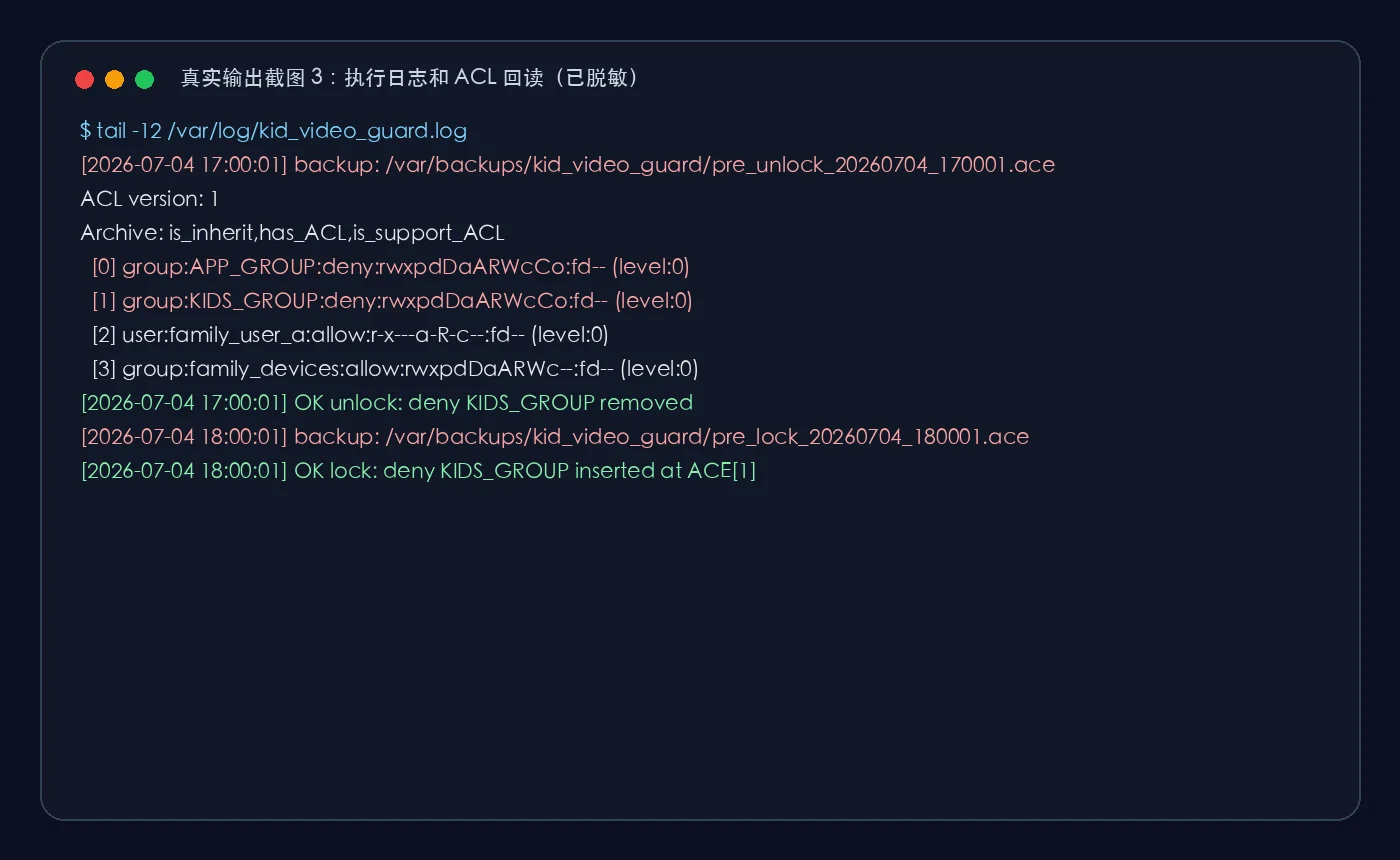
The third screenshot shows why logging matters. It answers three basic questions: when did the change run, was the ACL backed up first, and did the script verify the final state?
The complete sanitized NAS-side script
This is the reusable version of the NAS-side script. Replace the target folder and group before running it on your NAS. Test it on a harmless folder first.
#!/bin/bash
# kid_video_guard.sh - Synology DSM 7.2.x directory curfew by ACL.
# Usage:
#   kid_video_guard.sh lock
#   kid_video_guard.sh unlock
#   kid_video_guard.sh status

export PATH=/sbin:/bin:/usr/sbin:/usr/bin:/usr/syno/sbin:/usr/syno/bin:/usr/local/sbin:/usr/local/bin
set -e

TARGET="/volumeX/Family/Video/Kids"     # 改成你的儿童视频目录
GROUP="KIDS_GROUP"                      # 改成你的儿童用户组
ACE="group:${GROUP}:deny:rwxpdDaARWcCo:fd--"
LOG="/var/log/kid_video_guard.log"
BACKUP_DIR="/var/backups/kid_video_guard"
mkdir -p "$BACKUP_DIR"

ts() { date "+%Y-%m-%d %H:%M:%S"; }
log() { echo "[$(ts)] $*" | tee -a "$LOG"; }

if [ ! -d "$TARGET" ]; then
  log "ERROR: target dir not found: $TARGET"
  exit 1
fi

backup_acl() {
  local tag="$1"
  local f="${BACKUP_DIR}/${tag}_$(date +%Y%m%d_%H%M%S).ace"
  synoacltool -get "$TARGET" 2>/dev/null > "$f"
  log "backup: $f"
}

find_marker() {
  local line
  line=$(synoacltool -get "$TARGET" 2>/dev/null | grep -F "$ACE" | head -1)
  if [ -z "$line" ]; then
    echo -1
    return
  fi
  echo "$line" | grep -oE '^\s*\[([0-9]+)\]' | tr -d ' \t[]' | head -1
}

lock() {
  local cur
  cur=$(find_marker)
  if [ "$cur" != "-1" ]; then
    log "SKIP lock: deny already present at ACE[$cur]"
    return 0
  fi
  backup_acl "pre_lock"
  synoacltool -add "$TARGET" "$ACE" >> "$LOG" 2>&1
  local new
  new=$(find_marker)
  if [ "$new" = "-1" ]; then
    log "ERROR lock: add succeeded but marker not found"
    exit 2
  fi
  log "OK lock: deny $GROUP inserted at ACE[$new]"
}

unlock() {
  local cur
  cur=$(find_marker)
  if [ "$cur" = "-1" ]; then
    log "SKIP unlock: deny not present (already unlocked)"
    return 0
  fi
  backup_acl "pre_unlock"
  synoacltool -del "$TARGET" "$cur" >> "$LOG" 2>&1
  local after
  after=$(find_marker)
  if [ "$after" != "-1" ]; then
    log "ERROR unlock: deny still at ACE[$after]"
    exit 3
  fi
  log "OK unlock: deny $GROUP removed"
}

case "${1:-}" in
  lock) lock ;;
  unlock) unlock ;;
  status)
    cur=$(find_marker)
    if [ "$cur" = "-1" ]; then
      echo "状态: 未上锁 (${GROUP} 可读)"
    else
      echo "状态: 已上锁 (deny at ACE[$cur])"
    fi
    ;;
  *)
    echo "usage: $0 {lock|unlock|status}" >&2
    exit 1
    ;;
esac
Manual test sequence
Do not schedule it immediately. SSH into the NAS and run:
chmod 700 /usr/local/sbin/kid_video_guard.sh
/usr/local/sbin/kid_video_guard.sh status
/usr/local/sbin/kid_video_guard.sh lock
/usr/local/sbin/kid_video_guard.sh unlock
If the kids’ group loses access after lock and regains access after unlock, then you can schedule it. This is like testing a door lock with the key before asking the family to rely on it.
Manual setup in DSM 7.2.1 Task Scheduler
The manual DSM path is:
- Open DSM Control Panel.
- Go to Task Scheduler.
- Create a scheduled task of type user-defined script.
- Run it as
root. - Create separate
unlockandlocktasks. - Put the command in the task settings.
Command examples:
/usr/local/sbin/kid_video_guard.sh unlock >> /var/log/kid_video_guard.log 2>&1
/usr/local/sbin/kid_video_guard.sh lock   >> /var/log/kid_video_guard.log 2>&1
A simple daily schedule:
| Time | Action | Purpose |
|---|---|---|
| 11:00 | unlock |
Open before lunch |
| 13:00 | lock |
Lock again after lunch |
| 17:00 | unlock |
Open before dinner |
| 18:00 | lock |
Lock again after dinner |
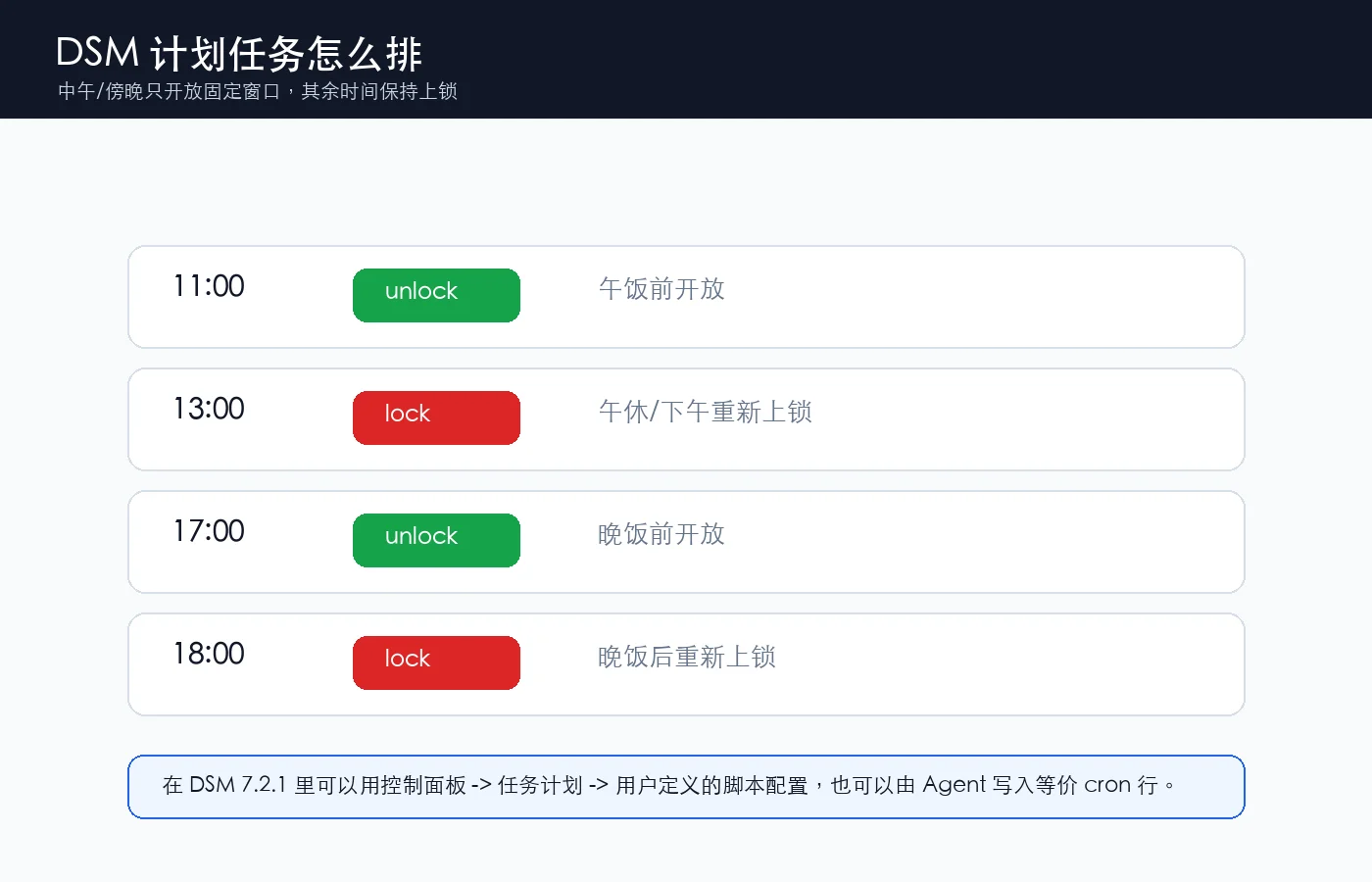
You could also write a single complicated script that checks the time and weekday. I prefer separate scheduled jobs. When something fails, it is immediately clear which job did not run.
Agent setup: make the boundary explicit
If you ask an AI agent to configure this, do not say “set it up for me” and hope for the best. Give it a tight boundary:
Log in to my Synology DSM 7.2.1 NAS over SSH.
Goal: install kid_video_guard.sh to apply a scheduled ACL deny/allow to one kids' video folder.
Constraints:
1. Do not delete users, groups, or shared folders.
2. Do not rewrite the full ACL. Only insert or remove the script's own deny ACE.
3. Redact real paths, groups, hostnames, and private addresses in the final report.
4. Back up /etc/crontab before editing it.
5. After installation, run status and grep kid_video_guard from /etc/crontab.
Open windows: 11:00-13:00 and 17:00-18:00.
The value of an agent is not that it can type commands. The value is that it can follow a checklist: verify the folder, verify the group, write the script, add the schedule, run status, and report the evidence.
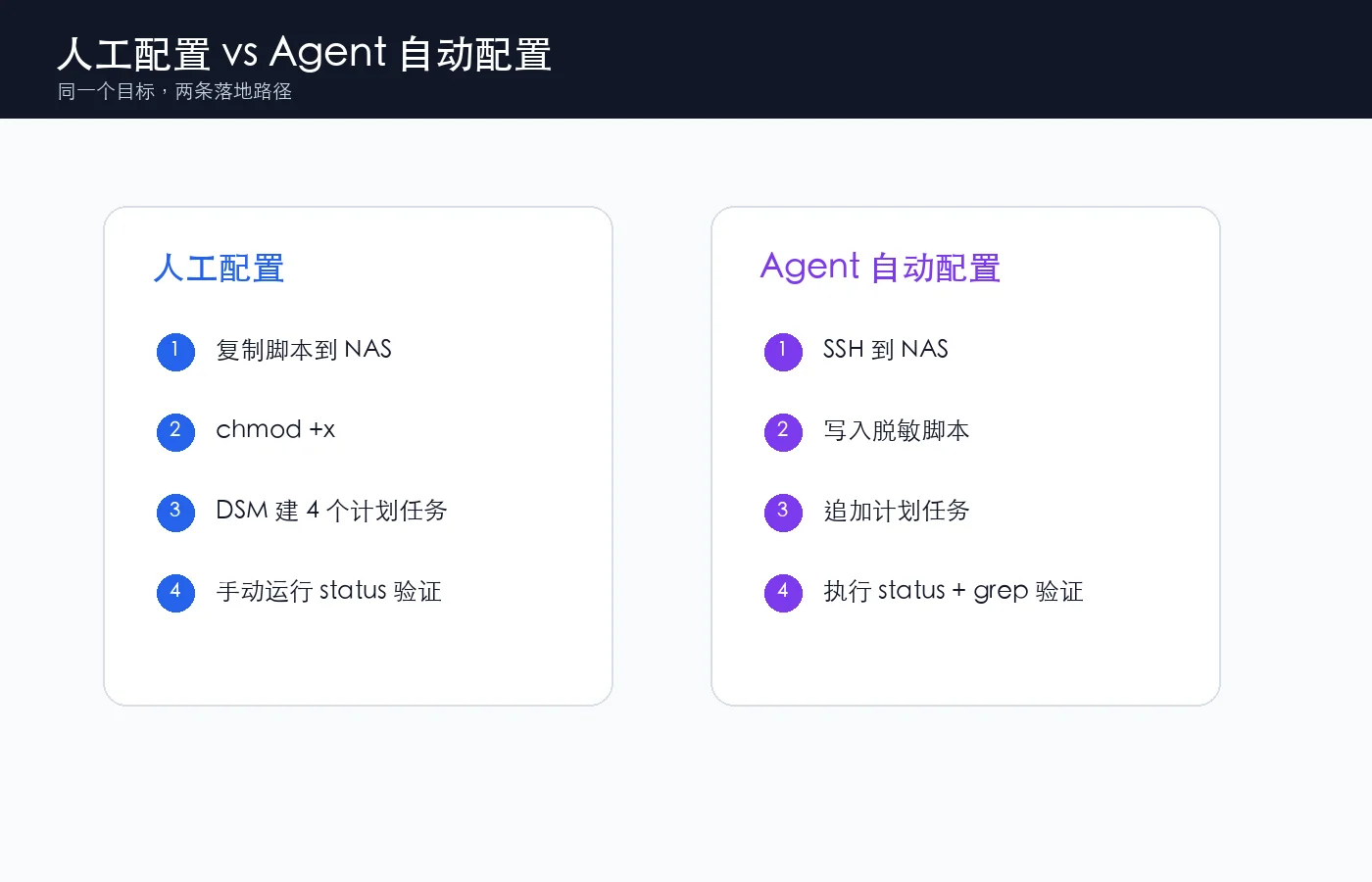
One-click deployers for Windows, Ubuntu, and macOS
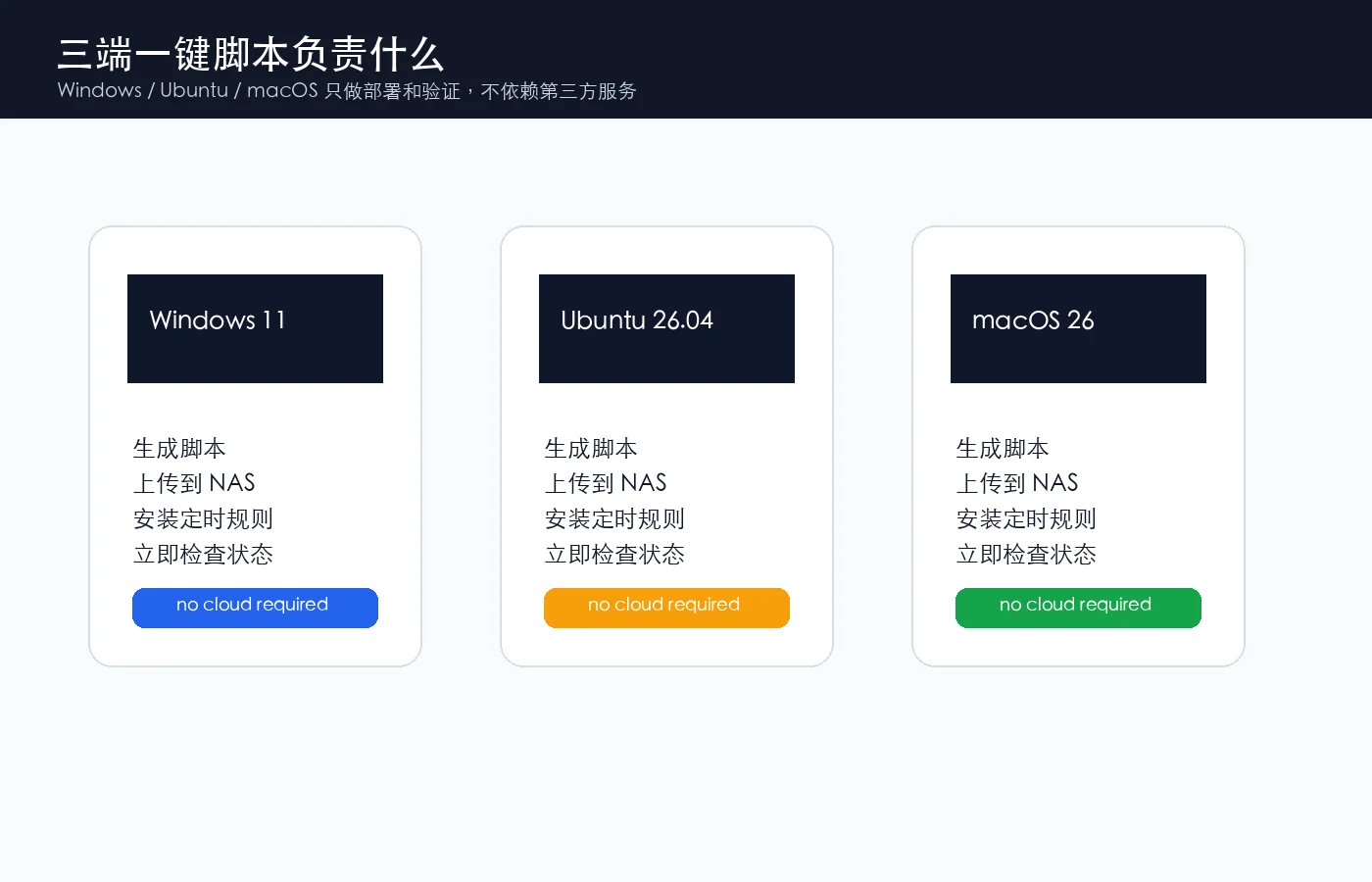
All three deployers use only SSH/SCP. They upload the NAS-side script, install it under /usr/local/sbin/, back up /etc/crontab, remove previous kid_video_guard lines, append four new schedule lines, and verify the final state.
Windows 11 PowerShell
# Windows 11 PowerShell: deploy-kid-video-guard.ps1
# Run in an elevated PowerShell window.
param(
  [string]$NasHost = "192.168.xxx.xxx",
  [string]$NasUser = "root",
  [string]$Target = "/volumeX/Family/Video/Kids",
  [string]$Group = "KIDS_GROUP"
)

$ErrorActionPreference = "Stop"
$local = Join-Path $env:TEMP "kid_video_guard.sh"
$install = Join-Path $env:TEMP "install_kid_video_guard.sh"
@'
#!/bin/bash
# kid_video_guard.sh - Synology DSM 7.2.x directory curfew by ACL.
# Usage:
#   kid_video_guard.sh lock
#   kid_video_guard.sh unlock
#   kid_video_guard.sh status

export PATH=/sbin:/bin:/usr/sbin:/usr/bin:/usr/syno/sbin:/usr/syno/bin:/usr/local/sbin:/usr/local/bin
set -e

TARGET="/volumeX/Family/Video/Kids"     # 改成你的儿童视频目录
GROUP="KIDS_GROUP"                      # 改成你的儿童用户组
ACE="group:${GROUP}:deny:rwxpdDaARWcCo:fd--"
LOG="/var/log/kid_video_guard.log"
BACKUP_DIR="/var/backups/kid_video_guard"
mkdir -p "$BACKUP_DIR"

ts() { date "+%Y-%m-%d %H:%M:%S"; }
log() { echo "[$(ts)] $*" | tee -a "$LOG"; }

if [ ! -d "$TARGET" ]; then
  log "ERROR: target dir not found: $TARGET"
  exit 1
fi

backup_acl() {
  local tag="$1"
  local f="${BACKUP_DIR}/${tag}_$(date +%Y%m%d_%H%M%S).ace"
  synoacltool -get "$TARGET" 2>/dev/null > "$f"
  log "backup: $f"
}

find_marker() {
  local line
  line=$(synoacltool -get "$TARGET" 2>/dev/null | grep -F "$ACE" | head -1)
  if [ -z "$line" ]; then
    echo -1
    return
  fi
  echo "$line" | grep -oE '^\s*\[([0-9]+)\]' | tr -d ' \t[]' | head -1
}

lock() {
  local cur
  cur=$(find_marker)
  if [ "$cur" != "-1" ]; then
    log "SKIP lock: deny already present at ACE[$cur]"
    return 0
  fi
  backup_acl "pre_lock"
  synoacltool -add "$TARGET" "$ACE" >> "$LOG" 2>&1
  local new
  new=$(find_marker)
  if [ "$new" = "-1" ]; then
    log "ERROR lock: add succeeded but marker not found"
    exit 2
  fi
  log "OK lock: deny $GROUP inserted at ACE[$new]"
}

unlock() {
  local cur
  cur=$(find_marker)
  if [ "$cur" = "-1" ]; then
    log "SKIP unlock: deny not present (already unlocked)"
    return 0
  fi
  backup_acl "pre_unlock"
  synoacltool -del "$TARGET" "$cur" >> "$LOG" 2>&1
  local after
  after=$(find_marker)
  if [ "$after" != "-1" ]; then
    log "ERROR unlock: deny still at ACE[$after]"
    exit 3
  fi
  log "OK unlock: deny $GROUP removed"
}

case "${1:-}" in
  lock) lock ;;
  unlock) unlock ;;
  status)
    cur=$(find_marker)
    if [ "$cur" = "-1" ]; then
      echo "状态: 未上锁 (${GROUP} 可读)"
    else
      echo "状态: 已上锁 (deny at ACE[$cur])"
    fi
    ;;
  *)
    echo "usage: $0 {lock|unlock|status}" >&2
    exit 1
    ;;
esac
'@.Replace('/volumeX/Family/Video/Kids', $Target).Replace('KIDS_GROUP', $Group) | Set-Content -Encoding UTF8 $local

@'
set -e
install -m 700 /tmp/kid_video_guard.sh /usr/local/sbin/kid_video_guard.sh
cp /etc/crontab /etc/crontab.bak.$(date +%Y%m%d_%H%M%S)
grep -v kid_video_guard /etc/crontab > /tmp/crontab.clean
cat /tmp/crontab.clean > /etc/crontab
cat >> /etc/crontab <<'CRON'
0  11  *  *  *  root  /usr/local/sbin/kid_video_guard.sh unlock >> /var/log/kid_video_guard.log 2>&1
0  13  *  *  *  root  /usr/local/sbin/kid_video_guard.sh lock   >> /var/log/kid_video_guard.log 2>&1
0  17  *  *  *  root  /usr/local/sbin/kid_video_guard.sh unlock >> /var/log/kid_video_guard.log 2>&1
0  18  *  *  *  root  /usr/local/sbin/kid_video_guard.sh lock   >> /var/log/kid_video_guard.log 2>&1
CRON
/usr/local/sbin/kid_video_guard.sh status
grep kid_video_guard /etc/crontab
'@ | Set-Content -Encoding ASCII $install

scp $local "${NasUser}@${NasHost}:/tmp/kid_video_guard.sh"
scp $install "${NasUser}@${NasHost}:/tmp/install_kid_video_guard.sh"
ssh "${NasUser}@${NasHost}" "sh /tmp/install_kid_video_guard.sh"
Ubuntu 26.04
#!/usr/bin/env bash
# Ubuntu 26.04: deploy-kid-video-guard.sh
set -euo pipefail

NAS_HOST="${NAS_HOST:-192.168.xxx.xxx}"
NAS_USER="${NAS_USER:-root}"
TARGET="${TARGET:-/volumeX/Family/Video/Kids}"
GROUP="${GROUP:-KIDS_GROUP}"

tmp="$(mktemp)"
cat > "$tmp" <<'SCRIPT'
#!/bin/bash
# kid_video_guard.sh - Synology DSM 7.2.x directory curfew by ACL.
# Usage:
#   kid_video_guard.sh lock
#   kid_video_guard.sh unlock
#   kid_video_guard.sh status

export PATH=/sbin:/bin:/usr/sbin:/usr/bin:/usr/syno/sbin:/usr/syno/bin:/usr/local/sbin:/usr/local/bin
set -e

TARGET="/volumeX/Family/Video/Kids"     # 改成你的儿童视频目录
GROUP="KIDS_GROUP"                      # 改成你的儿童用户组
ACE="group:${GROUP}:deny:rwxpdDaARWcCo:fd--"
LOG="/var/log/kid_video_guard.log"
BACKUP_DIR="/var/backups/kid_video_guard"
mkdir -p "$BACKUP_DIR"

ts() { date "+%Y-%m-%d %H:%M:%S"; }
log() { echo "[$(ts)] $*" | tee -a "$LOG"; }

if [ ! -d "$TARGET" ]; then
  log "ERROR: target dir not found: $TARGET"
  exit 1
fi

backup_acl() {
  local tag="$1"
  local f="${BACKUP_DIR}/${tag}_$(date +%Y%m%d_%H%M%S).ace"
  synoacltool -get "$TARGET" 2>/dev/null > "$f"
  log "backup: $f"
}

find_marker() {
  local line
  line=$(synoacltool -get "$TARGET" 2>/dev/null | grep -F "$ACE" | head -1)
  if [ -z "$line" ]; then
    echo -1
    return
  fi
  echo "$line" | grep -oE '^\s*\[([0-9]+)\]' | tr -d ' \t[]' | head -1
}

lock() {
  local cur
  cur=$(find_marker)
  if [ "$cur" != "-1" ]; then
    log "SKIP lock: deny already present at ACE[$cur]"
    return 0
  fi
  backup_acl "pre_lock"
  synoacltool -add "$TARGET" "$ACE" >> "$LOG" 2>&1
  local new
  new=$(find_marker)
  if [ "$new" = "-1" ]; then
    log "ERROR lock: add succeeded but marker not found"
    exit 2
  fi
  log "OK lock: deny $GROUP inserted at ACE[$new]"
}

unlock() {
  local cur
  cur=$(find_marker)
  if [ "$cur" = "-1" ]; then
    log "SKIP unlock: deny not present (already unlocked)"
    return 0
  fi
  backup_acl "pre_unlock"
  synoacltool -del "$TARGET" "$cur" >> "$LOG" 2>&1
  local after
  after=$(find_marker)
  if [ "$after" != "-1" ]; then
    log "ERROR unlock: deny still at ACE[$after]"
    exit 3
  fi
  log "OK unlock: deny $GROUP removed"
}

case "${1:-}" in
  lock) lock ;;
  unlock) unlock ;;
  status)
    cur=$(find_marker)
    if [ "$cur" = "-1" ]; then
      echo "状态: 未上锁 (${GROUP} 可读)"
    else
      echo "状态: 已上锁 (deny at ACE[$cur])"
    fi
    ;;
  *)
    echo "usage: $0 {lock|unlock|status}" >&2
    exit 1
    ;;
esac
SCRIPT
TARGET="$TARGET" GROUP="$GROUP" perl -0pi -e 's|\Q/volumeX/Family/Video/Kids\E|$ENV{TARGET}|g; s|\QKIDS_GROUP\E|$ENV{GROUP}|g' "$tmp"

scp "$tmp" "${NAS_USER}@${NAS_HOST}:/tmp/kid_video_guard.sh"
ssh "${NAS_USER}@${NAS_HOST}" '
  set -e
  install -m 700 /tmp/kid_video_guard.sh /usr/local/sbin/kid_video_guard.sh
  cp /etc/crontab /etc/crontab.bak.$(date +%Y%m%d_%H%M%S)
  grep -v kid_video_guard /etc/crontab > /tmp/crontab.clean
  cat /tmp/crontab.clean > /etc/crontab
  cat >> /etc/crontab <<CRON
0  11  *  *  *  root  /usr/local/sbin/kid_video_guard.sh unlock >> /var/log/kid_video_guard.log 2>&1
0  13  *  *  *  root  /usr/local/sbin/kid_video_guard.sh lock   >> /var/log/kid_video_guard.log 2>&1
0  17  *  *  *  root  /usr/local/sbin/kid_video_guard.sh unlock >> /var/log/kid_video_guard.log 2>&1
0  18  *  *  *  root  /usr/local/sbin/kid_video_guard.sh lock   >> /var/log/kid_video_guard.log 2>&1
CRON
  /usr/local/sbin/kid_video_guard.sh status
  grep kid_video_guard /etc/crontab
'
macOS 26
#!/usr/bin/env bash
# macOS 26: deploy-kid-video-guard-macos.sh
set -euo pipefail

NAS_HOST="${NAS_HOST:-192.168.xxx.xxx}"
NAS_USER="${NAS_USER:-root}"
TARGET="${TARGET:-/volumeX/Family/Video/Kids}"
GROUP="${GROUP:-KIDS_GROUP}"

tmp="$(mktemp)"
cat > "$tmp" <<'SCRIPT'
#!/bin/bash
# kid_video_guard.sh - Synology DSM 7.2.x directory curfew by ACL.
# Usage:
#   kid_video_guard.sh lock
#   kid_video_guard.sh unlock
#   kid_video_guard.sh status

export PATH=/sbin:/bin:/usr/sbin:/usr/bin:/usr/syno/sbin:/usr/syno/bin:/usr/local/sbin:/usr/local/bin
set -e

TARGET="/volumeX/Family/Video/Kids"     # 改成你的儿童视频目录
GROUP="KIDS_GROUP"                      # 改成你的儿童用户组
ACE="group:${GROUP}:deny:rwxpdDaARWcCo:fd--"
LOG="/var/log/kid_video_guard.log"
BACKUP_DIR="/var/backups/kid_video_guard"
mkdir -p "$BACKUP_DIR"

ts() { date "+%Y-%m-%d %H:%M:%S"; }
log() { echo "[$(ts)] $*" | tee -a "$LOG"; }

if [ ! -d "$TARGET" ]; then
  log "ERROR: target dir not found: $TARGET"
  exit 1
fi

backup_acl() {
  local tag="$1"
  local f="${BACKUP_DIR}/${tag}_$(date +%Y%m%d_%H%M%S).ace"
  synoacltool -get "$TARGET" 2>/dev/null > "$f"
  log "backup: $f"
}

find_marker() {
  local line
  line=$(synoacltool -get "$TARGET" 2>/dev/null | grep -F "$ACE" | head -1)
  if [ -z "$line" ]; then
    echo -1
    return
  fi
  echo "$line" | grep -oE '^\s*\[([0-9]+)\]' | tr -d ' \t[]' | head -1
}

lock() {
  local cur
  cur=$(find_marker)
  if [ "$cur" != "-1" ]; then
    log "SKIP lock: deny already present at ACE[$cur]"
    return 0
  fi
  backup_acl "pre_lock"
  synoacltool -add "$TARGET" "$ACE" >> "$LOG" 2>&1
  local new
  new=$(find_marker)
  if [ "$new" = "-1" ]; then
    log "ERROR lock: add succeeded but marker not found"
    exit 2
  fi
  log "OK lock: deny $GROUP inserted at ACE[$new]"
}

unlock() {
  local cur
  cur=$(find_marker)
  if [ "$cur" = "-1" ]; then
    log "SKIP unlock: deny not present (already unlocked)"
    return 0
  fi
  backup_acl "pre_unlock"
  synoacltool -del "$TARGET" "$cur" >> "$LOG" 2>&1
  local after
  after=$(find_marker)
  if [ "$after" != "-1" ]; then
    log "ERROR unlock: deny still at ACE[$after]"
    exit 3
  fi
  log "OK unlock: deny $GROUP removed"
}

case "${1:-}" in
  lock) lock ;;
  unlock) unlock ;;
  status)
    cur=$(find_marker)
    if [ "$cur" = "-1" ]; then
      echo "状态: 未上锁 (${GROUP} 可读)"
    else
      echo "状态: 已上锁 (deny at ACE[$cur])"
    fi
    ;;
  *)
    echo "usage: $0 {lock|unlock|status}" >&2
    exit 1
    ;;
esac
SCRIPT
TARGET="$TARGET" GROUP="$GROUP" perl -0pi -e 's|\Q/volumeX/Family/Video/Kids\E|$ENV{TARGET}|g; s|\QKIDS_GROUP\E|$ENV{GROUP}|g' "$tmp"

scp "$tmp" "${NAS_USER}@${NAS_HOST}:/tmp/kid_video_guard.sh"
ssh "${NAS_USER}@${NAS_HOST}" '
  set -e
  install -m 700 /tmp/kid_video_guard.sh /usr/local/sbin/kid_video_guard.sh
  cp /etc/crontab /etc/crontab.bak.$(date +%Y%m%d_%H%M%S)
  grep -v kid_video_guard /etc/crontab > /tmp/crontab.clean
  cat /tmp/crontab.clean > /etc/crontab
  cat >> /etc/crontab <<CRON
0  11  *  *  *  root  /usr/local/sbin/kid_video_guard.sh unlock >> /var/log/kid_video_guard.log 2>&1
0  13  *  *  *  root  /usr/local/sbin/kid_video_guard.sh lock   >> /var/log/kid_video_guard.log 2>&1
0  17  *  *  *  root  /usr/local/sbin/kid_video_guard.sh unlock >> /var/log/kid_video_guard.log 2>&1
0  18  *  *  *  root  /usr/local/sbin/kid_video_guard.sh lock   >> /var/log/kid_video_guard.log 2>&1
CRON
  /usr/local/sbin/kid_video_guard.sh status
  grep kid_video_guard /etc/crontab
'
Risks and rollback
There are three main risks: wrong folder, wrong group, and deleting the wrong ACL index.
The script checks whether TARGET exists before doing anything. A wrong group is harder because the string may still be syntactically accepted, so you should always test with a real member of the intended kids’ group. For the ACL index, the script does not hard-code a number. It reads the current ACL, finds the exact marker line, extracts the current index, and deletes that line only.
Rollback has two levels.
First, run:
/usr/local/sbin/kid_video_guard.sh unlock
Second, inspect the backup files under /var/backups/kid_video_guard. They are primarily audit material and recovery references. If you need to restore a complex ACL by hand, test the recovery command on a temporary folder first.
Q&A
Q: Why not disable the child’s account directly?
A: Account disable is a front-door lock. This guide is a cabinet lock. If you want the child to lose all NAS access at night, account disable is simpler. If you only want to limit one video folder, ACL is more precise.
Q: Why not use the File Station UI manually?
A: For a one-time change, the UI is fine. For daily repeated windows, a scheduled script is more reliable and less emotionally expensive.
Q: Is synoacltool an official stable API?
A: Treat it as an internal DSM command, not a public cross-version API contract. It is useful, but after DSM upgrades you should test status, lock, and unlock on a temporary folder.
Q: Can this run only on weekdays?
A: Yes. In DSM, choose the weekdays in Task Scheduler. In cron form, change the final * to 1-5 for Monday through Friday.
Q: Will administrators or backup accounts be affected?
A: Not if they are outside the restricted kids’ group. Use a dedicated kids’ group. Do not use broad groups such as users for the deny rule.
Q: Why keep logs?
A: Logs are the audit camera for automation. You do not read them every day, but when something goes wrong, they tell you what actually happened.
References
- Synology DSM Help: Task Scheduler
- Synology DSM Help: Terminal & SNMP
- Synology DSM Help: Shared Folder permissions
- Synology Knowledge Center: How to sign in to DSM with root permission via SSH/Telnet