Who Stole 3 Minutes from the Server? Timestamps, Clock Drift and NTP Explained
The short answer
A server clock is not decoration. It is the referee for expiry dates, ordering, authentication and scheduled work. A cheap quartz clock can drift by seconds per day; a paused virtual machine, a dead CMOS battery or a blocked time service can turn that into minutes. Then certificates say “not yet valid”, logs appear out of order, Kerberos rejects a login and one-time passwords never match.
The fix is simple: keep the operating system time service enabled, point it at a trusted public time source, and verify the result. This article explains timestamps, time zones, clock drift, NTP and monotonic clocks, then provides built-in-tool scripts for Windows 11, Ubuntu 26.04 and macOS 26. No third-party updater is required.
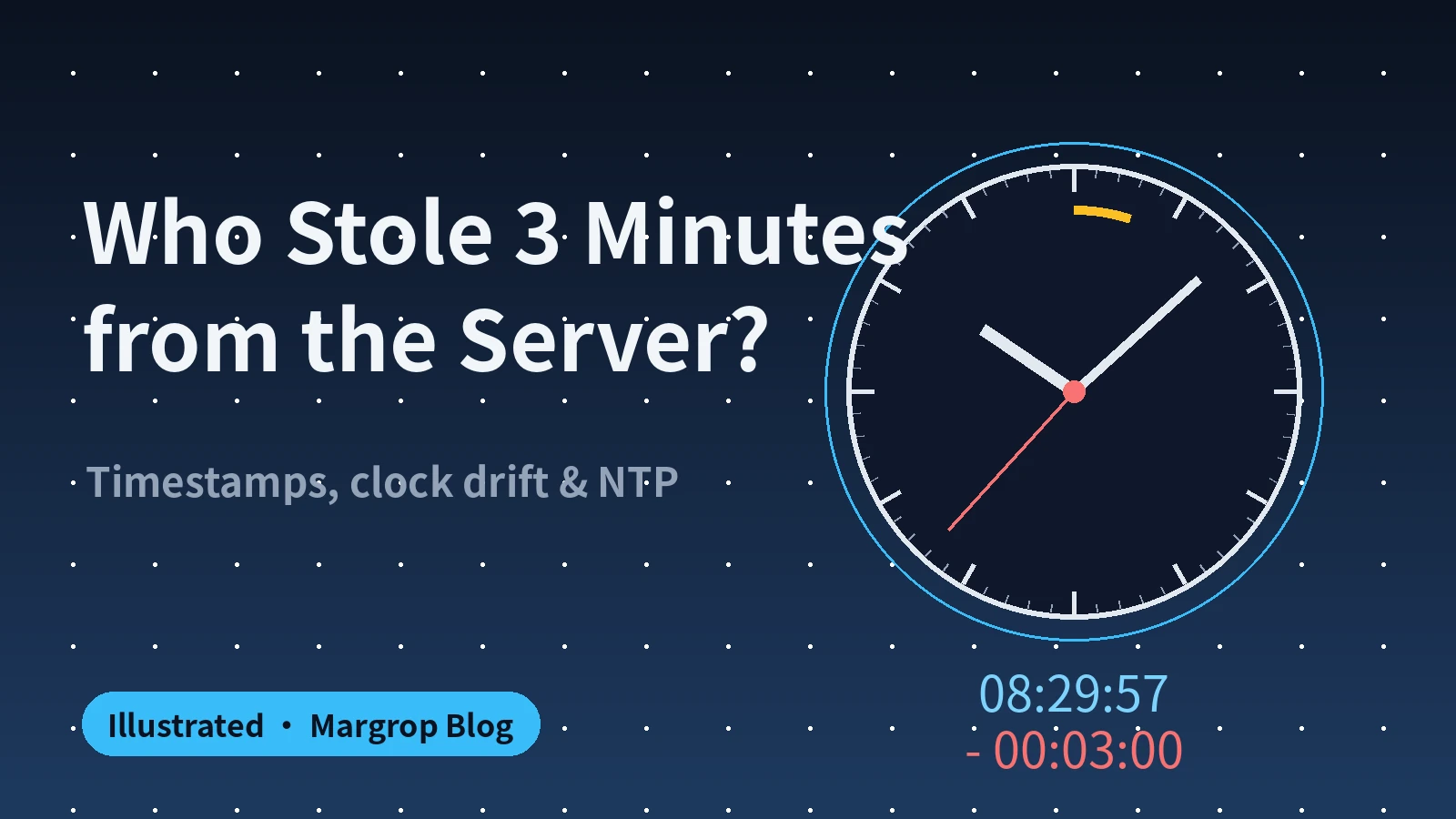
Figure 1: The hands look normal until the clock is compared with the standard.
1. The midnight certificate alert
Here is a common incident with private details removed. An internal tool suddenly failed every HTTPS request. The error said the certificate was “not yet valid”. At the same time, two machines wrote logs in an impossible order, and a six-digit authenticator code was rejected repeatedly.
The cause was not three different bugs. One server clock was three minutes slow. Three minutes feels harmless to a person. It is not harmless to a computer, because computers use time to decide whether something happened before something else, whether a certificate is inside its validity window, and whether a short-lived code is current.
The machine did not display a warning saying “my clock is wrong”. It displayed secondary failures. That is why time should be one of the first checks in an incident.
2. What a timestamp really is
The most common machine representation is the Unix timestamp: the number of seconds since 1970-01-01 00:00:00 UTC. The starting instant is number zero. Every second adds one.
Think of it as a receipt number or a race timer. Beijing and New York may print different local date strings for the same instant, but the instant has one Unix number. That is why databases, logs, API signatures, cache expiry and distributed locks like timestamps.
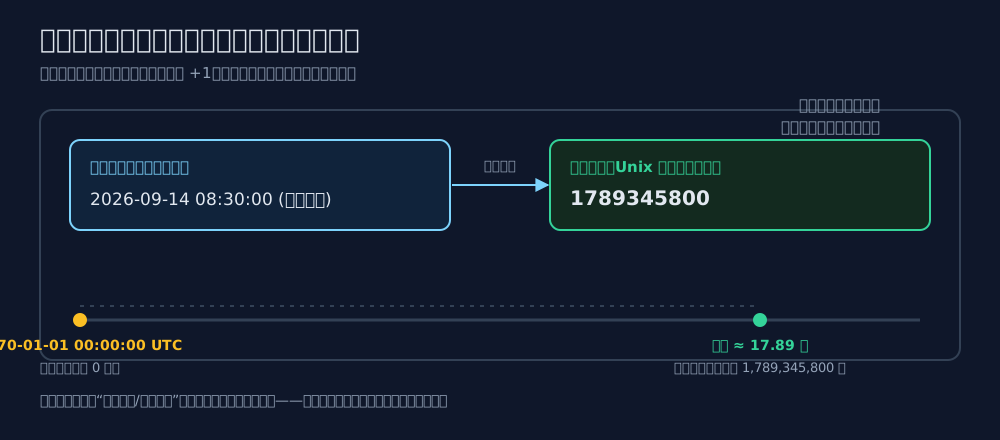
Figure 2: A date string is for people; a timestamp is a stable machine identifier.
Do not mix three related terms:
- UTC is the worldwide reference scale.
- A time zone is the local display rule, such as UTC+8.
- A timestamp is the count of elapsed seconds from the agreed epoch.
A time zone changes how a value is printed; it does not change the instant represented by the value.
3. Why a few minutes break so much
Certificates behave like milk labels
A TLS certificate has notBefore and notAfter, just like a carton says “good from this date until that date”. If the checking machine’s clock is before notBefore, a perfectly genuine certificate is rejected. The certificate did not become bad; the checker’s calendar became untrustworthy.
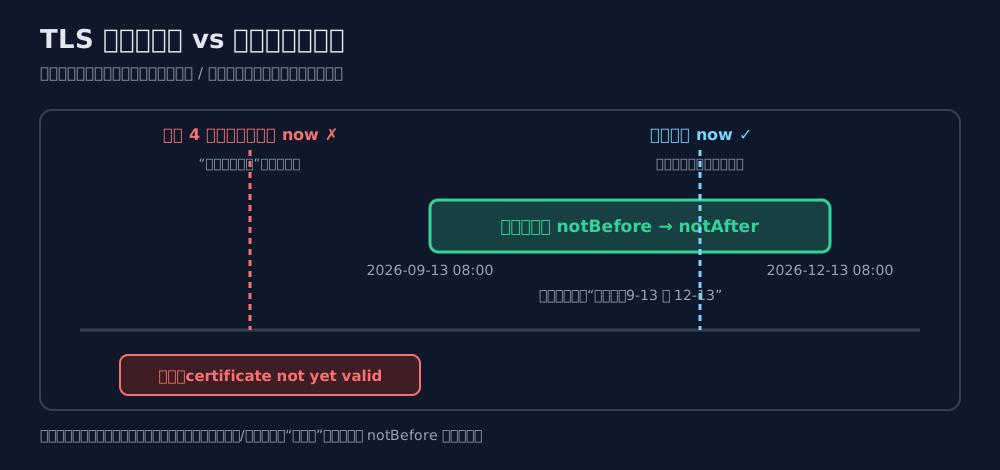
Figure 3: The same certificate is valid for a correct clock and “not yet valid” for a clock that is behind.
Logs need a common referee
Distributed systems tell a story through logs. If service A is correct and service B is three minutes slow, sorting all lines by wall-clock time can reverse the real cause and effect. The result is a debugging story that is internally neat but factually wrong.
Authentication has a time budget
Kerberos commonly allows only a small clock skew, traditionally five minutes. TOTP applications usually change their six-digit code every 30 seconds. A minute-scale difference is enough to turn a correct password into a rejected login.
4. Root cause: clocks drift
Computers count oscillations from a quartz crystal. A typical oscillator is excellent, but it is still a physical component. Temperature, voltage, aging and virtualization scheduling change its frequency. A clock that gains two seconds per day is already half a minute away after two weeks.
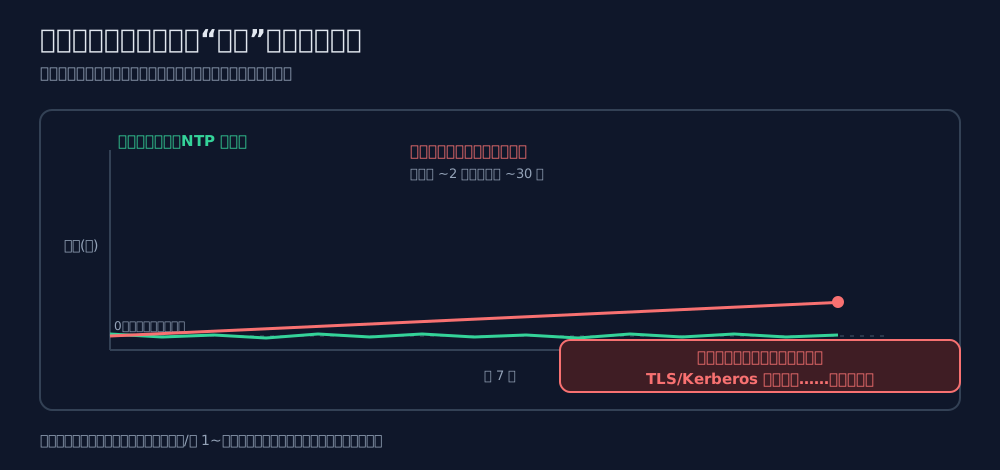
Figure 4: NTP does not make the crystal perfect; it keeps correcting the accumulated error.
A virtual machine can be paused while the host is busy. After resume, its guest clock may be behind. A drained CMOS battery can make the hardware clock forget. A firewall can block the time protocol. All four paths lead to the same operational symptom: the machine is free-running without a reliable reference.
On Windows, w32tm /query /status is an excellent first check. A source such as “Local CMOS Clock”, an unspecified last successful sync, or a zero stratum is evidence that the service is not receiving a real network reference.
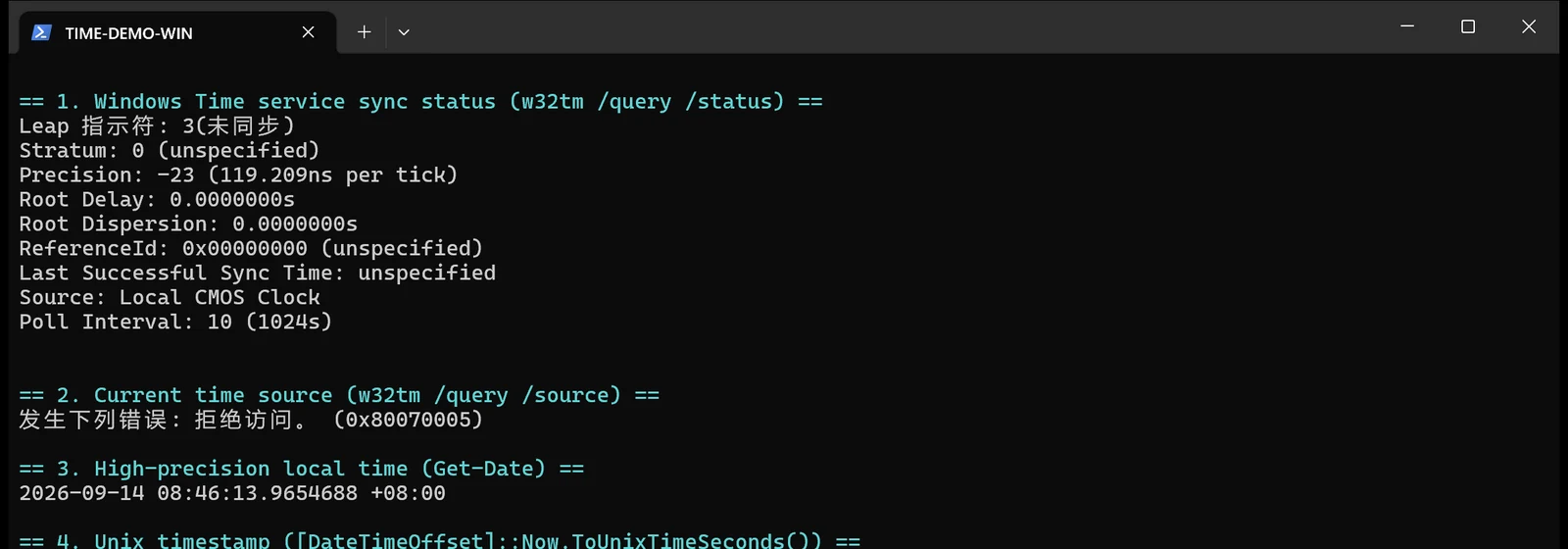
Figure 5: A real capture of the built-in Windows diagnostic command.
5. NTP: the global “compare watches” protocol
NTP, the Network Time Protocol, is the standard way computers synchronize clocks over a packet-switched network. Its hierarchy is easy to picture as a broadcast system:
- Stratum 0 is the reference clock itself: atomic, GPS or another primary source.
- Stratum 1 is directly attached to that reference.
- Stratum 2 and 3 synchronize from the level above and serve more clients.
- End-user computers and servers consume the result.
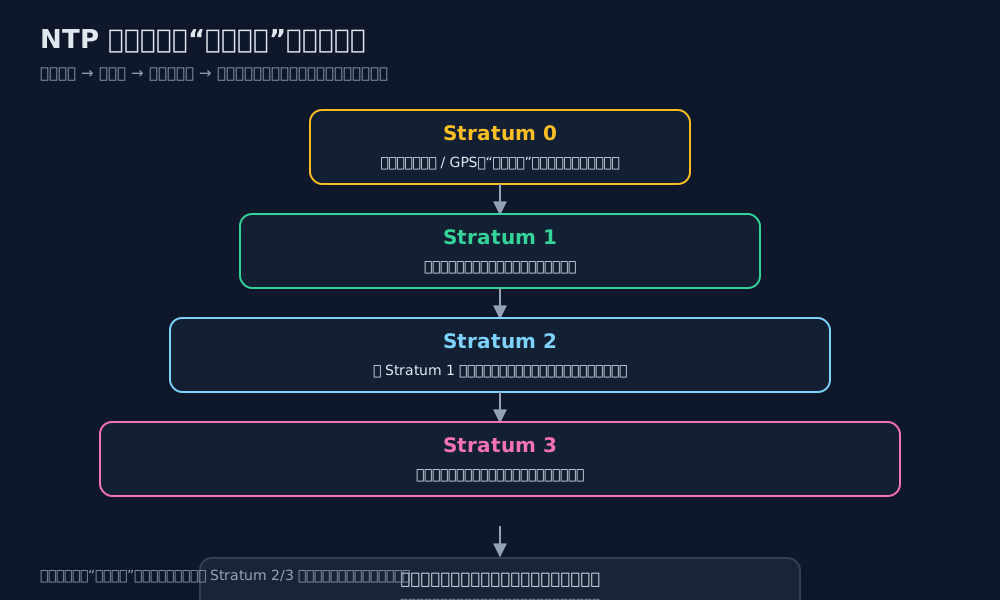
Figure 6: Each layer measures and disciplines its own clock; it does not blindly repeat a rumor.
Lower stratum numbers are closer to the reference, but ordinary servers do not need a dedicated atomic clock. A reliable Stratum 2 or 3 source normally provides millisecond-level accuracy for everyday infrastructure.
The four timestamps in one exchange
Network delay is the tricky part. Asking a friend the time takes time: the question travels, the answer travels back, and neither direction is guaranteed to be identical. NTP records four moments: when the client sends, when the server receives, when the server replies and when the client receives the reply.
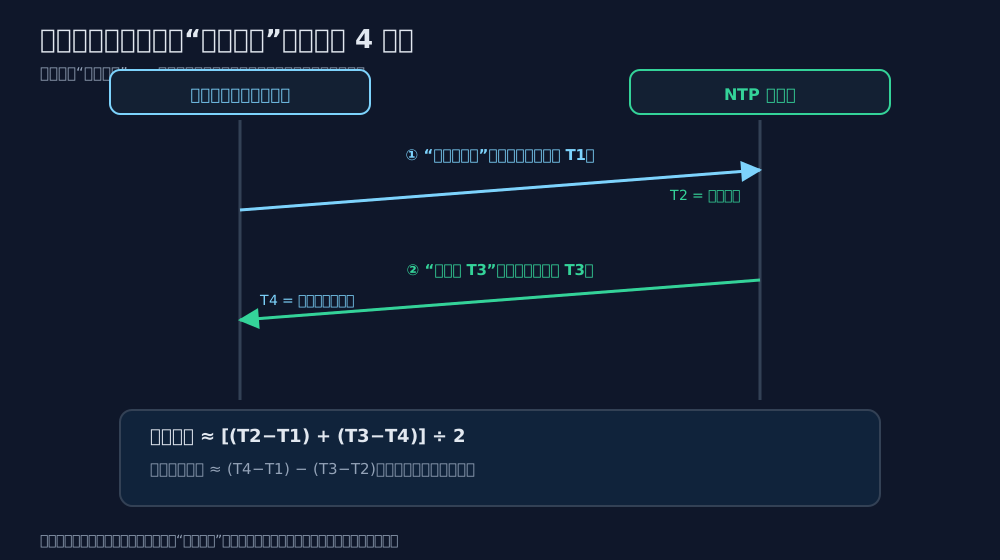
Figure 7: The four timestamps let NTP estimate both offset and round-trip delay.
With a reasonably symmetric path, the delay cancels out and the remaining difference estimates the clock offset. NTP repeats this measurement, filters bad samples and disciplines the local clock.
Slew or step?
For a small error, the service can slew: slightly speed up or slow down the clock until it catches up. This avoids a visible jump. For a large error, it may step to the correct value. A backward step is dangerous because an event that already happened can appear to happen in the future. That is another reason to keep synchronization running continuously instead of waiting for a three-minute disaster.
6. One-command fixes with built-in tools
The same workflow works on all three systems: inspect first, change only with administrator permission, then inspect again.
Windows 11
param([switch]$Execute)
$isAdmin = ([Security.Principal.WindowsPrincipal][Security.Principal.WindowsIdentity]::GetCurrent()).IsInRole([Security.Principal.WindowsBuiltInRole]::Administrator)
Write-Host "== Current time and zone =="; Get-Date -Format "yyyy-MM-dd HH:mm:ss zzz"; Get-TimeZone
Write-Host "== Service and status =="; Get-Service W32Time; w32tm /query /status
if (-not $Execute) { Write-Host "Dry run complete. Re-run as administrator with -Execute"; exit 0 }
if (-not $isAdmin) { throw "Run from an administrator terminal" }
Set-Service W32Time -StartupType Automatic; Start-Service W32Time
w32tm /config /syncfromflags:manual /manualpeerlist:"time.windows.com,0x9 time.nist.gov,0x9" /update
w32tm /resync /force
w32tm /query /status
The graphical equivalent is Settings → Time & language → Date & time → Set time automatically → Sync now. The classic Internet Time dialog shows the selected server and the last successful synchronization.
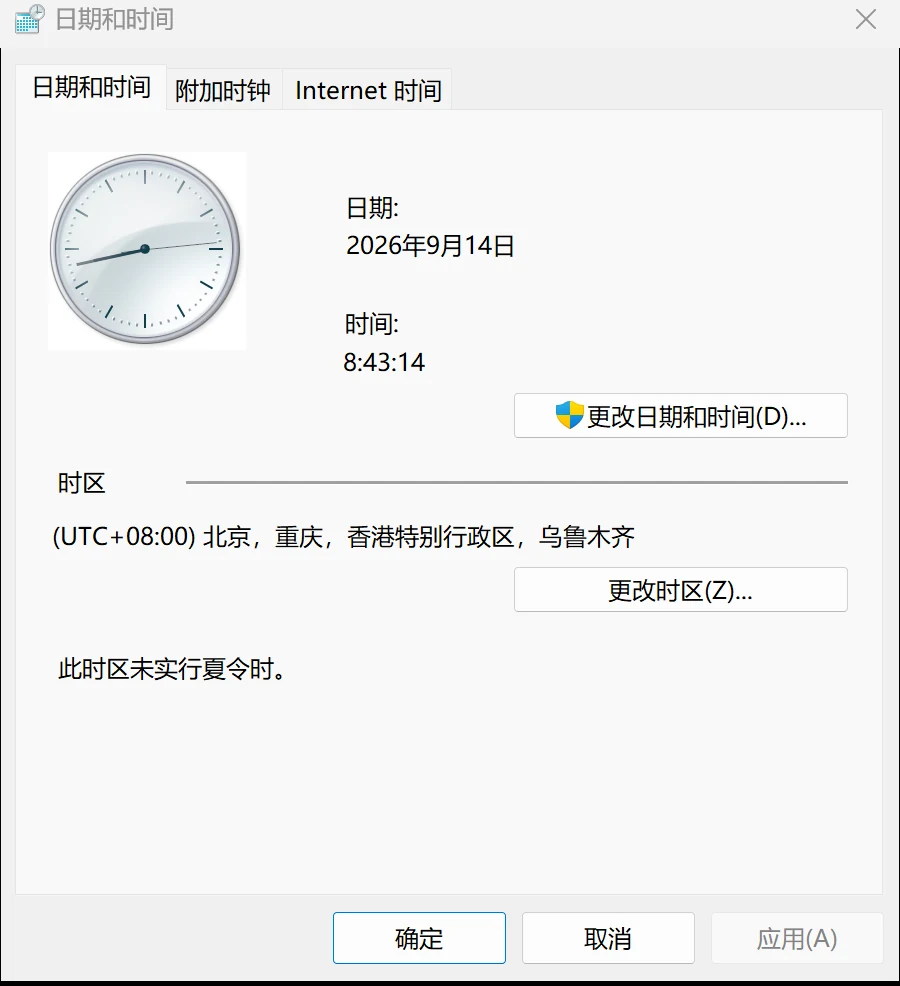
Figure 8: The built-in Windows date and time control.
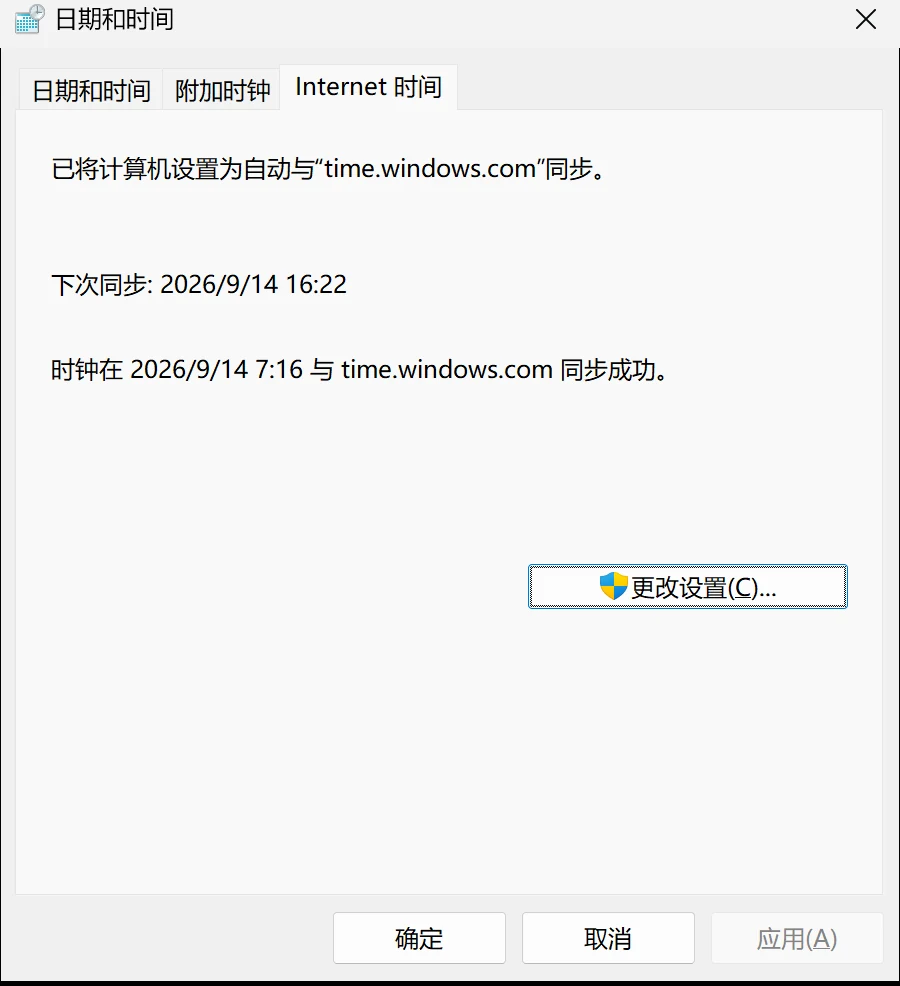
Figure 9: The GUI reports automatic synchronization and the latest result.
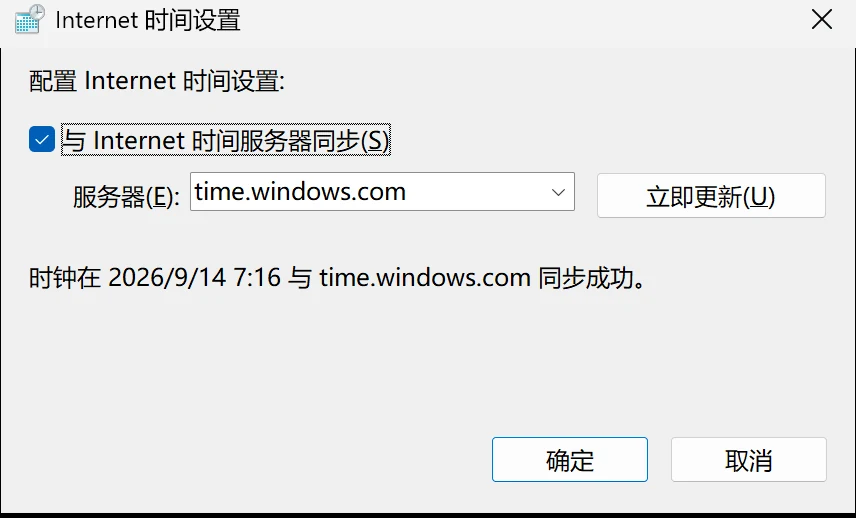
Figure 10: The server field is the graphical counterpart of w32tm /config.
Ubuntu 26.04
#!/usr/bin/env bash
set -euo pipefail
MODE="${1:-check}"
echo "== Status =="; timedatectl
echo "== Configuration =="; systemctl is-active systemd-timesyncd || true
if [[ "$MODE" != run ]]; then echo "Dry run complete. Use: sudo bash $0 run"; exit 0; fi
if [[ $EUID -ne 0 ]]; then echo "Run with sudo"; exit 1; fi
mkdir -p /etc/systemd/timesyncd.conf.d
cat >/etc/systemd/timesyncd.conf.d/90-fix-time.conf <<'EOF'
[Time]
NTP=ntp.ubuntu.com time.cloudflare.com
FallbackNTP=time.windows.com
EOF
timedatectl set-ntp true
systemctl restart systemd-timesyncd
sleep 3
timedatectl
The success signals are System clock synchronized: yes and NTP service: active.
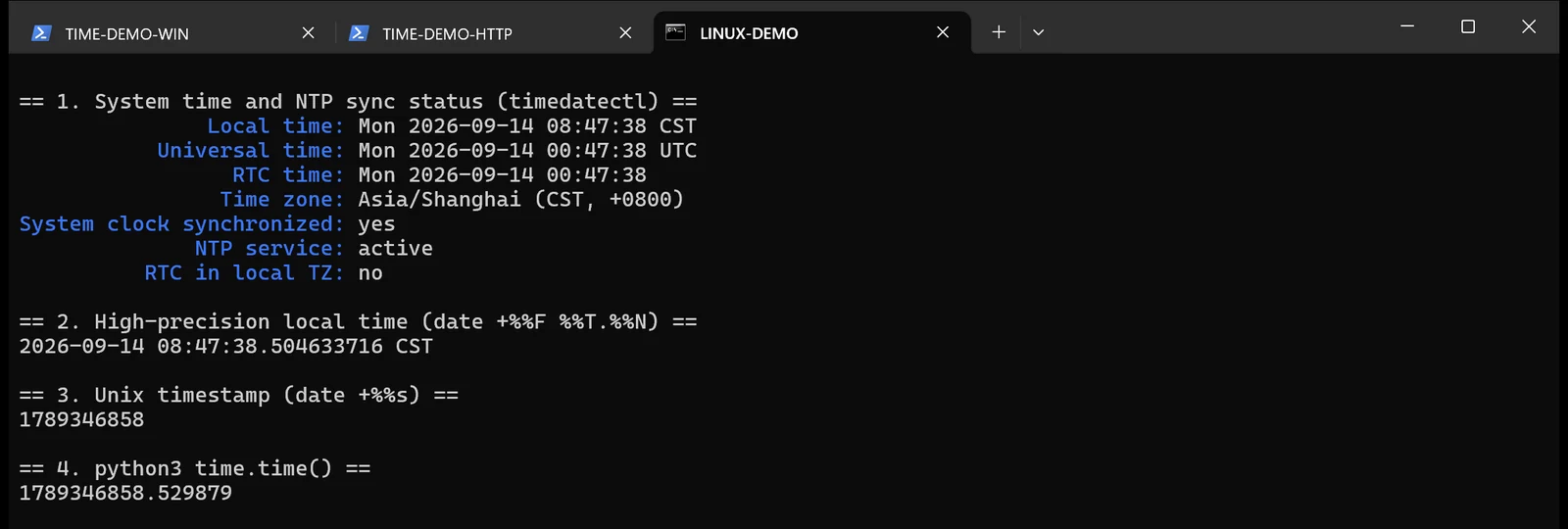
Figure 11: A real Linux status check.
macOS 26
#!/bin/zsh
set -e
MODE="${1:-check}"
echo "== Current settings =="
date
sudo systemsetup -getusingnetworktime
sudo systemsetup -gettimezone
sudo systemsetup -getnetworktimeserver
if [[ "$MODE" != run ]]; then echo "Dry run complete. Use: sudo zsh $0 run"; exit 0; fi
sudo systemsetup -setusingnetworktime on
sudo systemsetup -setnetworktimeserver time.apple.com
sudo sntp -sS time.apple.com || true
date
This uses only systemsetup and sntp, both provided by macOS. It does not install Homebrew, a package manager or a third-party App Store utility.
7. Human execution and Agent execution
For a single new machine, I prefer the human path: run the read-only check, read the output, then run the repair command in an administrator terminal. This teaches you what the machine is actually doing.
For many machines, an Agent can repeat the same workflow and collect evidence. Give it boundaries, not just “fix the time”:
Inspect the current machine and identify Windows 11, Ubuntu 26.04 or macOS 26.
First perform a read-only time check: local time, time zone, service status and
last successful synchronization. Use only built-in tools and documented public
sources. Before any state-changing command, list its purpose and ask for
approval. Prefer gradual correction; do not manually jump the clock by a large
amount. Do not install third-party software. Do not reveal private addresses,
full hostnames, domains, tokens or keys. After the change, re-run the platform
specific status command and return the raw evidence plus any reboot warning.
An Agent is good at repetition, reporting and cross-machine comparison. It should not silently decide to change a production clock or reboot a host.
8. Verification without extra software
A public clock website gives a quick visual check. The page below is a real browser capture of time.is and can show the local offset from its reference clock.
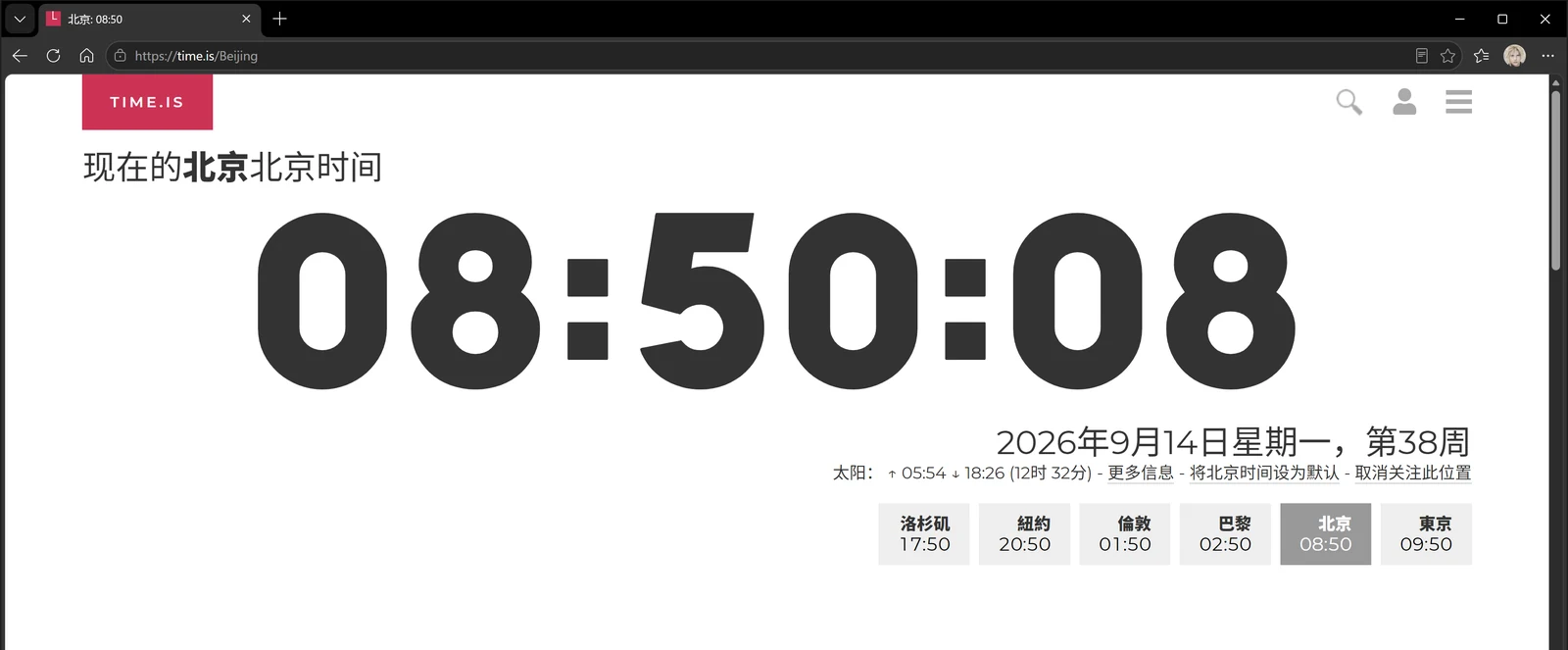
Figure 12: A human-friendly comparison with a reference clock.
You can also compare an HTTP Date header with your own UTC time. Web servers normally express that header in GMT/UTC, so it is a useful cross-check:
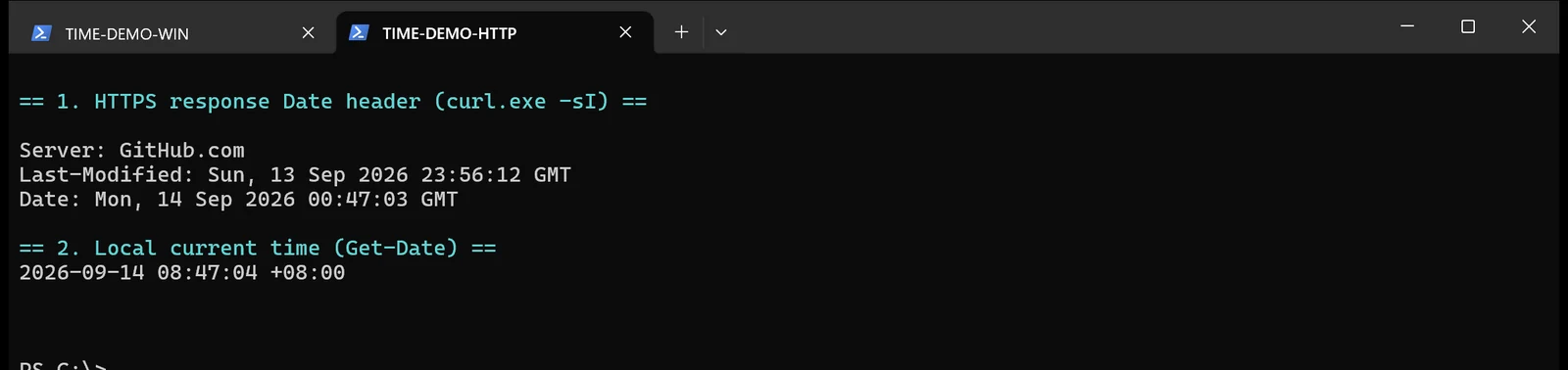
Figure 13: The remote server and local machine describe the same instant in different display zones.
Do not treat one web page as a precision laboratory instrument. It is a smoke test. For production evidence, keep the platform command output and monitoring metrics.
9. Six questions people ask
Is three minutes really serious? It depends on the check. Browsing may not care; Kerberos, TOTP and certificate validation absolutely can.
Can I just set the clock manually? You can repair the symptom once, but the oscillator will drift again. The service must remain enabled.
What is a leap second? Earth rotation is not perfectly uniform. Historically, UTC occasionally inserted one extra second. It exposed code that assumed time always moves forward. Modern systems may smear the adjustment, and engineers should still distinguish wall-clock time from elapsed time.
What is the Year 2038 problem? Old 32-bit signed Unix seconds overflow on 2038-01-19. Modern 64-bit operating systems are not limited by that representation; old embedded devices still need review.
Can I calculate duration with Unix timestamps? Prefer a monotonic clock. NTP may move wall time forward or backward, while a monotonic clock only measures elapsed progress.
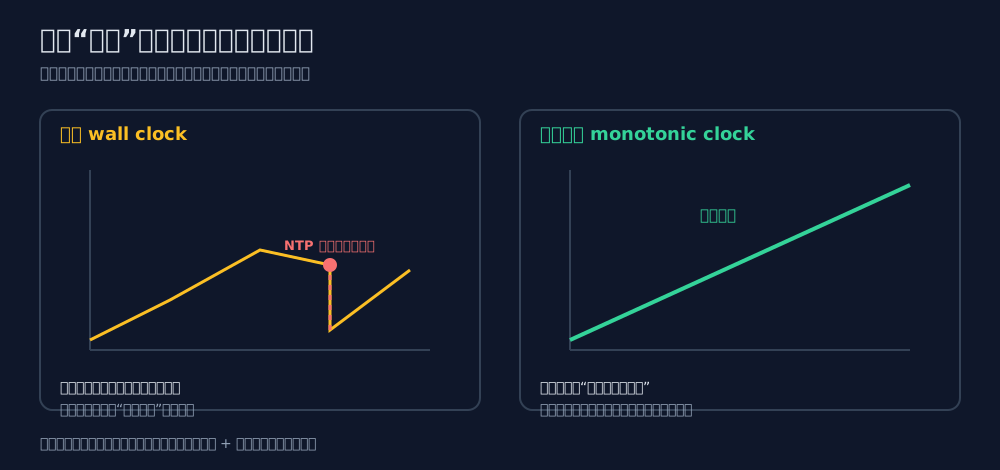
Figure 14: Use wall time for business timestamps and a monotonic clock for duration.
Does continuous NTP waste bandwidth? No. The packets are small and infrequent. Blocking time synchronization creates far more operational risk than allowing it.
10. Final advice
Time is the invisible referee of a distributed system. When it is correct, nobody notices. When it is wrong, certificates, log ordering, authentication, scheduled jobs and one-time passwords fail in ways that look unrelated.
Keep the time service on. Use a trusted source. Verify after changes. Store timestamps in UTC or epoch form, convert to local time only for presentation, and use monotonic clocks for durations. When the next “mysterious certificate failure” arrives, check the clock before rewriting the application.