Don't Rush After Installing Ubuntu 26.04 LTS! Swiftly Configure Domestic Mirrors (Huawei & Alibaba Cloud APT Sources DEB822 Tutorial)
TL;DR
Ubuntu 26.04 LTS (Resolute Raccoon) has officially been released. If you have just installed it, the very first thing you should do is replace the default APT sources with fast domestic mirror servers (such as Alibaba Cloud or Huawei Cloud). Note that starting from Ubuntu 24.04, the system has transitioned entirely to the new DEB822 format for APT source configurations (stored in
/etc/apt/sources.list.d/ubuntu.sources), making the traditional/etc/apt/sources.listinactive by default.This tutorial provides a step-by-step guide on how to safely change to Alibaba Cloud and Huawei Cloud mirrors in Ubuntu 26.04 LTS, along with deep troubleshooting analysis for potential pitfalls like dependency conflicts and version codename mismatches.
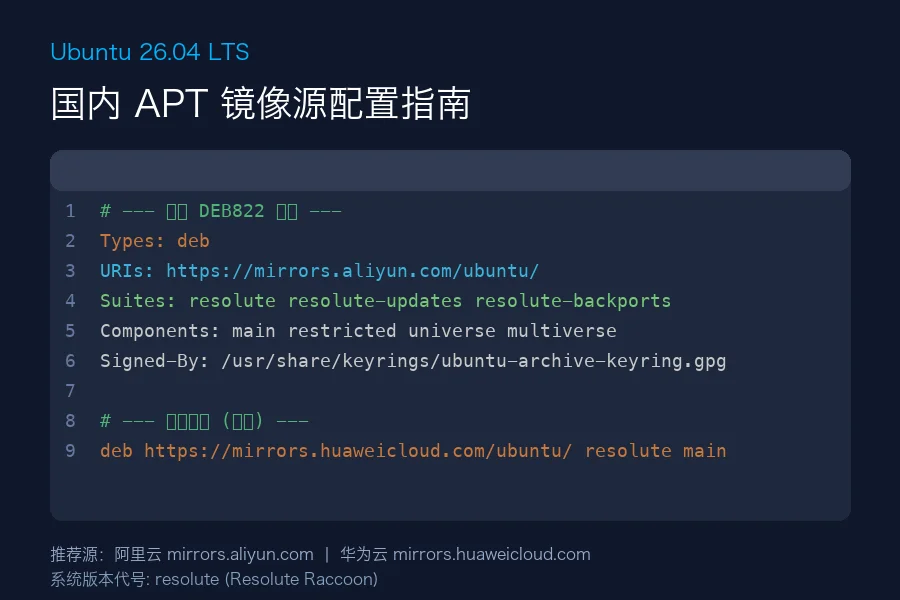
Figure 1: Switching mirrors is quick and easy, but improper configurations can lead to dependency nightmares. This post will guide you through all the safety protocols.
1. Why is Changing Sources Different in Ubuntu 26.04?
Users accustomed to older Ubuntu versions (like 20.04 or 22.04) might intuitively head to /etc/apt/sources.list to edit package sources.
However, once you open that file in Ubuntu 26.04, you will find it empty, consisting of just comments, or non-existent altogether.
1.1 The Newly Introduced DEB822 Format
Starting from Ubuntu 24.04 LTS, Ubuntu has transitioned the default APT sources config style to the DEB822 format. The configuration is now stored at /etc/apt/sources.list.d/ubuntu.sources.
This new format offers several notable benefits:
- Structure & Readability: It employs a YAML-like
Key: Valueformat that is easy to comprehend. - Granular Key Management: The
Signed-Byattribute pairs each source repository with its own specific GPG key, eliminating security risks of sharing GPG keys across multiple domains. - Automation Friendliness: Automation tools like Ansible, SaltStack, or custom shell scripts can easily parse and write configuration attributes without complex regular expressions.
Here is what the default /etc/apt/sources.list.d/ubuntu.sources file looks like:
Types: deb
URIs: http://archive.ubuntu.com/ubuntu/
Suites: resolute resolute-updates resolute-backports
Components: main restricted universe multiverse
Signed-By: /usr/share/keyrings/ubuntu-archive-keyring.gpg

Types: deb
URIs: http://security.ubuntu.com/ubuntu/
Suites: resolute-security
Components: main restricted universe multiverse
Signed-By: /usr/share/keyrings/ubuntu-archive-keyring.gpg
The configuration is organized into two groups: one for standard releases, updates, and backports (resolute, resolute-updates, resolute-backports), and one dedicated solely to security patches (resolute-security).
1.2 Verification of System Codename: Resolute
Before modifying the URIs, it is critical to confirm the correct codename. Ubuntu 26.04 LTS’s official codename is Resolute Raccoon, which translates to resolute in the Suites configuration.
Some unofficial or testing mirrors might contain typographical errors, putting older codenames (such as plucky or noble) in the Suites section, causing 404 errors during apt update. Always remember: the Suites keyword for Ubuntu 26.04 is resolute.
2. Alibaba Cloud vs. Huawei Cloud: Which Mirror to Choose?
While China hosts many excellent open-source mirrors, Alibaba Cloud Mirror (Aliyun) and Huawei Cloud Mirror (Huawei) stand out as the top choices for stability, speed, and bandwidth.
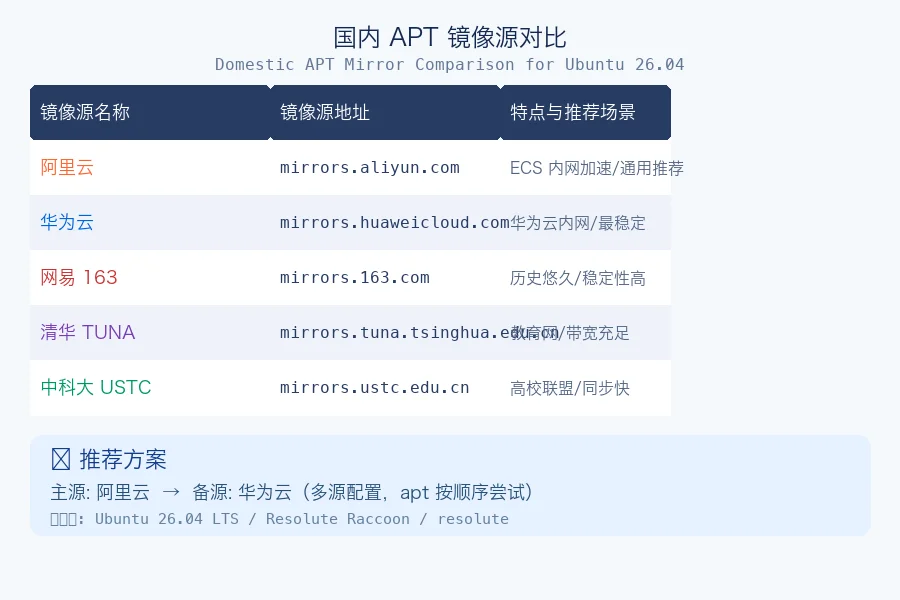
Figure 2: Performance and stability comparison across major cloud mirrors.
2.1 Alibaba Cloud Mirror (mirrors.aliyun.com)
- Pros: Incredible distribution density, enormous bandwidth, fast synchronization rates, and free internal network acceleration for Alibaba Cloud ECS instances.
- Cons: Occasional minor delays during peak hours (evenings) due to high load.
2.2 Huawei Cloud Mirror (mirrors.huaweicloud.com)
- Pros: Substantial infrastructure investment, high stability, frequent sync updates, excellent routing path routing, and remarkable performance across universities and generic consumer broadband.
- Cons: Internal network acceleration is limited only to instances residing within Huawei Cloud VPCs.
3. Step-by-Step Guide: Configuring the DEB822 ubuntu.sources File
Before tweaking any system configuration, creating a backup is mandatory. Follow these tasks closely.
Step 1: Backup Your Current Configuration
Open your terminal and run:
sudo cp /etc/apt/sources.list.d/ubuntu.sources /etc/apt/sources.list.d/ubuntu.sources.bak
Note: If anything breaks, you can instantly restore it using sudo cp /etc/apt/sources.list.d/ubuntu.sources.bak /etc/apt/sources.list.d/ubuntu.sources.
Step 2: Edit the Configurations
Open the active source configuration file with a text editor (e.g. vim or nano):
sudo vim /etc/apt/sources.list.d/ubuntu.sources
Option A: Alibaba Cloud (Aliyun) Configurations
Clear the existing lines in /etc/apt/sources.list.d/ubuntu.sources and paste the following block:
Types: deb
URIs: https://mirrors.aliyun.com/ubuntu/
Suites: resolute resolute-updates resolute-backports
Components: main restricted universe multiverse
Signed-By: /usr/share/keyrings/ubuntu-archive-keyring.gpg

Types: deb
URIs: https://mirrors.aliyun.com/ubuntu/
Suites: resolute-security
Components: main restricted universe multiverse
Signed-By: /usr/share/keyrings/ubuntu-archive-keyring.gpg
Option B: Huawei Cloud (Huawei) Configurations
Alternatively, if you prefer Huawei Cloud Mirror, replace the content with:
Types: deb
URIs: https://mirrors.huaweicloud.com/ubuntu/
Suites: resolute resolute-updates resolute-backports
Components: main restricted universe multiverse
Signed-By: /usr/share/keyrings/ubuntu-archive-keyring.gpg

Types: deb
URIs: https://mirrors.huaweicloud.com/ubuntu/
Suites: resolute-security
Components: main restricted universe multiverse
Signed-By: /usr/share/keyrings/ubuntu-archive-keyring.gpg
Quick Command Line Swap (Non-interactive)
For automated shell provisioning or rapid script runs, you can execute these sed commands directly.
For Alibaba Cloud:
sudo sed -i 's|http://archive.ubuntu.com/ubuntu/|https://mirrors.aliyun.com/ubuntu/|g' /etc/apt/sources.list.d/ubuntu.sources
sudo sed -i 's|http://security.ubuntu.com/ubuntu/|https://mirrors.aliyun.com/ubuntu/|g' /etc/apt/sources.list.d/ubuntu.sources
For Huawei Cloud:
sudo sed -i 's|http://archive.ubuntu.com/ubuntu/|https://mirrors.huaweicloud.com/ubuntu/|g' /etc/apt/sources.list.d/ubuntu.sources
sudo sed -i 's|http://security.ubuntu.com/ubuntu/|https://mirrors.huaweicloud.com/ubuntu/|g' /etc/apt/sources.list.d/ubuntu.sources
4. How to Update Legacy /etc/apt/sources.list Format?
Although official Ubuntu 26.04 installations default to the DEB822 style, certain vendor-customized images (like simplified Docker containers or private cloud templates) might still leverage the traditional /etc/apt/sources.list file.
If that is the case, modify /etc/apt/sources.list directly using the traditional formats below.
Alibaba Cloud Traditional Config
deb https://mirrors.aliyun.com/ubuntu/ resolute main restricted universe multiverse
deb https://mirrors.aliyun.com/ubuntu/ resolute-updates main restricted universe multiverse
deb https://mirrors.aliyun.com/ubuntu/ resolute-backports main restricted universe multiverse
deb https://mirrors.aliyun.com/ubuntu/ resolute-security main restricted universe multiverse
Huawei Cloud Traditional Config
deb https://mirrors.huaweicloud.com/ubuntu/ resolute main restricted universe multiverse
deb https://mirrors.huaweicloud.com/ubuntu/ resolute-updates main restricted universe multiverse
deb https://mirrors.huaweicloud.com/ubuntu/ resolute-backports main restricted universe multiverse
deb https://mirrors.huaweicloud.com/ubuntu/ resolute-security main restricted universe multiverse
5. Applying Changes & System Upgrades
Once you have saved your modifications, apply them by rebuilding your local APT package indexes.
Task 1: Update APT Packages List
Run the update command:
sudo apt update
If the logs list items originating from https://mirrors.aliyun.com or https://mirrors.huaweicloud.com without any errors, the migration was successful!
Task 2: Perform a Clean System Upgrade
It is highly recommended to run a complete system upgrade immediately after changing mirrors:
sudo apt full-upgrade -y
Unlike upgrade, the full-upgrade command resolves package conflicts and removes redundant dependencies dynamically to match the newly added source configurations.
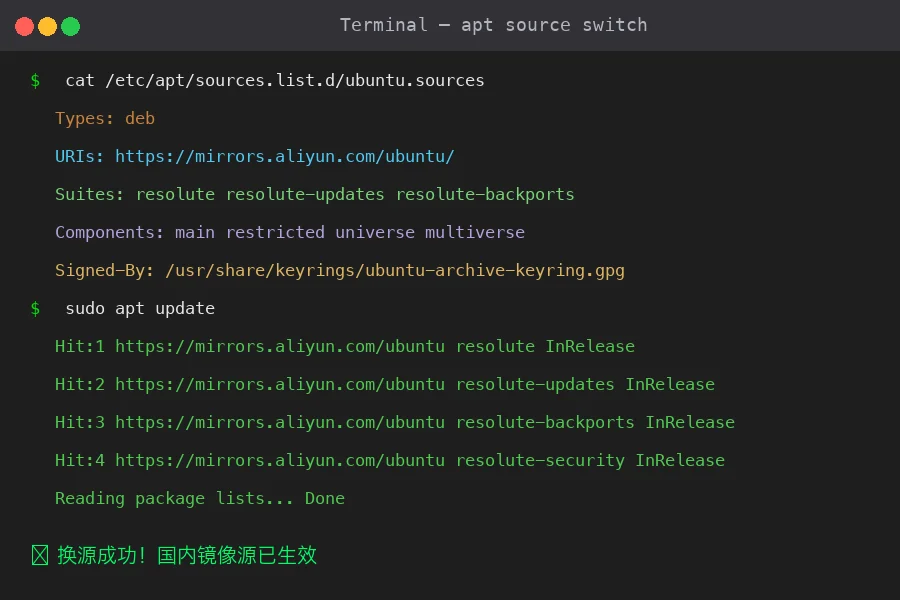
Figure 3: Complete terminal workflow showing source switching commands and apt update verification.
6. Common Pitfalls & Troubleshooting
If you encounter an issue during the update process, don’t worry. Here are the most common issues and how to fix them.
6.1 Issue: Unable to locate package / 404 Not Found
Root Cause:
- Wrong Codename: The Suites attribute was accidentally configured with older versions (e.g.
pluckyornoble). - Mirror Sync Issues: Since Ubuntu 26.04 is relatively new, smaller university mirrors or localized providers might not have fetched all the packages yet.
- Incorrect URL: Typos in URIs or incorrect security mirrors.
Fix:
Double check that the Suites keyword matches resolute. If the selected mirror is lagging behind, switch to Alibaba Cloud or Huawei Cloud, as they provide the most robust synchronization infrastructure.
6.2 Issue: APT Dependency Conflicts (Unsatisfied dependencies)
If you encounter a dependency mismatch error during package installation (e.g., apt complaining about version discrepancies between local installed packages and mirror-provided packages), it means the local package databases think they have newer versions of libraries than what is currently provided by the new mirror server.
Resolution: We wrote an in-depth diagnosis of this scenario (see our article Ubuntu 26.04 APT Source Mirror Dependency Conflict Analysis).
The simplest fix is to force dependency correction using apt --fix-broken install, or use dpkg to downgrade conflicting package variations to match those served by the current mirror.
# Force APT dependency resolution
sudo apt --fix-broken install -y

# Reconfigure all uncompleted dpkg installations
sudo dpkg --configure -a
6.3 Issue: GPG Key Signing Error / Key Mismatch
Root Cause:
Your ubuntu.sources file is missing the Signed-By property, or the referenced .gpg file is missing, leading to GPG validation failure.
Fix:
Ensure your DEB822 blocks include:
Signed-By: /usr/share/keyrings/ubuntu-archive-keyring.gpg
If the keyring is corrupted, reinstall the official Ubuntu keys:
sudo apt install --reinstall ubuntu-keyring
7. Summary & Simple Workflow Diagram
Here is a simplified flowchart summary to visualize the switch:
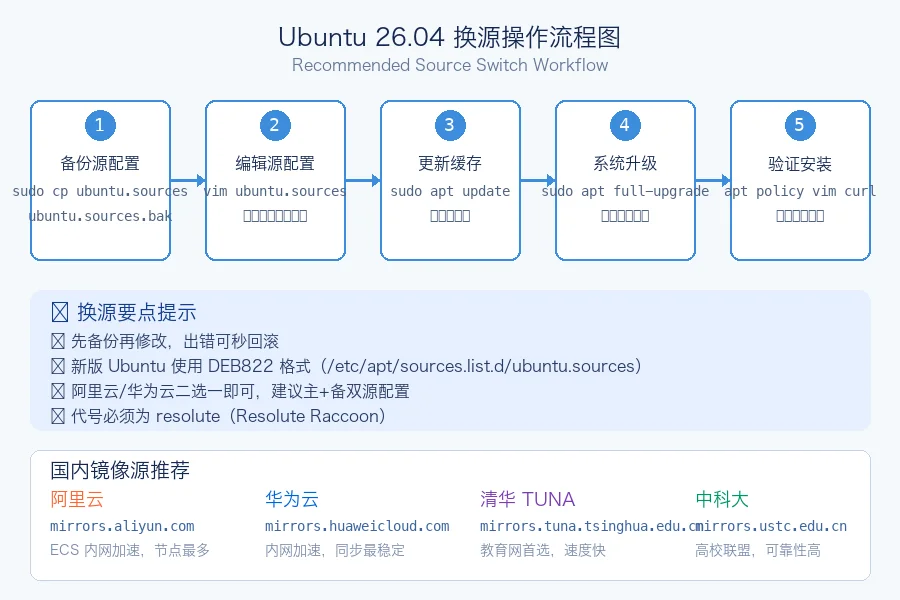
Figure 4: The recommended workflow for switching and maintaining APT repositories.
Configuring stable mirrors is key to smooth system maintenance. We hope this guide serves you well as you start your journey with Ubuntu 26.04 LTS! If you run into any unusual behavior, feel free to leave a comment in the Gitalk section below.