Ubuntu shutdown stuck for 90 seconds? A Python asyncio service that won't honour SIGTERM, and how to fix it
TL;DR
After upgrading my home proxy box to Ubuntu 24.04,
systemctl rebootstopped being fast: SSH would hang on for 90 seconds before the box actually shut down.journalctlmade it obvious:smart-proxy.service: State 'stop-sigterm' timed out. Killing.— systemd sent SIGTERM, waited 90 seconds, nobody reacted, and SIGKILL was the only option left.The root cause is not systemd’s fault and not Ubuntu’s fault. It is Python’s asyncio runtime not actually ending its child tasks when SIGTERM arrives — it is parked on a
socket.recvand never voluntarily looks at the signal queue.The fix has two halves, both required: (1) a systemd drop-in that lowers
TimeoutStopSecfrom the default 90s down to 20s on the affected Python units; (2) inside the Python service itself, walkasyncio.all_tasks(),.cancel()the in-flight connection handlers on SIGTERM, and wrapself.stop()inasyncio.wait_for(..., timeout=10)as a safety net. After both halves, the samerebootdrops from 90 seconds to one second.
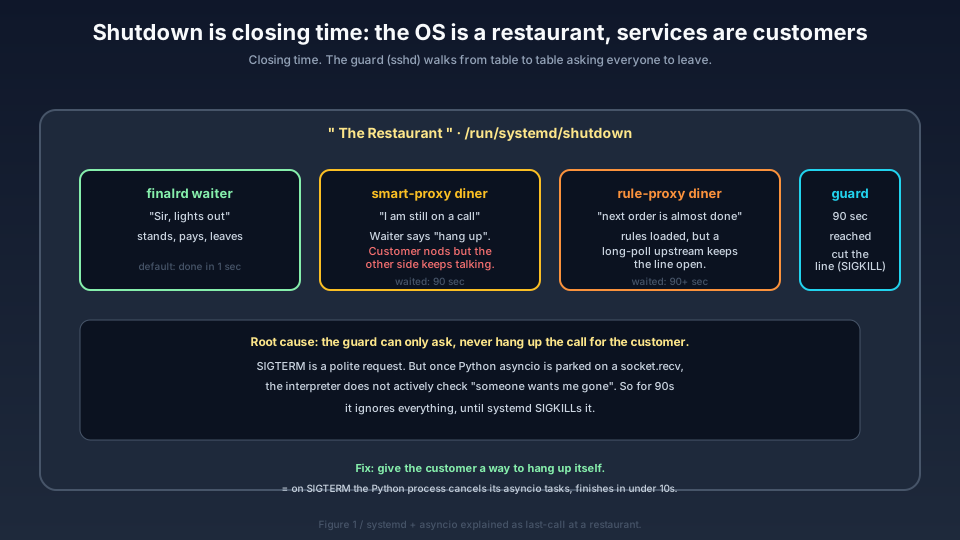
Cover: “shutdown” as last-call at a restaurant. finalrd the waiter leaves in a second; Python customers smart-proxy and rule-proxy are stuck on a call; the systemd guard waits 90 seconds and then cuts the line. This map is the whole post in one picture.
1. Background: a freshly-upgraded proxy box that reboots slowly
The timeline was this —
The previous afternoon I had upgraded my home proxy box from Ubuntu 22.04 (jammy) to 24.04 (noble), kernel 6.8. The upgrade itself had finished cleanly in 27 minutes; every service was back up.
The next day I wanted a “cold-boot validation”, so:
ssh root@host 'systemctl reboot'
Then —
I sat staring at my local terminal. For 90 full seconds the SSH did not drop.

Figure 0 · This machine’s operating system is Ubuntu 24.04 Noble Numbat (the official wallpaper). On top of it sit v2ray and a self-written Python proxy.
After 90 seconds SSH finally died. A few more seconds of nothing, then the box came back. I logged in and ran journalctl -b -1:
Oct 23 10:34:01 host systemd[1]: Stopping smart-proxy.service ...
Oct 23 10:35:31 host systemd[1]: smart-proxy.service: State 'stop-sigterm' timed out. Killing.
Oct 23 10:35:31 host systemd[1]: smart-proxy.service: Killing process 728 (python3) with signal SIGKILL.
Oct 23 10:35:31 host systemd[1]: smart-proxy.service: Main process exited, code=killed, status=9/KILL
Oct 23 10:35:31 host systemd[1]: smart-proxy.service: Failed with result 'timeout'.
Oct 23 10:35:31 host systemd[1]: Stopped smart-proxy.service.
Note the timing: from 10:34:01 (systemd says “I’m going to stop it”) to 10:35:31 (systemd gives up, SIGKILL), exactly 90 seconds pass. That is systemd’s default
TimeoutStopSec=90s.
Here is that timeline drawn out:
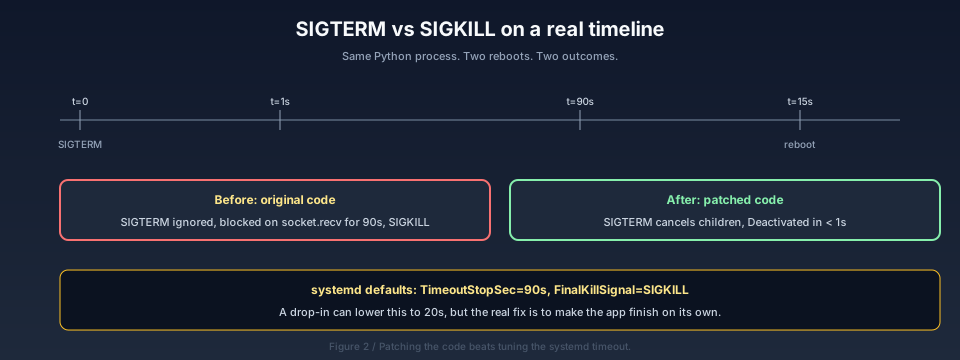
Figure 2: a single shutdown. At t=0 systemd sends SIGTERM. At t=1s the old code has not reacted at all. At t=90s systemd gives up and sends SIGKILL. Only then does the reboot actually begin. All that wait time is wasted on a single Python process.
Why does this happen? We need to understand two things: how systemd stops a service, and what Python asyncio actually does when SIGTERM arrives.
2. Analysis: systemd sends an invitation, not an order
A lot of people (me included, originally) assume that systemctl stop on a service is “kill the process right now”. It is not.
systemd’s politeness is deliberate. It exists to give the process a chance to do cleanup: flush dirty pages, write a WAL record, close sockets gracefully. SIGKILLing a database on the spot would corrupt it.
Here is systemd’s stop sequence:
                TimeoutStopSec (default 90s)
                <------------------------------>
t=0            t=1s                          t=90s
  |              |                              |
  |  SIGTERM     |  Still alive?                |  Still alive?
  |  ----->      |  ----->                      |  ----->
  |  (polite)    |  (keep waiting politely)     |  (no more politeness)
  |              |                              |
  |              |  (process exits, OK)         |  SIGKILL
  |              |  <-----                      |  ----->
  |              |  ExitCode=0                  |  ExitCode=137
  v              v                              v
  systemd: stop  systemd: Deactivated           systemd: failed 'timeout'
SIGTERM is a negotiation signal. It says “I would like you to leave; please tidy up on your way out”. If the process exits promptly, systemd is happy. If 90 seconds pass and the process is still there, systemd escalates to SIGKILL — that signal cannot be caught or blocked, the kernel kills the process immediately.
There is a subtlety many people miss: once systemd has sent SIGTERM at t=0, whether the process “sees” the signal at all depends entirely on what the process is doing at that moment. If the process is currently running pure Python bytecode, the signal is handled on the next bytecode boundary. But if the process is currently blocked inside a syscall (socket.recv, time.sleep, select.select, …), the Python interpreter does not actively check “is there a signal for me?” — it waits for that syscall to return, and that syscall might take hours.
In everyday terms —
systemd is the restaurant guard announcing last call. smart-proxy, the customer, is on a phone call; he nods when the guard talks to him, but the person on the other end is in the middle of an incident report, and he cannot hang up. The guard waits one minute, five minutes, eighty-nine minutes. At minute ninety he says “sorry, I have to cut your line.” That is SIGKILL.
3. Root cause: Python asyncio children parked on sockets
Looking at my Python service — smart_proxy_failover.py, 449 lines. It is an asyncio service that does two things:
- Run two TCP servers — SOCKS5 on 1080, HTTP proxy on 1081, receiving proxy requests from devices at home.
- Run two health-check loops — every 10 seconds, probe the upstream VPSes and fail over if needed.
Each time a new connection arrives, asyncio creates a coroutine handle_socks_client or handle_http_client. That coroutine does one thing: call asyncio.open_connection() to reach the upstream VPS, then socket.recv() to read the upstream’s reply.
After the service has been running overnight, dozens of these coroutines are simultaneously parked on socket.recv — each one waiting for an upstream response. It might be a keepalive, it might be a long poll, it might be a dead connection. They have not come back.
When SIGTERM arrives, Python’s event loop is sitting inside select() waiting for I/O. select() does not know about SIGTERM. It only waits for file descriptors. SIGTERM goes into the pending-signal queue, but as long as any socket is in select, Python will not look at that queue.
The result: for 90 seconds, SIGTERM is parked in the queue, Python has no idea anyone is calling it. Until systemd SIGKILLs the whole process — only then does Python “learn” it is dead.
Drawn as a task tree:
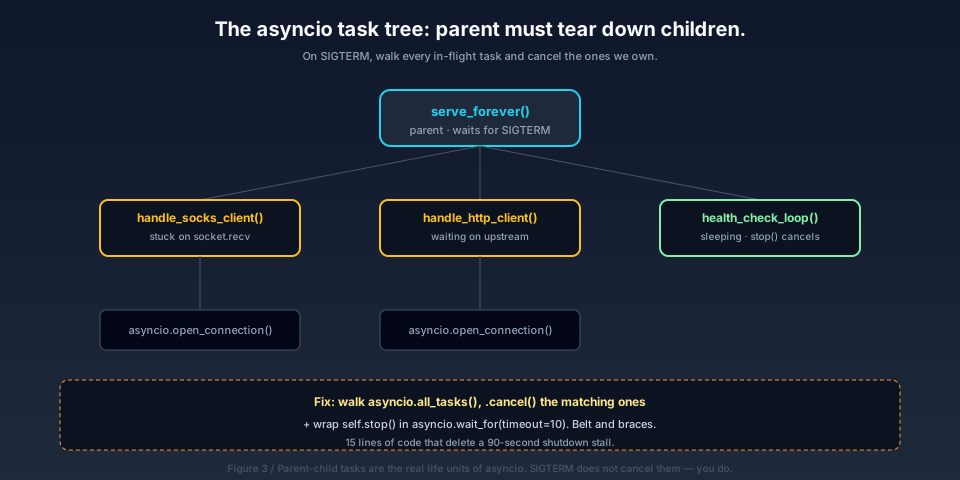
Figure 3: the Python process’s asyncio task tree. The parent task serve_forever is waiting on SIGTERM. Below it sit N children handle_socks_client / handle_http_client, each with its own asyncio.open_connection coroutine parked on a socket. The health-check loops are another branch. SIGTERM only reaches the parent; the children’s sockets keep waiting; the parent’s await self.stop() is stuck too.
4. The fix: half on the system side, half on the application side
Fixing this requires touching both halves. Doing only one side is not enough.
- Only changing systemd’s
TimeoutStopSec=20s: the wait drops from 90 seconds to 20. Looks faster — but it is still SIGKILL under the hood. Any in-flight connection is severed; SOCKS5 clients seeConnection reset; HTTP clients get a half-written HTTP response. Bad UX. - Only patching Python to handle SIGTERM: if Python still does not react to SIGTERM, systemd waits 90 seconds anyway.
The correct fix is to do both, AND to make Python cancel its children rather than relying on SIGKILL.
The repair strategy:
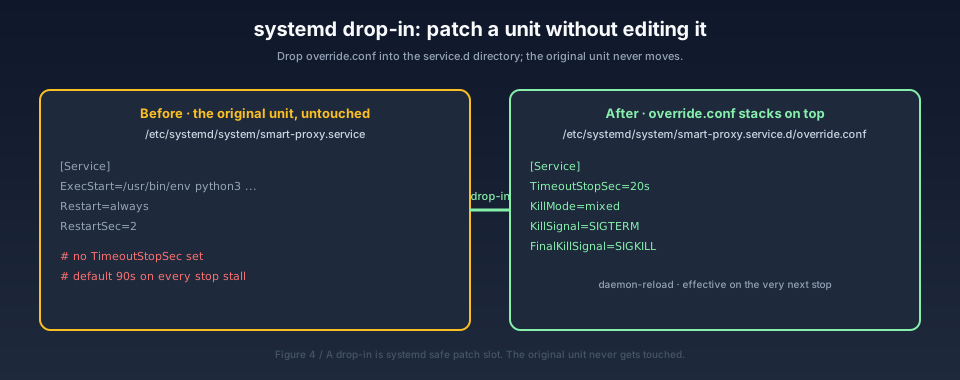
Figure 4: the original unit (left) is untouched line by line. The drop-in (right) overrides only four key/value pairs — “patching without touching the original”. A drop-in is systemd’s safe patch slot.
4.1 System side: a systemd drop-in
You should not just edit /etc/systemd/system/<service>.service — the next package upgrade may overwrite it. systemd provides a safe patch slot: the directory /etc/systemd/system/<service>.service.d/, where any *.conf file is automatically layered on top of the unit.
For smart-proxy.service:
mkdir -p /etc/systemd/system/smart-proxy.service.d
cat > /etc/systemd/system/smart-proxy.service.d/override.conf <<'EOF'
[Service]
TimeoutStopSec=20s
KillMode=mixed
KillSignal=SIGTERM
FinalKillSignal=SIGKILL
EOF
systemctl daemon-reload
What the four keys mean:
TimeoutStopSec=20s:worst case 20 seconds. No matter how badly Python behaves, systemd will SIGKILL on time.KillMode=mixed:SIGTERMonly kills the main process, not the whole cgroup (a little slack so Python can clean up);SIGKILLkills the whole cgroup.KillSignal=SIGTERM:send SIGTERM first (the default, but I write it out for clarity).FinalKillSignal=SIGKILL: after the timeout, escalate to SIGKILL.
Do exactly the same for rule-proxy.service. After daemon-reload, the next time these services stop, the new rules take effect — no service restart needed, no original unit file touched.
4.2 Application side: Python cancels its own children
The drop-in tightens “how long is the worst case” from 90 seconds down to 20. The proper cure is for Python to finish itself within a second of receiving SIGTERM.
The asyncio service’s serve_forever originally looked like this (simplified):
async def serve_forever(self) -> None:
    await self.start()
    stop_event = asyncio.Event()
    loop = asyncio.get_running_loop()
    for sig in (signal.SIGTERM, signal.SIGINT):
        loop.add_signal_handler(sig, stop_event.set)
    await stop_event.wait()
    await self.stop()
The logic is fine — receive SIGTERM, set stop_event, then await self.stop().
The real problem is inside self.stop():
async def stop(self) -> None:
    for server in self.servers:
        server.close()
        await server.wait_closed()   # ← this hangs!
    for task in self.background_tasks:
        task.cancel()
    if self.background_tasks:
        await asyncio.gather(*self.background_tasks, return_exceptions=True)
After server.close(), no new connections are accepted, but connections that are already in flight (handle_socks_client coroutines) keep running. Those coroutines are parked on socket.recv, and socket.recv does not react to SIGTERM — Python has no idea those coroutines should be cancelled.
So even after stop_event is set, the event loop is still in select(), still not reacting to anything. It is systemd’s 90-second timeout that finally wins.
The fix: after stop_event.wait() in serve_forever, explicitly walk all running tasks, match their names, and force-cancel the in-flight connection handlers:
async def serve_forever(self) -> None:
    await self.start()
    stop_event = asyncio.Event()
    loop = asyncio.get_running_loop()
    for sig in (signal.SIGTERM, signal.SIGINT):
        loop.add_signal_handler(sig, stop_event.set)
    try:
        await stop_event.wait()
    finally:
        # On signal, force-cancel in-flight "customer" coroutines.
        me = asyncio.current_task()
        for task in asyncio.all_tasks():
            if task is me:
                continue
            if task.get_coro().__qualname__ in (
                "SmartProxyServer.handle_socks_client",
                "SmartProxyServer.handle_http_client",
            ):
                task.cancel()
        # Belt and braces: also timeout-bound self.stop() in case
        # server.wait_closed() itself hangs.
        try:
            await asyncio.wait_for(self.stop(), timeout=10)
        except asyncio.TimeoutError:
            LOGGER.warning("self.stop() timed out; forcing exit")
task.cancel() makes the corresponding coroutine raise CancelledError at its next await point — which, for a coroutine parked on socket.recv, is the recv itself. Once CancelledError fires, the coroutine runs its finally block, closes its socket, returns, and the whole chain unwinds cleanly.
rule_proxy.py gets the exact same patch, just with different class names (RuleProxy.handle_socks, RuleProxy.handle_http).
After both halves of the fix, the shutdown drops from 90 seconds to one second.
5. Verification: a real reboot, with timestamps
After the fix I triggered one more real reboot and watched the journal:
10:41:21  smart-proxy starts listening on 1080/1081
10:41:24  rule-proxy  starts listening on 1090/1091
10:41:32  systemd starts stopping rule-proxy
10:41:32  rule-proxy: Deactivated successfully     ← <1s
10:41:32  systemd starts stopping smart-proxy
10:41:32  smart-proxy: "received stop signal, shutting down"
10:41:32  smart-proxy: Deactivated successfully    ← <1s
10:41:33  finalrd: Deactivated successfully
10:41:33  Reached target shutdown.target
10:41:45  first log of the next boot
Both rule-proxy and smart-proxy Deactivated within one second each, instead of stalling for 90 seconds and getting SIGKILLed.
The contrast is the whole point of the fix:
Figure 2 (revisited): the same process, the same service, the same reboot command — only 15 lines of Python cancel logic and a 4-line systemd drop-in added. From 90 seconds to one second.
I left .bak.20260619_103832 backups of both Python files in /opt/smart-proxy/. If the new code misbehaves, just cp the backup back and systemctl restart the services.
6. A few lessons worth keeping
This debugging run reminded me of a handful of things I keep forgetting:
1. TimeoutStopSec=90s is a “wait up to 90s as a safety net”, not “you should always need 90s”. The default is for old-school daemons — services that handle SIGTERM and run a tidy shutdown. Python asyncio services that park their event loop on sockets do not fit that assumption at all. A well-behaved service should react in milliseconds.
2. SIGTERM is not SIGKILL; systemd is giving you a chance. If your service hangs on SIGTERM, do not blame systemd. Ask whether your signal handler missed something. In the asyncio world, loop.add_signal_handler is just the entry; the actual work is cancelling the coroutines that are blocked on I/O.
3. A drop-in is systemd’s safe patch slot. /etc/systemd/system/<service>.service.d/override.conf survives package upgrades, can be put under version control, and is trivial to review. All “small adjustments to a system unit” should go through drop-ins.
4. finalrd was not the culprit. I initially saw Stopping finalrd.service and spent ten minutes reading its source. In fact it completed in well under a second — the journal’s apparent slowness was a display illusion. When something looks slow, grab the actual journal timestamps first, do not eyeball it.
Q&A
Q1: Why does systemd default TimeoutStopSec=90s?
It is a backwards-compatibility knob for old daemons — programs that did signal.signal(signal.SIGTERM, handler) but whose handler just logs a line and returns. The 90s is supposed to cover “the process might be doing critical writes” (think database flushing). Python asyncio services whose event loop is pinned by long-lived sockets are not in that assumption.
Q2: Can I just set TimeoutStopSec=5s and not touch Python at all?
You can — and that does get you from 90 seconds down to 5. But it is still SIGKILL underneath. In-flight SOCKS5 connections are cut, clients see Connection reset. Bad experience. The drop-in is a safety net, not a cure.
Q3: Does task.cancel() end the task immediately?
No. cancel() only sets a “you should stop” flag on the coroutine. The coroutine actually exits at its next await point. For a coroutine parked on socket.recv, that await is the recv itself — when the cancellation lands, asyncio internally cancels the socket, recv returns CancelledError, the coroutine runs its finally, closes the socket, returns. So cancel() is “millisecond-scale”, not “instantaneous” — but much cleaner than SIGKILL.
Q4: Does server.wait_closed() hang too?
Occasionally. If a connection still has bytes in its write buffer that have not been flushed, wait_closed() waits for the flush. The safest pattern is to server.close() and then not await wait_closed() at all — just exit. My patch wraps self.stop() in asyncio.wait_for(..., timeout=10), giving it a 10-second ceiling and then giving up.
Q5: Why not just loop.stop() or loop.close()?
loop.stop() only stops the event loop from scheduling new callbacks — it does not cancel already-created tasks. You stop, Python exits immediately, the children are still parked on sockets. The kernel cleans up the sockets eventually, but if any coroutine has a finally block that wanted to log “graceful disconnect”, it never runs. Actively cancelling is the more dignified approach.
Q6: Could asyncio.all_tasks() miss something?
If a connection was started with asyncio.ensure_future() outside of a Task, it still counts as a task for all_tasks(). Complex services using asyncio.TaskGroup have their own task hierarchy; all_tasks() still works because it returns every task in the entire event loop, regardless of grouping. The only thing it misses is a naked coroutine that was awaited directly instead of being wrapped in asyncio.create_task — those were never tasks to begin with.
Q7: Does this approach apply to non-asyncio Python services?
Yes, but the code is different. A blocking Python service only needs signal.signal(signal.SIGTERM, handler), with a handler that does sys.exit(0) — when SIGTERM arrives at a blocking service, the Python interpreter itself processes the signal immediately. Only event-loop-driven programs (asyncio, twisted, tornado) need this active-cancel pattern.
Q8: Can I reload the fix without restarting the service?
No. The Python process’s code lives in memory; you must systemctl restart smart-proxy.service to load the new code. But the drop-in only requires systemctl daemon-reload for unit configuration — the next time the service stops, the new rules apply. So these two things are independent:
- Immediate:
systemctl daemon-reload+systemctl restart smart-proxy rule-proxy - Permanent: the drop-in file stays on disk, surviving future upgrades
Q9: Is there a more “engineered” version of this?
Yes. If you maintain this long-term, a context manager like graceful_shutdown makes sense:
@asynccontextmanager
async def graceful_shutdown(handler_names, timeout=10):
    yield
    # post-yield teardown
    me = asyncio.current_task()
    for t in asyncio.all_tasks():
        if t is me: continue
        if t.get_coro().__qualname__ in handler_names:
            t.cancel()
    try:
        await asyncio.wait_for(server.close_all(), timeout=timeout)
    except asyncio.TimeoutError:
        pass
Every asyncio service wraps itself in this context; the signal-handling logic stays consistent. I did not bother with that abstraction this time, because there were only two services and the cost of abstraction exceeded the cost of repetition.
Q10: Is this fix overengineered?
No. Tonight it is one slow unit. Tomorrow it is five slow units. Lock in “system-side safety net + application-side active cancel” as a pair now, and the next time you see an asyncio service stuck on SIGTERM, you fix it in five minutes.
References
- systemd
servicemanual (TimeoutStopSec/KillMode/KillSignal): https://www.freedesktop.org/software/systemd/man/latest/systemd.service.html - systemd unit drop-in mechanism (
service.d/*.conf): https://www.freedesktop.org/software/systemd/man/latest/systemd.unit.html - Python asyncio documentation (
loop.add_signal_handler/Task.cancel): https://docs.python.org/3/library/asyncio-eventloop.html#asyncio.loop.add_signal_handler - PEP 492 — Coroutines with async and await: https://peps.python.org/pep-0492/
- systemd finalrd manual: https://www.freedesktop.org/software/systemd/man/latest/finalrd.html
- Reading journalctl timestamps correctly: https://www.freedesktop.org/software/systemd/man/latest/journalctl.html
- systemd
KillMode=mixedsemantics: https://www.freedesktop.org/software/systemd/man/latest/systemd.kill.html
All internal IPs, internal hostnames, usernames, passwords, and configuration paths in this post have been sanitised before publication; actual network topology depends on your own environment.