You Bought an Overseas VPS and a Domain. Now What? 12 Things That Make a Public IP Worth Owning
The short answer
An overseas VPS by itself is a powered, connected room without a memorable street address. A top-level domain by itself is only a sign. Put the domain on Cloudflare DNS and point carefully chosen records at the VPS, and you finally own the sign, the map, the storefront, and a standards-based public entrance.
The result is much more useful than “a place to host a blog.” It is a small, always-on piece of Internet infrastructure where you control the code and the migration path: websites, APIs, webhooks, status pages, monitoring, controlled file sharing, password management, remote-access relays, automation jobs, and a personal AI gateway can all grow from the same foundation.
A public IP is also a door facing a busy street. Automated scanners may try the handle shortly after the server appears. This guide therefore covers both the useful projects and the services that should never be exposed directly.

Figure 1: AI-generated cover. The VPS supplies always-on computing, the domain provides a portable name, and DNS tells visitors where to go.
Why a VPS and a domain are stronger together
Many people spend their first VPS evening logging in over SSH, running a speed test, and installing a dashboard. A few days later the machine has no real job beyond generating renewal reminders.
The missing piece is often a durable entrance. An IP address resembles geographic coordinates: machines handle it well, people do not. A domain is a street address that can be divided into useful rooms:
blog.example.comfor publishing;status.example.comfor monitoring;api.example.comfor an API;vault.example.comfor a password vault;hook.example.comfor signed webhooks.
All names and addresses in this article are examples. No real server IP, private hostname, internal domain, credential, or device identity is published.
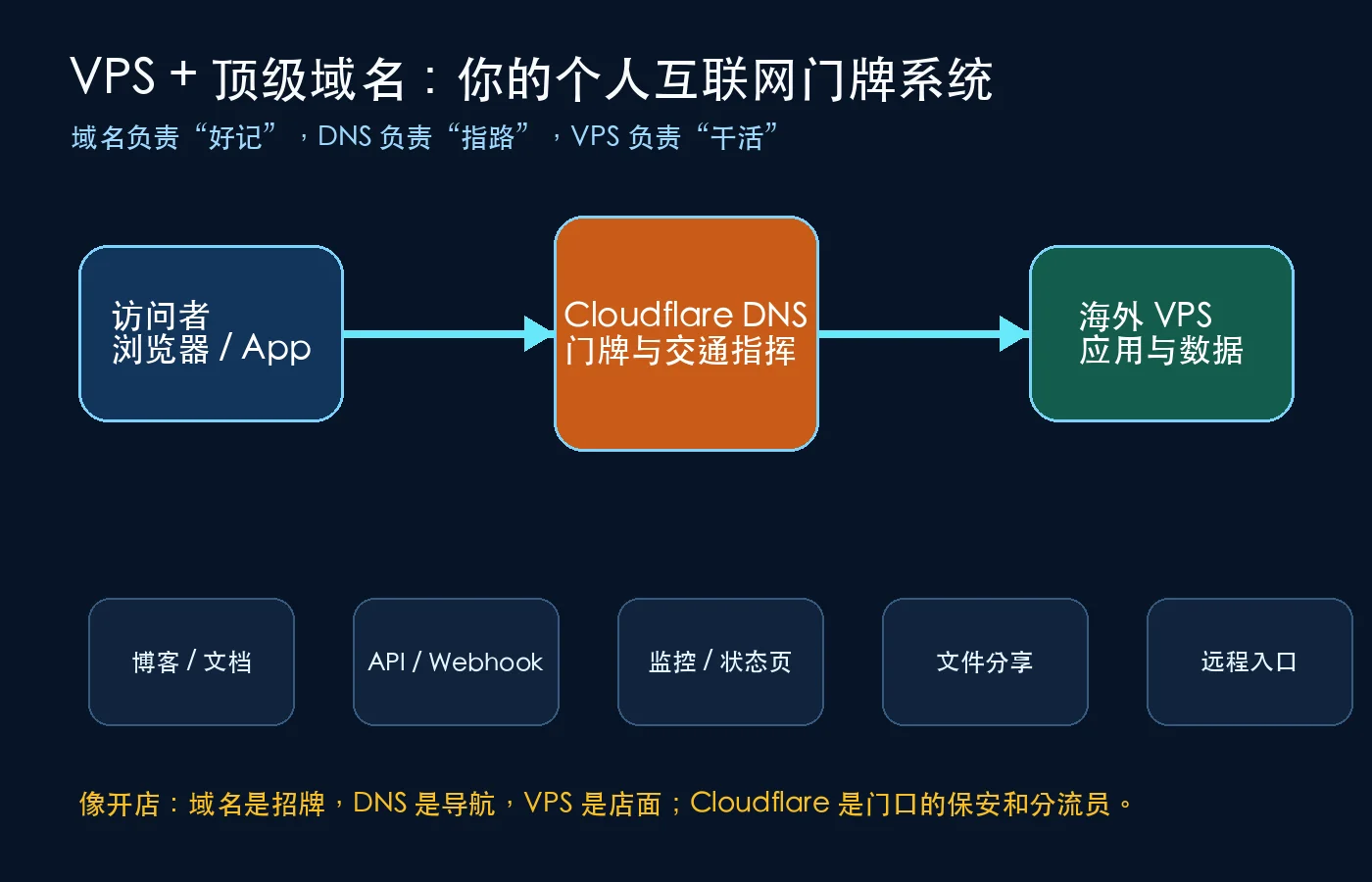
Figure 2: Think of a shop. The domain is the sign, DNS is the navigation system, the VPS is the premises where work happens, and Cloudflare can act as a traffic desk and a first defensive layer.
The browser resolves a DNS record, connects on port 80 or 443, and sends the requested hostname. A reverse proxy uses that hostname to route the request to the correct local application. One modest VPS can therefore serve several lightweight applications behind separate subdomains.
What Cloudflare actually contributes
Cloudflare does not turn an empty VPS into a finished service. It hosts DNS and can optionally provide proxying, TLS, caching, access policies, and traffic rules.
Its two DNS states are frequently misunderstood:
- DNS only, the gray cloud: DNS returns the origin address and the client connects directly. SSH, mail, and many non-HTTP protocols normally require a direct or otherwise purpose-built path.
- Proxied, the orange cloud: supported HTTP/HTTPS traffic reaches Cloudflare first and is then sent to the origin. This is useful for websites and web APIs, but it never removes the need to secure the origin.
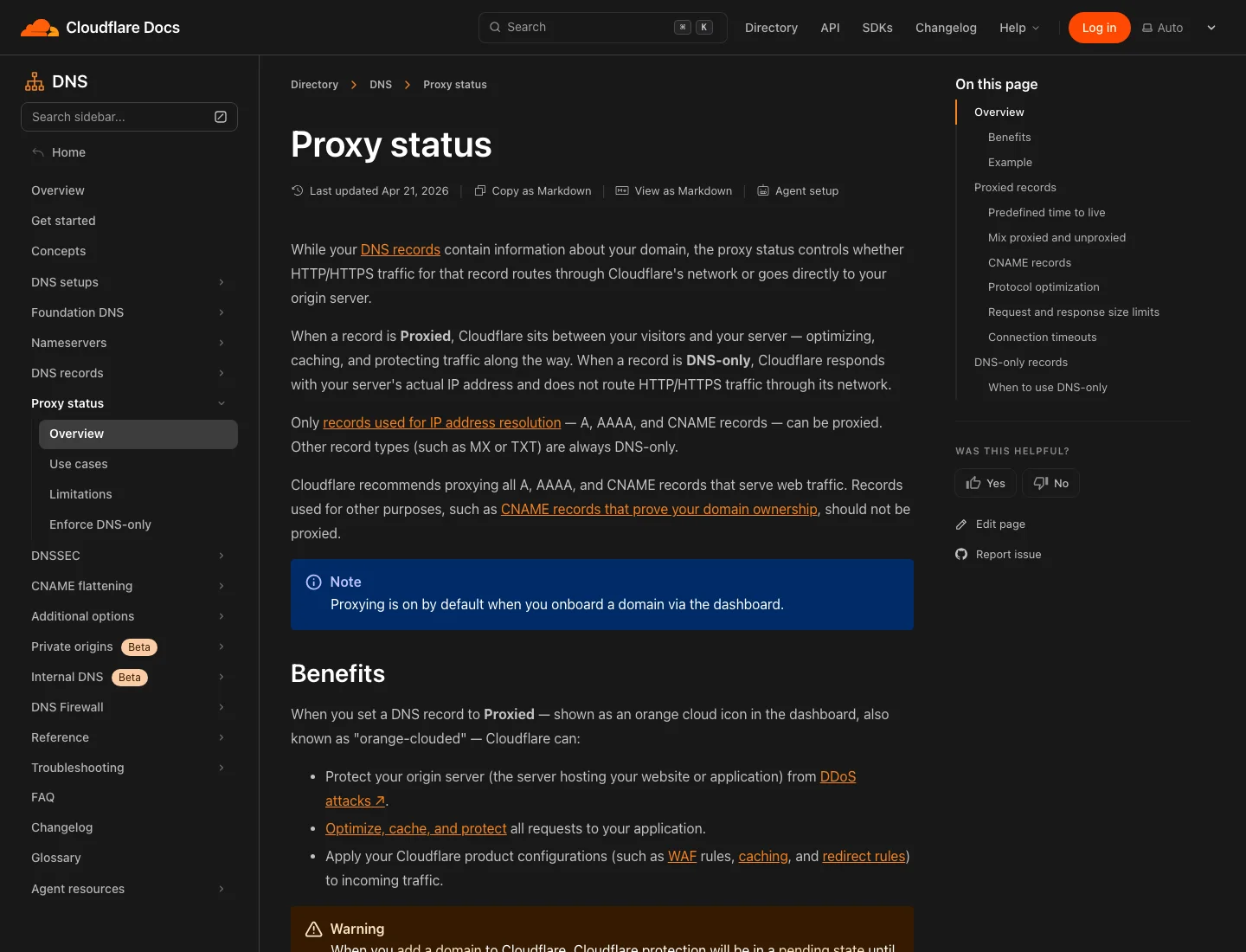
Figure 3: A real screenshot from Cloudflare documentation. Orange and gray clouds are different network paths, not merely a faster-versus-slower switch.
A sensible starting design is to proxy the public website while protecting management services with Cloudflare Access, a VPN, or a strict allowlist. A difficult-to-guess hostname is not authentication.
Cloudflare Tunnel is another option when an application does not need a directly exposed origin port. A connector on the VPS establishes an outbound connection and maps an approved hostname to a local service. It is like a shop employee calling the front desk from inside instead of cutting a permanently unlocked door into the rear wall.
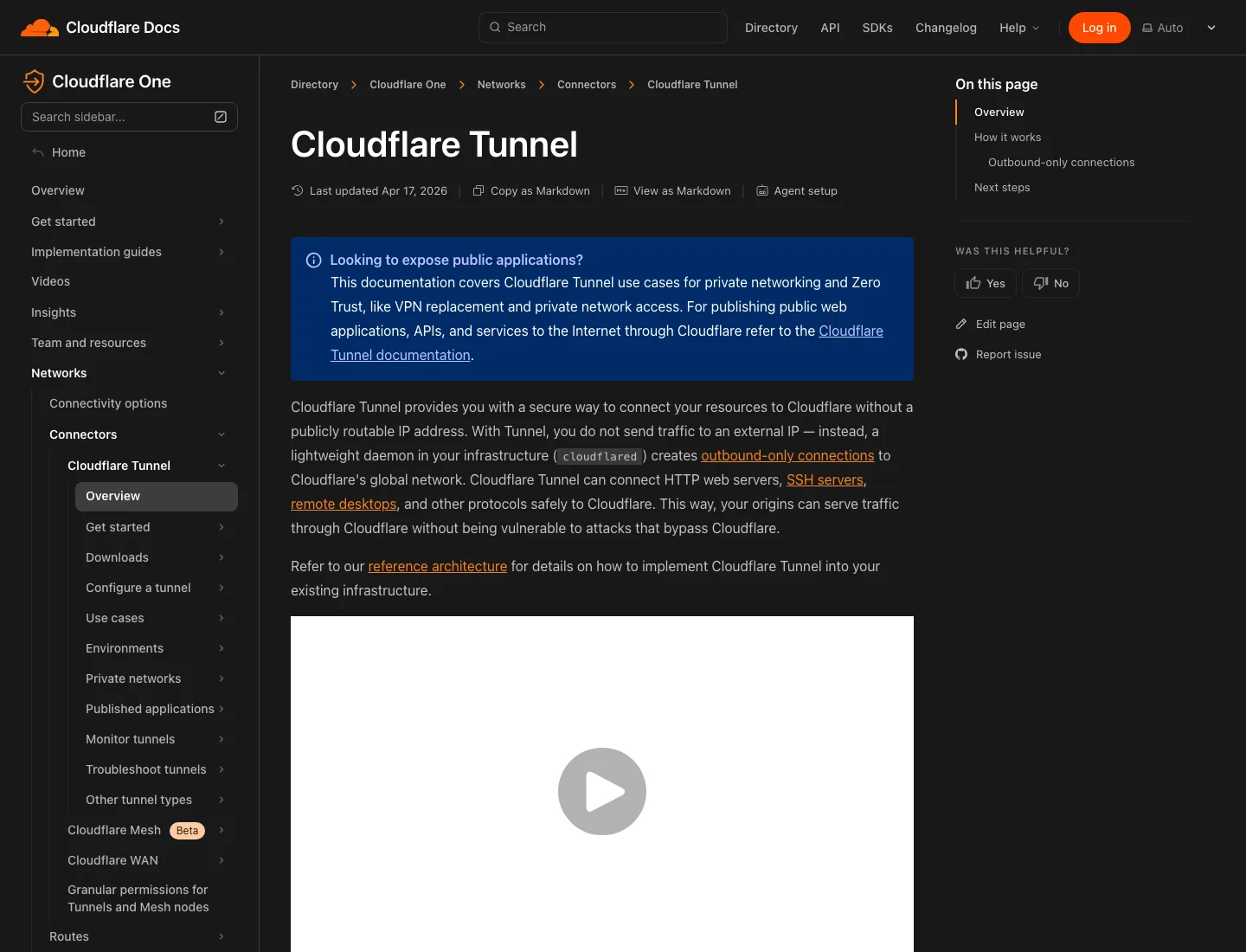
Figure 4: Cloudflare Tunnel can reduce directly exposed ports. It does not eliminate application updates, identity controls, logging, or backups.
Twelve genuinely useful roles
A portable blog, portfolio, and digital identity
This is the safest first project. A social-media account is a rented kiosk inside somebody else’s mall; a domain is a portable sign. If you later move the site to a different VPS, changing DNS preserves the address readers already know.
Static sites built by Hugo, Hexo, or a plain HTML generator need few resources. A 1 GB VPS can serve substantial ordinary traffic through Caddy or Nginx. The same domain can anchor a résumé, project documentation, and professional email forwarding.
An API, webhook receiver, and automation switchboard
Git pushes, monitoring alerts, forms, payment events, and bots often require a stable public HTTPS endpoint. A small Python, Go, or Node.js service can validate incoming events and translate them between otherwise disconnected systems.
It works like a parcel locker: external systems deliver to one controlled entrance without learning the layout of your private network. The receiver must still verify signatures, limit body size, enforce timeouts, record audit logs, and prevent arbitrary command execution.
External monitoring and a status page
Uptime Kuma, Prometheus, Grafana, or a tiny scheduled probe can monitor a blog, API, home NAS, or another server. A remote VPS sees failures from a different vantage point. When the home Internet connection fails, a monitor running inside the same house may disappear with it; the VPS can still record the outage and recovery.
A password vault, RSS reader, bookmarks, and read-later service
Vaultwarden, FreshRSS, Linkding, and similar lightweight applications have modest storage needs but benefit from a stable hostname and continuous availability.
A password vault should not be the first experiment. Establish HTTPS, two-factor authentication, backups, update procedures, and a tested restore before migrating real credentials. Learn to lock the doors and locate the emergency exit before moving in the safe.
Controlled temporary file sharing
A VPS can host password-protected, expiring downloads or provide a controlled gateway to selected object-storage or NAS content. This is useful for customer deliveries and cross-device transfers.
Do not expose SMB, a database, the Docker API, or a NAS administration page directly. Add authentication, quotas, upload limits, and a malware-handling policy. Keep an independent copy of valuable data.
A meeting point for remote access
WireGuard, a Tailscale DERP relay, a reverse tunnel, or another zero-trust design can use the VPS as a controlled station connecting devices in different locations. It should resemble a railway interchange with ticket gates, not a plan to remove every home’s front door.
A development lab and preview environment
Developers can keep a real Linux environment online for Docker Compose experiments, documentation builds, preview deployments, Git webhooks, and scheduled code backups. Domains and TLS make these experiments closer to production than a laptop-only setup.
A personal AI-service entrance
The VPS can host a lightweight chat frontend, prompt library, retrieval API, or model gateway under your own domain. Never place provider keys in browser code, and never publish an unrestricted relay without identity, quotas, and rate limits.
A short-link and redirect service
Owning the domain lets you create durable links for documents, campaigns, downloads, and migration notices. Keep an exportable database so that changing the software does not break years of links.
Scheduled jobs and notification routing
Certificate checks, feed generation, backups, health probes, and notification aggregation fit naturally on an always-on Linux host. Use systemd timers or cron, log every result, and make jobs idempotent so that retries do not duplicate destructive actions.
A small public documentation hub
Runbooks, privacy policies, project manuals, API references, and incident status updates benefit from an address that does not change with a vendor account. Static generation also keeps the attack surface small.
Email infrastructure—possible, but not a beginner project
A full mail server involves IP reputation, reverse DNS, SPF, DKIM, DMARC, abuse handling, port-25 policy, and deliverability. “The SMTP transaction succeeded” does not mean the message reaches an inbox. Begin with forwarding or a specialized provider, then self-host only after understanding the operational cost.
A safe build order for the first server
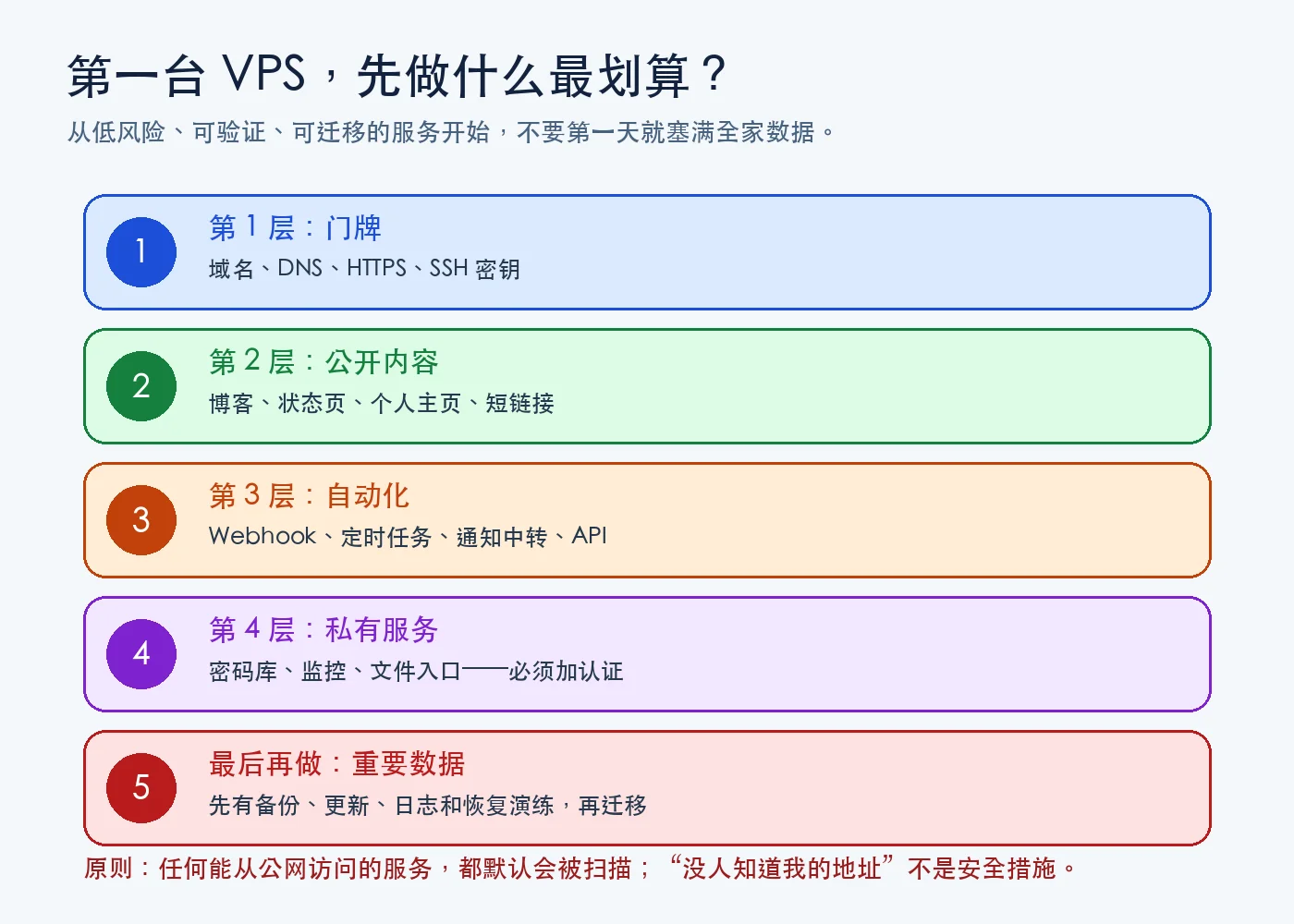
Figure 5: Build the address and low-risk public content first. Add private services only after authentication, updates, backups, and restore practice exist.
Use this order:
- Install SSH keys, disable direct password login, and enable a firewall.
- Add the smallest possible set of Cloudflare DNS records.
- Install Caddy or Nginx and publish one static page.
- Verify HTTPS, logs, and recovery after a reboot.
- Add a blog or status page.
- Automate backups and perform a real restore.
- Only then deploy applications containing private data.
What should you buy?
Do not compare only CPU cores and RAM. Location, network consistency, included IPv4, traffic allowance, disk type, backup pricing, and renewal terms matter just as much for a public service.
RackNerd: an inexpensive always-on lightweight entrance
The supplied RackNerd purchase link showed 1 vCPU, 1 GB RAM, 20 GB SSD, 3,000 GB monthly traffic, one IPv4 address, and a $21.99 annual price when captured on July 11, 2026. Availability, location, and price can change; the checkout page is authoritative.
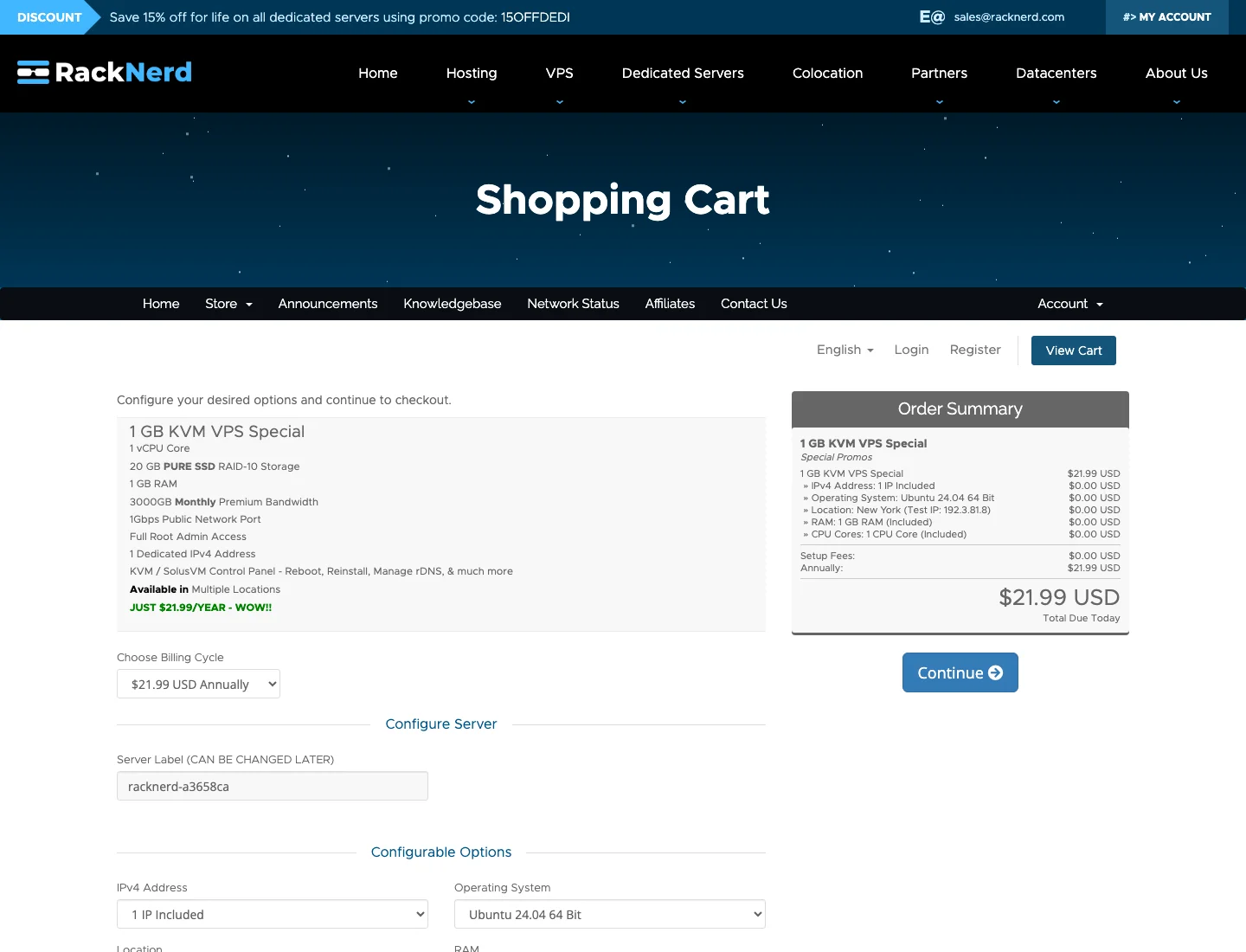
Figure 6: Real RackNerd order-page screenshot captured on July 11, 2026. This tier fits a blog, status page, lightweight API, or small monitor—not a heavy database or local model.
One gigabyte works best with Ubuntu Server, Caddy/Nginx, a small number of containers, and explicit memory limits. Two gigabytes provides much more breathing room if a database, monitoring, and several Docker services will run together.
CloudCone: worth checking for flexible and promotional inventory
The CloudCone referral entry frequently exposes promotional inventory whose availability and pricing change more quickly than a fixed annual package. Look first for 1–2 GB RAM, included IPv4, at least 20 GB SSD, and at least 1 TB monthly traffic, then compare renewal price, backup price, and location rather than choosing solely by the first payment.
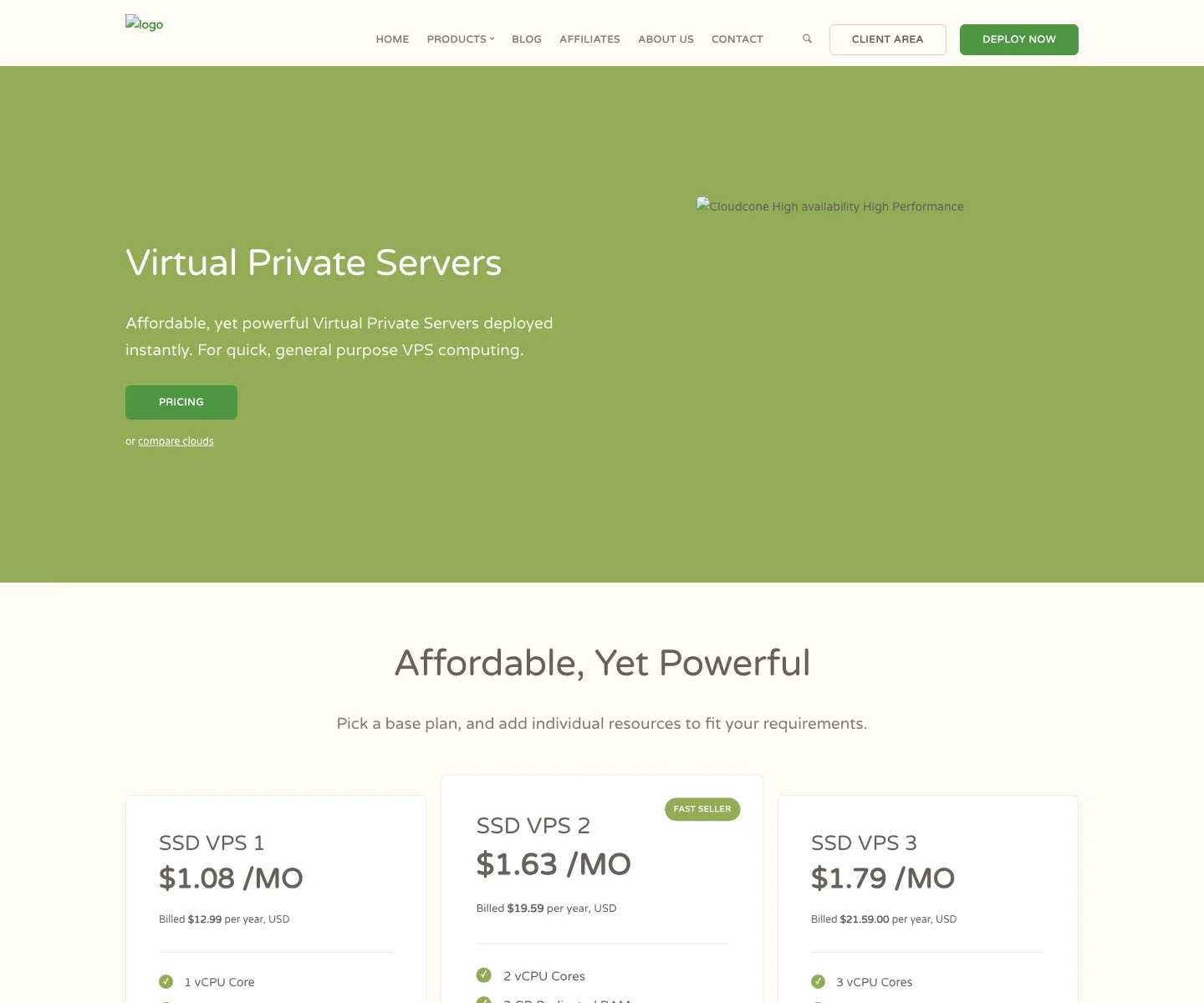
Figure 7: Real screenshot of CloudCone’s VPS page. Promotional stock is time-sensitive; the authenticated configuration and final checkout amount should decide the purchase.
This article contains referral links. The author may receive a commission without increasing the listed price. Buy only after reviewing current terms and testing the network for your own users.
A minimum domain-to-VPS path
Assume the domain already uses Cloudflare nameservers and you have the VPS public address:
- Create an
Arecord such asblogpointing to the VPS. - Proxy the public website and leave TTL on automatic.
- Allow only SSH, HTTP, and HTTPS in the host and provider firewalls.
- Install Caddy and route
blog.example.comto the local application. - Open the domain and verify HTTPS.
- Reboot the VPS and verify automatic recovery.
- Test from a second network so cached local success does not hide a routing problem.
blog.example.com {
    encode zstd gzip
    reverse_proxy localhost:8080
}
Before repeatedly deleting DNS records, inspect them with dig or nslookup. A proxied record normally resolves to Cloudflare edge addresses rather than the origin.
One-command verification on three operating systems
These scripts use built-in operating-system tools and do not modify Cloudflare or call a third-party SaaS. Replace the example domain. Never commit a private SSH address or key.
Windows 11 PowerShell
param([string]$Domain = "blog.example.com", [int]$SshPort = 22)
$ErrorActionPreference = "Stop"
Resolve-DnsName $Domain | Format-Table Name, Type, IPAddress
$response = Invoke-WebRequest "https://$Domain" -Method Head -TimeoutSec 15
Write-Host "HTTP $($response.StatusCode)"
Test-NetConnection $Domain -Port $SshPort |
  Select-Object ComputerName, RemotePort, TcpTestSucceeded
Ubuntu 26.04 Bash
#!/usr/bin/env bash
set -euo pipefail
domain="${1:-blog.example.com}"
ssh_port="${2:-22}"
getent ahosts "$domain" | awk '!seen[$1]++ {print $1}'
curl -fsSIL --max-time 15 "https://$domain" | sed -n '1p'
timeout 15 openssl s_client -connect "$domain:443" -servername "$domain" </dev/null 2>/dev/null \
  | openssl x509 -noout -subject -issuer -dates
timeout 5 bash -c "</dev/tcp/$domain/$ssh_port" && echo 'SSH reachable'
macOS 26 Zsh
#!/bin/zsh
set -euo pipefail
domain="${1:-blog.example.com}"
ssh_port="${2:-22}"
dscacheutil -q host -a name "$domain"
curl -fsSIL --max-time 15 "https://$domain" | sed -n '1p'
openssl s_client -connect "$domain:443" -servername "$domain" </dev/null 2>/dev/null \
  | openssl x509 -noout -subject -issuer -dates
nc -G 5 -vz "$domain" "$ssh_port"
Human-guided automation
Run the script to record a baseline, then change DNS, the reverse proxy, and the firewall one layer at a time. Rerun after every step. If a check fails, revert only the latest change. Finish with a cellular-network test and a VPS reboot.
Agent-guided configuration
Give the following prompt to a coding agent with terminal access. Do not paste a global Cloudflare key, root password, or private key into chat. Prefer an existing SSH agent and a least-privilege token supplied through the environment.
Goal: safely publish the application listening on localhost:8080 as blog.example.com.
1. Begin with read-only inspection of OS version, listening ports, firewalls, reverse proxies, and existing sites. Do not overwrite configuration.
2. Present a change plan and rollback path. Back up every file before modification.
3. Open only necessary ports. Keep SSH key-only. Never print the public IP, full hostname, keys, or tokens.
4. Configure HTTPS reverse proxying, automatic startup, and log rotation.
5. Verify local origin, DNS, HTTPS, certificate dates, external access, and reboot recovery in order.
6. If Cloudflare API access is needed, read a least-privilege token from an environment variable and never persist or log it.
7. Report changed files, exact verification results, and one-command rollback.
Frequent failure modes
DNS is correct but the website is unreachable
Check the application listener, reverse-proxy service, host firewall, provider firewall, and DNS target in that order. Do not “diagnose” by disabling every firewall.
SSH stopped working after enabling the orange cloud
Ordinary SSH is not carried by Cloudflare’s standard website proxy. Use a DNS-only record or a purpose-built Tunnel, VPN, or controlled jump host. Keep management and public-web policies separate.
HTTPS loops forever
Cloudflare TLS mode, the origin proxy, and application redirects may be fighting one another. Prefer end-to-end encryption and assign redirect responsibility to one layer.
A 1 GB VPS runs out of memory
Containers are lightweight packaging, not zero-memory software. Databases, Java services, monitoring stacks, and browser automation can consume hundreds of megabytes each. Add limits, a modest swap file, and OOM-log monitoring.
Backups exist but have never been restored
An untested backup is a hope. Restore into a temporary directory or another machine at least quarterly and verify the database, attachments, configuration, and encryption keys.
Never expose these directly
- Docker Remote API;
- Redis, MySQL, PostgreSQL, and similar database ports;
- NAS, router, and hypervisor administration pages;
- unauthenticated Grafana, Prometheus, Jupyter, or file managers;
- any panel retaining a default password;
- the only copy of personal photos, identity documents, or irreplaceable data.
Internet scanning does not wait for fame. Automated scanners are robots trying handles across an entire city. They do not know you and do not need your domain; an open port may be found within minutes or hours.
Q&A
Is an IPv6-only VPS enough?
It can support experiments, but compatibility and access paths are more complicated. Included IPv4 is usually easier for a first production-oriented VPS.
Is Cloudflare mandatory?
No. Any reliable authoritative DNS provider can publish the records. Cloudflare is convenient because DNS, proxying, TLS, rules, Access, and Tunnel are integrated, but you must understand which traffic passes through it.
Can one domain use several VPS instances?
Yes. Different subdomains can point to different servers, and load balancers or reverse proxies can distribute traffic. Lower TTL before a migration, switch, verify, and only then retire the old host.
Is 1 GB RAM really enough?
Usually for a static blog, Caddy, a small API, or a status page. Usually not for several databases, Java services, a full monitoring stack, or AI inference. Measure real process peaks rather than counting containers.
Does the orange cloud guarantee that the origin remains hidden?
No. Historical DNS, other records, mail configuration, outbound application traffic, and mistakes may reveal it. Keep the origin patched and firewalled, and restrict it to trusted ingress where practical.
Final thoughts
The most valuable property of an overseas public VPS is not a speed-test screenshot or a large virtual CPU number. It is an always-on node built on open Internet protocols where an ordinary person can control the code, the data path, and the migration plan.
The domain gives that node a portable identity. DNS makes the route manageable. HTTPS and reverse proxying let several services share an entrance. Backups, least privilege, and restore practice determine whether the digital property remains habitable.
Do not install twenty dashboards on day one. Publish one page, bind one subdomain, complete one HTTPS setup, survive one reboot, and restore one backup. Once that loop works, the small server stops being “1 GB of RAM” and becomes a piece of the Internet whose rules you can design.