Free MiniMax Accounts, fnOS, and Daily Review: What's New in My Family's AI Notebook
An AI mistake notebook can have a surprisingly technical first homework assignment: connect the AI before you can ask it about the child’s actual homework.
An API key, an endpoint and a model name are familiar settings to a developer. To a parent who wants to photograph a maths question and understand the mistake, they can feel like being asked to study a library’s computer system before borrowing a book.
The latest version of wrong-notebook, the open-source application I use with my own child and keep improving through use, removes part of that setup. Its new MiniMax Code OAuth channel lets a parent authorize a MiniMax Code account in the browser and use available account credits, including free credits, without first configuring an open-platform API key. The default model is MiniMax-M3.1-Flash.
There are useful changes beyond connecting a model: a list of questions due for review today, a way to return to yesterday’s unfinished practice, stricter answer checking, and backups that carry more of the learning history between devices.

Figure 1: Original illustration. Provider credits and the application’s review schedule serve different purposes.
This article follows the public v2026.10.25 release, checked on October 25, 2026. The project is a fork of wttwins/wrong-notebook; thanks to the upstream project for its foundation. My branch adds features and fixes shaped by family use. The work remains open, and the application will continue to change as actual use reveals problems.
Two similar names, two different ways to connect
The provider selector now contains both MiniMax and MiniMax Code OAuth. Choosing the right one matters more than the similarity of their names.
| Channel | How it connects | Which allowance applies |
|---|---|---|
| MiniMax | An API key from the open platform | That platform account’s API allowance, balance and billing rules |
| MiniMax Code OAuth | Browser authorization for a MiniMax Code account | Available MiniMax Code account credits, including free credits supplied by the platform |
An API key is an access credential, rather than a model that somebody buys as an object. The new route removes the initial task of obtaining an open-platform credential and copying connection parameters into the application. It gives free-account users a different entrance; it does not merge the two billing systems.
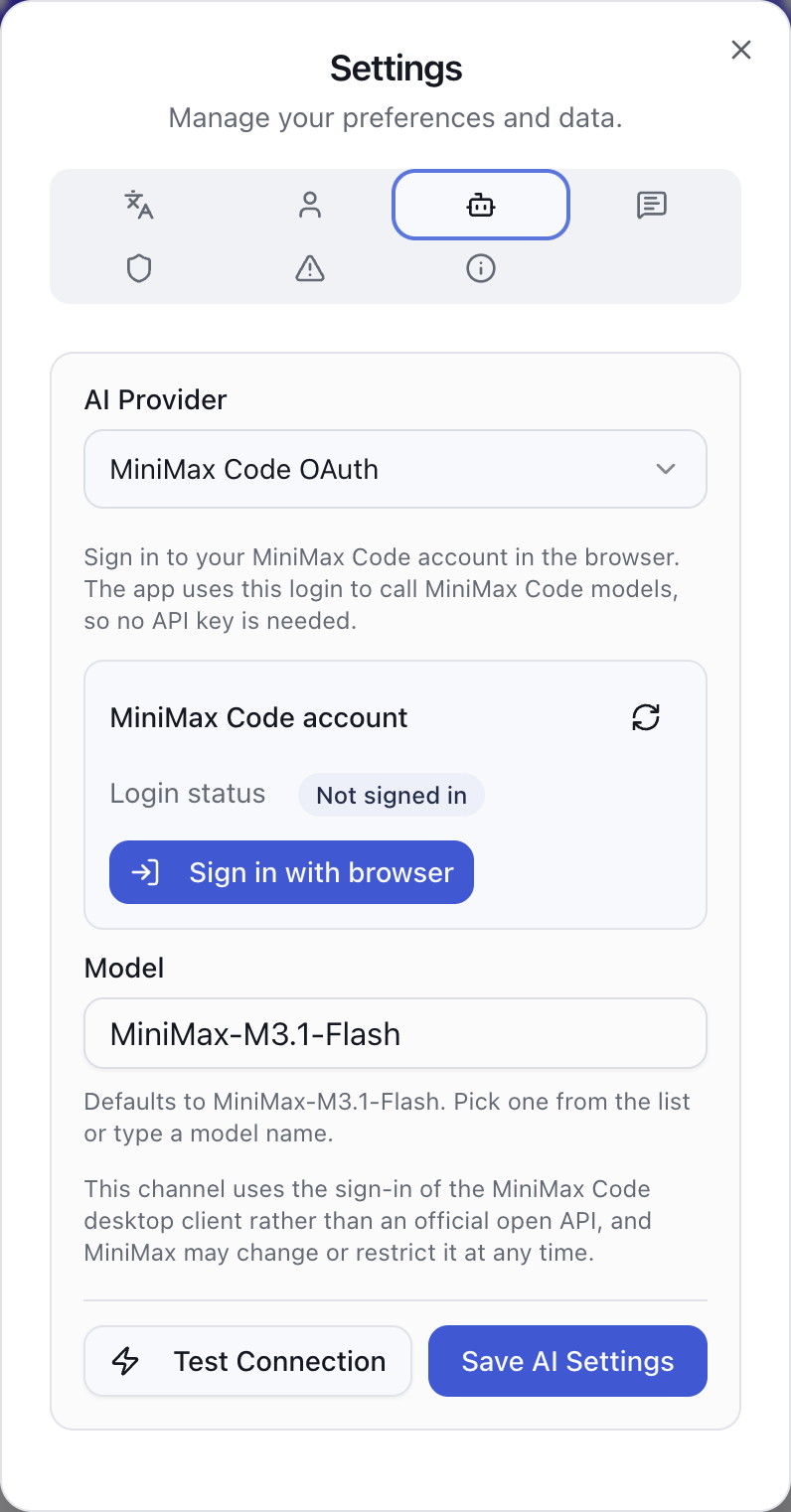
Figure 2: The current application’s actual settings interface, captured in an isolated demonstration environment. It remains signed out of MiniMax and does not display an invented credit balance.
An administrator opens Settings, chooses the AI provider tab, selects MiniMax Code OAuth, and uses Sign in with browser. Login and approval happen on the MiniMax page that opens. If the browser blocks the new window, the settings interface also offers a link to open the authorization page. After approval, return to the application, save the provider and model settings, and use its connection test to check the account’s current access.
Think of OAuth as permission to borrow books from a library. The library handles the login; the application receives authorization to perform the agreed work. The normal workflow does not ask a parent to copy a long token out of a browser. The server stores the resulting credentials, attempts renewal when needed, and asks for another sign-in if authorization becomes invalid.
The project’s release documentation records that free accounts can use the default MiniMax-M3.1-Flash, including image recognition. Recognition, explanations, practice variations and grading then remain inside the notebook’s existing workflow. There is less copying from a photo album into a chat window and back again. Access to any particular model still depends on the actual account and the provider’s current rules.
Free credits are a budget you can use
“Supports a free account” needs a precise meaning. MiniMax Code supplies the credits; wrong-notebook connects the account, displays the returned balance and makes requests. The provider can change its grants, check-in rewards, expiry rules, model access and rate limits.
There is no dependable universal figure that this article can turn into “this many free questions every day.” Different questions and operations use different amounts of model work. A long explanation is not the same request as a short answer check.

Figure 3: Two cards for different entrances. Having the same provider name does not make their balances interchangeable.
The settings interface separates total remaining credits, free credits and purchased credits. When an account has purchased credits as well, the application does not offer a separate “spend free credits only” control. Actual deductions follow the provider’s rules. A temporary balance-query failure also needs to be distinguished from having no credits left.
A familiar comparison is a bag of trial tickets for a theme park. They help a family try the rides, but rides may consume different numbers of tickets and the park may change its promotion. Start with one ordinary question containing no personal information. Check recognition, the explanation and the actual account balance before deciding how heavily to use the service.
There is another boundary: authorization is not a long-term service guarantee. This channel follows the MiniMax Code client’s device authorization and related client interfaces. It is not an open-platform API agreement specifically promising permanent support for third-party mistake notebooks. Use it in accordance with MiniMax’s terms, and expect that upstream changes may require maintenance.
Daily check-in works while the service keeps running
An available daily reward is easy to forget. The new automatic check-in is enabled by default and gives the settings page a record of today’s result.
The scheduler makes its first check about a minute after the server starts, then checks every hour. With a valid signed-in account and automatic check-in enabled, it attempts to claim the reward if today’s check-in has not already succeeded. The date is evaluated in Beijing time. An existing successful check-in is recorded without claiming twice; a failure remains visible and can be retried at a later scheduled check. There is also a manual check-in action.

Figure 4: The scheduler needs a running server process. The check-in date uses Asia/Shanghai; reward amounts come from the provider.
This is like giving a small reminder clock the job of checking whether a plant needs watering. The clock needs power. An always-running fnOS or other NAS installation, or a persistent Docker service, is a natural fit. A shut-down computer, an exited desktop app or a standalone Android server stopped by the operating system cannot continue doing scheduled work.
Changing the application’s display time zone does not move the provider’s check-in day. The provider has one calendar for rewards; the application has a calendar for learning records and daily usage. Keeping those separate avoids confusion around midnight.
A daily operation limit helps manage the family’s use
Easier access can also make repeated regeneration easier. To manage that, the update adds a per-user daily AI operation limit. An administrator can set it in User Management and see how many operations each user has initiated today.
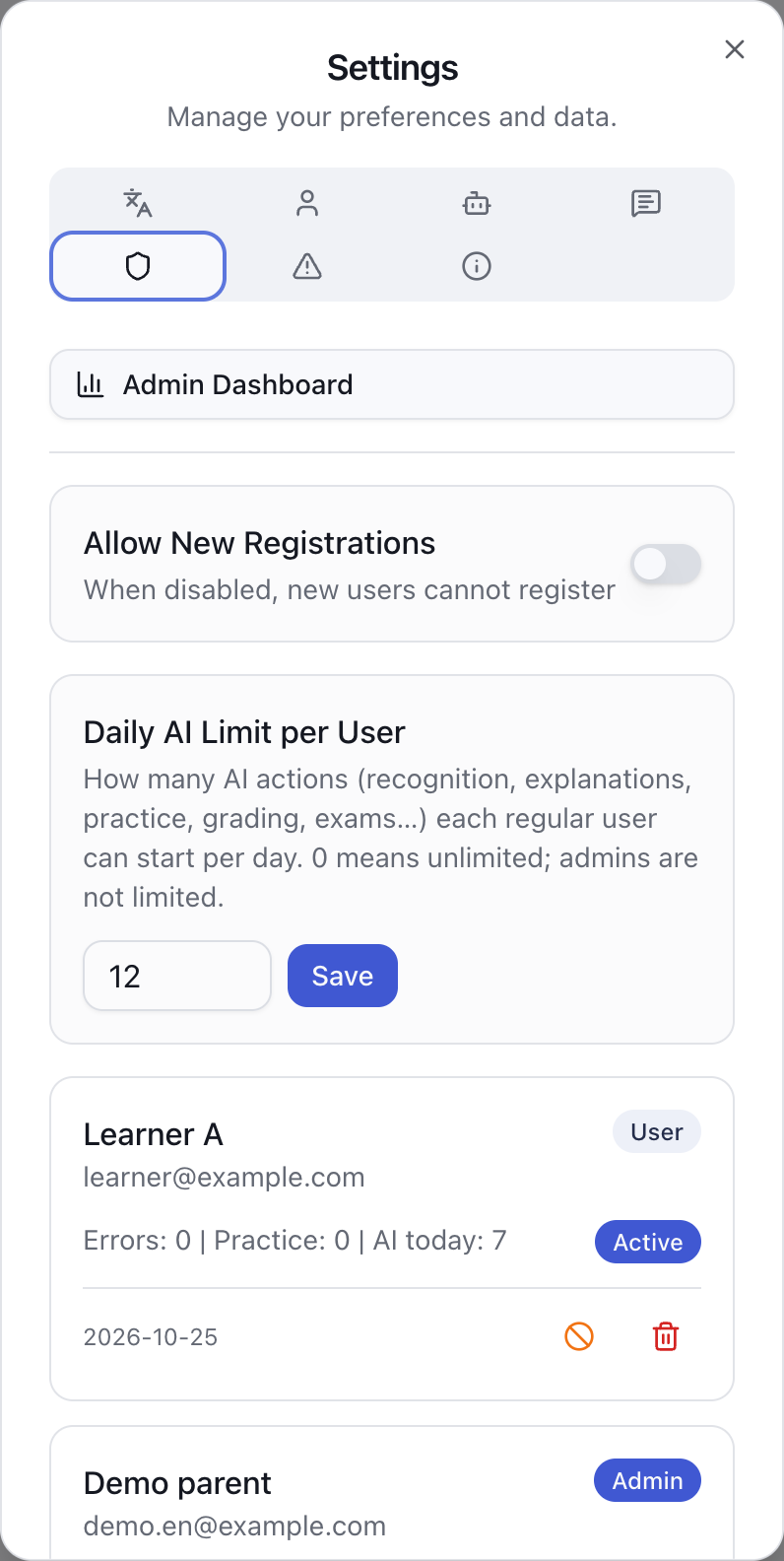
Figure 5: The real administration interface. The configured limit and usage figures are synthetic demonstration data, not a promise about MiniMax’s free allowance.
Alongside the theme-park tickets, imagine a parent agreeing with each child on how many times to ask for help today. That family rule controls the application’s pace. It does not change the value of a provider credit.
Zero means unlimited and is the default. Positive limits apply to regular users; administrators are exempt, although their usage is still recorded. The day follows the application’s configured time zone. User-initiated recognition, regeneration, practice generation, AI grading, animations and exam generation count toward the limit. A whole exam is counted as one exam operation even if it involves several internal model calls. Background mastery estimation is excluded from this counter.
That means remaining operations cannot be converted directly into remaining credits. An operation is recorded before its AI work begins, so a failed attempt can still consume an operation. The current implementation also prioritizes keeping calls available if usage recording itself fails. It is a practical family usage control, rather than a guaranteed ceiling on the provider’s monetary bill.
The AI configuration belongs to the instance and is managed by an administrator. Children can have separate learning records and application usage counts while sharing the one authorized MiniMax account behind that configuration. Regular accounts are therefore useful for children. New installations also close public registration by default; the administrator can enable it when creating family accounts.
Today’s review list replaces another job for the parent
Generating more explanations is only useful if the child returns to worthwhile questions later. In the previous introduction, arranging those returns was largely a job for the parent. This release adds a built-in Today’s Review list.
The home page shows how many questions are due. The review page gathers questions due today and overdue questions, with earlier due dates first. The next action is close to the question rather than hidden in a separate planning tool.
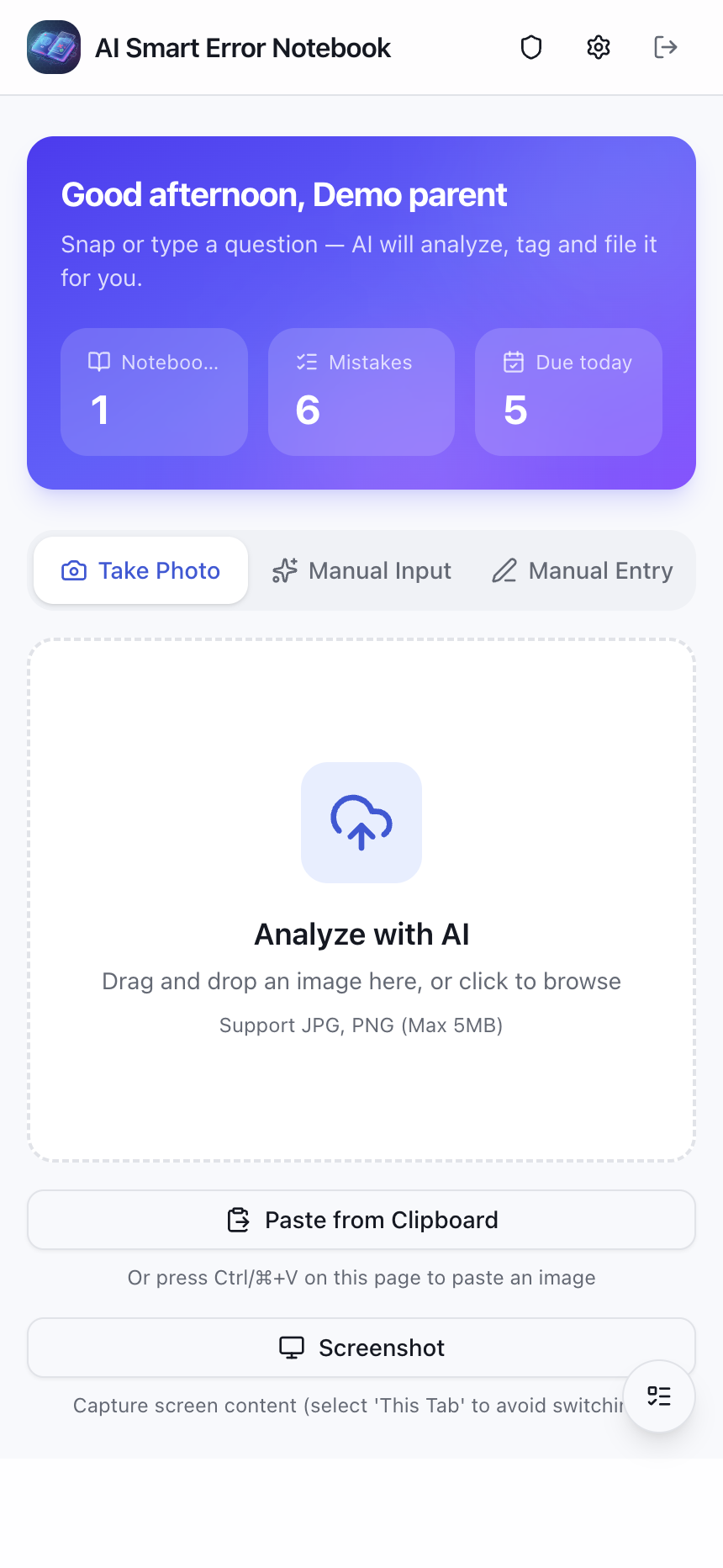
Figure 6: The current home page. Questions and counts belong to the demonstration database.
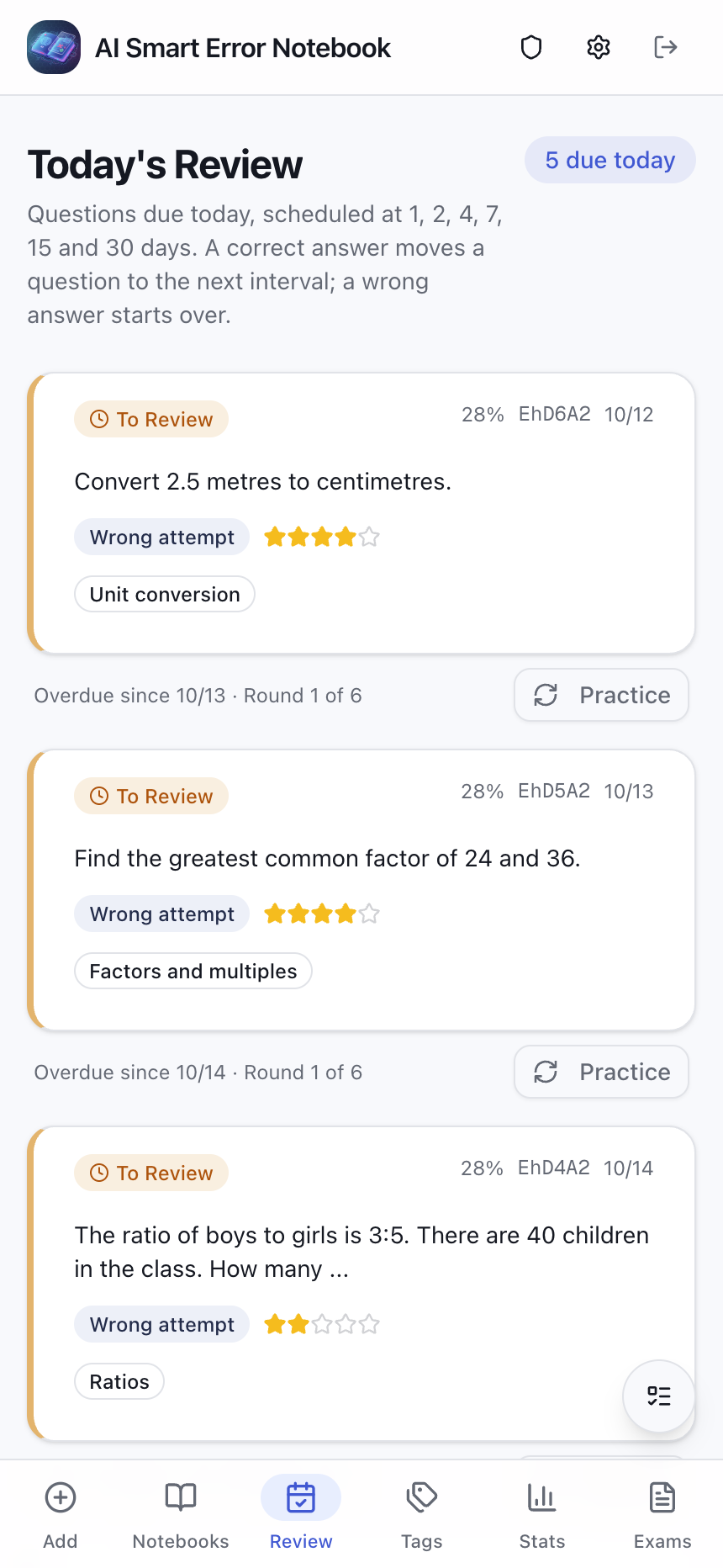
Figure 7: The actual review interface, placing the next set of questions together.
The current rule has six intervals: 1, 2, 4, 7, 15 and 30 days. Before an answer exists, scheduling starts from the question’s creation date. Later dates are derived from the most recent answered attempt and the trailing run of correct answers. A correct answer advances the stage, a wrong answer resets it, and a record marked not attempted does not advance the plan. After six successive correct stages, this review cycle no longer assigns another due date.
These are application presets. They are not a measurement of the ideal memory curve for every child, and they do not establish that installing the software will improve grades.

Figure 8: These are gaps between stages, not cumulative day numbers from the original upload. The application uses its time zone and actual answer history to calculate dates.
Picture six bookmarks in an exercise book. At first, the bookmark brings the child back soon. With continued success, it moves farther away. Another mistake brings it toward the front again. The bookmarks help somebody remember to open the book; they cannot do the exercises.
The calendar also answers a different question from the notebook’s three review labels. A due date asks when to revisit a question. To Review, Reviewing and Mastered classify it using recorded practice and estimated mastery. Reaching the 50% classification threshold does not cancel every future review date or guarantee permanent understanding.
Yesterday’s unfinished practice stays where you left it
Leaving a practice page used to create a small interruption if returning meant generating another variation. That adds waiting and can replace the question the child was preparing to solve.
Each original question now keeps its most recently generated practice variation, answer and explanation. Returning to practice loads that saved question. Generating another remains an explicit choice. It is a “continue here” note in an exercise book: leaving the desk does not require copying the entire page again.
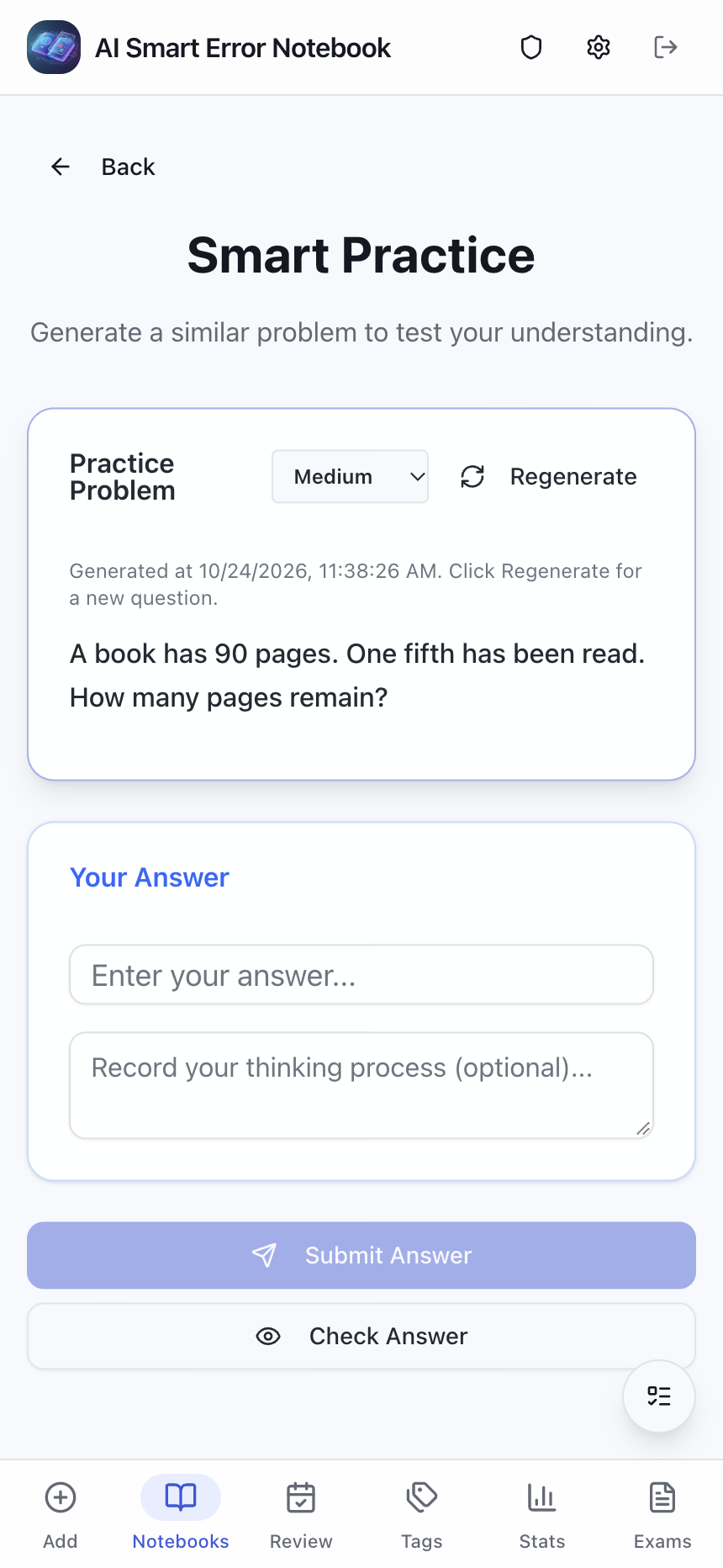
Figure 9: The real practice page with manually prepared demonstration content. It illustrates restoration behavior and is not presented as a newly completed live model request.
A related fix matters more than saving a call: answer checking no longer gives a green light merely because the correct answer contains the student’s text.
For example, the old substring check could accept 12 against a correct answer of 120. A delivery driver would not send a parcel for house 120 to house 12 just because the door numbers share characters. Matching part of a string is not matching the answer’s meaning.
The new local check confirms correctness only when normalized answers agree, or when choice letters can be compared unambiguously. Other answers go to AI grading against the server’s saved question and answer, with a reason shown to the user. If grading fails, the interface leaves the decision to a person rather than silently reporting success.

Figure 10: Failure to confirm a local match does not mean the answer is wrong. Equivalent fractions and alternative solutions can need fuller evaluation.
Simple, clear matches avoid unnecessary model work; answers requiring interpretation receive a more suitable check. AI can still make mistakes, however, especially if recognition or the saved reference answer is wrong. The original question remains the place to verify disputed results.
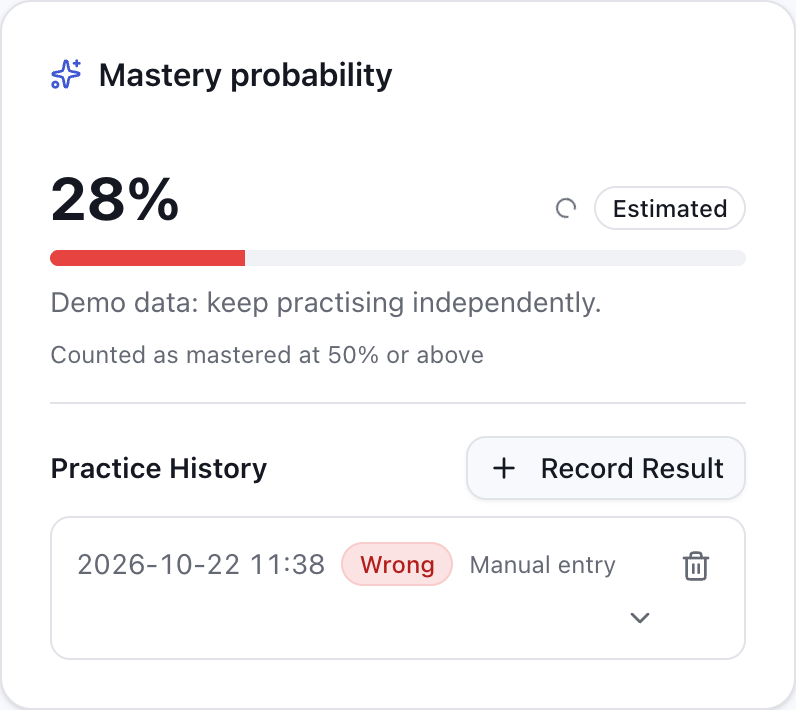
Figure 11: The real detail page with synthetic answer history. Recorded practice also feeds later review scheduling.
Run it on fnOS, a computer or an Android device
The project still supports several ways to run the notebook. A family already using fnOS can keep it on the NAS as a shared learning service. A NAS is one option, rather than a prerequisite.
| Option | Typical use |
|---|---|
| fnOS | Install the relevant package on a family NAS and access the same instance from phones and tablets |
| Docker | Run a persistent service on a suitable server or NAS, with amd64 and arm64 images |
| Windows, macOS and Linux desktop apps | Run the notebook on a personal computer when needed |
| npm or source | Manage the Node.js environment and service process yourself |
| Standalone Android | Keep the application server and its data on the device without deploying another server first |
| Android client, browser or PWA | Connect to an existing service; a PWA offers a home-screen installation entry |

Figure 12: A deployment illustration, not screenshots of package installation tests. Check the package documentation and release assets for device requirements and downloads.
Imagine a kitchen. A shared server on fnOS or Docker is the family kitchen; browsers and clients visit it. Standalone Android carries a small kitchen on the device. Where that server lives determines which instance holds the questions and history. Calling external AI still sends the relevant question and prompt to the configured service. A local installation does not make external AI available without a network.
The default source runtime has moved to Node.js 24, alongside desktop and dependency updates. Readers choosing a packaged application do not need to learn the build toolchain first; the repository documents the available installation routes.
A move between devices should carry the learning history
The version 2 data export now covers more than question text. It includes notebooks, questions, practice and answer records, exam papers and their questions and results, personal preferences, GeoGebra data, SVG animations, saved practice and mastery-related fields.
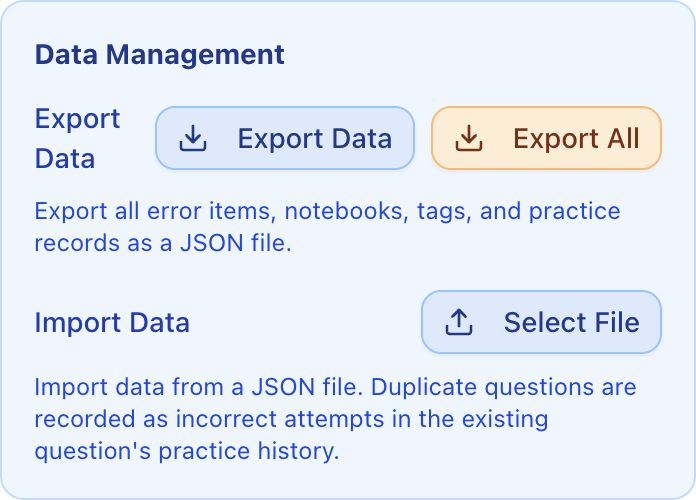
Figure 13: The actual data-management interface. A learning-data export and a complete instance backup have different scopes.
Moving only the questions is like packing books while leaving the notes tucked between their pages behind. The questions matter, but so do past attempts and the context that makes the next review useful.
The browser’s JSON export does not include complete account credentials, AI configuration or MiniMax Code login credentials. A new instance needs the relevant configuration and authorization again. A complete recovery also requires the database, server configuration and deployment information. Export before uninstalling standalone Android; operating-system backup should not be assumed to preserve everything. The backup and restore guide explains the boundaries.
Questions worth answering before trying it
How much free use does an account get each day?
Use the account’s actual returned balance and current platform rules. There is no fixed number this article can responsibly promise for every account. A small trial with balance checks is more useful than estimating a month of use from somebody else’s screenshot.
Do existing paid API users need to switch?
They can keep their current provider. This adds an entrance without requiring a migration. The official open-platform API route remains available for people who prefer its corresponding billing and service terms.
Is automatic check-in completely hands-off?
It requires a running service, valid authorization and network access, and it remains affected by upstream changes. Today’s actual status is the evidence that a check-in succeeded. A NAS that stays on makes the running-process requirement easier to meet.
Is the review plan personalized to my child’s memory?
It applies the six-stage rule to recorded answers. It does not train a personal memory model. Parents can still add practice based on classroom progress, the child’s condition and the actual reason for a mistake.
Can AI make the final educational judgment?
It helps with recognition, organization, explanations and practice generation. Conditions, reasoning, units and reference answers still deserve checking. Lower-cost access makes experimentation easier; verification remains part of using the tool well.
If it saves your family some organizing time
The direction of this update is a manageable routine: connect an available account, keep a useful question, record an actual attempt, and find it again when another attempt is due.
For the complete workflow, start with the previous AI notebook introduction. To try the project or inspect the code, visit margrop/wrong-notebook on GitHub. If it helps, a Star makes the project easier for other families to discover.
Problems and suggestions are welcome in GitHub Issues or in the comments below. Include the version, reproduction steps and a redacted screenshot. Leave out children’s names, school information, login credentials and complete configuration files.
Version, sources and image notes
- The v2026.10.25 changelog and README define the article’s feature scope and its attributed free-account support statement.
- The provider implementation, check-in scheduler, usage counter and review rule supply the implementation boundaries.
- MiniMax Agent is the platform entrance. RFC 8628 explains device authorization; neither is used here as a promise of permanent free grants.
- The MiniMax client-interface work references the open-source CreditDaddy implementation. Thanks to that project as well.
This article contains seven real application screenshots and six original illustrations, with separately laid-out Chinese and English illustrations for desktop and mobile. All application screenshots show the real mobile interface. Screenshots come from the public version running in an isolated environment; questions, attempts and usage numbers are synthetic demonstration data. MiniMax remains signed out, with no real or invented balance shown. Free-account and image-input availability are attributed to the project’s release documentation, rather than to a new live-account billing test performed for this article. The article also does not claim installation testing on every supported device.