Stop Copying Mistakes. Start Learning from Them: The AI Notebook I Use with My Child
The easiest part of a mistake notebook is putting a question into it. The part that often falls apart is opening it a few days later and finding out whether your child can actually solve it now.
There is a question to copy, a diagram to redraw and an answer to organize. Once everything is neatly collected, the next review session starts with another search. If the same question goes wrong again, there may simply be another photograph, with little connecting the two attempts.
I have been using wrong-notebook with my own child for a while, and I keep refining it around this everyday workflow: let the computer handle more recognition, organization and retrieval, leaving the parent and child more attention for understanding and practice.
First, credit where it belongs. This project is a fork of wttwins/wrong-notebook. I am grateful for that foundation. My branch adds features and fixes around our family use, with the changes publicly available. It is already being used, and it will continue to change as new problems appear.
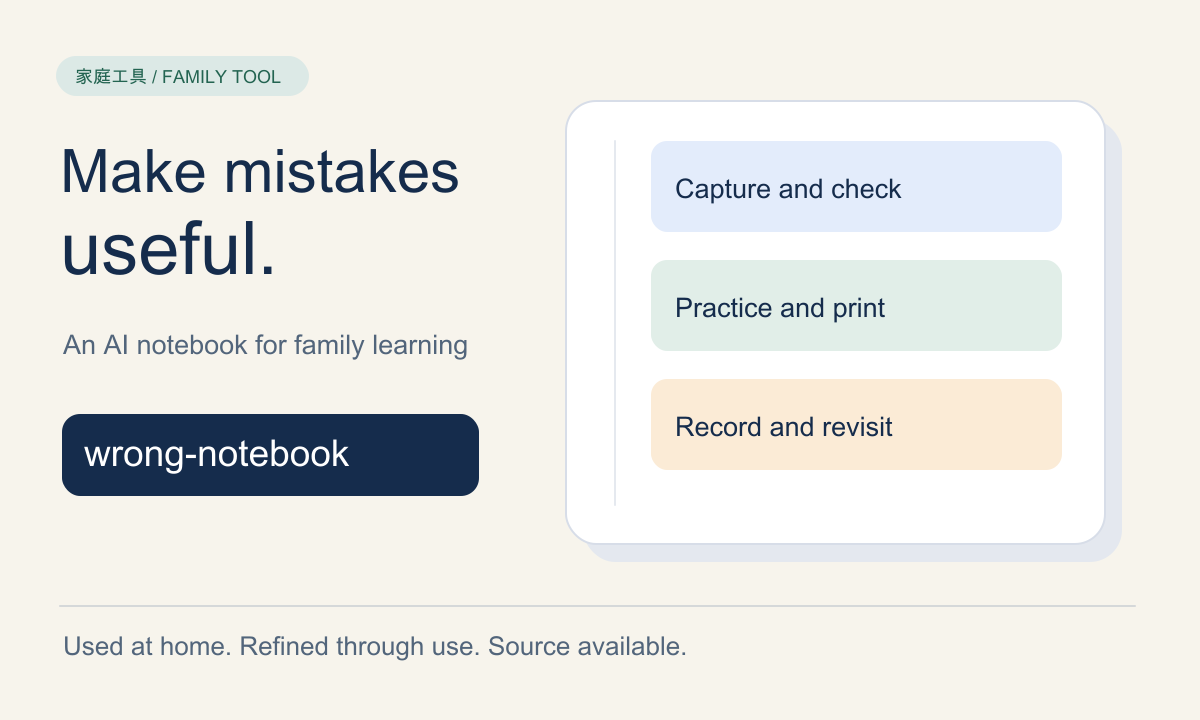
Figure 1: Original SVG illustration for this article. This is a project introduction and a discussion of family use; installation details live in the repository documentation.
1. The difficult part comes after collecting a mistake
The purpose of a mistake notebook is straightforward: preserve weak spots so they can be revisited. The difficulty is that all the information around one question can end up scattered.
The photograph is in an album. The explanation is in a conversation. The printed practice sheet is on the desk. What happened last time exists only in a parent’s memory. Preparing a weekend review session starts with a small administrative job.
wrong-notebook brings these pieces together. A question can have its text, original image, explanation, concept tags, difficulty and practice history in one place. Results from variations and generated worksheets can be linked back to the source question.
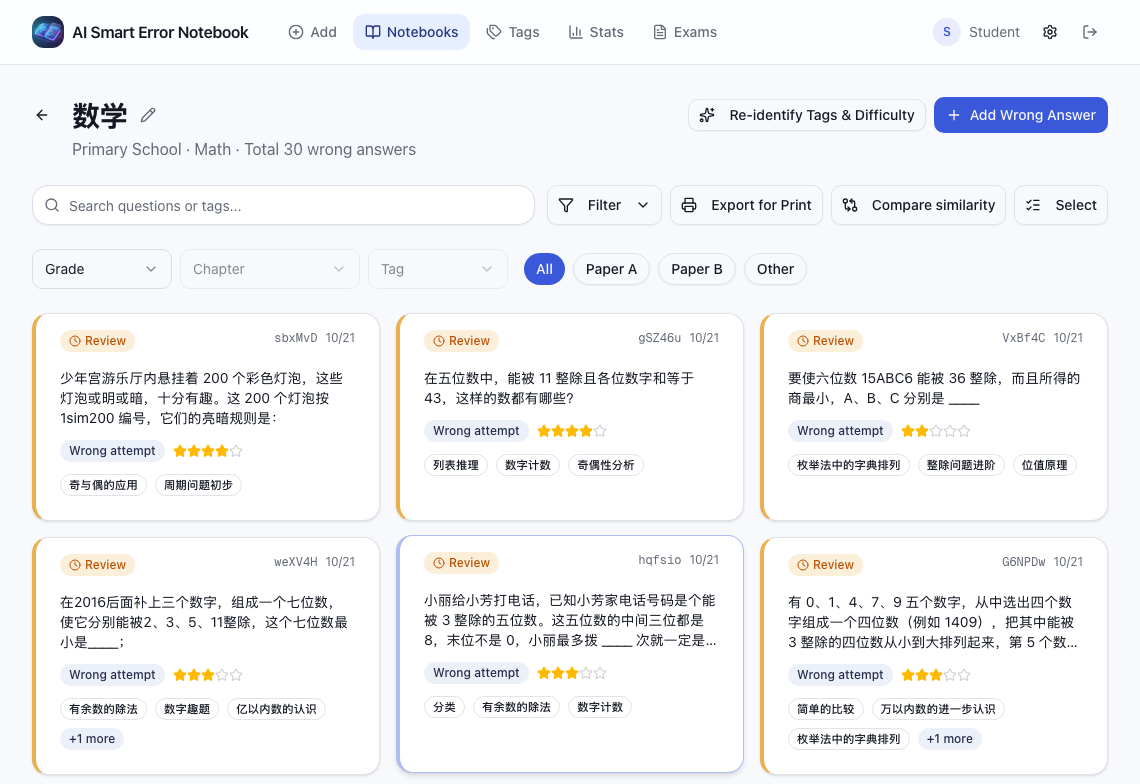
Figure 2: Real application screenshot from the project’s published, anonymized screenshot set, captured on October 22, 2026. The remaining application screenshots come from that same set. User identity has been anonymized; question content and interface values have been preserved. The English interface retains the original Chinese questions and learning materials. Click a screenshot to open it at its original size.
Think of each question as having its own library card. Whether it appears in a review list, a practice variation or a printed worksheet, its record tells you where it came from. You do not have to identify it from scratch every time.
Three questions matter most to me:
- What went wrong, and which concept needs attention?
- Can the child solve a different question using the same idea?
- After this attempt, which questions deserve another look?
A tidy collection is pleasant. Being able to answer these questions gives the collection a reason to be opened again.
2. Understanding an explanation still needs an independent attempt
Watching someone demonstrate a bicycle turn can help. After understanding the movement, however, you still need to hold the handlebars and pedal to discover which parts you cannot yet do yourself.
Reading an explanation and solving a question have a similar relationship. While reading, the path is already visible. Put the answer away and try to find the first step independently, and the remaining difficulties become easier to see.
In their review of learning techniques, Dunlosky and colleagues rated practice testing and distributed practice as having high utility. In everyday language, these involve recalling and attempting things yourself, and spreading practice across time. That research concerns learning methods. It does not evaluate this application, and it cannot support a promise that installing the software will improve a child’s grades.
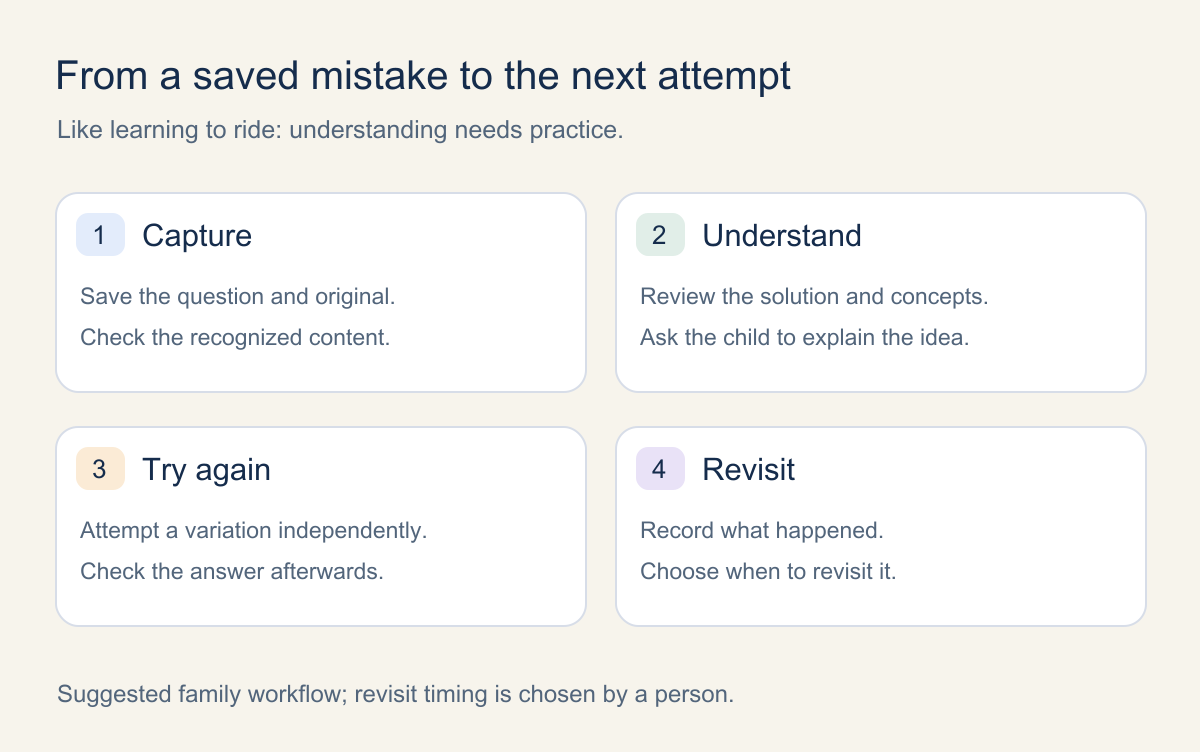
Figure 3: Original illustration of a suggested family review cycle. A parent and child still decide when to revisit a question; this diagram does not represent a built-in automatic spaced-repetition scheduler.
The design goal is to make it easier for a saved question to return to practice. AI can offer explanations and prepare variations. A parent checks the material. The child attempts it independently. The result becomes part of the record. Each step is ordinary; connecting them makes the workflow useful.
3. Capture: photographs, pasted images and typed questions
Questions at home arrive in different forms: printed workbooks, images shared by a teacher, digital learning materials and short questions a parent types in. A single input method quickly becomes restrictive.
The project supports image upload, clipboard paste, screen capture and manual text entry. Images can be cropped, and multiple questions can be selected from one image. Text can include Markdown and LaTeX mathematics.
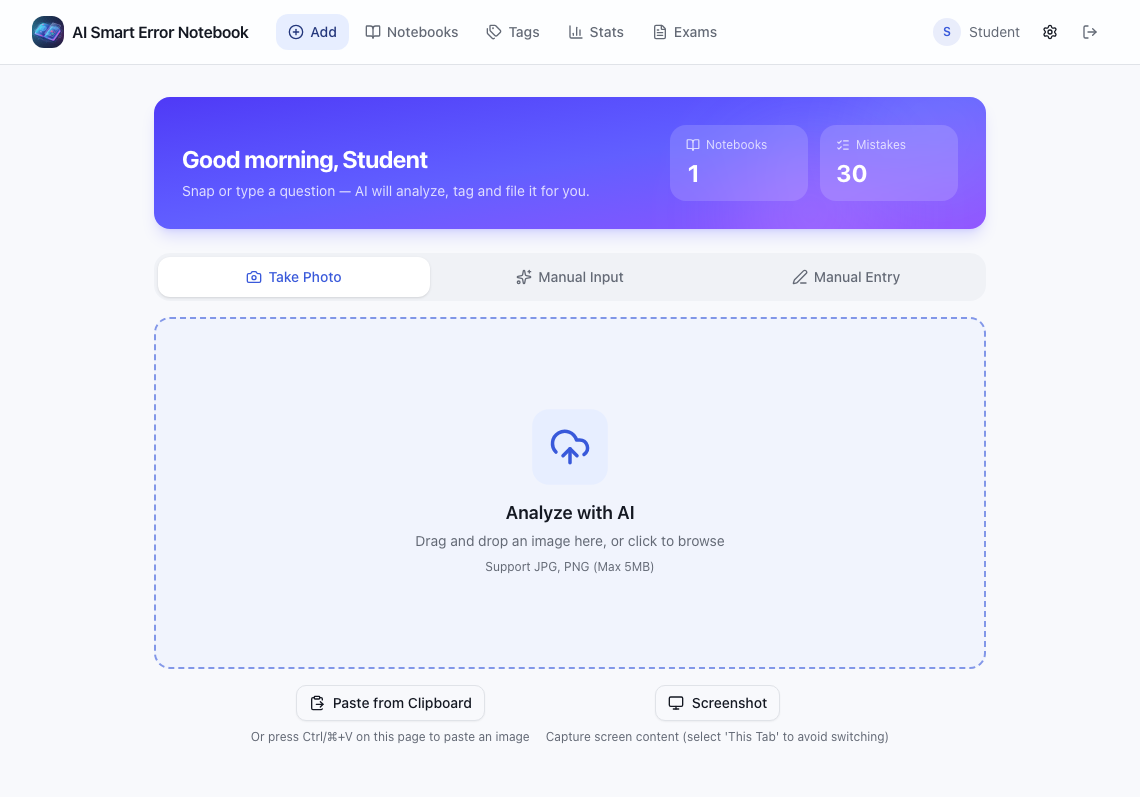
Figure 4: Real home screen. Questions from different sources can enter the same organization workflow.
AI attempts to recognize the question, answer, explanation, the student’s incorrect working and the reason for the mistake. It can also suggest a subject, concept tags and difficulty. For illustrated questions, it can generate a redrawn SVG diagram for display and printing.
OCR is simply the computer reading the writing in a photograph. A missed minus sign or a dropped condition can send the rest of the solution in the wrong direction. The application therefore preserves the original image and offers a review-before-import option, allowing a person to check the recognized material before saving it.
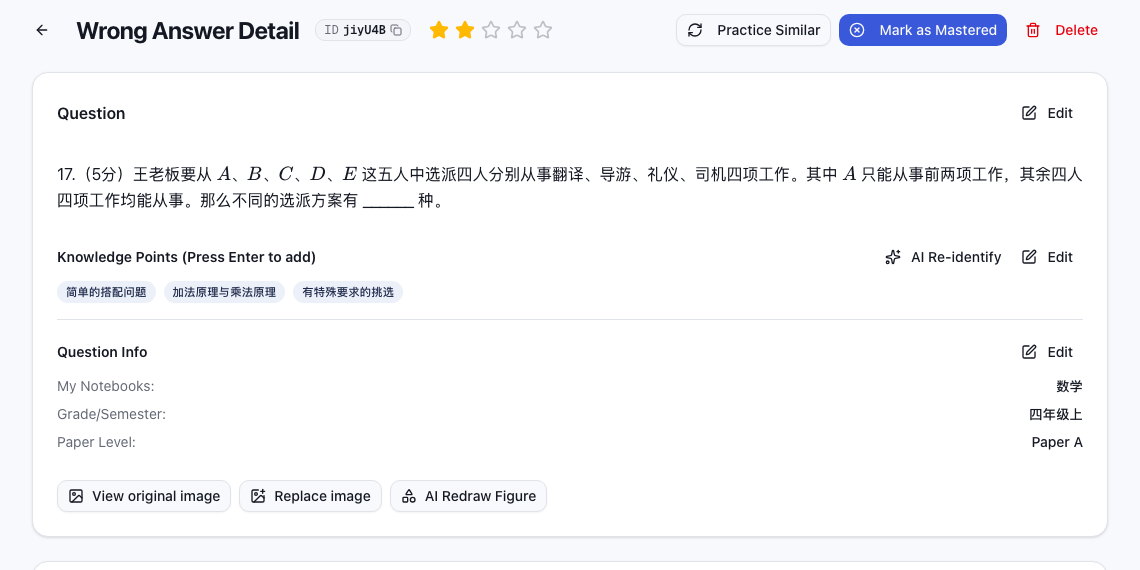
Figure 5: Real question detail screen. The question, its classification and follow-up actions are kept together, with an option to consult the original image.
Suppose a question says “at least” and recognition turns it into “at most.” That is like copying one character incorrectly in a delivery address: careful packaging will not send the parcel to the right place. Keeping the original and making corrections convenient helps catch the problem early.
Mathematical formatting has its own practical details. Fractions, roots and equations are rendered as mathematics. If the LaTeX syntax is broken, the application offers an AI repair action. Regenerating the complete solution is a separate operation, with confirmation before replacement, so a formatting correction and a new solution can be treated differently.
4. Concept tags and animation offer more ways into a question
When preparing a review, searching by concept is often more direct than searching by date. You might want to revisit angles without remembering when a particular photograph was taken.
The standard concept library is organized by subject, school stage, grade and chapter. Custom tags are also supported. AI selects tags from the appropriate subject and stage, and a parent can review and adjust them.
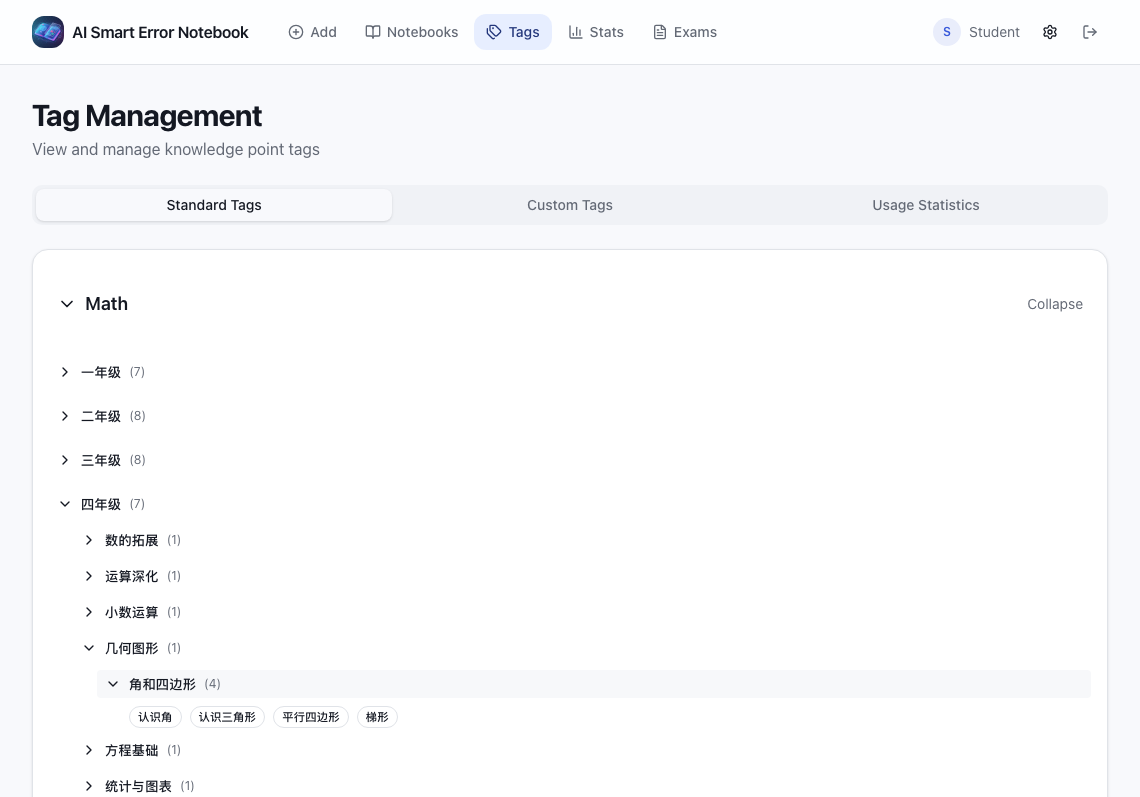
Figure 6: Real concept library. Tags work like labels on bookshelves, making it easier to find material for a particular weak spot.
Some explanations work well as text. Other relationships become easier to discuss when they are drawn. The project can ask AI to generate a step-by-step SVG animation, with pause, seek, replay and full-screen controls. Interactive GeoGebra demonstrations can also be enabled for mathematics and physics questions.
An SVG is a picture described through drawing instructions: lines, shapes and text each have a place. Those shapes remain clear when enlarged. Revealing them in stages can break a solution into smaller pieces.
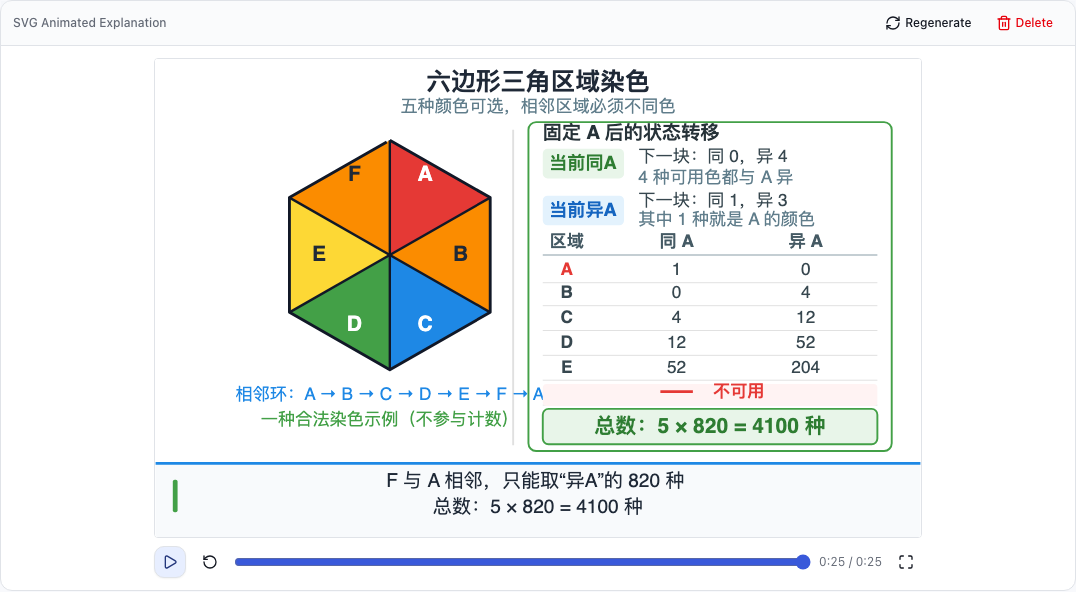
Figure 7: Real animation player showing an existing question explanation. The English interface surrounds the original Chinese learning content. Mathematical claims should still be checked against the question.
One useful moment may come when a parent pauses the animation and asks, “What happens next, and why?” The child offers a prediction before playback continues. A presentation becomes something to talk through together.
Smooth animation and attractive colors do not establish that a proof is correct. Conditions, geometric relationships and answers still need checking. Families can also turn animation off and keep a simpler combination of text and paper practice.
5. Everyday details drive the next iteration
A tool used repeatedly at home develops increasingly specific requirements. “Import a question” soon becomes “What if we photographed it twice?”, “What if recognition needs a correction?”, or “Can the paper level follow the difficulty we already selected?”
Several current behaviors address those practical details.
| Everyday friction | Current behavior |
|---|---|
| The same question is photographed again | Text similarity is used to detect duplicates; a match keeps the original and records another incorrect attempt |
| Families need different duplicate-detection sensitivity | The threshold is saved in user preferences; the default is 90% |
| AI recognition needs checking before it is saved | Review before import can be enabled, with an editable correction screen |
| Difficulty and A/B paper level repeat related choices | When no manual choice is supplied, 1–3 stars default to A and 4–5 stars to B |
| AI work takes time | Background-task progress is available, and work can continue after leaving the current page |
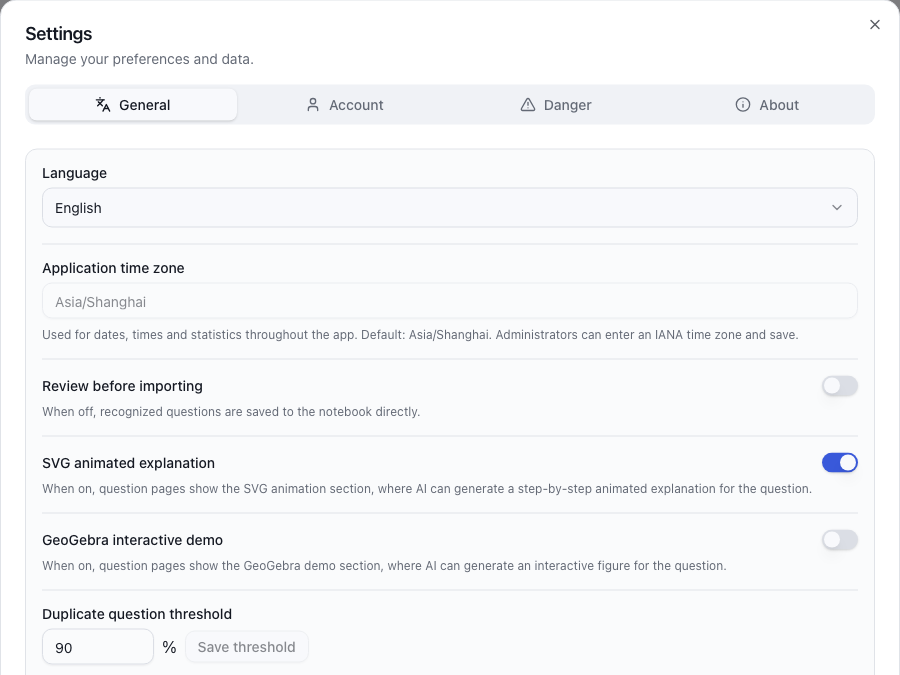
Figure 8: Real preferences screen. Options that affect the organization workflow can be adjusted by the user.
Recording the repeated mistake is especially useful. A question database rarely needs two identical copies, but a review history needs to preserve the fact that the same question went wrong again.
Imagine a tap that starts leaking for a second time. The maintenance log needs another entry, even though the tap itself was registered long ago. A repeated problem contains information about what happened after the first repair.
Similarity detection also needs judgment. Two questions can look almost identical while testing a meaningful change in conditions. The application allows threshold adjustment and question comparison so a family can choose a suitable level of sensitivity.
These details may not make dramatic feature announcements. They do affect whether a tool remains comfortable enough to keep using. This is the kind of iteration I intend to continue as real use reveals more friction.
6. Practice variations turn a recent explanation into a visible history
The project can generate variations around the same concept as a source question, with a choice of difficulty. After an attempt, a result can be recorded. Worksheet results also return to the originating question.
A parent can then examine the sequence: an initial mistake, a later variation and another encounter on a worksheet. That history provides more context than a single mastered/unmastered switch.
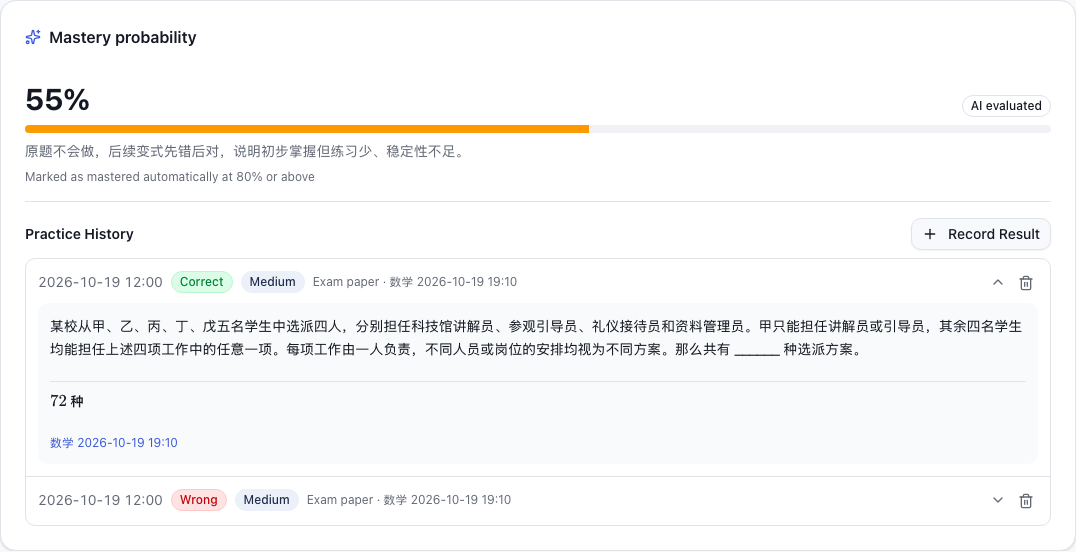
Figure 9: Real practice history. The percentage is an application estimate for this question, rather than an exam score or evidence of the project’s educational effectiveness.
The current implementation first asks AI to estimate mastery using the attempt history. If that assessment fails, a rule-based estimate is used as a fallback. An estimate of at least 80% automatically marks the question as mastered.
Think of the number as a weather forecast: it can help with plans, but you still look outside. Sparse records, closely repeated questions or substantial parental prompting can create a gap between an apparently correct answer and independent understanding.
I suggest using the percentage as a reason to examine the record. Which attempt went wrong recently? Did a changed condition cause trouble? Could the child explain the method without a prompt? The strongest evidence still comes from the child’s work and explanation.
7. Printing matters because family learning also happens on paper
Long arithmetic, auxiliary lines and a complete written argument all need space. A family study tool has to support those moments away from the screen.
The project can generate printable worksheets using selected notebooks, concepts and mastery conditions, with variations based on source questions. It can also print filtered mistakes directly, optionally including answers, explanations, tags or original images.
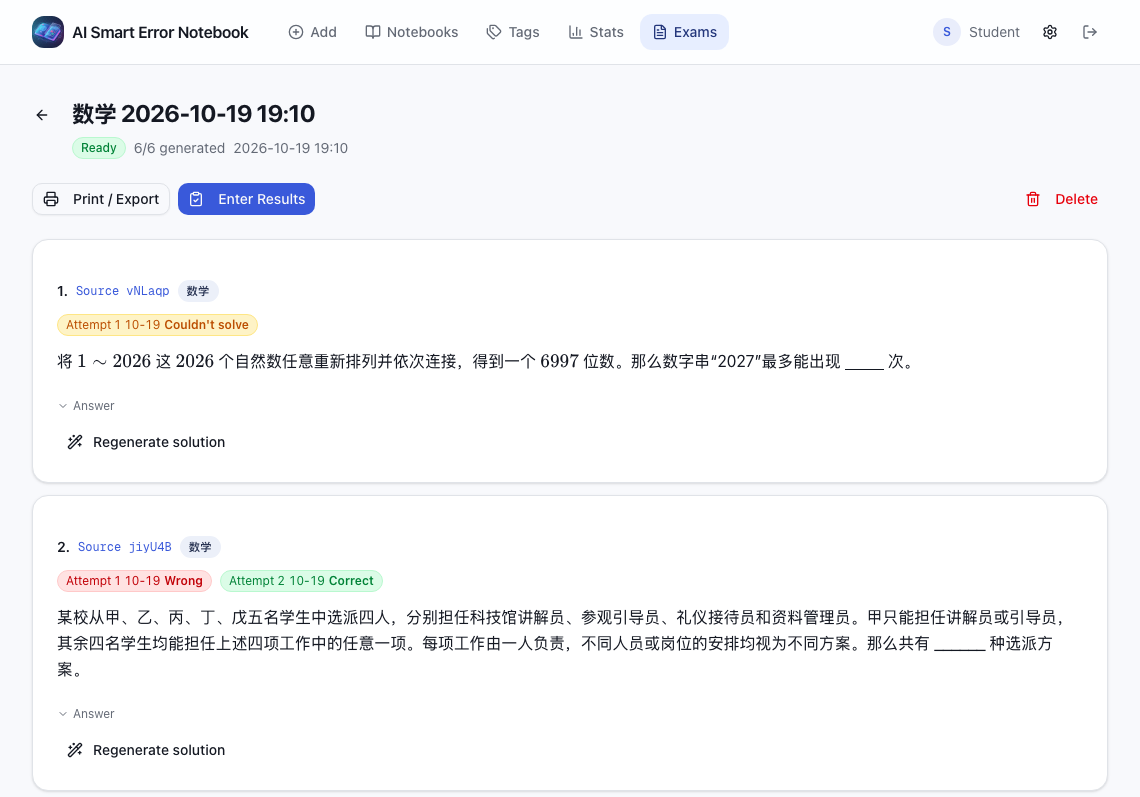
Figure 10: Real worksheet screen. Source questions and later attempt results remain connected.
Printed content carries a source ID, making it possible to locate the original record when entering results afterwards. The ID works like a parcel collection code: even after the paper leaves the computer, there is a route back to its record.
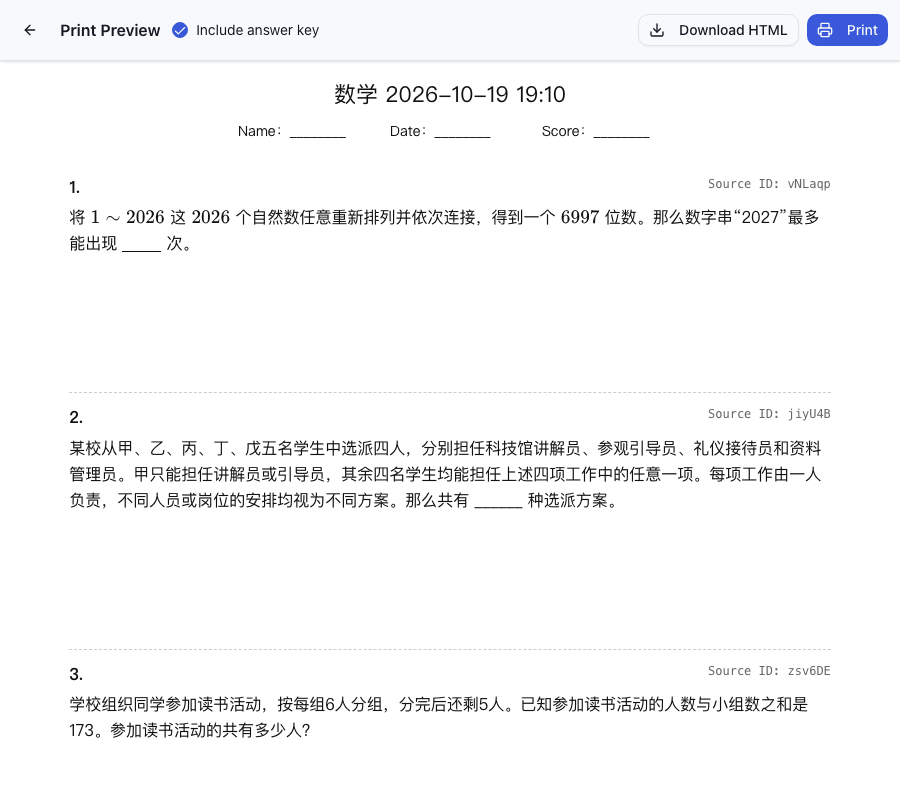
Figure 11: Real print preview. HTML can be downloaded, or the browser can print the sheet or save it as a PDF.
A possible family routine is to choose a few concepts that need reinforcement, print a small set and let the child work independently. Check the answers together afterwards and record the useful results. The amount and frequency should follow the child’s needs; easy question generation is no reason to produce an endless pile of exercises.
The application prepares materials and preserves records. The thinking on the page still belongs to the child.
8. Statistics help choose the next step
The application separates mistake statistics from practice statistics. The former includes question counts, mastery rate, subject distribution and monthly trends. The latter includes attempt counts, accuracy and active months.
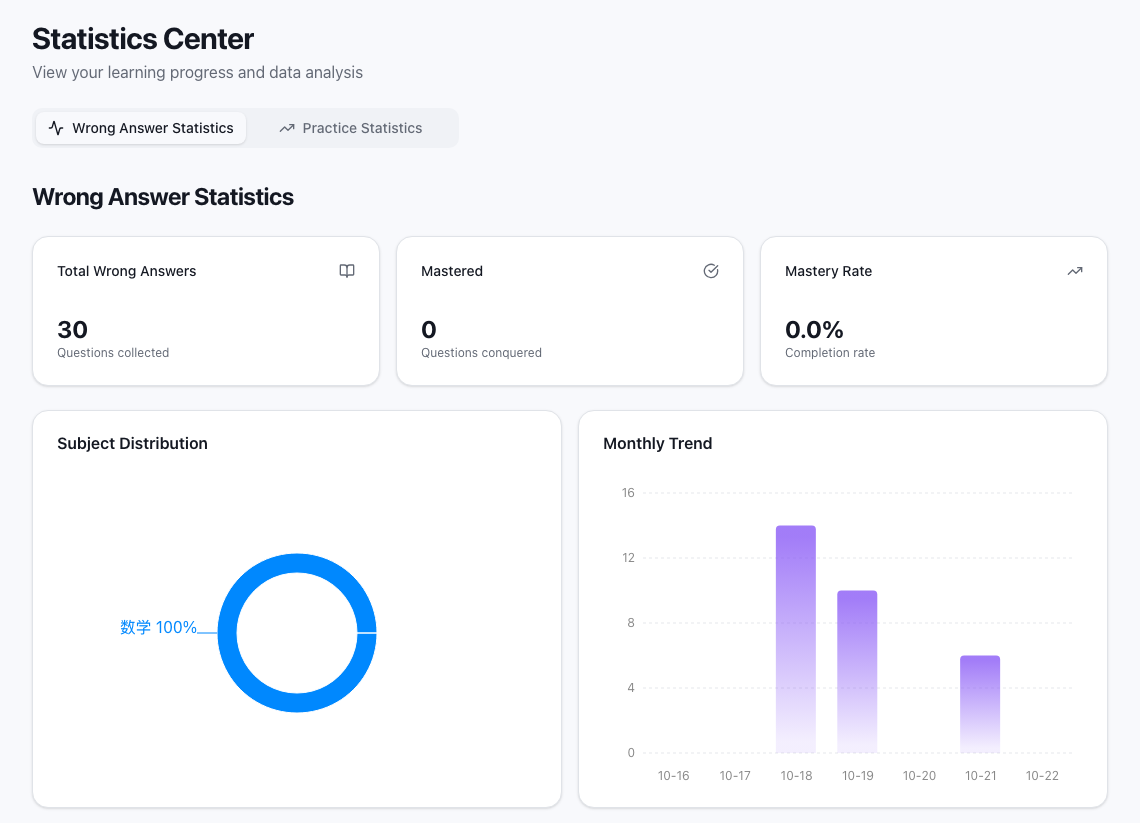
Figure 12: Real mistake statistics. The numbers are the values in that interface snapshot and illustrate the feature.
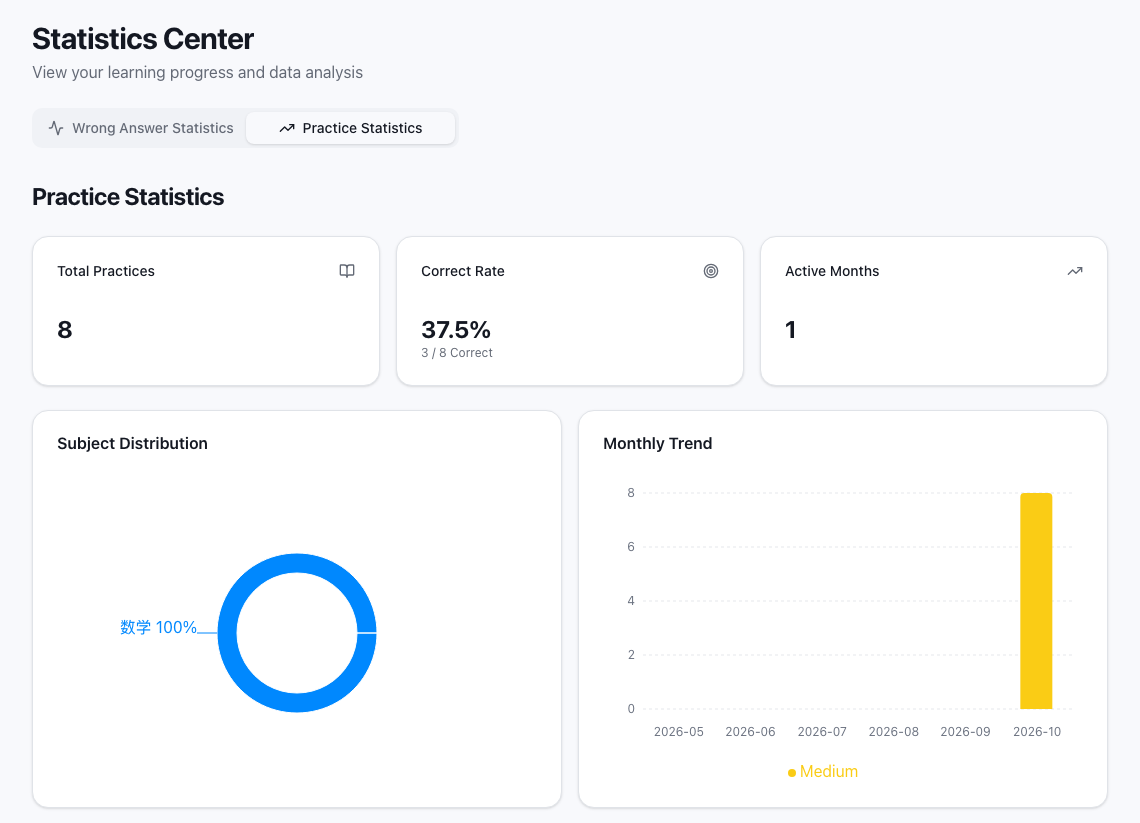
Figure 13: Real practice statistics. These are usage records, not the results of a controlled study of learning outcomes.
The two views answer different questions. How many mistakes have been collected and how many attempts have actually been made are different measures. Accuracy also needs context when question difficulty changes.
For me, the useful question is, “What deserves another look this week?” A statistics page can act like a sign at a crossroads, helping choose a direction. It should not become a permanent label attached to a child.
9. Self-hosting, model choice and privacy need concrete boundaries
The application uses Next.js, React and TypeScript, with Prisma and SQLite for data. It supports multiple users and data import/export. Documentation and release channels cover Docker, npm, desktop applications and FnOS packages.
You can set the technical names aside for a moment. Self-hosting is like keeping a filing cabinet in a place you manage. You have more control over backups, access and upgrades, along with responsibility for maintaining them.
AI integrations include Gemini, OpenAI, Azure OpenAI, Anthropic, MiniMax, Zhipu GLM, DeepSeek and Kimi. Image-input support, pricing and output quality need to be checked for the chosen channel and model. An integration in the list does not mean every model can perform every task.
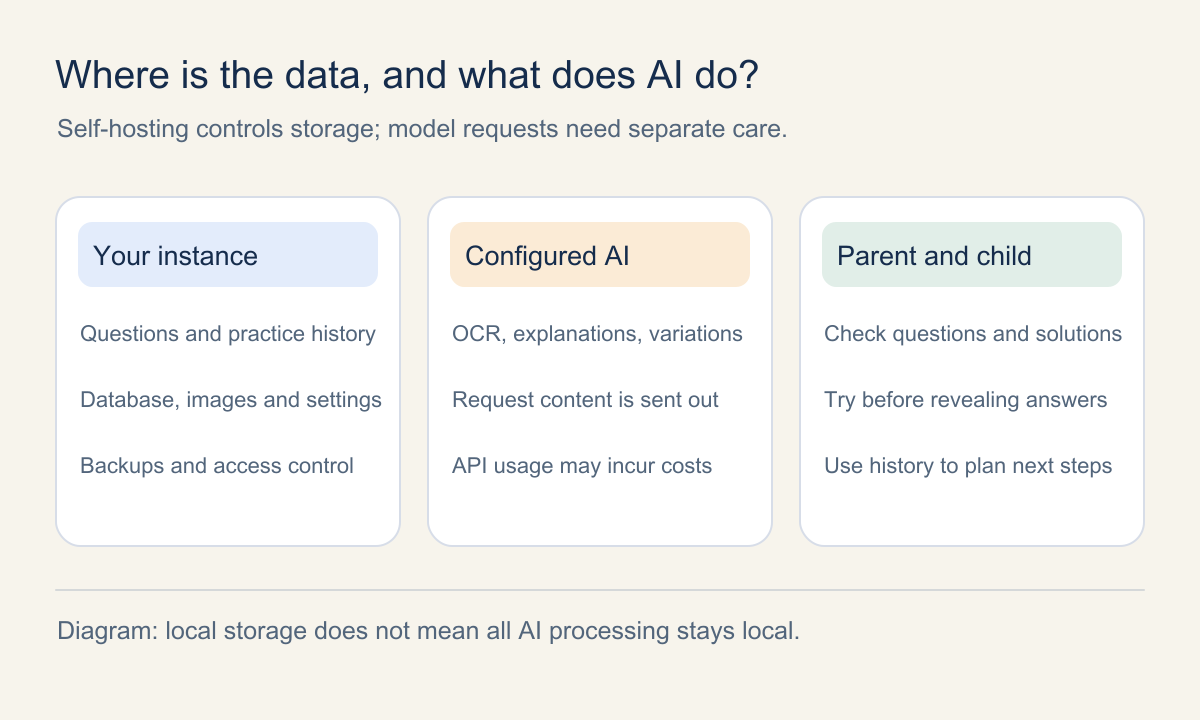
Figure 14: Original data-boundary illustration. Self-hosting does not mean that every AI operation runs locally.
When an external model API is used for recognition or generation, relevant question content is sent to that provider. Keeping the database under your control does not automatically keep every processing step on the device. Cropping away names, school details and class information before upload is a useful habit.
The project also provides an Openclaw batch-image-upload endpoint for parents who already use agents in their workflows. That is an existing import capability. It should not be read as a claim of autonomous teaching, complete tutoring or a finished MCP product.
My preferred division of work is straightforward: an agent helps prepare and move materials, a parent checks the content and results, and the child does the learning. Credentials and identifiable schoolwork do not belong in public screenshots or issues simply to demonstrate automation.
10. Who might find it useful, and common questions
If your family already photographs questions, organizes mistakes and revisits them periodically, this project may be useful. It is particularly relevant if preparing a review repeatedly involves finding the same materials again, and you are willing to check AI output and manage your own records.
Families seeking a complete curriculum, guaranteed answer quality or someone to guide every study session will need services beyond what this evolving project provides.
Can I explore it without writing code?
Start with the project introduction or the online demo. The demo uses a shared account: other visitors can see its data, so use only non-private example material. Login information is in the repository README.
For long-term family use, consult Releases and the installation guide. The assets actually available depend on the selected release.
Does everything work offline?
Separate saved material from new AI work. Access to existing content depends on how the application and its resources are running. External model calls for recognition, explanations and practice variations still need their corresponding network and API access. This article does not claim a verified, fully offline product.
Can AI explain a question incorrectly?
Yes. Original images, review before import, editing and regeneration make corrections easier. The same scrutiny applies to animations, formulas and mastery estimates. For disputed questions, return to the textbook, the teacher’s requirements and a solution that can be checked step by step.
Could it become an answer-copying tool?
How the family uses it matters. A parent can organize and print the material, let the child attempt it independently and discuss the explanation afterwards. The software supplies materials and records; the sequence of use remains something adults and children agree on together.
Will the project keep changing?
Yes. I still use it with my child and intend to keep responding to problems found through use. Open-source maintenance has a practical pace, though. Commits, issues and releases are the record of what has actually shipped; I am not promising a fixed update timetable.
If your mistake notebook is carefully filled but difficult to revisit
Have a look at margrop/wrong-notebook. Browse the screenshots and demo, then decide whether it fits your family’s habits. If it looks useful, a Star can help you find it again. Specific reports about awkward steps are welcome as issues.
Helpful feedback describes what you tried, what you expected and what happened. Remove child identity, school information, account details and access addresses before attaching images. Contributions can start with documentation, interface translation, tests or a small practical fix.
I hope it becomes an increasingly comfortable family tool: questions are easier to preserve, review is easier to begin and each attempt is easier to see. The most valuable part of learning still happens between people: a child willing to try again, and a parent willing to help think a problem through.
Sources and image notes
Features checked on October 22, 2026. The software continues to evolve; consult the current repository for changes.
- Project repository and README: features, demo and entry points.
- Upstream: wttwins/wrong-notebook: the foundation of this fork, with thanks to its author and contributors.
- Multi-platform installation guide: package forms and runtime details.
- Screenshot provenance: capture date, anonymization and bilingual materials.
- Mastery evaluation implementation: AI assessment, rule fallback and the 80% threshold.
- Dunlosky et al., Improving Students’ Learning With Effective Learning Techniques: the 2013 review; this article cites its conclusions about methods, not this application’s effectiveness.
This article contains 11 real application screenshots and three original diagrams. Published PNG screenshots were converted losslessly to WebP without changing question content or statistical values. Text in the original SVG illustrations is outlined to avoid missing glyphs on different devices.
For other tools that can complement paper-based learning, see this blog’s PhET interactive science lab introduction and 41 online logic puzzles.