From XiaoAi to Xiaozhi: Rebuilding a Xiaomi X08C Speaker into a Local AI Voice Device
The short version
I did not replace a Xiaomi smart speaker with an entirely different product. I kept the factory system and XiaoAi path intact, then added a recoverable ADB workflow, a foreground voice service, local wake-word detection, and a configurable LAN voice backend.
The result is a small, practical AI terminal: “小智小智” and “小屁小屁” enter a Xiaozhi auto/VAD session, while “小爱同学” remains with the stock assistant. It also supports click-to-talk, local acknowledgement sounds, TTS interruption, a five-second follow-up window, weather, and safe Home Assistant control.
This article contains no real IP address, MAC address, token, device identifier, or internal hostname. Values such as
<DEVICE_IP>,<SERVER_IP>, and<ACCESS_TOKEN>are placeholders.
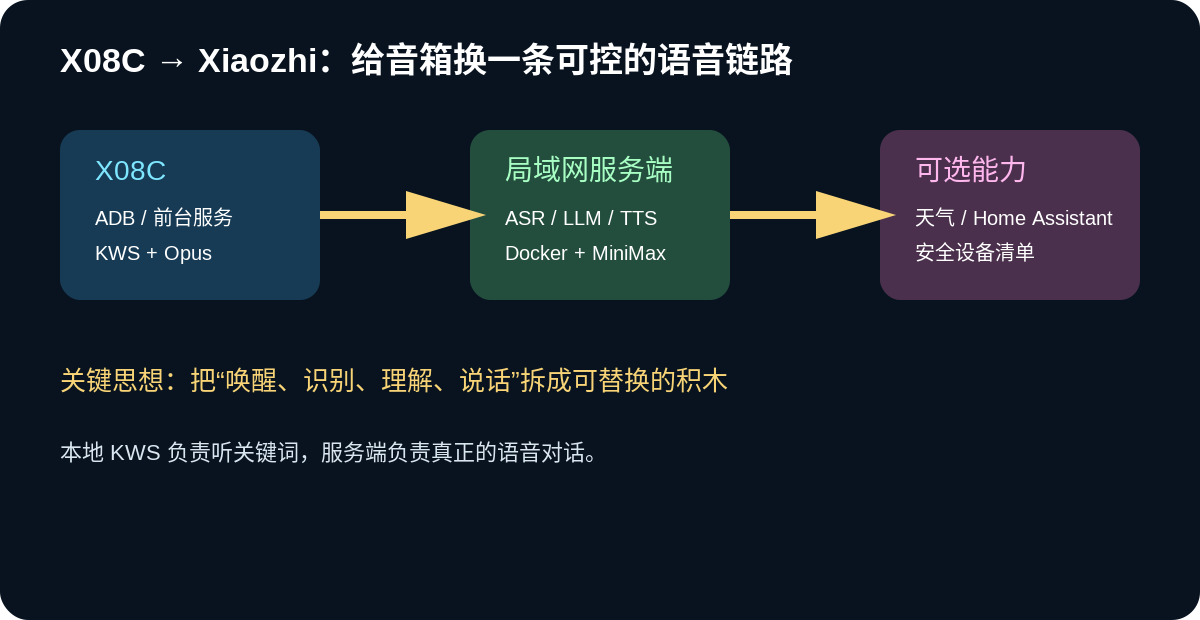
Figure 1: The final architecture. The speaker handles keyword detection and audio transport; the server handles recognition, reasoning, and speech synthesis.
1. Why modify a speaker that already talks?
A factory smart speaker can already play music, answer weather questions, and control appliances. Why add another voice path?
The reason is not that the original product is useless. Its boundary is simply defined by someone else’s product roadmap. I wanted a LAN voice endpoint connected to a backend I could configure: my own ASR, LLM, TTS, wake-word routing, and Home Assistant allowlist. I also wanted the process to be backed up, reversible, and explainable.
A useful analogy is a kitchen. The original XiaoAi system is a complete kitchen whose walls you cannot freely rebuild. Instead of demolishing it, I added a second workbench beside it. The original stove continues to work; the new workbench handles new recipes. Each path has a clear owner, and either path can be disabled independently.
2. The first gate: USB does not mean ADB is ready
2.1 USB is a road; ADB is the service entrance
When a speaker is connected to a computer, many people expect it to appear like a phone in a file manager. That is often not what happens. The USB port may only provide power, or the Android debugging service may not be enabled.
ADB is not simply a file-transfer protocol. It is a small system made of a client on the computer, an ADB server, and a daemon on the device. Think of it as an apartment-building entrance:
- the USB cable is the road to the building;
- the ADB daemon is the guard;
- the RSA prompt is the resident approving a computer;
adb shellis entering the maintenance room.
The Android documentation explains the client/server/daemon architecture, USB authorization, Platform-Tools, and wireless workflows. The public links are listed at the end. In practice, confirm ownership, make a backup, and prefer reversible changes before removing applications or writing partitions.
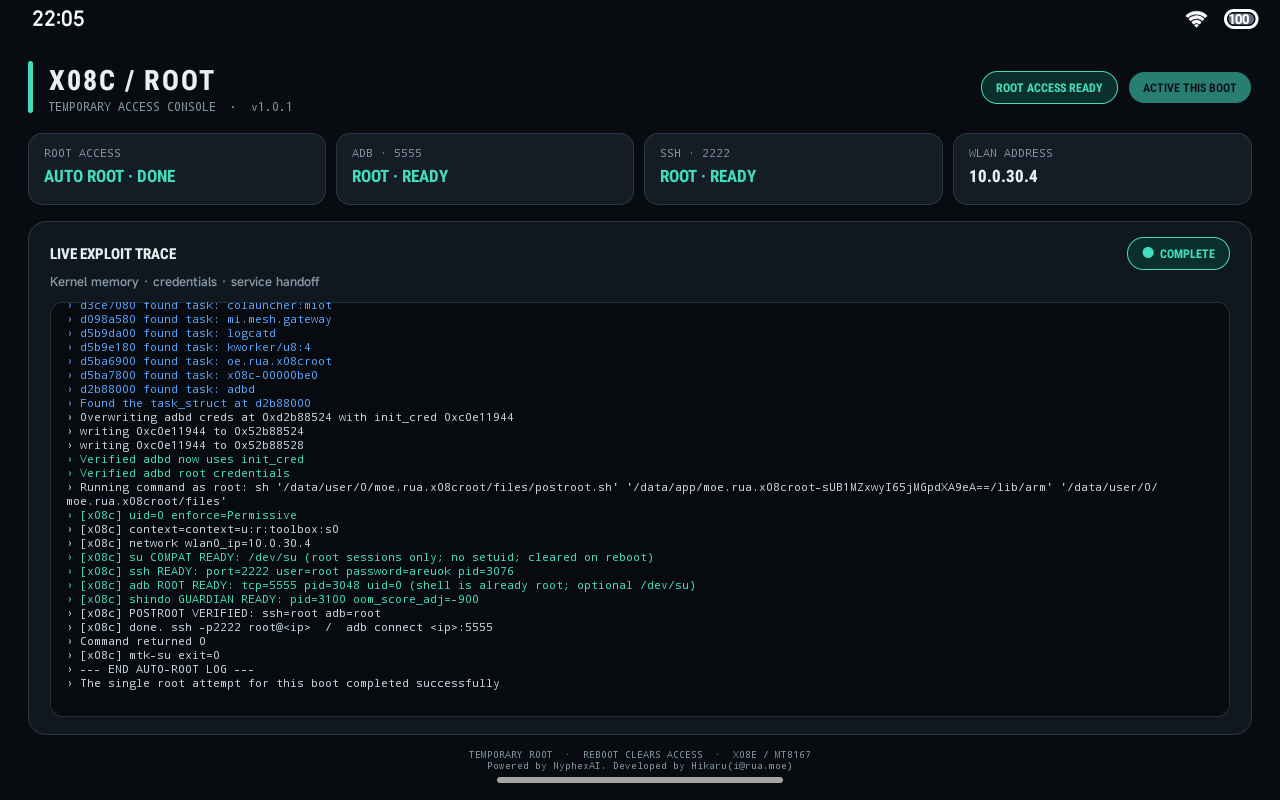
Figure 2: A real tool screenshot. Only the generic interface is used; addresses, serials, and personal data are not published.
2.2 Why back up before optimizing?
An Android speaker is not a disposable USB drive. It can contain boot, system, userdata, vendor partitions, and A/B slots. A wrong image, offset, or system-app change can cause a black screen or boot loop.
My order was:
- identify the partition layout and active slot;
- create a complete firmware and userdata backup;
- calculate checksums;
- make one small change;
- reboot and verify;
- record the result and keep a recovery path.
It is like repairing a clock: photograph the mechanism, put each part in a labeled tray, and turn one screw at a time. Changing a partition without a verified backup is the digital equivalent of throwing every clock component into one box and asking which part was the spring.
3. Lightweight optimization before the AI layer
After ADB was available, I started with animation, launcher, and application-level changes instead of immediately overwriting system partitions. Removing unwanted background work and choosing a touch-friendly launcher is easier to validate than a mysterious “optimization pack.”
The principle is simple: if a user-level disable is enough, do not edit system; if a change can be backed up and reverted, do not overwrite it live.
Use placeholders in public instructions:
<DEVICE_IP>:5555
<SERVER_IP>:8000
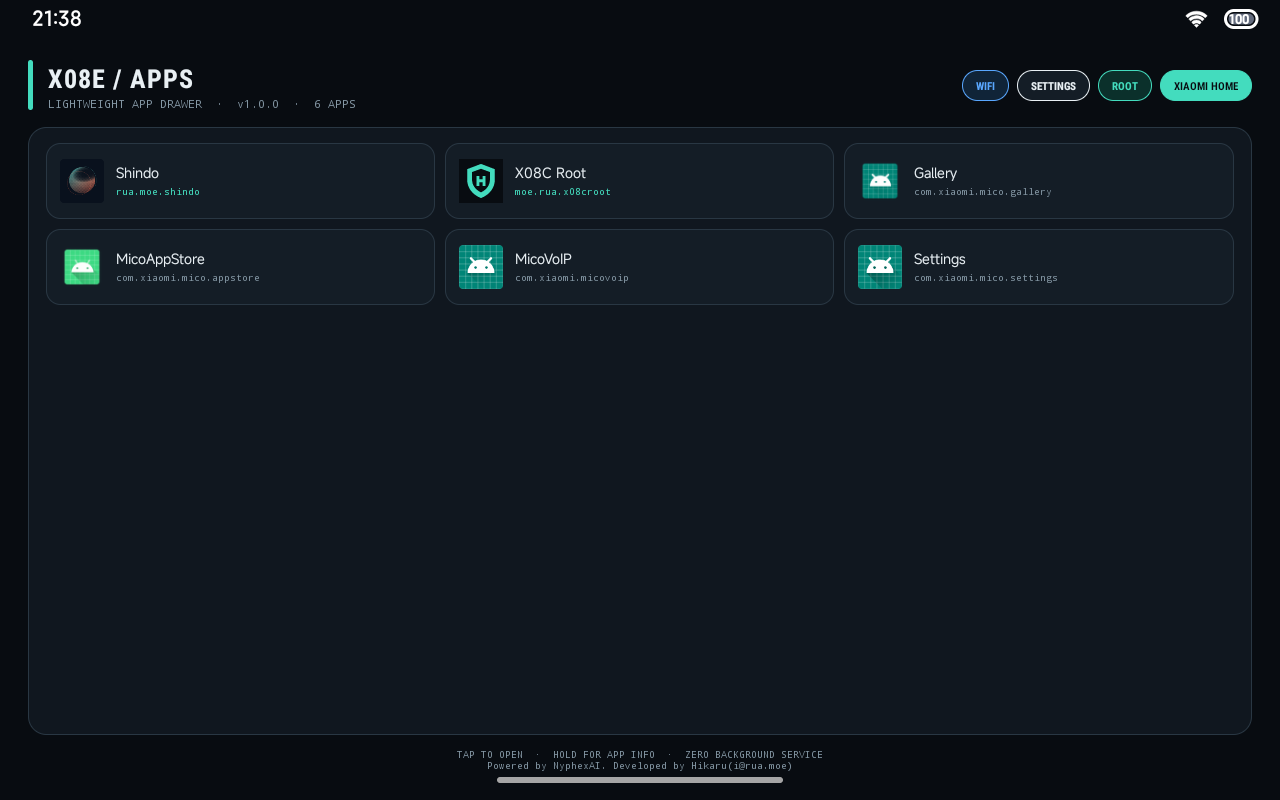
Figure 3: The launcher is a presentation layer. The backup and recovery plan remains more important than the launcher itself.
4. From “optimizing a speaker” to giving it a second brain
4.1 Keep the speaker light
X08C has limited resources. Running a large model, ASR, and TTS locally is not a realistic target. The final design is “light client, heavier server”:
- device: Java client, AudioRecord, Opus, and local KWS;
- server: Docker, Paraformer ASR, MiniMax LLM, and MiniMax TTS;
- transport: WebSocket control messages and Opus audio frames.
This is like a restaurant. The waiter hears the order and sends it to the kitchen; the kitchen does the expensive preparation. The waiter does not carry the whole kitchen around. As long as the order format is stable, the kitchen can be replaced.
4.2 Why keep ASR, LLM, and TTS independent?
An all-in-one service looks simple, but any upgrade can disturb the whole chain. Splitting the components makes each one replaceable:
- compare Paraformer with SenseVoiceSmall;
- use MiniMax or another OpenAI-compatible LLM;
- stream PCM TTS to reduce the first-response delay.
The tested default is Paraformer. SenseVoiceSmall can run on the server, but the actual Chinese recognition experience on this setup was better with Paraformer.
5. Multiple wake words are routing, not microphone theft
The local Sherpa-ONNX KWS processes 16 kHz mono PCM continuously, but only a matching keyword starts a route.
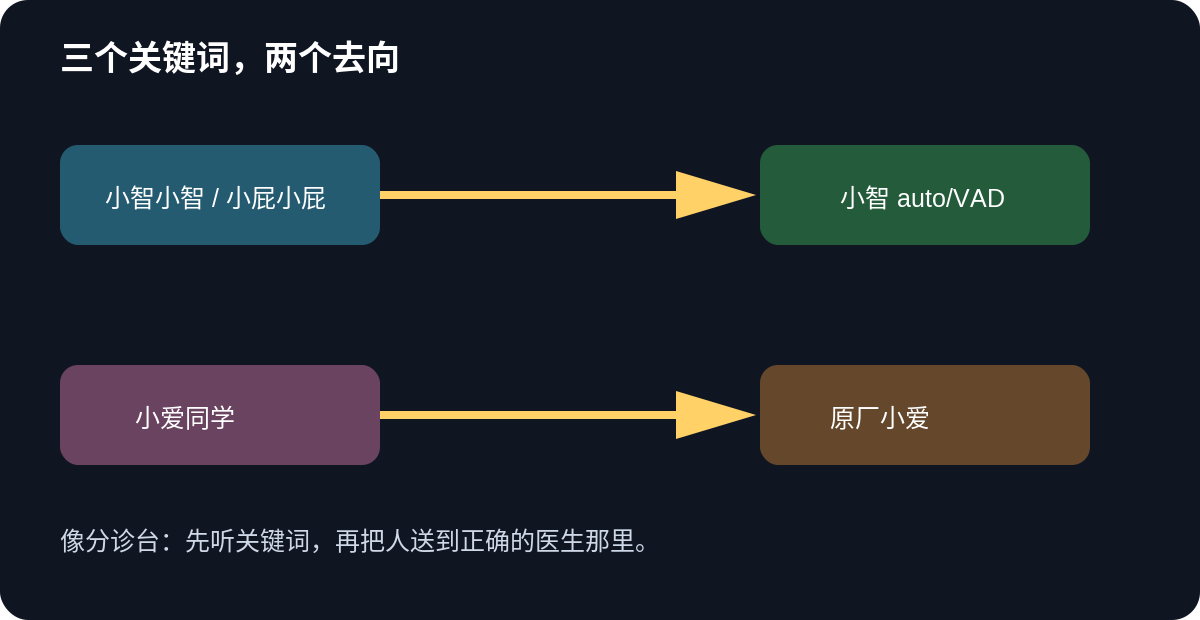
Figure 4: Keyword routing. Xiaozhi phrases enter the new path; the XiaoAi phrase remains with the factory path.
| Phrase | Result |
|---|---|
| 小智小智 | Xiaozhi auto/VAD |
| 小屁小屁 | Xiaozhi auto/VAD |
| 小爱同学 | Stock XiaoAi |
The most surprising bug was the speaker hearing its own acknowledgement. The first version played “干嘛呀” while the recording path had already entered ASR. The speaker treated its own voice as a user question, answered twice, and created a feedback loop.
The fix resembles a walkie-talkie’s transmit light: while the local acknowledgement is audible, KWS and audio upload pause. Only after it finishes does the client send listen mode=auto. A wake debounce also prevents two reports from the same utterance.
6. What happens during one conversation?
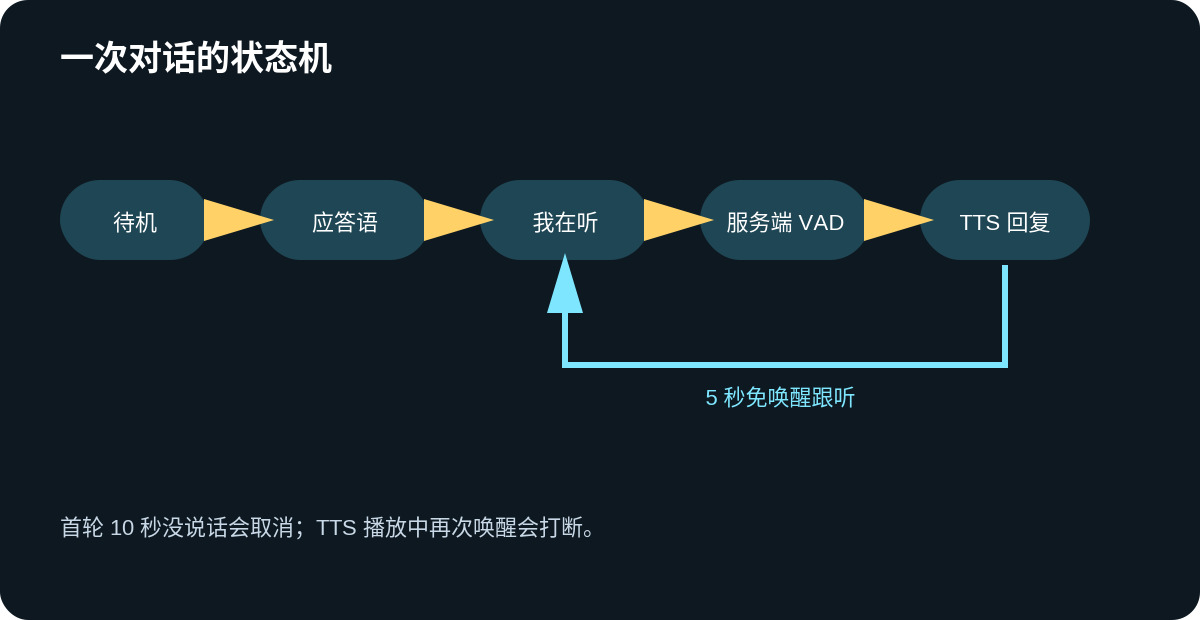
Figure 5: The conversation state machine, with explicit entry and exit conditions.
- standby listens for local keywords;
- a match opens the Xiaozhi UI and plays “我在”, “干嘛呀”, or “诶”;
- the user speaks and Opus frames are uploaded;
- server VAD detects the pause and Paraformer returns the complete text;
- MiniMax creates the response and TTS streams it;
- a five-second follow-up window allows the next sentence without another wake word.
The first listening window expires after ten seconds without speech. During TTS, saying a Xiaozhi wake word stops playback and sends abort.
Figure 6: A real validation-workflow capture used only after privacy review.
7. Why did the UI flash and disappear?
One of the most valuable bugs was a state race rather than a command-line mistake.
The service first entered “listening,” then launched the Activity. The Activity registered only future callbacks, so it missed the current state. The fix was to read the current service state immediately after binding, then subscribe to later changes.
A second issue was an early return in updateStatus(): while reconnecting, the service could already be listening while the UI still believed the client was not ready. The microphone indicator must update independently from the connection label.
Long TTS responses also made the text area jump. Multiple asynchronous fullScroll tasks competed with each other. The fix waits for layout measurement, calculates the bottom position, and uses direct scrolling so the newest text stays visible.
Figure 7: A real publishing-workflow reference, with network identity excluded.
8. Home Assistant: “can control” does not mean “should expose everything”
The easiest Home Assistant mistake is to expose every entity simply because the API can return every entity. That is like hanging every key in a building at the front desk and asking a conversational model to choose one.
The safer design is an allowlist:
- lights, switches, climate, fans, and media players by default;
- cameras, locks, garage doors, alarms, gas/water valves, scripts, and automations excluded;
- the bread machine is an explicit exception, but only approved entity domains are included;
- generate the list, review it manually, then render the server configuration.
Figure 8: Modularity also applies to control permissions: constrain the entrance before adding capability.
9. Performance trade-offs and the missing GPU
With four vCPUs and 4 GB of memory, SenseVoiceSmall could run on the server, but its practical recognition experience was not better than Paraformer in this setup. The virtual machine exposed no Intel GPU passthrough, and ONNX Runtime had no usable GPU execution provider.
The general lesson is that “the framework supports GPU” does not mean “this machine has acceleration.” It is like a road sign pointing to a highway: it does not mean you own a sports car. Check hardware passthrough, drivers, execution providers, and model support first.
10. One-click scripts for three operating systems
The companion scripts are:
- Windows 11:
xiaozhi_x08c_deploy_windows.ps1; - Ubuntu 26.04:
xiaozhi_x08c_deploy_ubuntu2604.sh; - macOS 27:
xiaozhi_x08c_deploy_macos27.zsh.
They only connect, install the APK, launch the app, and print the version. They do not flash partitions, remove applications, or modify system files.
$env:DEVICE = "<DEVICE_IP>:5555"
.\xiaozhi_x08c_deploy_windows.ps1
export DEVICE='<DEVICE_IP>:5555'
bash ./xiaozhi_x08c_deploy_ubuntu2604.sh
export DEVICE='<DEVICE_IP>:5555'
zsh ./xiaozhi_x08c_deploy_macos27.zsh
Manual operation
For a first install, manually approve the device, run the audio self-test, click “点击说话,” and test all three wake phrases. Partition writes, system-app removal, and flashing should remain separate, backed-up operations.
Agent-assisted operation
An Agent can run the repeatable build/install steps, but give it a small “work permit”:
- read the project
AGENTS.md; - use placeholders and local configuration only;
- run the public-tree scan;
- build before installing;
- read the installed version and foreground-service status;
- stop for human approval before deleting apps, writing partitions, flashing, or overwriting backups.
An Agent is a careful construction crew, not a robot that should knock down walls whenever it sees a hammer.
11. Verification checklist
Before publishing, verify:
- APK version is
0.2.0; - foreground service starts after microphone permission;
- both Xiaozhi phrases trigger once;
- XiaoAi remains on the stock path;
- acknowledgement audio plays once and is not recognized as a question;
- complete text appears, TTS plays, and the five-second follow-up works;
- a wake word interrupts TTS;
- “关闭灯” does not exit, while standalone “停止” returns to the clock;
- Home Assistant only reaches allowlisted entities;
- logs, APKs, and articles contain no private network identity.
12. Q&A
Does this replace XiaoAi?
No. The design is coexistence: Xiaozhi phrases enter the new route, while “小爱同学” remains with the factory service. Microphone contention and echo are still device-level limitations.
Why not install the model directly on the speaker?
Memory, CPU, and model size make that impractical. Keeping the speaker as a light endpoint makes upgrades and debugging easier.
Why is the text not displayed character by character?
The local ASR returns a complete result after server VAD detects the pause. This is fast full-sentence transcription, not cloud-style live subtitles.
Can I flash the speaker immediately?
You can research it, but flashing should not be the first step. A complete backup, checksum, A/B-slot understanding, and recovery plan matter more than a ready-made image. The public article intentionally contains no firmware, userdata, tokens, or device addresses.
Can I expose every Home Assistant entity?
The API may expose many entities, but the safe design should not. Use an allowlist, exclude dangerous domains, and manually review the bread-machine exception.
Do the scripts flash the speaker?
No. They only build/install the APK and check the service. Partition writes and system-app removal are deliberately outside the automation.
13. References
- Android Debug Bridge
- Run apps on a hardware device
- ADB manual
- Sherpa-ONNX Keyword Spotting
- Xiaozhi ESP32
- Hugo multilingual mode
Conclusion
The most reusable result is not that one speaker became another product. It is the method: make the device recoverable first, split capabilities into clear layers, keep latency- and privacy-sensitive work local, move expensive reasoning to a replaceable server, and define boundaries before adding power.
The X08C is still a XiaoAi speaker—but now it also has a separate voice route that can be observed, tested, and maintained like an engineering system.