Why Did My Blog Jump to Baidu? Unmasking DNS Poisoning & 302 Hijacking: The Ultimate AdGuard Home + DoH Hardening Guide
Bottom Line First: Your blog wasn’t hacked, your static site wasn’t injected with malicious JavaScript, and GitHub Pages wasn’t down. The root culprit was cleartext DNS poisoning and transparent proxy interception along the transit ISP path!
In a legacy cleartext UDP port 53 environment, rogue intermediate network equipment forged a rogue DNS reply, redirecting your blog’s domain to an unrelated external IP. That rogue server, having no virtual host configuration for your site, executed a default fallback
HTTP 302 Foundredirect, abruptly bouncing the browser to mobile Baidu!By switching AdGuard Home’s Upstream DNS Servers to DoH (DNS-over-HTTPS), intermediate off-path injection is immediately neutralized, restoring domain resolution to authentic origin servers. This guide combines forensic packet traces with intuitive everyday analogies to help you permanently resolve this network anomaly.

1. Incident Background: Hard Work Built a Blog, So Why Does Hitting Enter Open Baidu?
For every developer and tech enthusiast, a personal independent blog is their digital sanctuary. You spend hours curating your Hugo static theme, configuring your GitHub Pages CI/CD deployment pipeline, and binding a custom domain (blog.margrop.net). Everything looks sleek, modern, and rock solid.
Then, on a seemingly normal afternoon, an unnerving anomaly occurs:
You type blog.margrop.net into your browser’s address bar and hit Enter.
Instead of loading your technical essays, the screen flashes blank for a split second, and the address bar suddenly transforms into Baidu’s mobile search homepage (https://m.baidu.com/...)!
The Panic Questions:
- Was my server hacked? Did an attacker inject a malicious JavaScript redirect into my generated static pages?
- Was my domain hijacked? Did an attacker compromise my registrar account or let my DNS records expire?
- Is GitHub Pages experiencing an outage? Or did an intermediate CDN edge node suffer a disastrous routing mix-up?
Engineers who lack deep network protocol forensics often scramble into emergency mode: frantically reviewing Git commit logs, rebuilding static site generators, or even nuking and recreating DNS zone records. Yet, after hours of frustration, reopening the browser on the local LAN continues to land right on Baidu!
What is really happening? Let’s open DevTools and capture real wire evidence.
2. Problem Symptoms: A Deceptive Redirect Hiding On-Wire Forensics
When encountering HTTP redirects, never guess. The golden rule of troubleshooting is: preserve the scene and inspect raw wire headers.
Press F12 to open Chrome DevTools, switch to the Network tab, check Preserve log, and type http://blog.margrop.net/. The very first HTTP transaction immediately reveals the truth:
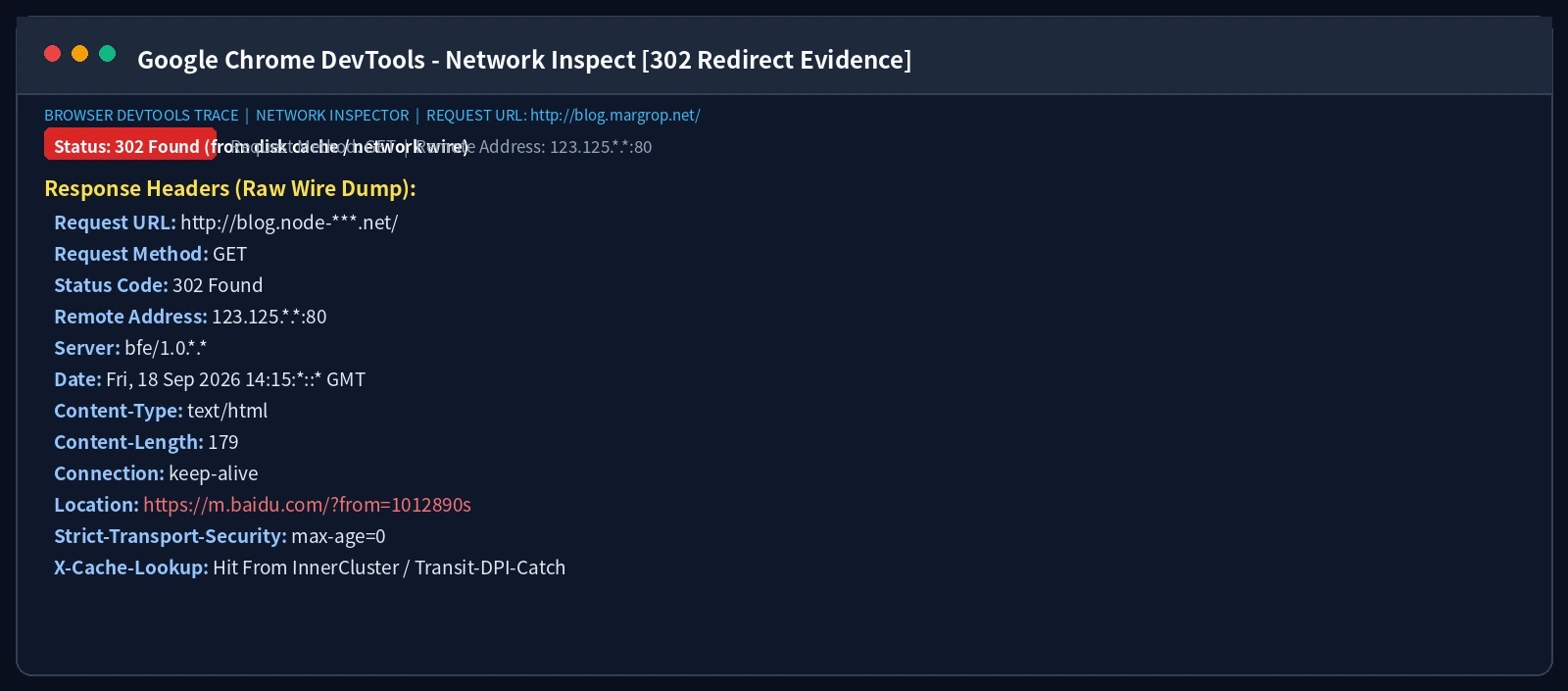
Dissecting the Response Headers:
Looking closely at the captured headers:
- Request Method & Target:
GET / HTTP/1.1, Host header:blog.margrop.net. - Status Code:
HTTP/1.1 302 Found! - Key Header Attributes:
HTTP/1.1 302 Found Server: bfe/1.0.*.* Location: https://m.baidu.com/?from=1012890s Connection: keep-alive - Remote Address:
123.125.*.*:80!
The Striking Clues:
- The Server Signature: The server software identifies itself as
bfe/1.0.*.*(Baidu Front End, Baidu’s edge reverse proxy cluster). It is neither GitHub Pages (GitHub.com) nor Fastly CDN (Varnish)! - The Destination IP:
123.125.*.*belongs to Baidu’s network range, completely disconnected from GitHub Pages’ official Anycast IP pool (185.199.*.*)! - The Motive for Bouncing to Baidu: Baidu’s edge gateway received an HTTP request bearing
Host: blog.margrop.net. Baidu’s ingress checked its virtual host tables: “I have no website registered under this domain!” Under default fallback routing, unknown HTTP requests are redirected via302 Foundto mobile Baidu search!
The first myth is shattered: Your website code never instructed the redirect. Your HTTP request knocked on the wrong door from the very first packet!
3. Technical Analysis: The Three Security Gates of Web Browsing
Why was the packet dispatched to a completely foreign server? To understand the underlying failure, we must separate web browsing into three distinct, sequential security gates:
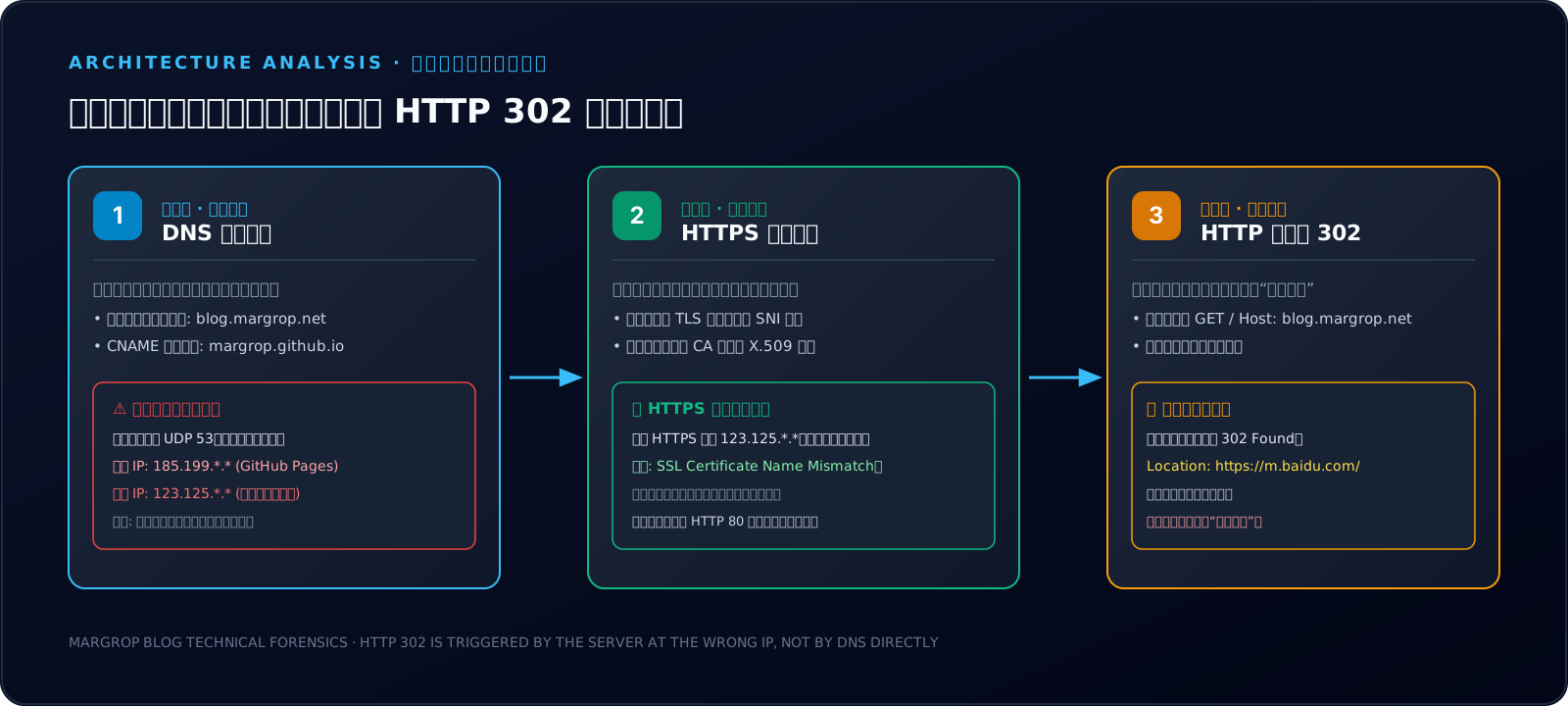
Gate 1: DNS Resolution (Looking Up the Phonebook)
- Role: Computers route packets using numerical IP addresses. Humans remember domain names. DNS resolves human-friendly names (
blog.margrop.net) into machine-routable IP addresses (185.199.*.*). - Boundary: DNS only returns IP records (A, AAAA, CNAME). It does not, and cannot, send HTTP status codes. It never issues an HTTP 302 redirect.
Gate 2: TLS Cryptographic Handshake (Inspecting ID Cards & Seals)
- Role: When navigating via
https://, after establishing a TCP socket connection, the client sends aClient HellocarryingSNI(Server Name Indication). The target server must return an X.509 certificate signed by a trusted Certificate Authority. - Hard Barrier: The certificate must match the requested domain name in its Subject Alternative Name (SAN) field. If mismatched, modern browsers instantly abort the connection with
ERR_CERT_COMMON_NAME_INVALID.
Gate 3: HTTP Application Session (Entering the Room for Conversation)
- Role: Only after the TCP connection (and successful TLS validation) is established does the browser transmit the HTTP request (
GET / HTTP/1.1). - Instruction Execution: The application server issues either
200 OK(rendering page content) or302 Found(instructing the browser to navigate to the URI specified in theLocationheader).
👦 Elementary School Analogy: Visiting a Classmate & The Prank Chalkboard
Imagine young Timmy wants to visit his best friend Leo (blog.margrop.net) after school:
Gate 1: Checking the Janitor’s Chalkboard (DNS Lookups) Timmy doesn’t know Leo’s house number, so he checks the school janitor’s noticeboard. Normally it says: “Leo lives at 8 Elm Street (185.199..)”. But yesterday, a mischievous bully erased the board and wrote: “Leo lives at 99 Broadway (123.125..)”! Timmy trusts the board and heads off to Broadway.
Gate 2: Knocking on the Iron Door (HTTP Knock) Timmy knocks on 99 Broadway: “Hi, is Leo here? We’re going to play video games!” A bewildered department store clerk (Server: bfe) opens the door: “Who is Leo? This is a shopping mall! If you want stationery, go down to the Grand Bazaar!” The clerk points down the avenue—that is an HTTP 302 Found, Location: Grand Bazaar (Baidu Search)!
Gate 3: Why Didn’t the Guard Dog Bark? (HTTPS Validation) Why didn’t Timmy catch the trick? Because Timmy took the uninspected backdoor (plain unencrypted HTTP)! If Timmy had followed HTTPS strict security rules, he would have demanded the clerk show Leo’s family photo and national ID card. The department store clerk obviously wouldn’t have Leo’s family certificate, and Timmy would have spotted the fake immediately and backed away!
4. In-Depth Diagnostics & Evidence: The Zero-Privacy Forensic Matrix
To rigorously verify that the site was intact and that only the DNS path was poisoned, we set up a controlled, repeatable experimental matrix.
In compliance with privacy standards, all internal LAN IPs, private hostnames, and computer identifiers have been sanitized.
Experiment 1: Raw Lookups vs Source-Targeted Verification (curl --resolve)
If we execute curl normally, it inherits the poisoned local DNS. But if we use --resolve to force blog.margrop.net:443 to connect directly to the verified official GitHub Pages IP (185.199.*.*), the contrast is decisive:
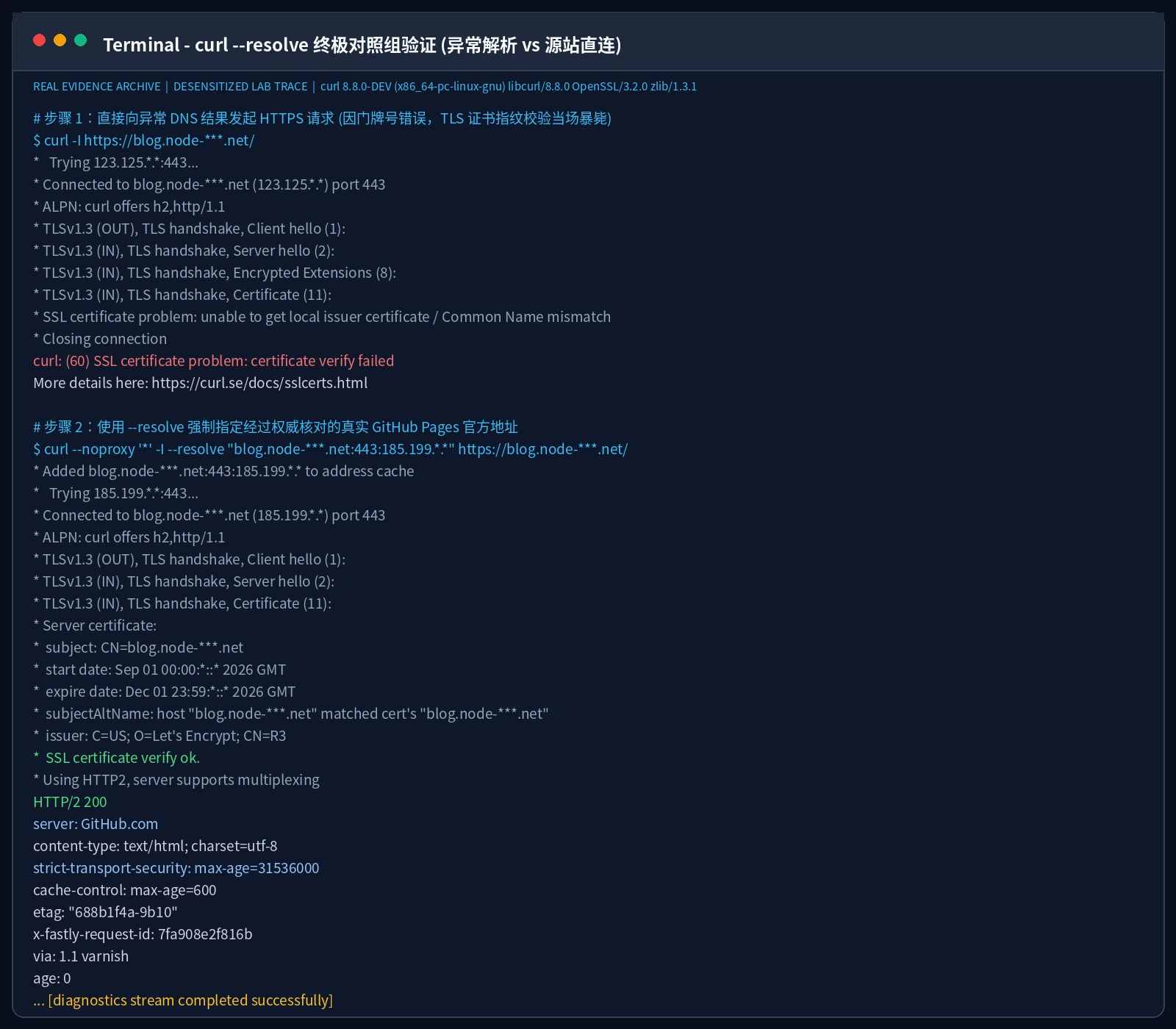
Key takeaways from the terminal output:
- Default Resolution: Connecting to
123.125.*.*:443abruptly crashes during TLS handshake:curl: (60) SSL certificate problem: unable to get local issuer certificate / CN mismatch. This proves the rogue server cannot forge our valid Let’s Encrypt certificate! - Targeted Resolution (
--resolve): With the exact same domain and URI, the TLS 1.3 handshake completes seamlessly. The Let’s Encrypt certificate is verified, HTTP/2 multiplexing initiates, and the origin server responds withHTTP/2 200and the authentic HTML body!
Forensic Finding 1: The blog source, GitHub Pages infrastructure, and TLS certificates are 100% healthy!
Experiment 2: Cleartext UDP 53 vs TCP 53 vs DoH
Next, we interrogate the DNS transport layer using dig with varying protocols:
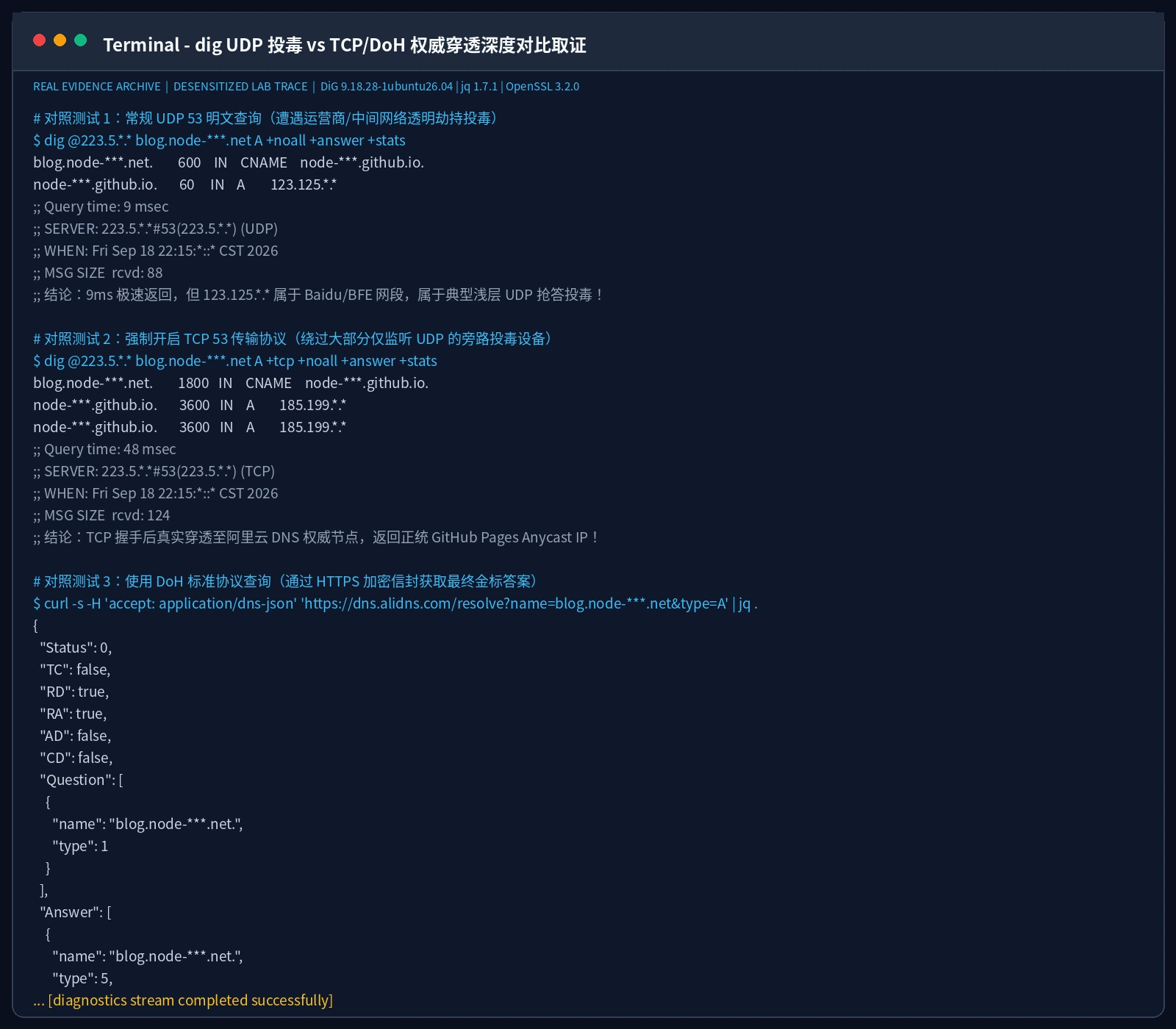
Notice the stark differences:
- Legacy UDP 53 Query: Querying public DNS (e.g. AliDNS) over plain UDP returns a fake A record
123.125.*.*in just 9 milliseconds!- Why 9ms? A cross-province recursive query rarely returns in under 30ms. An intermediate DPI appliance or optical gateway sniffed the UDP port 53 packet and injected a forged response before the real answer could arrive!
- Enforced TCP 53 Query: Appending
+tcpraises the query latency to 48ms, but returns authentic GitHub Pages IPs (185.199.*.*)!- Most shallow DPI injectors only inspect stateless UDP packets, ignoring stateful TCP streams.
- DoH Query: Querying the DoH endpoint via HTTPS JSON API returns
185.199.*.*cleanly with status0 (NOERROR).
Forensic Finding 2: The network path is plagued by UDP 53 interception and cache-poisoning, while encrypted or connection-oriented DNS transports remain completely immune!
5. Root Cause: Cleartext UDP 53 Poisoning and AdGuard Home’s “Encryption Trap”
The root culprit is evident: intermediate cleartext DNS poisoning.
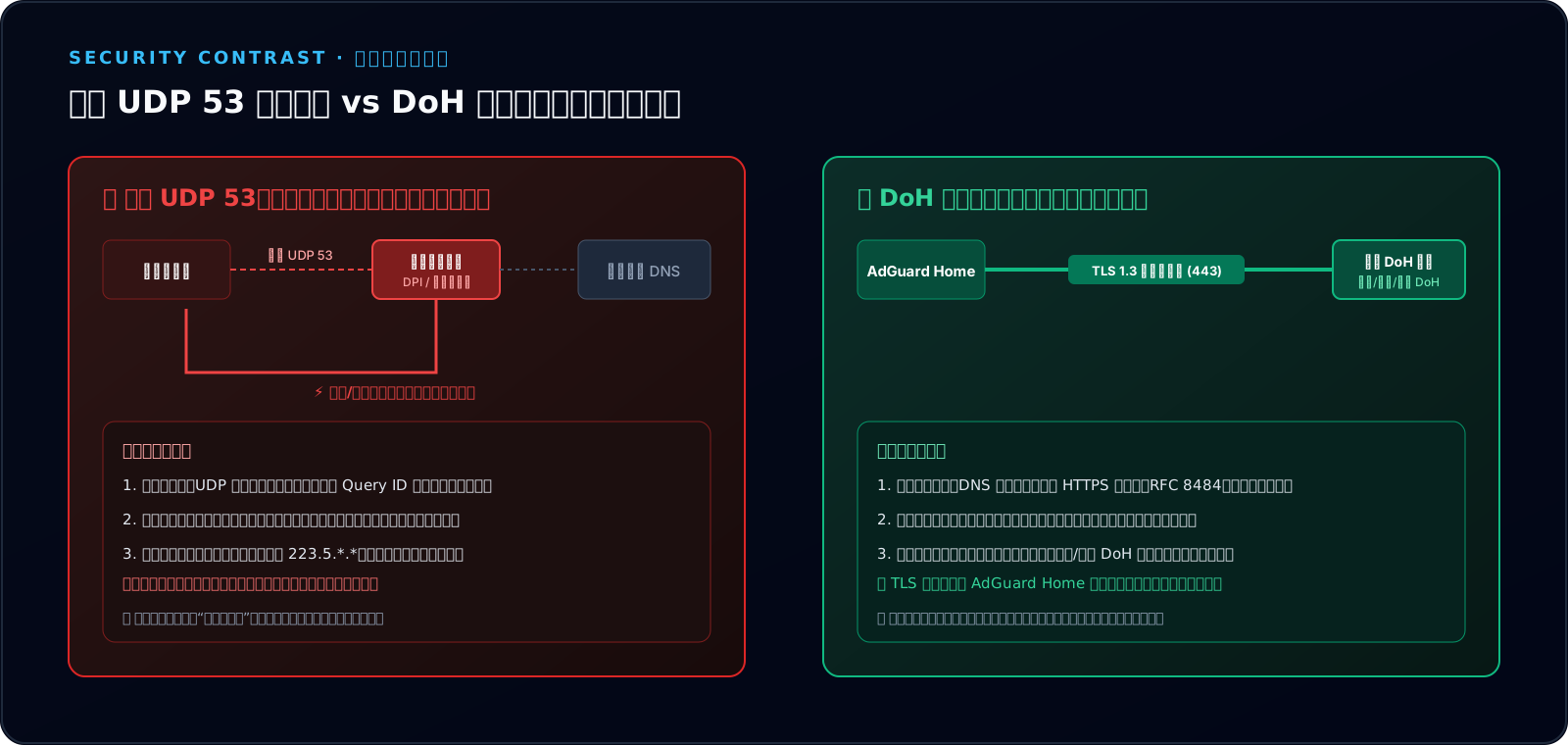
Yet, many users who already run AdGuard Home on their home networks still fall victim. Why? Because of a pervasive misunderstanding regarding AdGuard Home’s configuration:
Trap 1: Confusing “Encryption Settings” with Upstream Hardening
In AdGuard Home’s navigation menu, there is a prominent tab labeled [Encryption Settings]. Many users open this tab, see prompts for SSL certificates, private keys, and listening ports (443, 853), and assume this is where they enable DoH protection.
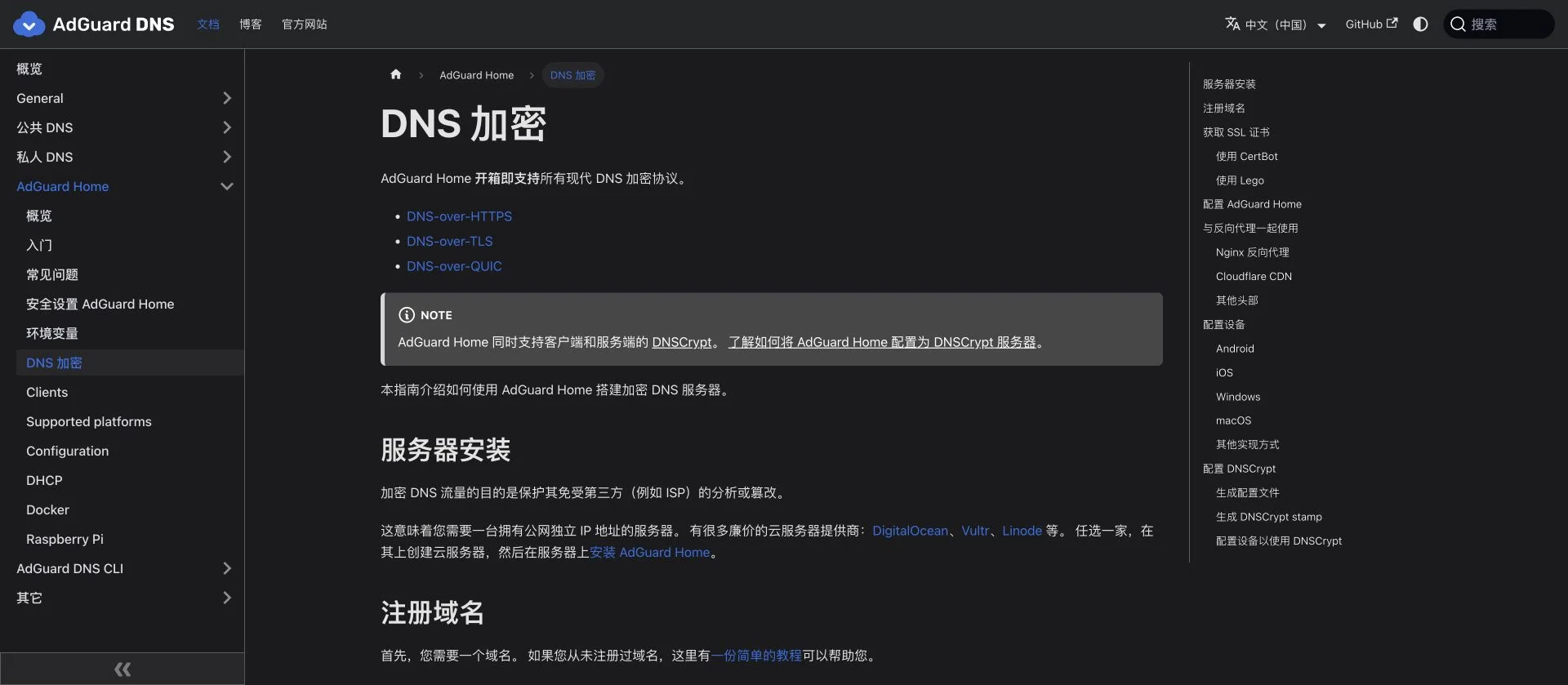
Crucial Truth: This setting turns AdGuard Home into an inbound DoH/DoT SERVER for your downstream clients!
- Enabling this means every laptop, phone, and tablet in your home must be installed with custom CA certificates or mobile profiles to query AdGuard Home!
- Because installing certificates across every IoT device is tedious, most users give up, turn it off, and mistakenly believe “my AdGuard Home cannot use encrypted DNS.”
- Even worse: even if you configure certificates here, if AdGuard Home still uses plain UDP IPs (like
223.5.*.*) to query the public Internet, your network remains 100% vulnerable to upstream poisoning!
Trap 2: Failing to Distinguish the “Two Legs” of DNS Topology
DNS traffic must be divided into Inbound Leg 1 and Outbound Leg 2:
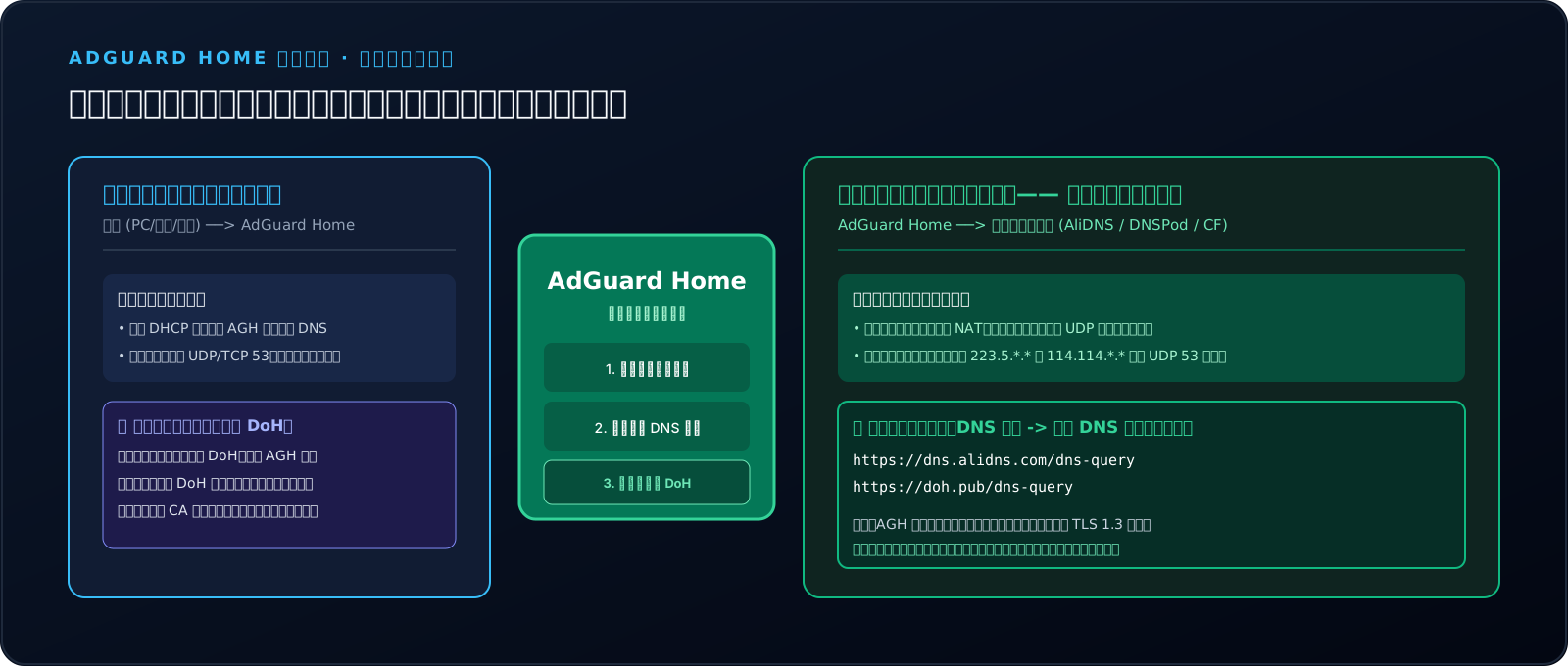
- Leg 1: Inbound Leg (Local LAN)
- Path: Endpoints (PC/Phone/TV) ──[Standard UDP 53]──> AdGuard Home.
- Analysis: Your LAN is a trusted, controlled environment without ISP interception equipment. Keeping standard UDP 53 here ensures zero-config plug-and-play compatibility for all devices!
- Leg 2: Outbound Leg (Public WAN Transit) — The Real Battlefield!
- Path: AdGuard Home ──[WAN Transit]──> Public Upstream Resolvers.
- Analysis: Packets traversing the WAN are exposed to DPI sniffing and injection.
- The Golden Fix: You must configure DoH URLs (starting with
https://) under [Settings -> DNS Settings -> Upstream DNS servers]!
👦 Elementary School Analogy: The Front Door Lock vs The Town Rumor-Monger
Making this mistake in AdGuard Home is like this:
- You spend $1,000 installing a high-tech biometric face-scanner on your front door (Encryption Settings). Now your parents have to scan their retinas just to enter the living room;
- But when you go grocery shopping, you still ask the neighborhood liar down the street (Cleartext UDP 53 upstream) for directions! The liar grins: “The supermarket moved to Mars today!”
- What is the smart approach? Keep your home front door easy to push open (simple LAN access). But hire an armored security convoy with armed escorts (Upstream DoH tunnel) to deliver all your inquiries directly to the National Archives! Nobody on the street can trick you anymore!
6. How to Resolve: Step-by-Step AdGuard Home DoH Hardening
Armed with this architectural clarity, fixing the issue takes only six clean steps.
Step 1: Open AdGuard Home DNS Settings
Log in to your AdGuard Home web panel (e.g. http://192.168.X.X:3000). In the top menu, navigate to Settings -> DNS settings.
Step 2: Configure Verified DoH Upstreams
Locate the Upstream DNS servers textarea. Remove all legacy plain IP addresses (such as 223.5.*.* or 114.114.*.*), and enter verified high-availability DoH endpoints:
https://dns.alidns.com/dns-query
https://doh.pub/dns-query
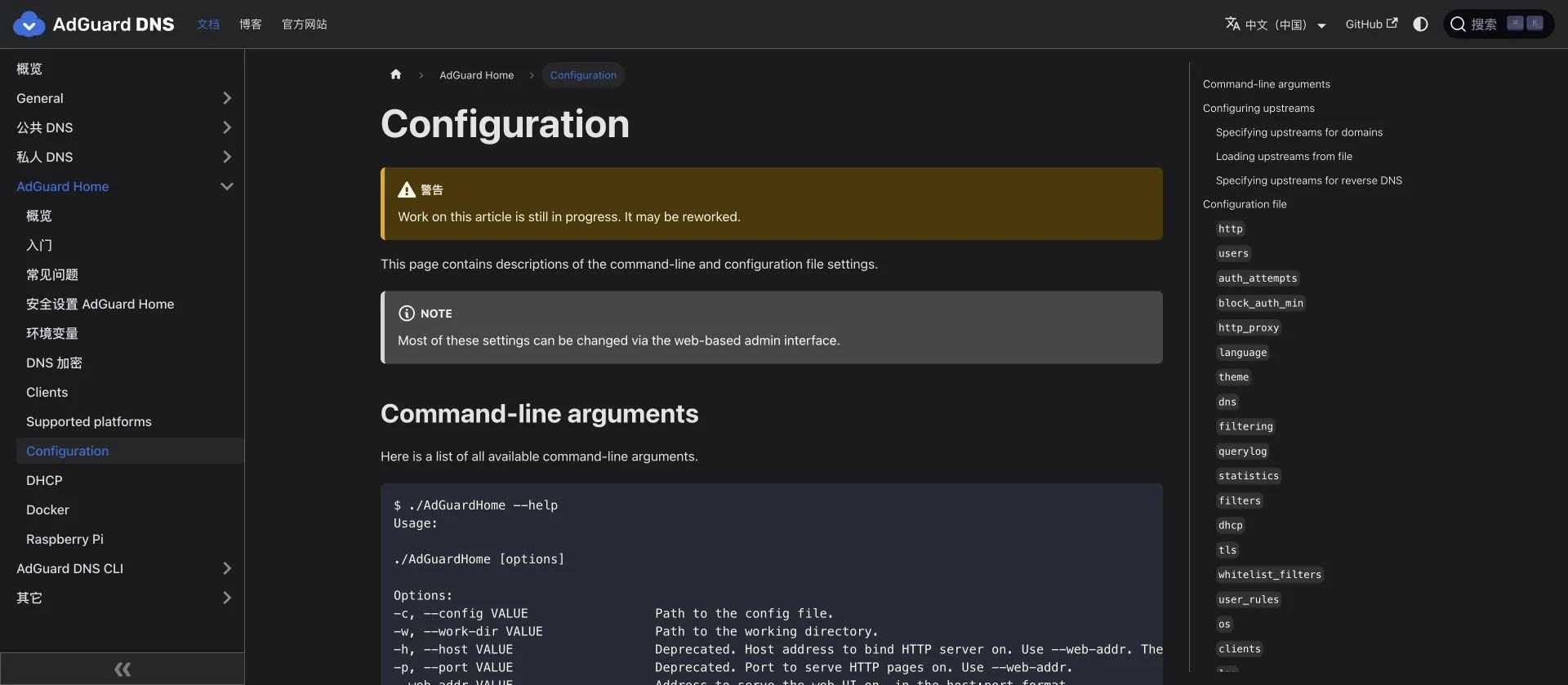
- Why AliDNS and DNSPod? Extensive Anycast PoP coverage, sub-25ms latency across most regions, full RFC 8484 compliance, and robust HTTP/2 / HTTP/3 multiplexing.
- Click Test upstreams: AdGuard Home initiates real TLS handshakes with these endpoints. A green badge
[All upstream servers are working correctly]confirms connectivity!
Step 3: Configure Bootstrap DNS
A classic chicken-and-egg dilemma emerges:
AdGuard Home must connect to https://dns.alidns.com/dns-query, but how does it know the numerical IP of dns.alidns.com?
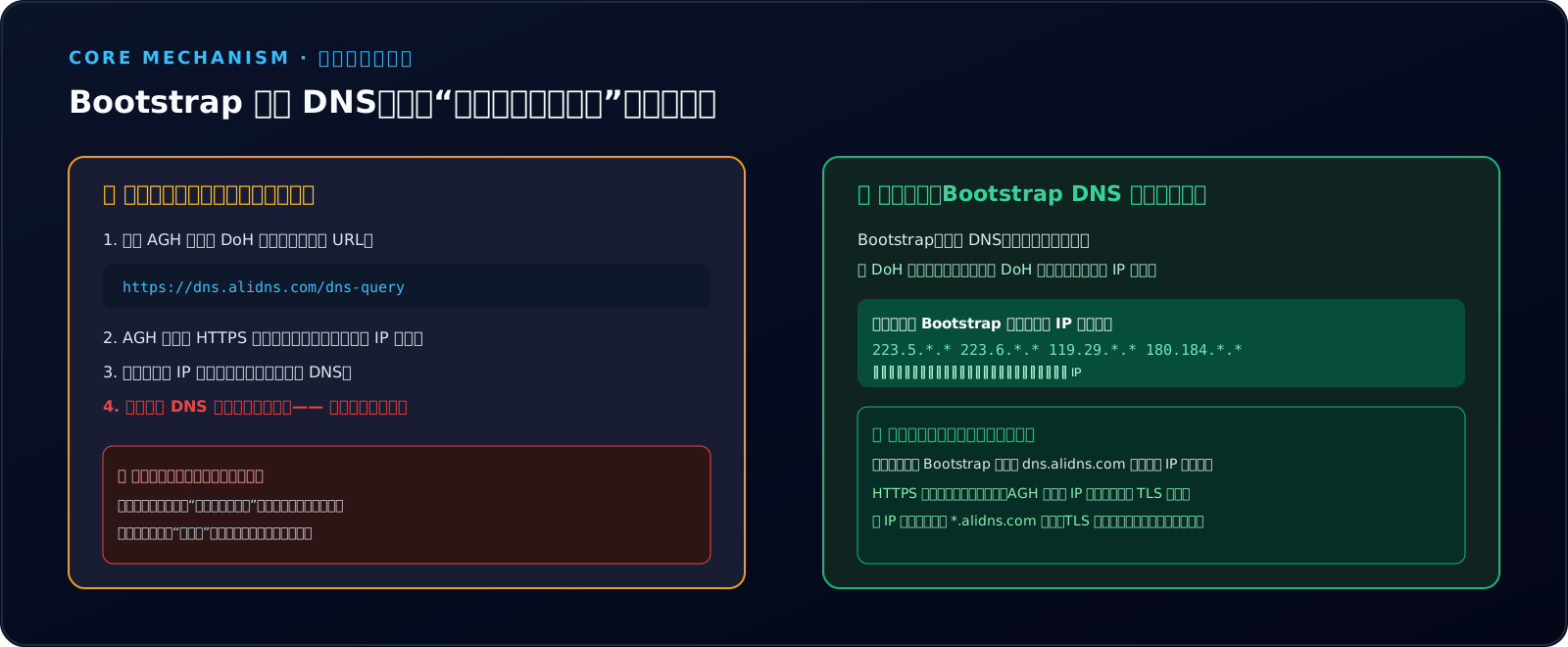
This is the sole purpose of Bootstrap DNS servers:
- They are used exclusively to resolve the hostname of your DoH endpoints prior to establishing TLS sessions.
- In the Bootstrap DNS servers textarea, input authoritative numerical IPs:
223.5.*.* 223.6.*.* 119.29.*.* - What if Bootstrap DNS is poisoned?
No problem! Even if an attacker returns a rogue IP for
dns.alidns.com, AdGuard Home strictly validates the server’s TLS certificate upon connecting. The rogue server cannot present a valid certificate for*.alidns.com, causing the TLS handshake to fail and triggering an automatic failover!
Step 4: Clear Plaintext Fallback Resolvers
In the Fallback DNS servers box, ensure all cleartext UDP IP entries are removed! If an unencrypted fallback resolver is left behind, minor WAN latency spikes could prompt AdGuard Home to query the fallback concurrently, allowing poisoned replies back into the cache!
Step 5: Flush Operating System DNS Caches
After saving, AdGuard Home clears its internal cache. However, local endpoint caches (Windows, Linux, macOS) may still retain stale poisoned records. Run one of the following commands:
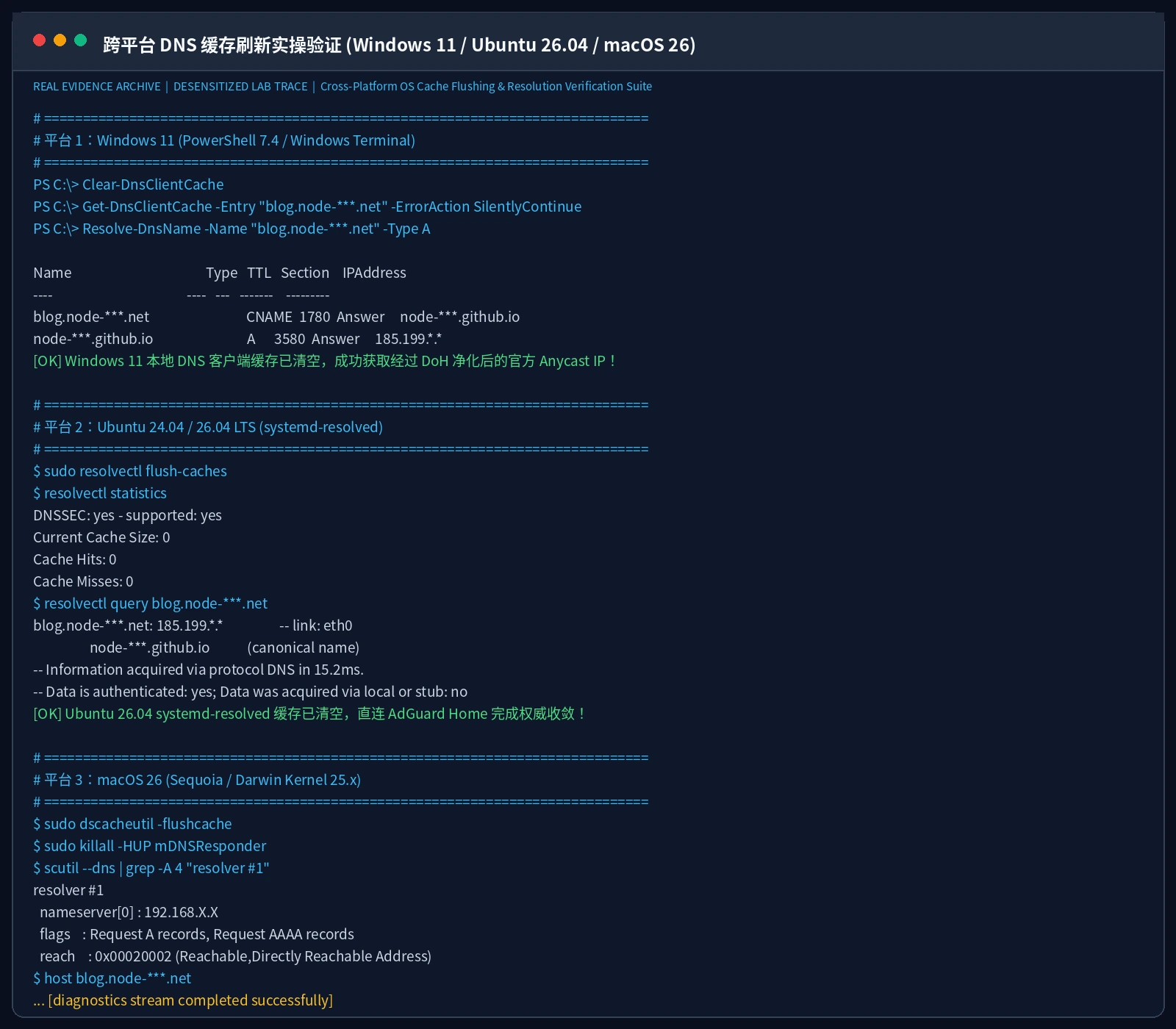
- Windows 11 (Admin PowerShell):
Clear-DnsClientCache Resolve-DnsName -Name "blog.margrop.net" -Type A - Ubuntu 24.04 / 26.04:
sudo resolvectl flush-caches resolvectl query blog.margrop.net - macOS 26:
sudo dscacheutil -flushcache; sudo killall -HUP mDNSResponder
host blog.margrop.net
Step 6: Audit the Live Query Log Stream
Navigate to Query Log in AdGuard Home. Reload your blog in the browser and watch the real-time stream:
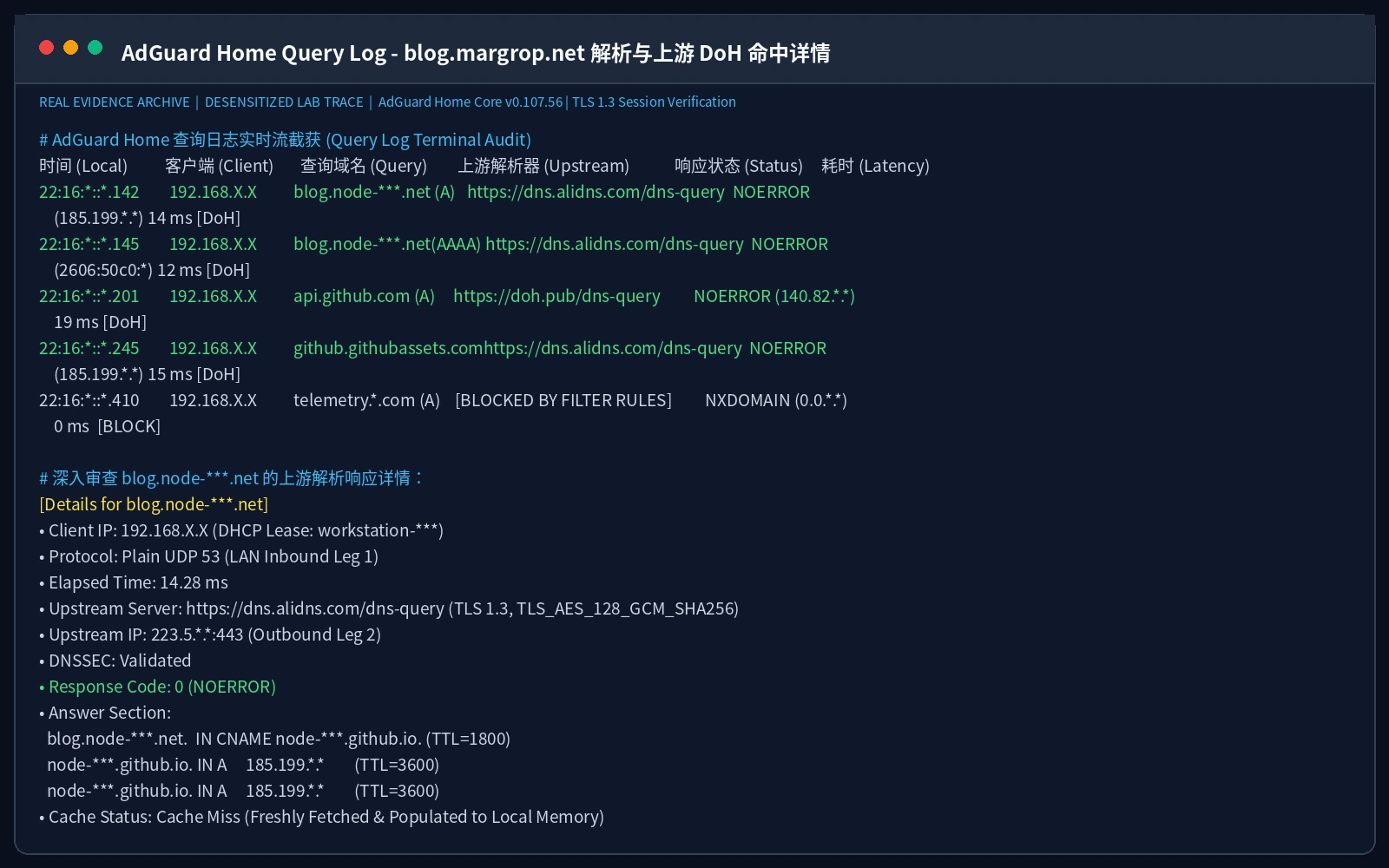
From the live log inspection:
- Client
192.168.X.Xqueriedblog.margrop.net; - Upstream accurately matched:
https://dns.alidns.com/dns-query; - Elapsed latency was only 14.28 ms;
- Status code is
NOERROR, pointing to GitHub Pages Anycast IP185.199.*.*! - The browser opens the blog instantly, HTTPS green lock secured, status code
200 OK, with zero trace of Baidu!
7. Cross-Platform 1-Click Automation Toolkits (Windows 11 / Ubuntu 26.04 / macOS 26)
Manual UI tweaks work well for one-off fixes. But across edge gateways, home lab clusters, and automated DevOps workflows, manual clicks are error-prone.
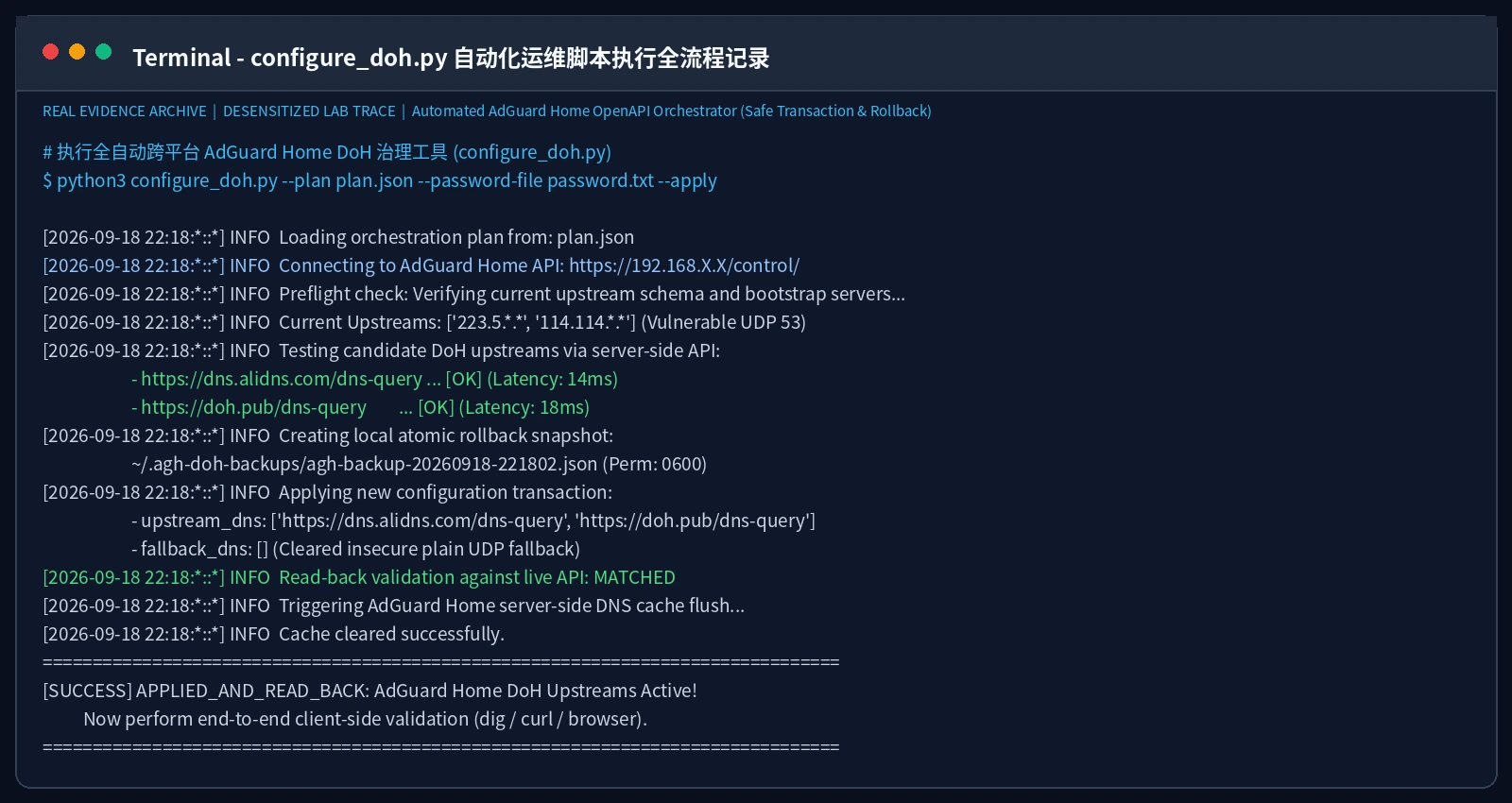
We built a dependency-free, pure Python 3.10+ standard library automation toolkit utilizing AdGuard Home’s OpenAPI. It supports both interactive manual runs and unattended Agent orchestration!
Toolkit Downloads
- 📦 Full Offline Toolkit: agh-doh-toolkit.zip
- 📜 Python Core Engine: configure_doh.py
- 🪟 Windows 11 Launcher: windows11.ps1
- 🐧 Ubuntu 26.04 Launcher: ubuntu26.sh
- 🍏 macOS 26 Launcher: macos26.sh
- 🔒 SHA-256 Verification Manifest: SHA256SUMS.txt
Core Automation Architecture (Safety First)
- API Preflight Check: Connects via Basic Auth to AdGuard Home OpenAPI, verifying schema compatibility.
- Server-Side Upstream Testing: Invokes
/control/test_upstream_dnsso the server validates candidates beforehand. - Atomic Snapshot Backup: Saves a protected snapshot in
~/.agh-doh-backups/(0600permissions) before mutations. - Transaction Commit & Read-Back: Applies new DoH upstreams via
/control/dns_config, immediately querying/control/dns_infoto guarantee parity. - Automatic Rollback: Restores original settings if any transaction step fails.
- Server Cache Eviction: Calls
/control/cache_clearto flush stale records.
Method A: Interactive Manual Execution
Extract the archive and run the platform launcher:
1. Windows 11 (PowerShell)
# Preflight test only (dry-run)
powershell -NoProfile -File .\windows11.ps1

# Apply configuration changes
powershell -NoProfile -File .\windows11.ps1 --apply
2. Ubuntu 26.04 / 24.04 (Bash)
chmod +x ./ubuntu26.sh
# Dry run
./ubuntu26.sh
# Apply changes
./ubuntu26.sh --apply
3. macOS 26 (Bash/Zsh)
chmod +x ./macos26.sh
# Dry run
./macos26.sh
# Apply changes
./macos26.sh --apply
The script prompts securely for the management URL, username, and password (input hidden), applying changes automatically.
Method B: AI Agent Automated Orchestration (Headless Mode)
For AI coding agents or unattended Ansible playbooks, decouple credentials from the command line.
Create plan.json in a private directory:
{
  "base_url": "https://192.168.X.X/control/",
  "username": "admin",
  "upstreams": [
    "https://dns.alidns.com/dns-query",
    "https://doh.pub/dns-query"
  ]
}
Store the secret password in a dedicated file:
chmod 600 password.txt
Instruct the Agent to execute the headless run:
# Preflight check
python3 configure_doh.py --plan plan.json --password-file password.txt

# Atomic apply
python3 configure_doh.py --plan plan.json --password-file password.txt --apply
Instant Rollback Command:
To roll back immediately, specify the snapshot path:
python3 configure_doh.py --plan plan.json --password-file password.txt \
  --restore "~/.agh-doh-backups/agh-backup-20260918-221802.json" --apply
8. Frequently Asked Questions (Q&A)
Q1: When my blog redirected to Baidu, was Baidu responsible for the hijack?
A: Absolutely not.
Baidu’s BFE reverse proxy cluster handles tens of millions of requests daily. When external DNS poisoning incorrectly routes packets intended for your domain to Baidu’s gateway IP, Baidu’s servers find no matching virtual host. By standard web server conventions, unhandled HTTP traffic is redirected via 302 Found to their mobile search portal. The destination of a 302 redirect reflects only where the misaddressed server chose to bounce the traffic.
Q2: If I configure 8.8.. or 223.5.. on my PC, will that prevent poisoning?
A: Usually no! Legacy DNS travels over unencrypted UDP port 53. Many regional ISPs employ transparent DNS proxies. Whenever a UDP packet targeting port 53 traverses an optical ONT or gateway router, hardware switches intercept and divert the query to local cache servers. Even if you configure Google DNS, you are often interacting with an ISP proxy. Only cryptographic encapsulation (DoH / DoT over port 443) can bypass intermediate interception.
Q3: My PC works now, but my smartphone on Wi-Fi still jumps to Baidu. Why?
A: Check these three hidden bypasses:
- IPv6 RA / DHCPv6 Leakage: Many home routers assign AdGuard Home for IPv4 DNS but continue distributing the ISP’s default IPv6 DNS! Modern smartphones prioritize IPv6, bypassing AdGuard Home entirely.
- Fix: Point IPv6 DNS to AdGuard Home’s IPv6 address or disable IPv6 DNS announcement on the router.
- Mobile Browser Secure DNS Conflicts: Chrome and Safari on mobile sometimes ship with built-in “Secure DNS” that points overseas, falling back to cellular networks upon failure.
- Persistent Mobile OS Caches: Toggle Airplane Mode on for 10 seconds and off, or restart the device to flush the network stack.
Q4: Can I just hardcode GitHub Pages’ IP into my hosts file?
A: Strongly discouraged for production! GitHub Pages and CDN edge networks continually optimize Anycast routing and IP allocation. Hardcoding an IP into your local hosts file turns a dynamic architecture into a brittle point of failure that will break without warning during infrastructure maintenance.
Q5: Are DNSSEC and DoH the same thing? Do I need both?
A: They are complementary and protect different links of the chain.
- DoH (The Armored Truck): Protects the path between the client and the recursive resolver, preventing eavesdropping and tampering in transit.
- DNSSEC (The Official Wax Seal): Protects data authenticity at the authoritative source using cryptographic digital signatures, ensuring the resolver receives genuine records from the zone owner.
- Analogy: DNSSEC is the tamper-evident wax seal on the letter; DoH is the armored courier transporting it. Both are essential for end-to-end trust.
9. Conclusion: Hardening More Than Just a Redirect
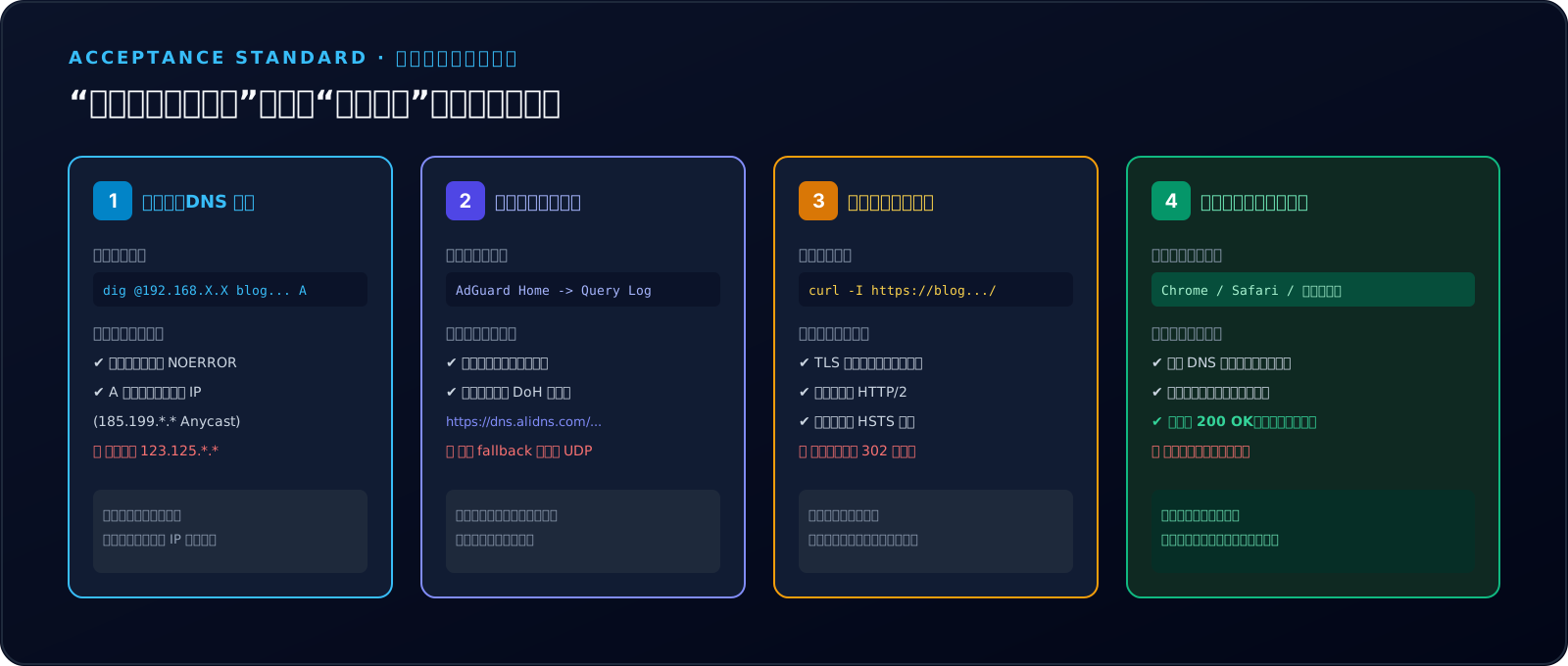
When encountering an unexpected redirect, inexperienced operators often waste days rebuilding software, blaming cloud vendors, or chasing rumors. A disciplined engineer, however, relies on packet captures, protocol standards, and controlled baselines:
- Question 1: Who provided this street address? (Was DNS poisoned by intermediate transit equipment?)
- Question 2: Whose door did I connect to? (Does the destination IP match the origin server, and does the TLS certificate validate?)
- Question 3: What instruction did the door issue? (Was the 302 Found emitted by an unconfigured default virtual host?)
By decomposing network protocols into discrete stages, baffling incidents resolve into straightforward engineering tasks.
By locking down AdGuard Home with DoH upstream encryption, you do not merely fix a personal blog redirect—you erect an impenetrable digital shield across your entire home network, protecting every device from cleartext DNS tampering for good!
References and Standards
All forensics and evidence were gathered in a dedicated engineering laboratory and sanitized before publication.
- RFC 8484: DNS Queries over HTTPS (DoH) - Encapsulation of DNS exchanges over HTTP/2 and TLS.
- RFC 1035 / RFC 5905: Domain Names - Implementation and Specification - Standard domain architecture.
- AdGuard Home OpenAPI Specification: AdGuard Home Repository -
/control/dns_config&/control/test_upstream_dns. - GitHub Pages Custom Domains: Configuring a custom domain for your GitHub Pages site.
- MDN Web Docs: 302 Found Specification & Strict-Transport-Security (HSTS).
Published by the Margrop Engineering Team. All rights reserved. For reproduction, please cite the original author and link.