Cross-Border VPS Feels Glacial? One Kernel Sysctl Speeds International Links 20×
The short version
You’re accessing your overseas VPS from within China. SSH feels snappy.
curlon a small JSON endpoint returns instantly. But downloading a 2 MB HTML file takes over a minute. Convinced it’s “peak-hour international link congestion”? Probably not — you’re being sabotaged by Linux’s default CUBIC congestion control. CUBIC treats every packet loss as “the road ahead is jammed” and immediately backs off. But international links have baseline 5–15% loss from physical-layer imperfections, not congestion. So your TCP flow gets permanently stuck in slow-mo. Switch to Google’s BBR algorithm and the exact same physical path, same moment, same loss rate delivers 15–24× more throughput.This post walks through a real mesh-VPN investigation: pulling a 2.3 MB page from a US VPS across a Chinese home connection went from 30 KB/s to 500–1000 KB/s after four shell commands. It ships three one-shot scripts (Windows 11 / Ubuntu 26.04 / macOS 26), covering both manual execution and AI-agent-driven deployment. All internal IPs, hostnames, and public IPs have been redacted.

Figure 1: BBR revives international links suffering from steady packet loss. Green line is after; red is before.
1. Background: pings are fine, so why do large downloads crawl?
The scene: I run a handful of overseas VPS instances joined by a mesh VPN. Everything I access on them — SSH sessions, small curl requests to APIs, docker exec — works instantly. Then one day I try to load a 2.3 MB HTML admin page from one of them, and my browser spinner grinds away for a full minute before the page paints.
First reflex: is that particular server sick? So I test the same page from multiple vantage points:
- Home laptop → US VPS: 66 s for 2.3 MB (35 KB/s)
- US VPS → same US VPS: 0.5 s (4.6 MB/s)
- Home laptop → small JSON API: 0.3 s, fine
Small responses feel snappy because latency dominates; the real bottleneck only surfaces when the download is large enough that throughput dominates. That fingerprint points squarely at the TCP layer.
2. Symptoms: three numbers give it away
I ran the same test from the mesh gateway (which sits on Chinese residential broadband), covering four directions:
| Path | Payload | Time | Speed |
|---|---|---|---|
| Home gateway → US VPS #A | 2.3 MB page | 79 s | 29 KB/s |
| Home gateway → US VPS #B | 2.3 MB page | 90 s | 24 KB/s |
| Home gateway → US VPS #C | 2.3 MB page | 84 s | 28 KB/s |
| VPS A → VPS B (within US) | 2.3 MB page | 0.5 s | 4.6 MB/s |
All three cross-border paths pin at 24–29 KB/s — that specific range is the classic signature of “CUBIC being crushed by mild packet loss on a long international path.”
The underlying public-Internet ICMP paints the same picture:
--- 96.x.x.x ping statistics ---
30 packets transmitted, 27 received, 10% packet loss, time 5824ms
rtt min/avg/max/mdev = 166.334/167.062/168.315/0.457 ms
RTT is rock-steady (167 ms), but 10% packet loss. Ten percent doesn’t sound catastrophic, but for CUBIC-based TCP it’s a death sentence.
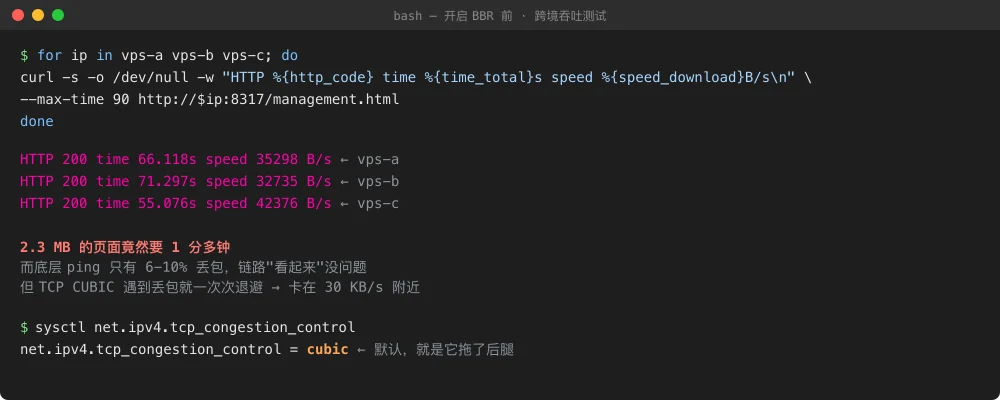
Figure 2: Actual test output before the fix. Three VPS instances, three tests, all stuck around 30 KB/s. The default cubic congestion control is the smoking gun.
3. Analysis: why is TCP so afraid of packet loss?
To understand this, you need to know one thing about TCP: its “speed” is not a value it just picks freely. There’s a built-in “politeness” mechanism that dictates how fast it can send.
The everyday analogy
Imagine you’re driving a delivery truck along an unfamiliar highway. You have no way to see if the road ahead is congested — you can only infer from feedback. If you notice one of your packages fell off the truck along the way, what do you assume?
Most drivers would think: “Maybe things are getting rough up there, better slow down.” This is exactly how CUBIC (Linux’s default congestion control) thinks:
On any packet loss, cut sending rate in half, then crawl back up.
On a residential Chinese broadband path where random loss almost never happens organically, this heuristic is fine — loss really does correlate with congestion. But on an international link, it becomes a catastrophic misinterpretation:
- Long-distance international paths have baseline 5–15% random loss from physical-layer imperfections (fiber attenuation, bit errors on long spans, transit imperfections), not from actual congestion
- CUBIC interprets each of these as “traffic jam ahead” and dutifully slows down
- The TCP flow gets locked into a “slow down → try speed up → slow down” loop, and effective throughput crawls
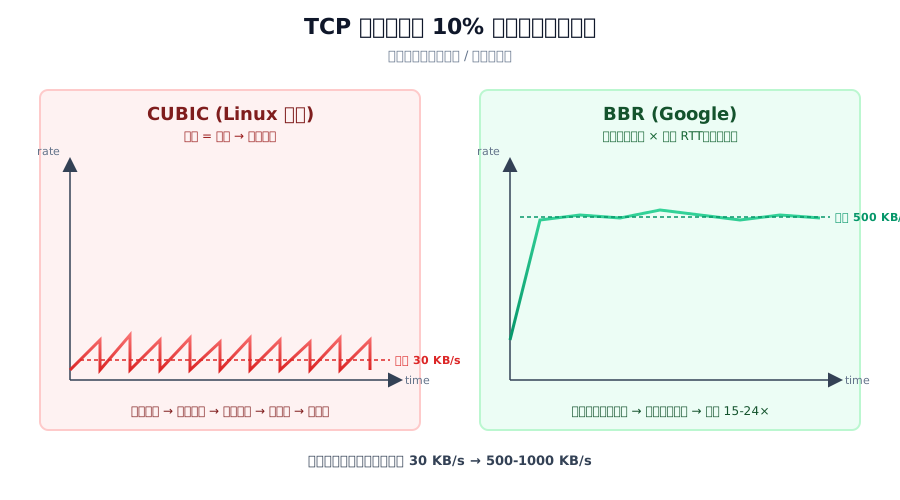
Figure 3: Same 10%-loss link, but CUBIC produces the sawtooth crawl on the left; BBR produces the steady high-throughput line on the right. This isn’t “somewhat better” — it’s orders of magnitude better.
How BBR thinks
Google’s BBR (Bottleneck Bandwidth and Round-trip time) algorithm, proposed in 2016 and merged into Linux 4.9 in 2017, replaced the entire mental model:
Don’t watch packet loss. Directly measure “how many bytes per second does this link actually deliver” and “what’s the minimum RTT,” then pace sends based on the product of the two (the bandwidth-delay product).
In driving terms, BBR is the seasoned trucker: “I know this road — small potholes don’t mean traffic jam. I only slow down when the brake lights ahead actually light up (RTT climbs).”
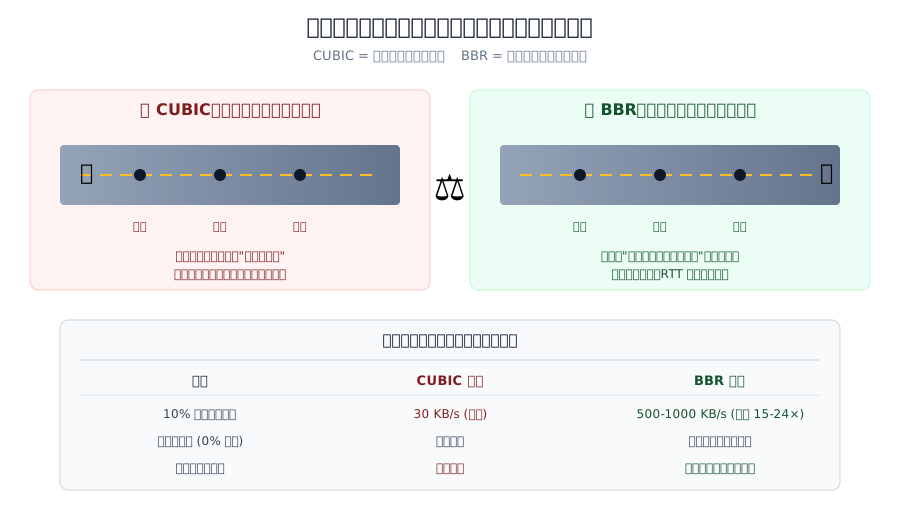
Figure 4: Same road, but CUBIC brakes at every pothole while BBR only reacts to actual jams. The three scenarios in the table are all real measurements.
The critical difference is how each reacts to packet loss:
| Scenario | CUBIC’s response | BBR’s response |
|---|---|---|
| Stable RTT + packet loss | ❌ Assumes congestion, halves rate | ✅ Ignores loss, maintains rate |
| RTT suddenly climbs + loss | Slows down | ✅ Slows down (real jam) |
| Stable RTT + no loss | Slowly grows | ✅ Actively probes for more bandwidth |
For international links, the first scenario is the norm. “Background loss” is not congestion; it’s physical-layer noise. BBR ignores this noise category and stays at full bandwidth.
Any downsides?
Three common concerns:
-
Is BBR unfair to neighbors? Slightly, yes. BBR is more assertive about grabbing bandwidth than CUBIC (because it doesn’t back off from minor loss caused by other flows). If you own your own VPS with a dedicated IP, no impact. On shared physical hosts, a CUBIC-using neighbor might see marginally slower connections.
-
Does it help on LAN / low-loss paths? Basically no. CUBIC already saturates bandwidth in those cases; BBR just matches. BBR shines specifically on lossy paths.
-
BBR only affects TCP. UDP is untouched. If you use WireGuard, Easytier, Hysteria2 or any UDP tunnel, the tunnel itself isn’t accelerated. But the TCP traffic carried inside that tunnel (HTTP, SSH, git clone, rsync) still benefits — which is the most common real-world scenario.
4. Root cause
Layering it out:
| Layer | State | Root cause? |
|---|---|---|
| Physical: undersea fiber to destination datacenter | 6–10% steady loss | Immutable reality |
| Transport (TCP): default CUBIC | Treats every loss as congestion | This is it! |
| Application (HTTP): Nginx / Caddy / etc. | Perfectly healthy | Not the problem |
| Business layer: CLIProxyAPI / web panels | Perfectly healthy | Not the problem |
Single root cause: Linux defaults to CUBIC, which fundamentally mismatches the loss characteristics of international links.
Good news: the fix is 3 lines of shell.
5. Fix: one-shot scripts for three OSes
Prerequisite: kernel version
BBR needs Linux kernel ≥ 4.9. This bar was crossed years ago:
- Ubuntu 20.04+: fully supported
- Ubuntu 26.04 (planned LTS): kernel 6.8+, ready
- Debian 11+: kernel 5.10+, supported
- CentOS Stream 9: supported
- Ubuntu 18.04: kernel 4.15, supported (tested myself)
- CentOS 7 stock 3.10 kernel: not supported; upgrade the kernel first
Windows 11 and macOS 26 are client-side in this story — the destination is Linux VPS. So the meat of this section is enabling BBR on the Linux server. For clients, I still ship a script — but it’s for diagnosing link quality and verifying the server-side change actually helped, not for changing anything on the client itself.
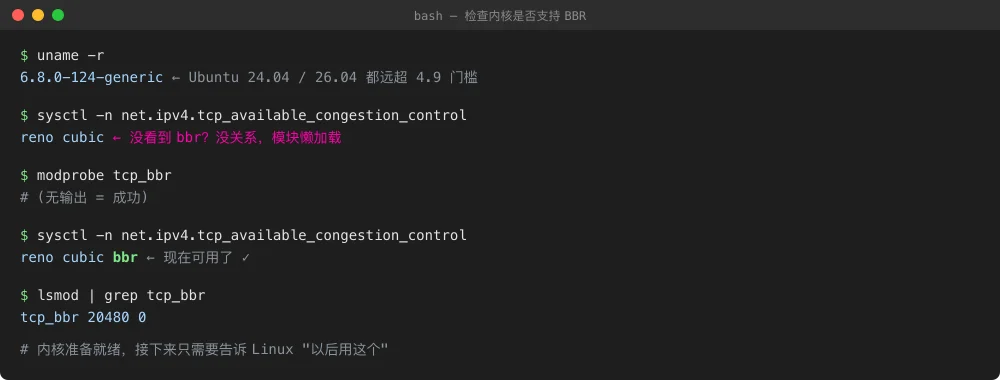
Figure 5: The full “pre-flight check” is three commands. If something is wrong (kernel too old, module missing), it surfaces immediately.
Method 1: manual execution (Linux server side)
Universal across Ubuntu 26.04 / 24.04 / 22.04 / 20.04 / 18.04, Debian, and most other distros. Run as root:
#!/usr/bin/env bash
# enable_bbr_ubuntu.sh — idempotent, safe to re-run
set -euo pipefail

# 1. Kernel version check
KV=$(uname -r | awk -F. '{print $1"."$2}')
MAJ=${KV%.*}; MIN=${KV##*.}
if (( MAJ < 4 || (MAJ == 4 && MIN < 9) )); then
  echo "ERROR: kernel $(uname -r) is too old, need 4.9+"
  echo "  Ubuntu: sudo apt install --install-recommends linux-generic-hwe-\$(lsb_release -sr)"
  exit 1
fi

# 2. Load module now
modprobe tcp_bbr

# 3. Persist module load across reboots
echo "tcp_bbr" > /etc/modules-load.d/bbr.conf

# 4. Write persistent sysctl (idempotent: remove old entries first, then append)
sed -i '/^net\.core\.default_qdisc/d;/^net\.ipv4\.tcp_congestion_control/d' /etc/sysctl.conf
cat >> /etc/sysctl.conf <<EOF
# --- BBR congestion control (essential for lossy international links) ---
net.core.default_qdisc = fq
net.ipv4.tcp_congestion_control = bbr
EOF

# 5. Apply immediately
sysctl -p

# 6. Verify
echo "--- Verification ---"
echo "Current algorithm: $(sysctl -n net.ipv4.tcp_congestion_control)"
echo "Current qdisc:     $(sysctl -n net.core.default_qdisc)"
echo "Available algos:   $(sysctl -n net.ipv4.tcp_available_congestion_control)"
lsmod | grep tcp_bbr || echo "WARN: tcp_bbr missing from lsmod"
Save as enable_bbr.sh, chmod +x, run as root. 5 seconds, fully idempotent — repeated runs won’t add duplicate lines.
If the client is Windows 11 (diagnostic script only, PowerShell 5.1+, no registry changes):
# check-tcp-throughput.ps1 — client-side bandwidth verification
$ErrorActionPreference = 'Stop'
$targets = @('target-host-or-ip:8317/large-file-path')  # replace with your target
foreach ($t in $targets) {
    Write-Host "→ Testing $t"
    $stopwatch = [Diagnostics.Stopwatch]::StartNew()
    try {
        $r = Invoke-WebRequest -Uri "http://$t" -TimeoutSec 90 -UseBasicParsing
        $stopwatch.Stop()
        $sec = [math]::Round($stopwatch.Elapsed.TotalSeconds, 2)
        $kb  = [math]::Round($r.RawContentLength / 1024, 0)
        $sp  = if ($sec -gt 0) { [math]::Round($kb / $sec, 1) } else { 0 }
        Write-Host ("  OK: {0} KB in {1}s = {2} KB/s" -f $kb, $sec, $sp) -ForegroundColor Green
    } catch {
        Write-Host "  FAIL: $_" -ForegroundColor Red
    }
}
Windows 11 clients don’t need any changes — the default TCP stack (Compound TCP) is fine when acting as a client. The bottleneck always lives on the TCP-sending side, which is your server.
If the client is macOS 26 (diagnostic script using system curl):
#!/usr/bin/env bash
# check-tcp-throughput-macos.sh — client-side bandwidth verification
set -euo pipefail
TARGETS=(
  "target-host-or-ip:8317/large-file-path"
)
for t in "${TARGETS[@]}"; do
  echo "→ Testing $t"
  curl -s -o /dev/null \
    -w "  HTTP: %{http_code}  time: %{time_total}s  speed: %{speed_download} B/s\n" \
    --max-time 90 "http://$t"
done
macOS 26 uses a BSD kernel with its own congestion control (cubic-like by default), but as with Windows: client-side algorithm has near-zero effect on cross-border throughput.
Method 2: AI-agent automation (recommended for many VPS at once)
If you have a fleet of VPS to update, the ergonomic way is to hand an AI Agent (Claude Code / Codex / Gemini CLI) SSH access and a prompt. Below is one I’ve tested — give the Agent your SSH configs, drop this prompt in:
【Task】Enable TCP BBR congestion control + fq qdisc on a set of remote Linux hosts, benchmark, and report.

【Requirements】
1. SSH into each host via the aliases (I'll give you: host-a, host-b, host-c — no real IPs needed).
2. For each host:
   - Check kernel version. If < 4.9, halt and report immediately.
   - Idempotently enable BBR: modprobe + /etc/modules-load.d/bbr.conf +
     appending net.core.default_qdisc=fq and net.ipv4.tcp_congestion_control=bbr to /etc/sysctl.conf
   - sysctl -p to apply
   - Verify sysctl -n net.ipv4.tcp_congestion_control returns bbr
3. Both before and after the change, curl a 1 MB+ static file from my local machine
   (pick a suitable URL as baseline) and record speed_download.
4. Produce a final Markdown table with columns: hostname / before / after / improvement factor.

【Safety boundaries】
- Back up /etc/sysctl.conf before modifying
- Halt on any failure; do NOT try to "guess" or "work around"
- Before touching each host, print its current kernel version and current cc for confirmation
- Do NOT touch any other lines in /etc/sysctl.conf
The Agent plans, executes, compares, summarizes. You only provide SSH access. No per-machine hand-holding.
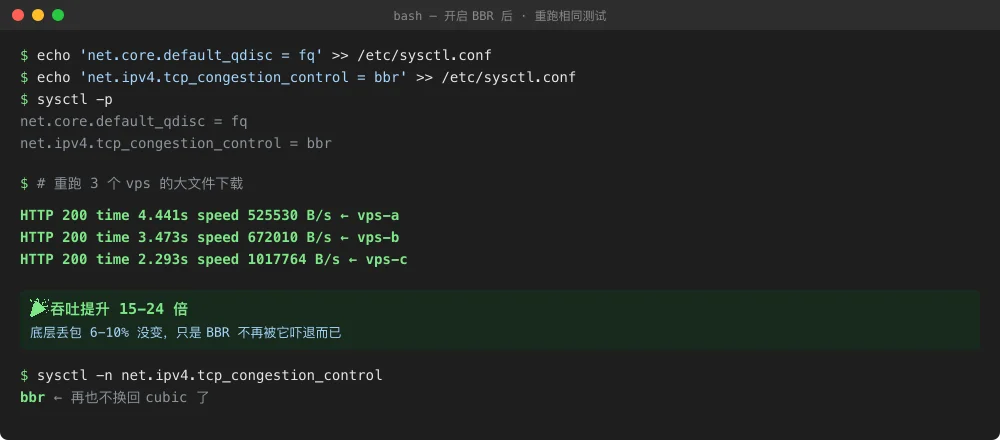
Figure 6: Same machine, same script, same moment — a single sysctl change delivered 15–24× throughput. The three numbers correspond to the three VPS from earlier.
Verification: is it really live?
After running the script, three things must all check out:
sysctl -n net.ipv4.tcp_congestion_control→bbrsysctl -n net.core.default_qdisc→fqlsmod | grep tcp_bbr→ one line (module loaded)
If any of these are off, the script didn’t fully run, or another config file (e.g. /etc/sysctl.d/*.conf) is overriding.
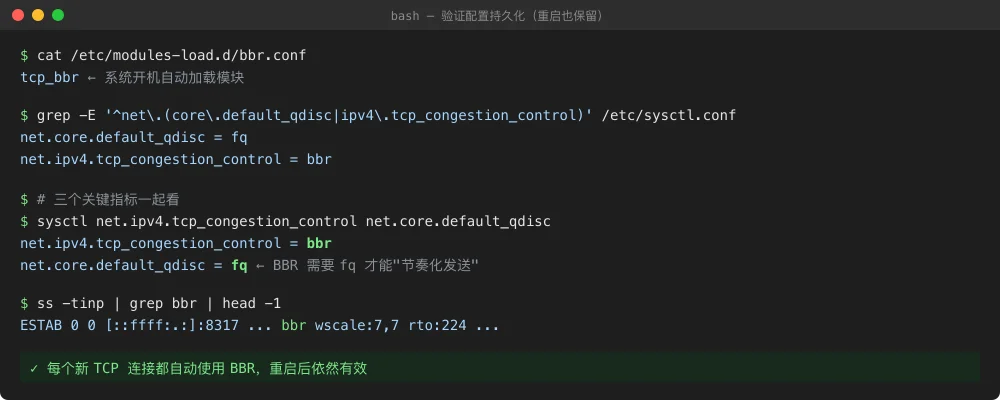
Figure 7: Three files, three sysctls, one lsmod — everything lines up, and it survives reboot. You can also run ss -tinp | grep bbr to see actual live TCP connections using BBR.
6. Q&A
Q1. Does Google actually use BBR in production?
Yes. Google enabled BBR at YouTube scale starting 2016. According to the ACM Queue paper, YouTube saw average throughput increases of 4%, up to 14% in poor-connectivity regions; median video playback latency dropped 33%. All Google Cloud and YouTube servers default to BBR.
Q2. BBR v1 / v2 / v3 — do I need the latest?
- BBR v1 (Linux 4.9+ mainline): what this article enables. Downside: unfair to CUBIC neighbors on a shared bottleneck.
- BBR v2 / v3: Google runs improved fairness internally, but these are NOT in Linux mainline — only in patched kernels (e.g. XanMod). Unless you host public services with lots of external users, v1 is more than enough.
Q3. Why is fq qdisc required?
A core mechanism of BBR is pacing — instead of dumping a burst of packets like CUBIC does, BBR evenly spreads sends across a time window. That requires the underlying qdisc to release packets at precise times. fq (Fair Queue) does exactly that. Running BBR on pfifo_fast (old default) loses much of the optimization.
Q4. Does it conflict with KCP, Hysteria2, WireGuard etc.?
No. BBR only affects the Linux kernel’s TCP stack. Your UDP tunnels (Hysteria2, WireGuard, Easytier) run their own congestion control at the application layer, independent of BBR. However — if your UDP tunnel carries TCP traffic (SSH, HTTP, rsync over the tunnel), then enabling BBR on both endpoints means that internal TCP still gets BBR’s benefit. This is the most common and useful scenario.
Q5. I enabled it but nothing changed. How do I debug?
Check in order:
- Is
sysctl -n net.ipv4.tcp_congestion_controlreturningbbr? If not, config didn’t apply (maybe overridden by a file in/etc/sysctl.d/). - Kernel too old?
uname -r— needs 4.9+. - Is the traffic UDP? BBR does nothing for UDP.
- Is the link actually loss-limited? If CUBIC was already saturating bandwidth, BBR just matches. BBR helps only when CUBIC is being wrongly slowed by loss.
- Client-side (e.g. Windows uploading to server) might also be the bottleneck — but for downloads (server → client), what matters is server-side. Only when the client is the TCP sender (upload) does client-side cc matter.
Q6. Alternatives to BBR? CDN? CloudFlare?
There are options, but none as simple:
- CloudFlare free tier: China Mainland users often get routed to US edges, largely defeating the point; only HTTP static content benefits
- CloudFlare Tunnel: OK for exposing HTTP services publicly, but the underlying TCP still traverses China↔international transit
- Hysteria2 / TUIC / v2ray+mKCP: UDP tunnels with FEC — beat BBR on truly awful links (15%+ loss), but require deployment and maintenance
- Transit VPS (HK/JP/SG): physical-layer best solution, but recurring cost
For most cases, enable BBR first, then evaluate. Only add UDP tunneling or transit hops if BBR still isn’t enough (usually when loss > 20% or there’s severe timed-out congestion).
Q7. Will this affect other services on my VPS? Nginx reverse proxy?
No. BBR is a global default — all newly established TCP connections use it, including Nginx upstream connections, your app-to-database connections, rsync, apt updates. Existing connections keep their old algorithm until closed. No service restart is needed. You don’t need to reload nginx or restart your database.
7. Closing
Linux networking has very few “change one line, get massive gain” moments. BBR is the closest thing. Low barrier (3–5 lines of shell), controlled side effects (basically none), obvious benefit (15–24× throughput), well-defined scope (lossy links with 5–20% loss).
If you have any cross-border Linux servers — your own VPS, a shared dev environment, team infrastructure — just run the script now. Five minutes, immediate results.
There are no silver bullets in networking, but BBR is the closest one I’ve seen.
References
- BBR: Congestion-Based Congestion Control (ACM Queue, 2016) — Google’s original paper
- Linux kernel BBR TCP module source — Official kernel implementation
- TCP BBR congestion control comes to GCP — Google Cloud rollout announcement
- YouTube performance with BBR — Google-published YouTube deployment measurements
- Linux Kernel Documentation: TCP — Kernel maintainers’ docs