Stop Letting Agents Burn Tokens: Wiring Headroom into NewAPI, OpenClaw, and HermesAgent
TL;DR
I did not replace NewAPI, and I did not point OpenClaw or HermesAgent at an unproven gateway. The actual design is simpler: place Headroom in front of NewAPI, then move only the already validated OpenAI-compatible providers to
http://<headroom-host>:8787/v1. The original NewAPI endpoint stays available. Long agent context now goes through Headroom first, gets compressed, then continues to NewAPI for the same routing and model management as before.The rule that kept the rollout boring was: test first, edit second; migrate only OpenAI-compatible providers that pass; leave non-OpenAI fallbacks alone. This post is both a write-up and a runbook you can hand to an Agent or follow manually.

Cover: agent traffic passes through Headroom before entering NewAPI. The image contains no real hostnames, internal addresses, or secrets.
1. Background: agents are smart, but they eat tokens
I already had OpenClaw and HermesAgent connected to a single NewAPI gateway. The benefit is obvious: models, quotas, keys, and routing live in one place, while the clients only need one OpenAI-compatible endpoint.
The problem is how agents work. They read files, collect logs, list directories, explain errors, keep conversation history, and feed tool output back into the next model call. A simple “please investigate why this service failed” can quickly turn into tens of thousands of tokens. In everyday terms, you ask a classmate to bring you a homework notebook, and they bring the notebook, the whole backpack, the desk drawer, and yesterday’s chat history.
Headroom fits exactly at that point. It is not another model provider and it does not need to replace NewAPI. It is a context compression layer. Its own documentation describes several modes: library, proxy, MCP, and agent wrapping. For this environment, proxy mode is the cleanest: OpenClaw and HermesAgent continue speaking OpenAI-compatible API; only their base_url changes from NewAPI to Headroom.
Think of NewAPI as the warehouse gate. Behind it are many delivery companies. Headroom is a packing table in front of that gate. Previously, the agent carried bulky blankets directly into the warehouse. Now the blankets are vacuum-packed first, labelled, and handed to the same warehouse. The warehouse stays the same. The delivery companies stay the same. The package gets smaller.
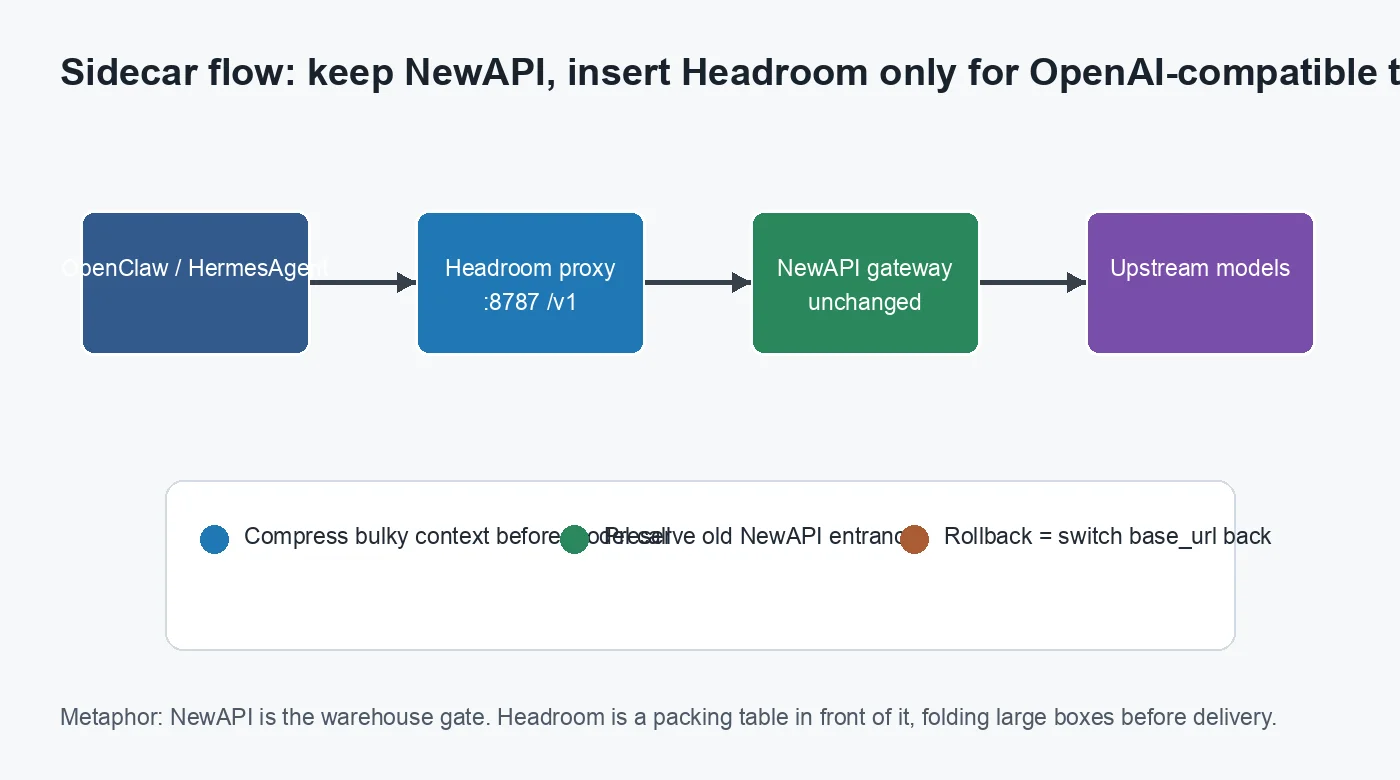
Figure 1: Headroom is a sidecar, not a NewAPI replacement. The old endpoint remains available; the new endpoint handles only validated OpenAI-compatible traffic.
2. Symptoms: two traps before the happy path
The first real trap was that the existing image failed on the old VM placement. The container log showed Fatal Python error: Illegal instruction, and the exit code was 132. This was not a port issue and not a missing environment variable. It was a CPU instruction-set mismatch: a native extension inside the image tried to use an instruction the current virtual CPU did not expose.
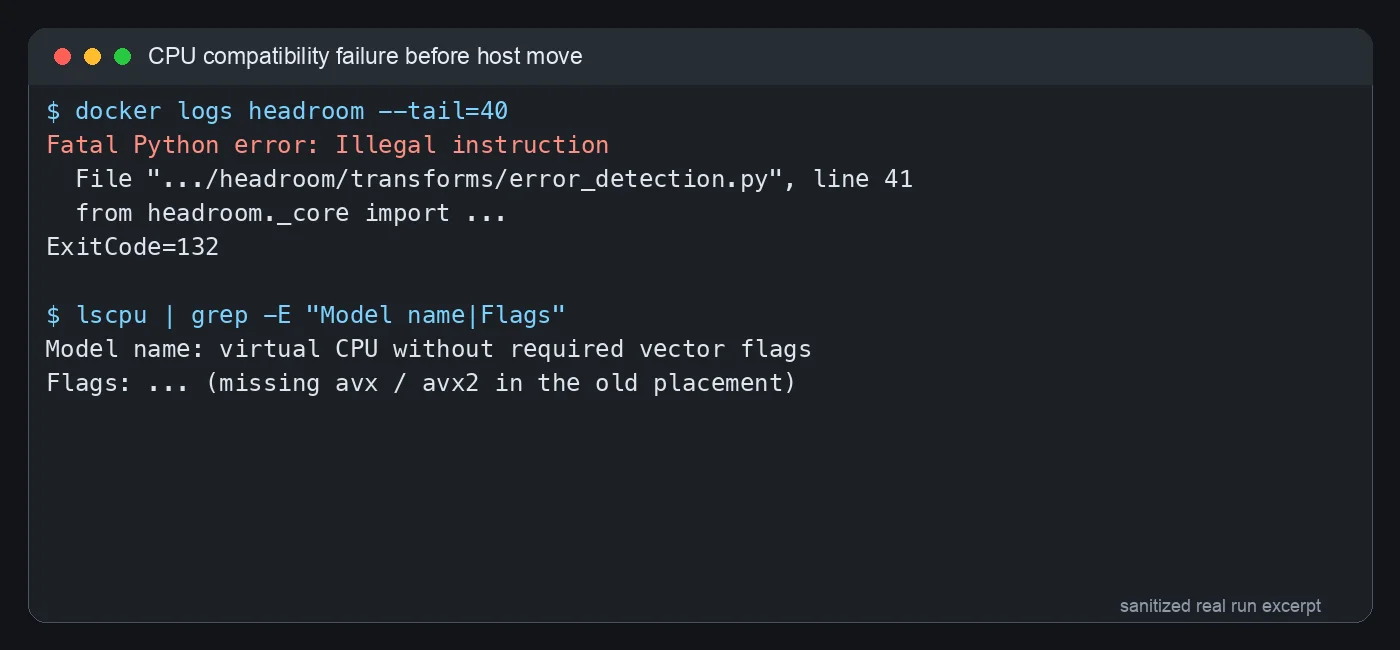
Figure 2: sanitized real terminal output. Illegal instruction points below Python syntax and into CPU capability territory.
The everyday analogy: you bought an appliance that requires a three-prong outlet, then tried to use it in an old room with only a two-prong outlet. The appliance is not broken, and the room is not broken; they just do not match. After the VM was moved to a newer host and the virtual CPU type was exposed as host, headroom._core loaded correctly and headroom-proxy --version printed a version. The existing image was fine; rebuilding it was unnecessary.
The second trap was subtler. Headroom listened on port 3000 inside the container, but the first stack published and health-checked 8787. The service was waiting in room 3000, while I kept knocking on room 8787. No wonder nobody answered.
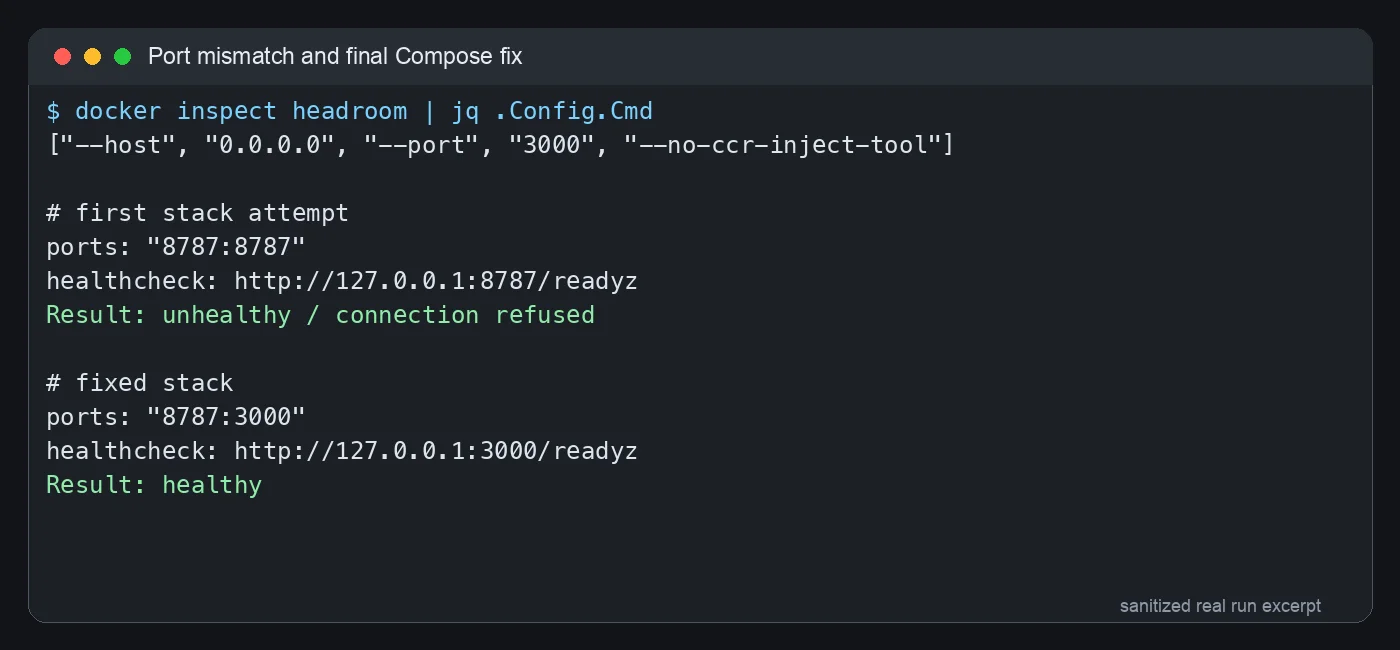
Figure 3: sanitized real terminal output. The final setup maps host 8787 to container 3000, and the healthcheck also targets container port 3000.
After fixing that, Headroom readiness returned healthy, version 0.26.0, with the Rust core loaded. More importantly, dummy-token requests to /v1/chat/completions, /v1/responses, and /v1/completions reached NewAPI through Headroom and returned NewAPI authentication errors with Headroom headers. That proves we were not just looking at a green health page; the OpenAI-compatible forwarding path was actually alive.
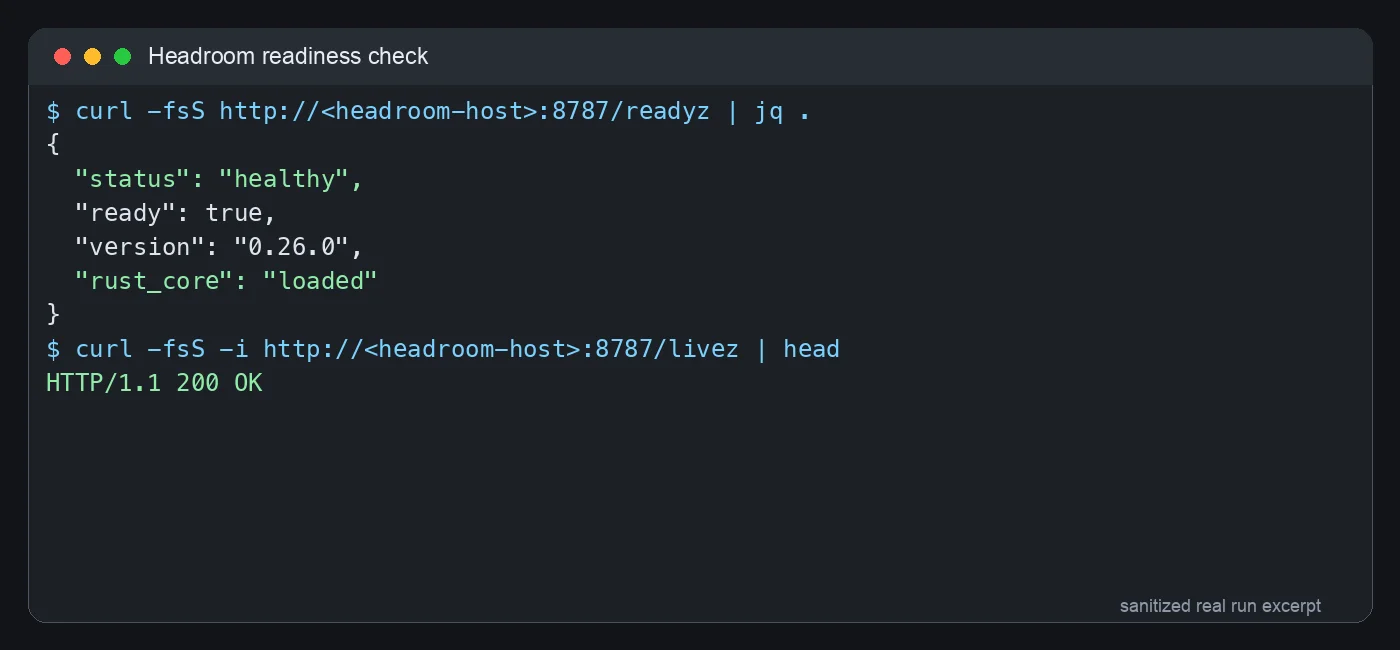
Figure 4: sanitized real readiness check. ready=true proves Headroom itself is up; a real OpenAI-compatible request proves the business path.
3. Deploying Headroom: a minimal Portainer Stack
This is the sanitized Stack shape. Replace the registry, network name, and NewAPI target for your own environment. Do not commit internal addresses, tokens, or private hostnames to a public repo.
services:
  headroom:
    image: registry.example.local/chopratejas/headroom:latest
    restart: unless-stopped
    environment:
      HEADROOM_TELEMETRY: "off"
      OPENAI_TARGET_API_URL: http://new-api:3000
    command: ["--host", "0.0.0.0", "--port", "3000", "--no-ccr-inject-tool"]
    ports:
      - "8787:3000"
    networks:
      - new-api_default
    healthcheck:
      test: ["CMD", "curl", "--fail", "--silent", "http://127.0.0.1:3000/readyz"]
      interval: 30s
      timeout: 5s
      retries: 5

networks:
  new-api_default:
    external: true
Three details matter.
First, OPENAI_TARGET_API_URL points to NewAPI inside the Docker network, not to a public address. If Headroom and NewAPI are on the same network, using the service name is more stable and leaks less topology.
Second, the port mapping is 8787:3000, not 8787:8787. I want clients to use http://<headroom-host>:8787/v1, but the process inside the container listens on 3000.
Third, the healthcheck must hit the real port from the container’s point of view. Inside the container, 127.0.0.1 is the container itself, not the host. If you check 127.0.0.1:8787 from inside, it fails forever.
After deploying, do not edit clients yet. Run three layers of checks:
curl -fsS http://<headroom-host>:8787/readyz
curl -fsS http://<headroom-host>:8787/livez
curl -sS http://<headroom-host>:8787/v1/chat/completions \
  -H "Authorization: Bearer $API_KEY" \
  -H "Content-Type: application/json" \
  -d '{"model":"<model>","messages":[{"role":"user","content":"reply OK"}],"max_tokens":8}'
readyz and livez are service checkups. chat/completions is the business-path check. The first two are like taking someone’s temperature; the third asks them to get out of bed and walk.
4. Migration strategy: test the old road, test the new road, then edit
After Headroom is up, the risky part is client migration. OpenClaw and HermesAgent may have many providers: some OpenAI-compatible, some Anthropic-compatible, and some already broken. If you blindly replace every base_url, you can damage working fallbacks while hiding old failures behind a new proxy.
My migration rule was:
- Read the config and list every provider’s
base_url, model, and API mode. - For each OpenAI-compatible provider, send a minimal
chat/completionsrequest to the existing NewAPI endpoint. - Using the same key and model, send the same request through the Headroom endpoint.
- Edit only providers where both checks pass.
- If the old endpoint already returns 503 and Headroom returns 502, leave it unchanged and record why.
- Do not migrate Anthropic-mode fallbacks unless you have separately deployed and verified a compatible route for that protocol.
This is like adding filters to a row of water pipes. You do not cut every pipe at once. You first confirm a pipe has water, attach the filter, test again, and only then move to the next pipe. Pipes that had no water before get labelled, not mixed into the success report.
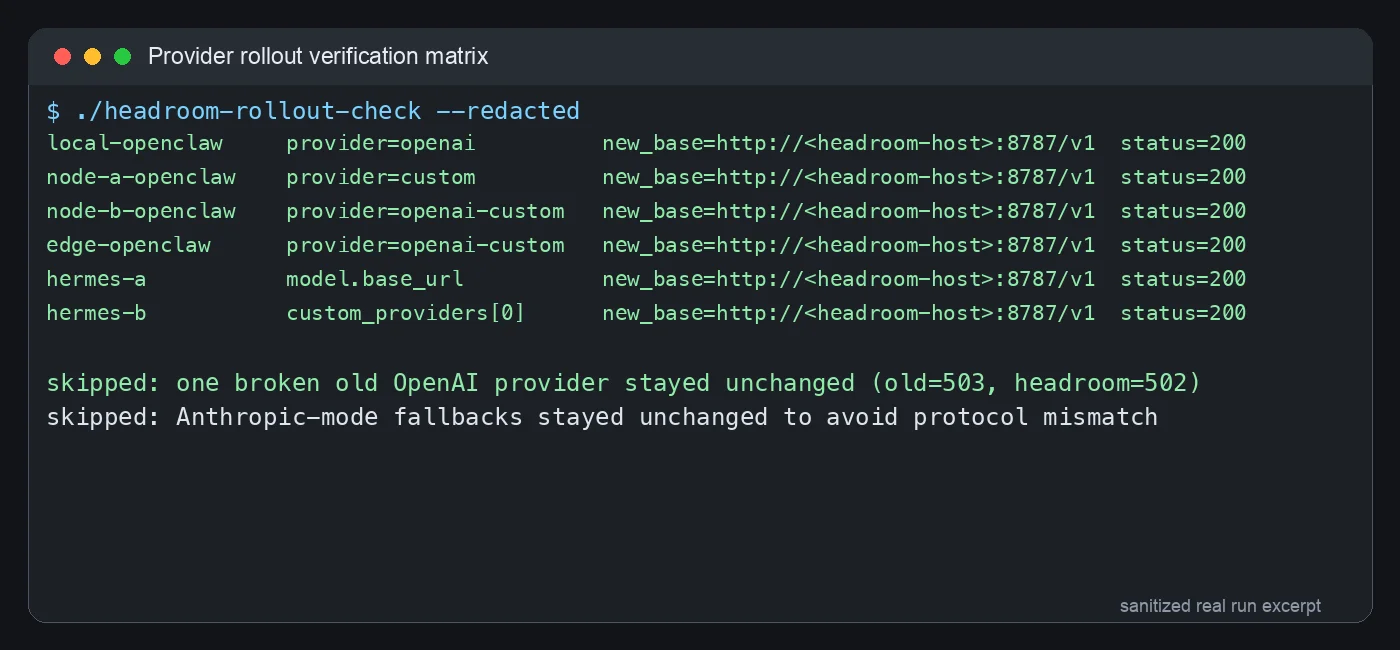
Figure 5: sanitized real verification matrix. Only 200-returning OpenAI-compatible providers moved. Broken old providers and Anthropic-mode fallbacks stayed in place.
5. OpenClaw changes: same idea locally and remotely, different paths
OpenClaw’s model/provider state is JSON. Locally it is usually here:
~/.openclaw/openclaw.json
On Linux nodes it is usually here:
/root/.openclaw/openclaw.json
Back it up first:
cp ~/.openclaw/openclaw.json ~/.openclaw/openclaw.json.bak-headroom-$(date +%Y%m%d-%H%M%S)
Then change only the providers that passed testing, replacing the old NewAPI base_url with:
http://<headroom-host>:8787/v1
If you want an Agent to do this safely, give it this prompt:
Read the OpenClaw config and list every OpenAI-compatible provider.
For each provider, first call /chat/completions using its current base_url, key, and model.
Then temporarily test the same key/model against http://<headroom-host>:8787/v1.
Modify only providers where both calls return 200.
Create a .bak-headroom-timestamp backup before editing.
Do not modify Anthropic-mode providers and do not print or save secrets.
After editing, restart OpenClaw gateway and re-test every modified provider.
Manual operators can inspect providers with jq and edit the JSON directly. Restart with:
openclaw gateway restart
openclaw gateway status --json
On systemd-managed Linux nodes, use:
systemctl restart openclaw-gateway
systemctl is-active openclaw-gateway
openclaw status --json
In this rollout, local OpenClaw and several remote OpenClaw nodes were migrated this way. One legacy provider already returned 503 from the old endpoint and 502 through Headroom, so it stayed unchanged. That distinction matters: migration is not a magic repair pass for every historical provider. It only moves healthy paths into the compression layer.
6. HermesAgent changes: watch api_mode
HermesAgent usually keeps its configuration in YAML, for example:
/root/.hermes/config.yaml
The fields to inspect are usually these:
model:
  provider: custom
  default: <model>
  base_url: http://<headroom-host>:8787/v1
  api_mode: chat_completions

providers:
  openai-custom:
    base_url: http://<headroom-host>:8787/v1

custom_providers:
  - name: newapi-through-headroom
    base_url: http://<headroom-host>:8787/v1
    api_mode: chat_completions
The important field is api_mode. If a fallback is explicitly anthropic, or points to a native Anthropic endpoint, do not force it into this Headroom endpoint. That is like asking someone who speaks Chinese to take an English listening test; the failure is not because they are foolish, it is because the question is in the wrong language.
Backup first:
cp /root/.hermes/config.yaml /root/.hermes/config.yaml.bak-headroom-$(date +%Y%m%d-%H%M%S)
Restart after editing:
systemctl restart hermes-gateway
systemctl is-active hermes-gateway
hermes fallback list
If the host uses a user service:
systemctl --user restart hermes-gateway
systemctl --user is-active hermes-gateway
In this rollout, I moved only chat_completions / OpenAI-compatible main models, custom providers, and verified fallbacks. Anthropic-mode fallbacks stayed untouched. The result is a narrower but safer change: Headroom handles traffic it has actually proven it can handle, and the existing fallback chain remains intact.
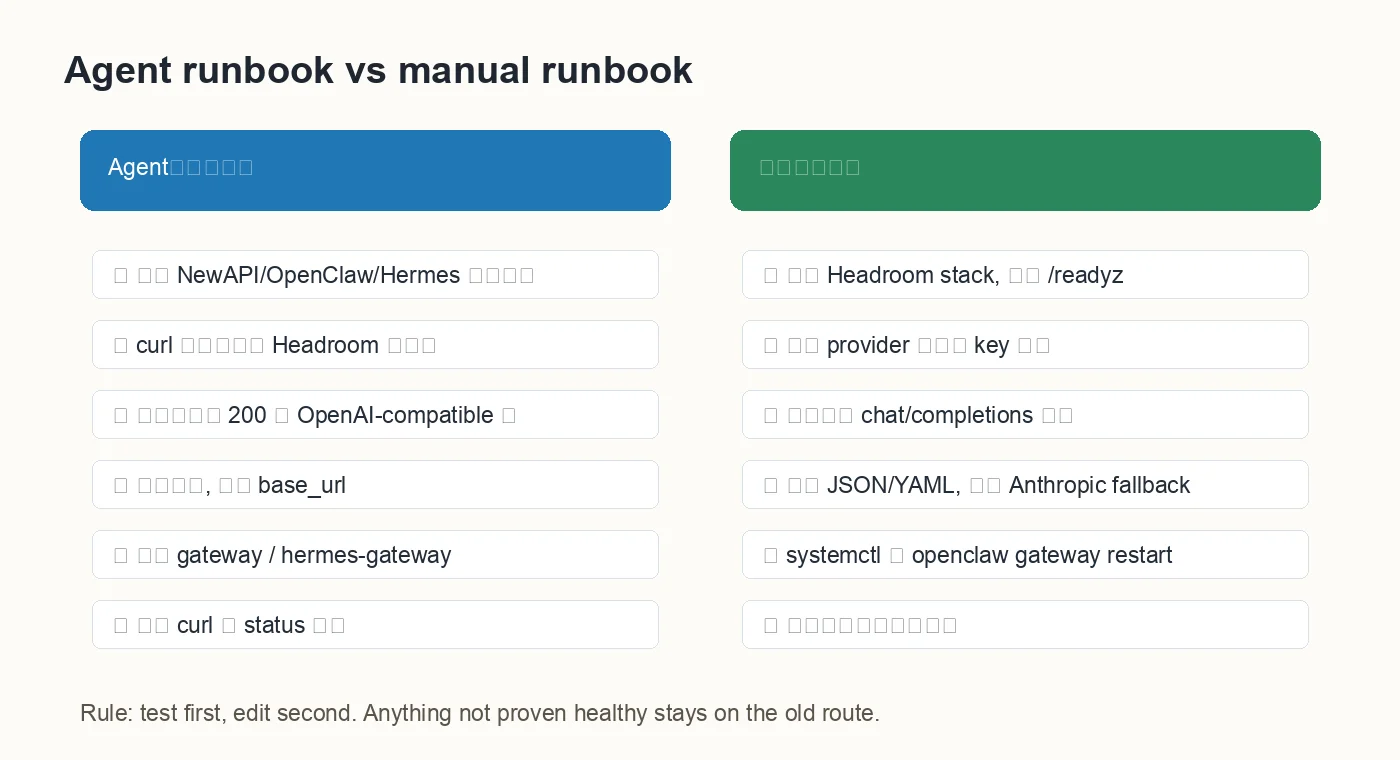
Figure 6: the same operation can be agent-driven or manual. The center rule is the same: test before editing.
7. Rollback: change base_url back
The biggest advantage of this sidecar design is rollback simplicity. NewAPI did not change. Keys did not change. Models did not change. Clients moved from:
http://<newapi-host>:3000/v1
to:
http://<headroom-host>:8787/v1
If a client misbehaves, restore the backup or switch base_url back. Do not remove the old endpoint. Do not clean up NewAPI. Do not change models in the same operation. Change one variable at a time, or debugging becomes blindfolded.
Keep two things on every node:
- a
*.bak-headroom-timestampconfig backup; - a sanitized migration note: which providers moved, which providers were skipped, and why.
That note pays for itself later. Three months from now, if you notice a provider still bypassing Headroom, you will not need to guess whether it was forgotten. The record will say it was intentionally skipped because the old endpoint already returned 503.
8. Q&A
Q1: Why not replace NewAPI directly?
Because NewAPI already owns model routing, keys, quotas, and provider management. Headroom solves context compression. Putting it in front of NewAPI is like adding a packing table at the warehouse gate, not rebuilding the warehouse.
Q2: Does Headroom compress every request?
It can process traffic that goes through it, but the savings depend on the request. Logs, tool output, RAG chunks, and long files benefit more. A one-line “hello” has almost nothing to compress.
Q3: Why leave Anthropic fallbacks unchanged?
This deployment verified an OpenAI-compatible path. Native Anthropic and OpenAI-compatible requests have different shapes. Without a separately verified compatible route, forcing Anthropic fallbacks through this proxy is protocol mismatch.
Q4: What should I do with Illegal instruction?
Check the container logs and CPU flags. If the image contains native extensions and the virtual CPU does not expose the required instructions, exit code 132 can appear. The options are: move to a compatible host, expose host CPU features to the VM, or use a CPU-compatible image. In my run, the existing image worked after the VM moved to a newer host.
Q5: The container is unhealthy but the process seems alive. What next?
Check the actual listen port first, then Compose port mapping and healthcheck. If the process listens on 3000 but healthcheck targets 8787 from inside the container, the healthcheck is wrong. Always read healthcheck from the container’s viewpoint.
Q6: How do I avoid leaking secrets?
Do not echo $API_KEY. Redact screenshots. Public articles and Git repos should contain placeholders such as $API_KEY, <headroom-host>, and registry.example.local. Keep real config backups on the server, not in the repo.
9. One prompt you can give to an Agent
If you already run NewAPI, OpenClaw, and HermesAgent, this is the prompt I would give an Agent:
Deploy Headroom as an OpenAI-compatible proxy in front of NewAPI.
Use the existing Headroom image and deploy it with Portainer/Docker Compose.
Expose http://<headroom-host>:8787/v1 externally.
If the container listens on 3000, the port mapping must be 8787:3000 and the healthcheck must target container port 3000.
After deployment, verify /readyz, /livez, /v1/chat/completions, /v1/responses, and /v1/completions.
Then read local and remote OpenClaw/HermesAgent configs.
For every provider, test the old NewAPI endpoint first and the Headroom endpoint second.
Modify only OpenAI-compatible providers where both tests return 200.
Keep Anthropic-mode fallbacks unchanged.
Backup before editing, restart services after editing, and re-test every modified provider.
Never print secrets and never write internal addresses into public files.
For manual work, split the prompt into four checklists: deployment, Headroom health checks, provider testing, and client configuration. Keep the order.
10. Summary
The real lesson is not “run a new tool.” It is where to place it. Headroom belongs in front of NewAPI, in the OpenAI-compatible traffic path, at a layer where client config can be rolled back without changing the rest of the system.
The final shape is clean: NewAPI remains the unified gateway; Headroom compresses context; OpenClaw and HermesAgent move only verified OpenAI-compatible providers to Headroom. The old endpoint remains, Anthropic fallbacks remain, and broken providers stay labelled instead of being silently mixed into the rollout.
If you run a self-hosted agent environment, start with one test provider. Do not switch everything at once. Treat it like adding filters to water pipes at home: close one valve, attach one filter, test for leaks, then move to the next. It is slower, but you sleep better.
References
- Headroom GitHub: https://github.com/chopratejas/headroom
- Headroom docs: https://headroom-docs.vercel.app/docs
- Headroom Proxy docs: https://headroom-docs.vercel.app/docs/proxy
- OpenClaw Gateway docs: https://docs.openclaw.ai/cli/gateway
- HermesAgent fallback providers docs: https://hermes-agent.nousresearch.com/docs/user-guide/features/fallback-providers