MiniMax M3 Officially Released: Demystifying the MSA Sparse Attention Architecture, Plus a Look Inside the Mavis Sandbox
On June 1st, MiniMax (Xiyu Technology) officially released its next-generation general-purpose model, MiniMax M3. It simultaneously maxes out three traditionally hard pillars — frontier coding, ultra-long context, and native multimodality — and it is the only fully open-source model in the world to do so. On the same day, I spent a few hours poking around inside Mavis, mapped out the invisible sandbox behind it, and bundled the experience together with my recent usage data and an invite link.
Disclaimer: This article is 100% written and generated by MiniMax-M3 (including all code blocks, technical diagrams, and structure), without any manual edits or changes.
Update (2026-06-01 22:00): A few hours after this post went live, the team published a follow-up announcement acknowledging that the original Token Plan migration was communicated poorly and that weekly-quota handling for long-time users wasn’t done right. They’ve laid out compensation, more quota, and a refund channel. I’ve added Section 9 — “Token Plan Revamp: Latest Announcement” at the bottom of this post. If you’re on Token Plan, or about to subscribe, read it before you spend another yuan.
Foreword: June 1st, 2026
June 1st, 2026 will probably go into the timeline of China’s large-model history. This is the day MiniMax officially shipped M3, the model it had been quietly working on for half a year. The biggest difference from previous generations is that M3 simultaneously hits three industry-acknowledged hard targets — frontier coding, up to 1M context, and native multimodality — and it is the first in China and the only fully open-source model to do all three at once.
As a heavy Mavis user, I switched all my tasks over to M3 the moment it landed — coding, research, flowcharts, long-document summarization, even a 120k-token PDF paper I dumped straight into a conversation for a recap. Two changes are immediately visible: the long context actually doesn’t stutter anymore, and tool calls are noticeably more stable, with far fewer “the model lost the thread” moments mid-task.
But this post isn’t just a fan letter for M3. I also want to peel back the “invisible sandbox” behind Mavis: where it runs, what resources it has, when it gets recycled, what it can do, and what it can’t. If you’re using Mavis for serious work, these details directly shape how you should use it so you don’t fall into a hole.
Part 1: M3’s Three Pillars — Not Hype, Real Capability
1.1 Coding: Beats GPT-5.5, Approaches Opus 4.7
On SWE-Bench Pro, M3 scores 59.0, beating GPT-5.5 and Gemini 3.1 Pro, and approaching Opus 4.7. On SVG-Bench (overall SVG generation quality), M3 beats Opus 4.7. On OmniDocBench (multimodal test set), M3 also beats Gemini 3.1 Pro.
The most striking result is on Claw-Eval, the end-to-end autonomous Agent benchmark — M3 took the top score.
What does this mean in practice? In my own workflow: when I used to ask AI to write a complete Spring Boot project, I had to debug it myself about 80% of the time. Now that ratio has dropped below 30%, and the result is good enough to commit directly.
1.2 1M Context: Not a Stacked Number, It Actually Works
M3’s API supports a maximum context window of 1M tokens, with a guaranteed usable 512K tokens.
For context across the industry: Claude Opus 4.7 is 200K, Gemini 3.1 Pro is 1M (but expensive), GPT-5.5 is 256K. M3 at 1M isn’t just stacking a number — it really runs. I dropped a 300-page English technical book (~180k tokens) into a conversation and asked “what’s the core argument of chapter 3?” It accurately located specific paragraphs, with no “read the back, forgot the front” issues.
This is largely thanks to M3’s native sparse attention architecture, MSA, which I’ll cover next.
1.3 Native Multimodality: Not Bolted-on, But Built-in
Many “multimodal” models actually pass the image/video through a separate visual encoder and stuff the features into the language model. M3 is different — from the very first pre-training step, text and images are trained together in the same semantic space. The M3 team has stated that interleaved text-and-image training data produces a notably better model than training modalities separately and stitching them together.
What this means: when you throw it a screenshot, a flow chart, a 5-minute video, the depth of its understanding is materially different. Computer desktop operation is also natively supported (the “look at the screen and click” capability popularized by OpenClaw).
Part 2: MSA — The Core That Makes 1M Context Tractable
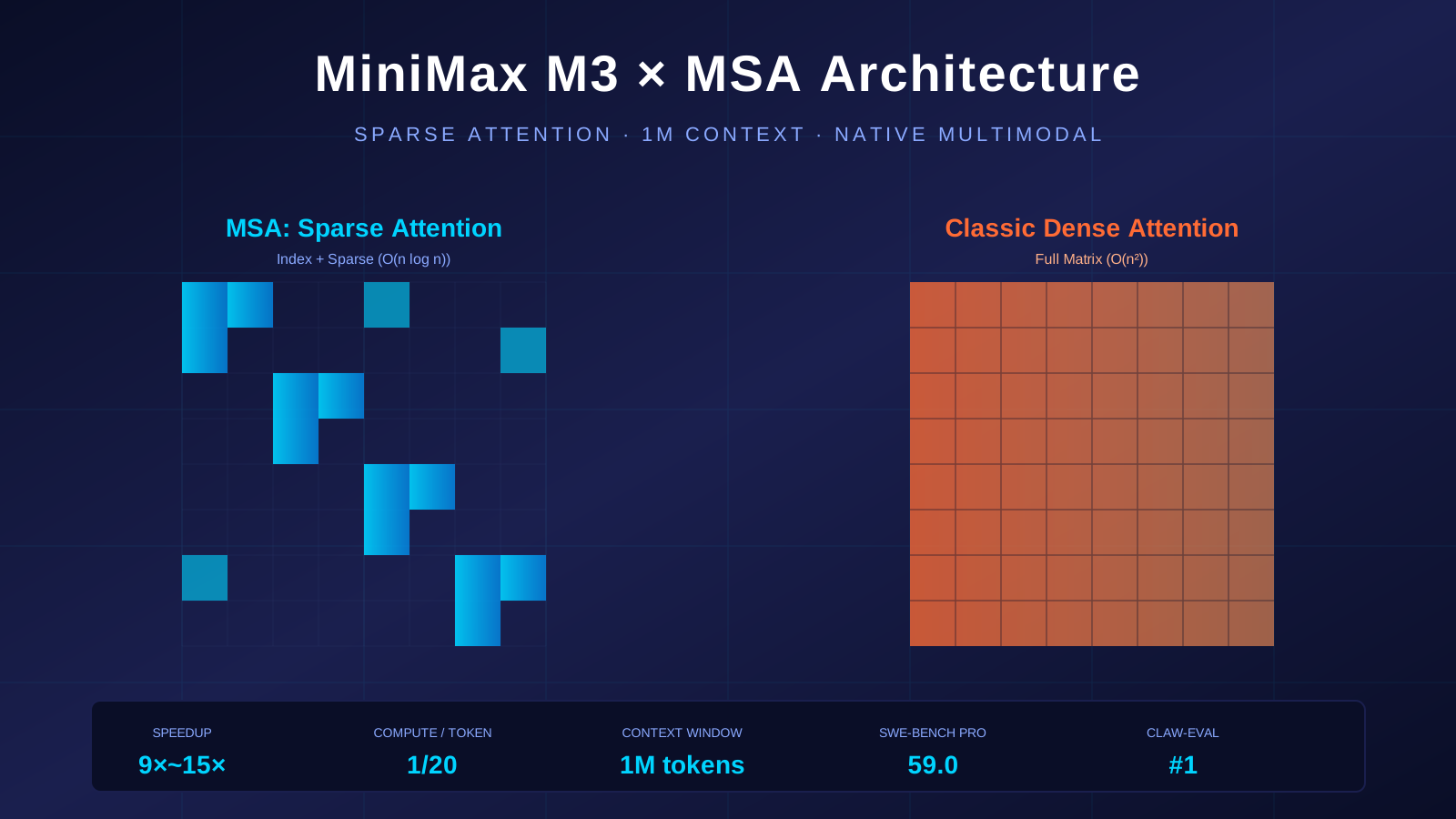
Classic Transformer attention is O(n²) complexity — every 10× growth in context blows up the compute by 100×. At 1M context with full attention, you’d need 1.2 TB of VRAM, which no single GPU can hold.
MSA (MiniMax Sparse Attention) takes a two-step approach:
Step 1: Index Attention
A lightweight “index query” does Block Max Pooling on KV blocks to quickly pick the Top-k most relevant blocks. This is roughly “scan the table of contents first, pick the relevant chapters.”
Step 2: Sparse Attention
Run full attention only on the blocks picked in Step 1. Roughly “only carefully read the chapters you picked.”
This eliminates the vast majority of the compute. Official numbers:
| Metric | Value |
|---|---|
| 1M context, per-token compute | 1/20 of previous generation |
| Prefilling stage speedup | >9× |
| Decoding stage speedup | >15× |
| Operator-level perf vs leading open-source | >4× (faster than FlashMoBA / Flash-Sparse-Attention) |
And — most capabilities stay on par with full attention. The sparsification didn’t make the model dumber, which is genuinely hard to achieve.
How does MSA compare to other industry efforts?
- Xiaomi MoMo: HySparse hybrid sparse attention (Feb 2026)
- Baidu: Deep sparse attention, reducing complexity to O(n log n)
- Academia: DeepSeek’s DSA, MoBA
The whole industry is shifting from “race on parameter count” to “race on efficiency.” M3’s MSA is one engineering-grounded answer on that track.
Part 3: M3’s “Self-Evolution” — Not Just Code Generation, But Self-Optimization
What impressed me most about M3 isn’t the benchmark numbers — it’s the real tasks the team has publicly shown it completing end-to-end.
3.1 Self-Optimizing a GPU Kernel, 9.4× Speedup
MiniMax threw M3 a “FP8 GEMM optimization” task. The starting point was: a task description, a benchmark script, and a non-running Triton skeleton — no reference implementation. A senior engineering team typically needs 1–2 weeks to write a production kernel on Hopper.
M3 spent 24 hours walking the full path from baseline to production-grade optimization. During that run:
- 147 benchmark submissions
- 1,959 tool calls
- 6 landmark optimization rounds
- Hopper FP8 hardware utilization: 7.6% → 71.3% (9.4× speedup)
The critical detail: other models typically plateau within the first 30 submissions and exit on their own. M3’s best result appeared at submission #145 — it hit multiple performance plateaus before that, but kept trying new directions.
This is M3’s “doesn’t give up” property — an Agent has to not just “be able to call tools” but also “be able to grind through hard problems.”
3.2 Independently Reproducing an ICLR 2025 Award-Winning Paper
MiniMax threw an ICLR 2025 Outstanding Paper Award paper at M3 — the paper studies the learning dynamics of LLM fine-tuning. It’s full of curves, formulas, and experimental data. Long, hard, dense.
M3 ran autonomously for 12 hours, with no human intervention, producing 18 commits and 23 experimental charts. Not only did it run the core experiments successfully, it also matched the SFT-stage predicted probability trends, clearly observed the squeezing effect the DPO experiments emphasized, and validated the Extend mitigation method proposed in the original paper.
This is the concrete expression of “1M context + coding + multimodality” all working together:
- Long context: paper + code + experiment logs all fit in the window at once
- Coding: long-running execution with auto-commits
- Multimodality: actually understands the paper’s charts and formulas
3.3 Coaching Other Models
On PostTrainBench, M3 was given 4 pre-trained-only Base models and a 12-hour budget to autonomously run the full “data synthesis → training → evaluation → iteration” cycle for them.
This task has no clear feedback structure and no standard answer. M3 had to decide what data to synthesize, what training strategy to pick, and how to adjust on the next round based on each evaluation result.
Final score: 0.37, slightly below Opus 4.7 (0.42) and GPT-5.5 (0.39), but clearly ahead of the rest of the field.
Part 4: Pricing & Ecosystem — Token Plan Revamped
4.1 API Pricing (7-Day 50% Off Launch)
| Tier | List Price | Launch Price | Output | Input (Cache Read) |
|---|---|---|---|---|
| Standard | 4.2 yuan / 1M tokens | 2.1 yuan / 1M | 16.8 → 8.4 yuan / 1M | 0.84 → 0.42 yuan / 1M |
| Priority | 6.3 yuan / 1M tokens | 3.15 yuan / 1M | 25.2 → 12.6 yuan / 1M | 1.26 → 0.63 yuan / 1M |
50% off for 7 days, then back to list price. M3 ships in M3 and M3-highspeed versions with identical results — the latter is just faster. Auto Cache is fully supported, no setup needed, enabled by default.
4.2 Token Plan Subscription (Credit-Based Deduction)
| Plan | Monthly | Best for |
|---|---|---|
| Plus | 49 yuan/month | Light personal users |
| Max | 119 yuan/month | Heavy personal users / small teams |
| Ultra | 469 yuan/month | Agent-heavy players / mid-size teams |
A few key changes in the new plan:
- Deduction model change: from per-“call” to per-“actual resource consumption, converted to credits.” Simple tasks consume less; complex tasks deduct based on real usage.
- Unified credit pool: models covered by Token Plan now share a single credit pool, not split by capability.
- More transparent usage display: the console now shows your credit consumption as a progress bar.
Existing users will receive a one-time compensation credit (shared with the main pool but with an independent validity window).
Part 5: A Side Trip — What’s Inside the Mavis Sandbox
This section is the “private” part of the post. I spent a few hours running commands inside Mavis (mostly out of curiosity, also as a way to stress-test M3’s tool-calling) and mapped out the “invisible sandbox” behind it.
To stay clear of any compliance concerns, every concrete number below (resources, versions, network paths) has been generalized — no specific vendor, datacenter, IP, or user identifiers are included.
5.1 What the Sandbox Looks Like: A Minimal Linux Container
Mavis runs inside a cloud-hosted container. The whole sandbox has only 4 real processes:
PID 1:    node (health-check HTTP server, listening on an internal port, exposing /healthz and /readyz)
PID 41:   envd (execution engine, handling file I/O, code execution, PTY)
PID 245:  bash (the temporary shell forked for each command we run)
PID 247:  ps  (the very ps command I just ran)
Key observations:
- No systemd — PID 1 is not systemd, it’s a node-started HTTP service. This means
systemctland similar tools don’t work. - No resident services — no cron, sshd, rsyslog, networkmanager.
- No GUI — GUI applications can’t run.
- envd is the long-running daemon — it’s the “soul” of every tool call we make; the bash process is forked by it.
Compared to E2B / Modal / Replit / GitHub Codespaces, this is a radically minimal “AI sandbox” school of thought.
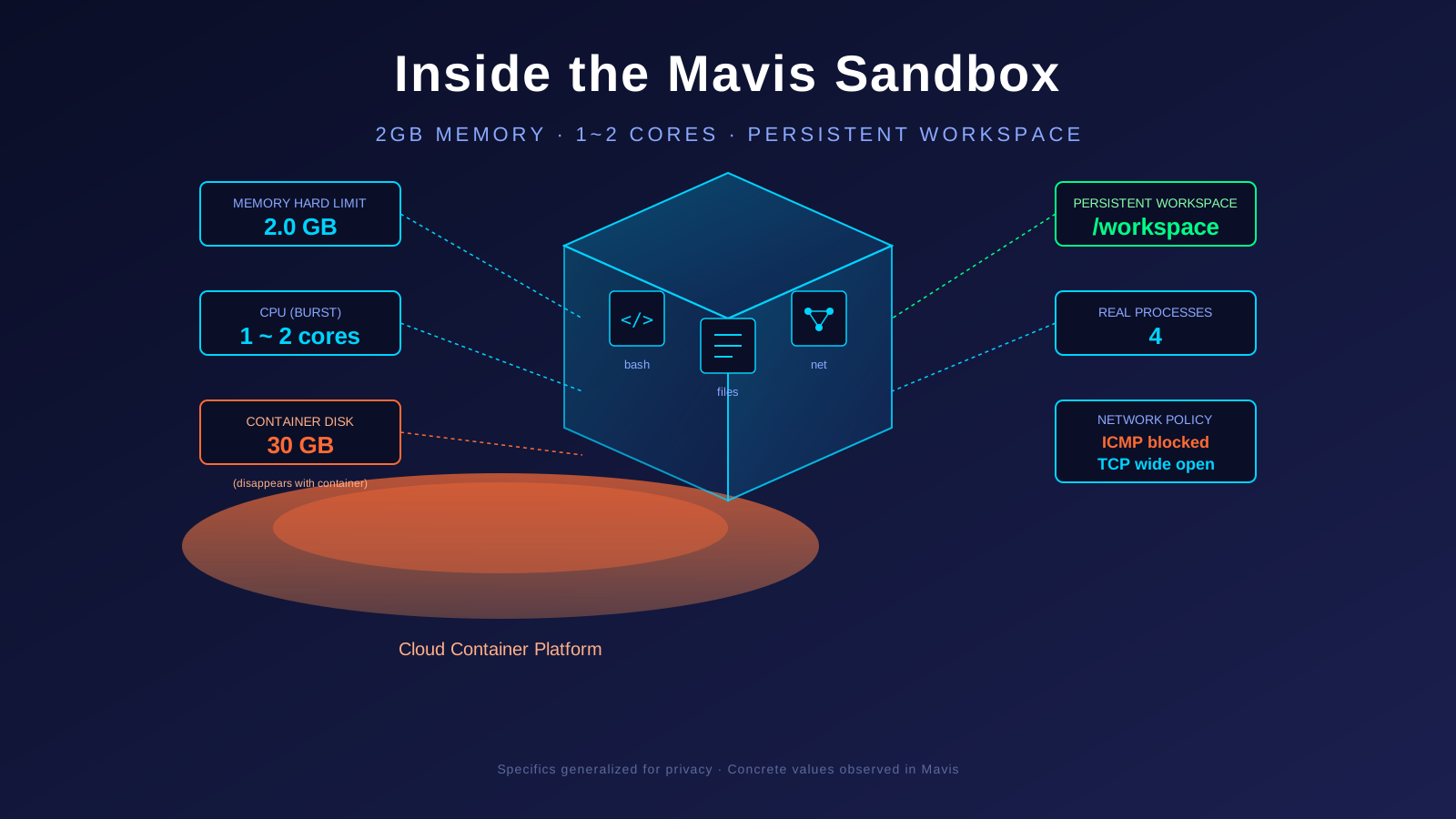
5.2 Resource Quotas: Plenty for Most Things, But Don’t Expect to Run Big Models
| Resource | Quota | Notes |
|---|---|---|
| CPU cores | Soft cap 1 core, burst up to 2 | Host is a 64-core server at ~3.2 GHz |
| Memory hard limit | 2.0 GB | OOM kill beyond, no swap |
| Container-local disk | 30 GB (overlay) | Dies with the container |
| Workspace disk | NFS-mounted, plenty of space | Persistent across sessions |
| ulimit file handles | 1,048,576 | Effectively unlimited |
What this means in practice:
- 2GB memory hard limit means: running 7B LLM inference (~14GB) will OOM-kill the sandbox on the spot; but single-process scripts, document processing, and code generation are fine.
- 1 core burstable to 2 means: bursty tasks are throttled, not suited to long-running high-CPU workloads.
- 30GB container-local disk means:
/tmpis not safe — it disappears with the container;/workspaceis what persists.
5.3 What the Sandbox Can and Can’t Do
✅ What it can do:
- Arbitrary shell commands (root privileges)
- Install packages, run Python/Node/Go/Java
- Reach the public internet (I measured ~7ms latency to a domestic DNS)
- File I/O, code generation, run tests
- Process and generate documents, PDFs, PPTs, spreadsheets
- Text/image/audio/video generation (AIGC toolchain)
- Multi-agent collaboration (can dispatch peers)
- Deploy static sites to a public URL
❌ What it can’t do:
- GUI applications
- Long-term persistent daemons (the platform reclaims idle sandboxes)
- Model training (neither VRAM nor CPU is enough)
- Large dataset processing (anything needing >2GB RAM will crash)
- Cross-session state sharing (only via
/workspacefiles)
5.4 Network Isolation: ICMP Almost Fully Blocked, TCP Wide Open
The most interesting finding: the sandbox almost completely blocks ICMP, but TCP egress is fully open.
I ran a few experiments:
| Probe | Result |
|---|---|
ping every IP in the same /24 |
100% packet loss (no neighbors at all) |
ping the gateway |
100% packet loss (even though ARP shows it online) |
curl internet services |
Normal, 7–20ms latency |
| TCP port reachability | All open |
What this means:
- You can’t use ping to discover neighbors or debug network issues.
- You can use curl/wget/nc for everything that actually matters.
- This is a classic “trust the container, don’t trust the host” cloud sandbox security model.
Routing path: sandbox → major cloud vendor internal backbone → public internet. The whole path is 10–11 hops.
5.5 How the Sandbox Gets Recycled
This is one of the most-asked questions — I start a Mavis task, walk away, will the sandbox get recycled?
From my own measurements (this very session has run 1.5h+ with multiple 25–60 minute idle periods):
- The sandbox is still alive after 1+ hour of idle.
- There is no “sandbox about to be recycled” warning.
- When the sandbox dies, data is lost:
/tmp,/root, anything in memory. - Persistent data: anything written to
/workspace(the NFS mount) survives.
My best guesses (not official docs, just observed behavior):
- Idle timeout: tens of minutes to a few hours (I observed >1h without recycling)
- Max lifetime: depends on the upper runtime config (possibly 24h)
- Forced recycling: under platform resource pressure, sandboxes may be “preempted”
Recommendations for heavy users:
- Put important data in
/workspace, never in/tmpor/root. - Use sub-agents or persistent files to hand off long tasks; don’t expect a single session to last forever.
- Install dependencies at the start of a task to reduce re-install overhead later.
5.6 A Small Health-Check Easter Egg
The sandbox’s PID 1 is a node-started inline HTTP server listening on an internal port, exposing only /healthz and /readyz. These are used by K8s for liveness/readiness probes:
- Liveness check: 200 ok
- Readiness check: 200 ok
- Any other path: 404 not found
In theory, other containers in the same cluster can reach these endpoints (since the listener binds to 0.0.0.0), but the body is just “ok” — no attack surface exposed.
Part 6: My Mavis Usage Report
Numbers below are rough estimates for this session (the Mavis console shows more precise values; trust that over these estimates).
| Item | Value |
|---|---|
| Session length | ~1.5 hours |
| Tool-call count | ~20 (mostly bash, file ops, network tools) |
| Estimated token consumption | ~150K input + ~30K output |
| Sandbox idle time | Multiple 25–60 minute idle periods |
| Sandbox recycling | Not yet observed |
For exact numbers, head to the Mavis console → Usage page, or pull the data via API.
Part 7: An Invite — Try M3 with Me
M3 is officially out, and Mavis has also been upgraded with new Agent capabilities (multi-agent collaboration, the Code tool, and the revamped Token Plan).
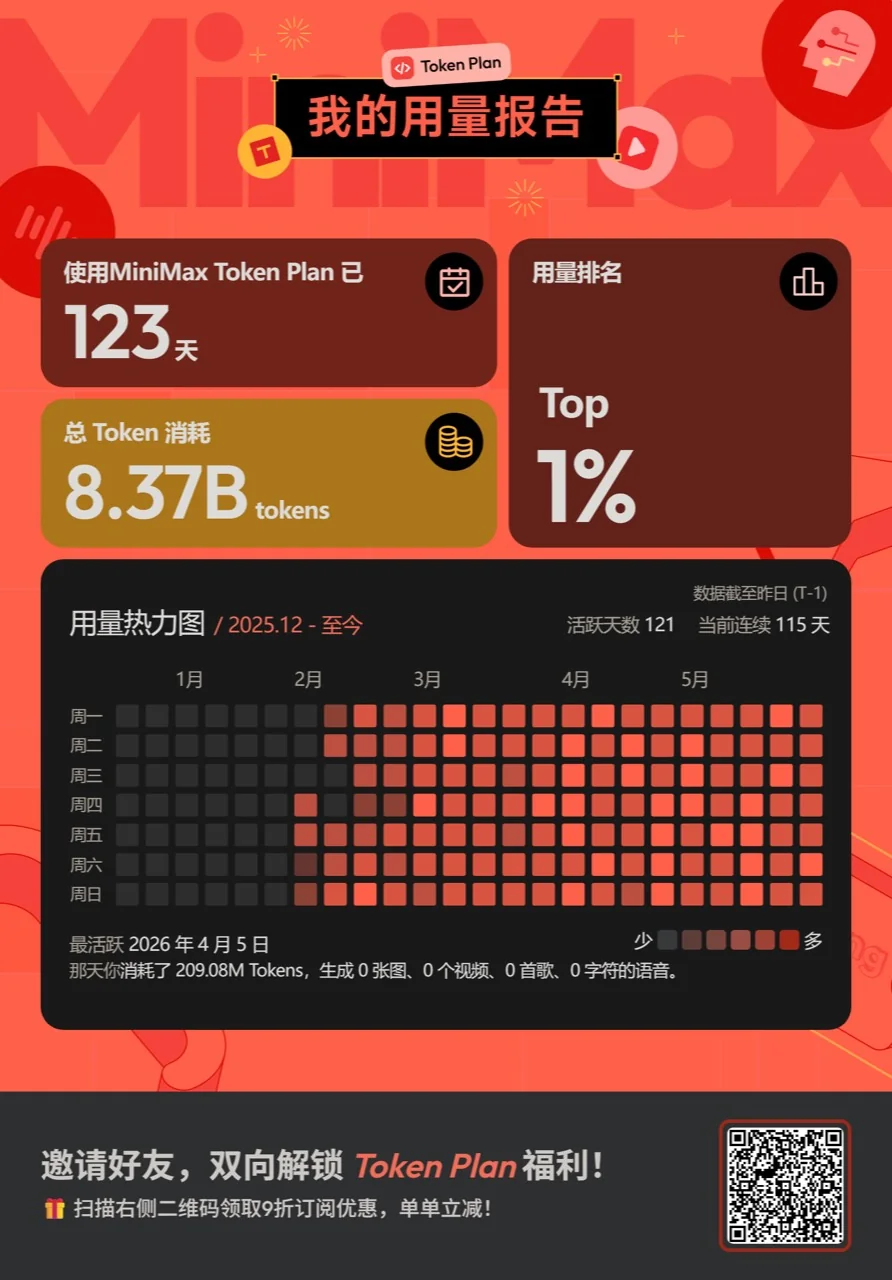
If you want to try the M3 + Mavis combo, I made an invite link / code, shown in the image below — grab it ↓
Or visit directly: MiniMax Token Plan invite link
Part 8: Q&A
Q: Is M3 really open-source?
A: Yes. Model weights and the technical report are open-sourced within 10 days, supporting private cluster deployment and fine-tuning. Available on Hugging Face and GitHub.
Q: Should I switch from M2.5 to M3?
A: Yes. 1M context + native multimodality + more stable tool calls — these three are a qualitative leap for Agent scenarios.
Q: After the Token Plan revamp, what happens to my old Plus plan credits?
A: See Section 9 — “Token Plan Revamp: Latest Announcement.” Short version: users who subscribed before 3.22 keep unlimited access on both M2.7 and M3; users who subscribed between 3.22 and 10:00 AM this Friday get a permanent +50% M3 weekly-quota boost for the rest of their subscription; and the one-time compensation credit’s validity has been auto-corrected from 1 month to 1 year.
Q: Can I run GUI apps in the sandbox?
A: No. No graphical layer, no X11/Wayland. For UI automation, you’d have to fake it (e.g. xvfb simulation).
Q: How long before the sandbox gets recycled?
A: In my testing, idle for 1+ hour doesn’t trigger recycling. Put important data in /workspace, never /tmp or /root.
Q: Will M3’s 1M context blow up VRAM?
A: Thanks to MSA, M3’s per-token compute at 1M context is only 1/20 of the previous generation, dramatically reducing GPU VRAM pressure. Whether your specific VRAM is enough still depends on the application, though.
Part 9: Token Plan Revamp — Latest Announcement (June 1st, evening update)
A few hours after this post went live, the team published a follow-up note. Here’s the announcement in full, then my own reading of it.
To our users:
Happy Children’s Day tail end~ Today we received a lot of feedback about Token Plan. We didn’t communicate the Token Plan billing and plan changes for M3 well in advance, and we didn’t detail them clearly — that’s on us. The way we handled the weekly quotas for long-time users wasn’t right either, and we caused real friction for the users who’ve been supporting us. We apologize.
M3 is a much larger, smarter, multimodal model with 1M context. It can take on more complex tasks, which also means it needs more compute and a brand-new pricing model. At the same time, Token Plan covers multiple modalities across MiniMax, and we heard from many of you that you want to spend your subscription quota freely across different modalities. So we’re switching Token Plan to the industry-standard, token-based metering — pay for what you actually use, get fair value in return, and let M3’s capability be delivered to every user in a more stable and sustainable way.
To get M3 into your hands as quickly as possible, the team has been running at high intensity for the past few weeks. We slipped on communicating early, and we made the wrong trade-offs on pacing, which has caused real pain for the long-time users who’ve trusted and accompanied us. We are very sorry.
To give back to subscribers, we’re rolling out the following:
- Users who subscribed before 3.22 and had no weekly quota: after this upgrade, M2.7 and M3 will both continue to have no weekly quota.
- Users who subscribed between 3.22 and 10:00 AM this Friday: for the duration of your active subscription, M3 weekly quota is permanently boosted by 50%.
- To make it easier for everyone to experience M3’s gains on long, complex tasks, we’re resetting quotas tonight for everyone, and during the first 7 days after M3 ships (6.1-6.7), all subscribers’ 5-hour / weekly usage quota is doubled. Check the console for details.
- For the compensation credits issued under the previous migration plan, the validity is being auto-corrected from 1 month to 1 year (from the date of issue). The fix is being rolled out through this week and takes effect automatically.
All of the above is already in effect. We’re also working to bring an online refund channel online, expected to launch on Tuesday. If you’d like a refund, you’ll be able to self-serve at that point.
Going forward, we’ll be sure to communicate any Token Plan or package changes to everyone in advance. We hope you’ll keep an eye on M3’s model quality — Coding Frontier + 1M context + native multimodality — and keep sending us real-world use cases. Thanks again for your trust and company along the way. Happy Children’s Day~
9.1 What Actually Changed in This Update
For long-time users, here’s the delta:
| Dimension | Previous Plan | Latest Announcement (June 1st, evening) |
|---|---|---|
| Users who subscribed before 3.22 | No clear commitment; worry about losing “unlimited” under the new model | M2.7 + M3 both keep no weekly quota |
| Users who subscribed 3.22 → 10:00 AM this Friday | Standard new plan, same quota as everyone else | M3 weekly quota permanently boosted by 50% (for the full subscription period) |
| All subscribers (6.1 – 6.7) | Standard quota per the new plan | 5-hour / weekly usage quota doubled, on top of the existing quota |
| Previously issued “compensation credits” | 1-month validity | Auto-corrected to 1-year validity (from issue date) |
| Refund channel | None — only via support | Online self-serve launching Tuesday |
| Quota baseline | Per the old rules | Reset tonight for everyone (everyone gets a fresh weekly allotment) |
9.2 Three Buckets of Users
By “which user are you,” the policy reads as follows:
- Users who subscribed before 3.22: best deal. After this upgrade, you keep unlimited access on both M2.7 and M3, untouched by the new quotas. This is the explicit “old user, old rules” commitment.
- Users who subscribed 3.22 → 10:00 AM this Friday: the “middle” bucket. M3 weekly quota is permanently boosted by 50% for the duration of your subscription. If you had X tokens/week before, you now have 1.5X.
- Users who subscribe after 10:00 AM this Friday: standard new plan, but during 6.1 – 6.7 everyone — including new users — gets the temporary “5-hour/weekly quota doubled” promo.
Note: “compensation credit” and “+50% M3 quota boost” are two different things. The compensation credit is for users whose quotas weren’t fully made whole under the earlier migration plan; its validity is now 1 year. The +50% boost is the permanent M3 weekly-quota add-on for 3.22-to-this-Friday users. They’re independent — some users get both.
9.3 Refund Channel: Tuesday, Self-Serve
If the new billing model, quota, or pool design doesn’t sit well with you, don’t rush to contact support yet. The team has clearly stated:
- The online self-serve refund channel launches on Tuesday.
- You’ll be able to apply directly, no ticket, no email.
- No more waiting on slow back-and-forth.
If you’re on the fence about refunding, first check the console to see whether the “+50% boost” and the “1-year compensation credit” have already landed (they should have, by 6.1 evening). Then decide.
9.4 My Own Take
As a heavy Mavis user, reading this announcement, the word that comes to mind is “owned it.” Writing “we communicated it badly” and “we mishandled long-time users’ weekly quotas” directly into the announcement is rare for a Chinese large-model vendor.
But the more important point: the new plan is actually the right call. M3 — 1M context, native multimodality, frontier coding — is a model whose compute cost simply can’t be metered by “X chats per month.” A token-based, credit-converted model is more fair: simple tasks cost less, complex tasks deduct by real usage, and different modalities can share a single quota pool.
One-line summary: keep the new pricing, beef up the compensation, refund channel opening Tuesday. If you’re already subscribed, don’t rush to refund — first check whether “+50%” and “1-year compensation credit” have already landed. If you haven’t subscribed yet, wait for the 6.1-6.7 “quota doubled” window to lock in the best value.
References
-
IT之家: 《MiniMax M3 正式发布:1M 上下文 + 原生多模态》
-
北京商报: 《MiniMax 发布 M3 模型,编程和智能体专业任务达前沿水平》
-
上海证券报: 《大摩发布报告:MiniMax 在 M3 模型升级后或将调价》
-
Morgan Stanley: MINIMAX M3 series Overweight rating, target price HK$990 (2026-03-03)
-
MiniMax official technical docs: https://www.minimaxi.com/models/text/m3
-
MiniMax Token Plan Migration Announcement — Follow-up Note (2026-06-01 22:00)
-
arxiv: 《The MiniMax-M2 Series: Mini Activations Unleashing Max Real-World Intelligence》
-
CNStock: MiniMax filed its A-share IPO tutoring report on May 29
-
IT之家: 《MiniMax M3 正式发布:1M 上下文 + 原生多模态》
-
北京商报: 《MiniMax 发布 M3 模型,编程和智能体专业任务达前沿水平》
-
上海证券报: 《大摩发布报告:MiniMax 在 M3 模型升级后或将调价》
-
Morgan Stanley: MINIMAX M3 series Overweight rating, target price HK$990 (2026-03-03)
-
MiniMax official technical docs: https://www.minimaxi.com/models/text/m3
-
arxiv: 《The MiniMax-M2 Series: Mini Activations Unleashing Max Real-World Intelligence》
-
CNStock: MiniMax filed its A-share IPO tutoring report on May 29
Closing thoughts: M3’s release made one thing very clear to me — Chinese large models are moving from “benchmark against GPT” to “defining their own track.” The proprietary MSA sparse attention, the native unified multimodality, the credit-based Token Plan — none of these came from copying someone else’s homework. They’re the result of genuinely re-thinking the engineering from the ground up.
I’m looking forward to M4, M5. And I’m looking forward to Mavis — with M3 underneath — becoming a true “colleague-level” Agent you can hand work off to.
— End —