Your Background Process Keeps Dying After Shell Exit? Stop Blaming nohup — Understand setsid and Unix Process Lifecycle
The short version
You launched a background service. You used
nohup. You added&. You redirected output. Everything looked fine. But when you closed the terminal, disconnected SSH, or—more insidiously—when an automation tool finished executing its script, the process silently vanished. You checkedps—nothing. You checked the port—nothing. No error in the logs. If this has happened to you, you’re not alone.The root cause isn’t SIGHUP—at least, not entirely. The real issue is process group and session membership.
nohupmerely tells the process to ignore the SIGHUP signal, but the process still belongs to the same session and process group as the parent shell. When the shell exits and sends SIGHUP to the entire process group,nohuphelps—but only if the signal delivery chain stops there. If the controlling terminal is destroyed, if stdin/stdout pipes break, or if the parent’s process group is collectively reaped, the process can still die. The proper fix issetsid: it creates a brand-new session, detaches from the controlling terminal, and places the process in its own process group—so SIGHUP from the parent shell never reaches it in the first place.
This post is based on a real debugging session of the CLIProxyAPI service. The service was started with nohup but kept disappearing every time an automation script finished. The management panel kept showing “connection failed.” The culprit turned out to be a subtle Unix process lifecycle issue. This class of problem is common in cloud dev machines, CI runners, SSH jump hosts, and containerized workflows, but it’s often misdiagnosed because the underlying process model is poorly understood.
All private details have been removed. No real internal addresses, tokens, or paths appear in this article.
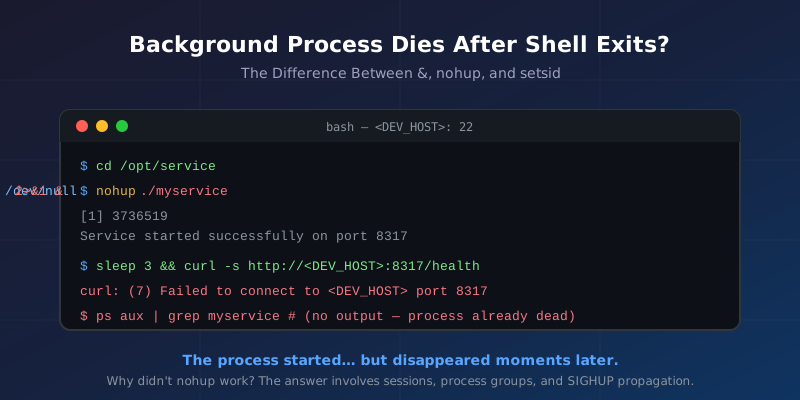
Figure 1: The process started, nohup was used, but moments later it was gone.
1. Background: Everything Looked Normal
On an internal development machine, we needed to run a local proxy service called cliproxy for an extended period. The startup command was straightforward:
cd /root/CLIProxyAPI
nohup ./cliproxy > /tmp/cliproxy.log 2>&1 &
The startup log confirmed success:
API server started successfully on: <DEV_HOST>:8317
The management key was verified against its bcrypt hash—it was correct. Everything seemed fine.
But when we opened the management panel in a browser at http://<DEV_HOST>:8317/management.html, we got:
Network connection failed. Please check the network or server address.
A curl test confirmed the problem:
curl -s http://<DEV_HOST>:8317/management.html
# curl: (7) Failed to connect to <DEV_HOST> port 8317 after 0 ms: Connection refused
A ps check showed the process was gone:
ps aux | grep cliproxy
# (no output)
Yet the process had clearly started moments earlier—the log file showed a successful startup message. The process started, ran briefly, and then exited.
2. Symptoms: Inconsistent Behavior
Further observation revealed that the behavior wasn’t consistent:
- Running
./cliproxy &in an interactive terminal: the process stayed alive. - Running
nohup ./cliproxy &then closing the terminal: the process stayed alive. - Running the exact same command through an automation script or AI Agent tool: the process always disappeared when the tool finished.
This is the hallmark of a “depends on who starts it” problem. In an interactive terminal, the shell runs in interactive mode with different behavior. In a non-interactive shell (scripts, CI, Agent tools), the shell behaves differently—and when the tool’s bash process exits, it sends SIGHUP to the entire process group.
The key insight: your process isn’t crashing—it’s being killed as collateral damage when its process group is reaped.
3. First Check: Did nohup Actually Work?
A common reaction is to check whether nohup did its job. Let’s verify:
# Start the process
nohup ./cliproxy > /tmp/cliproxy.log 2>&1 &
echo $!  # record the PID

# Confirm it's running
ps -p $! -o pid,ppid,pgid,sid,cmd,stat

# Check if SIGHUP is ignored
cat /proc/$!/status | grep -i sighup
# SigIgn: 0000000000000001  (bit 0 = SIGHUP masked)
If bit 0 of SigIgn is 1, nohup did set signal(SIGHUP, SIG_IGN). But ignoring SIGHUP only solves half the problem.
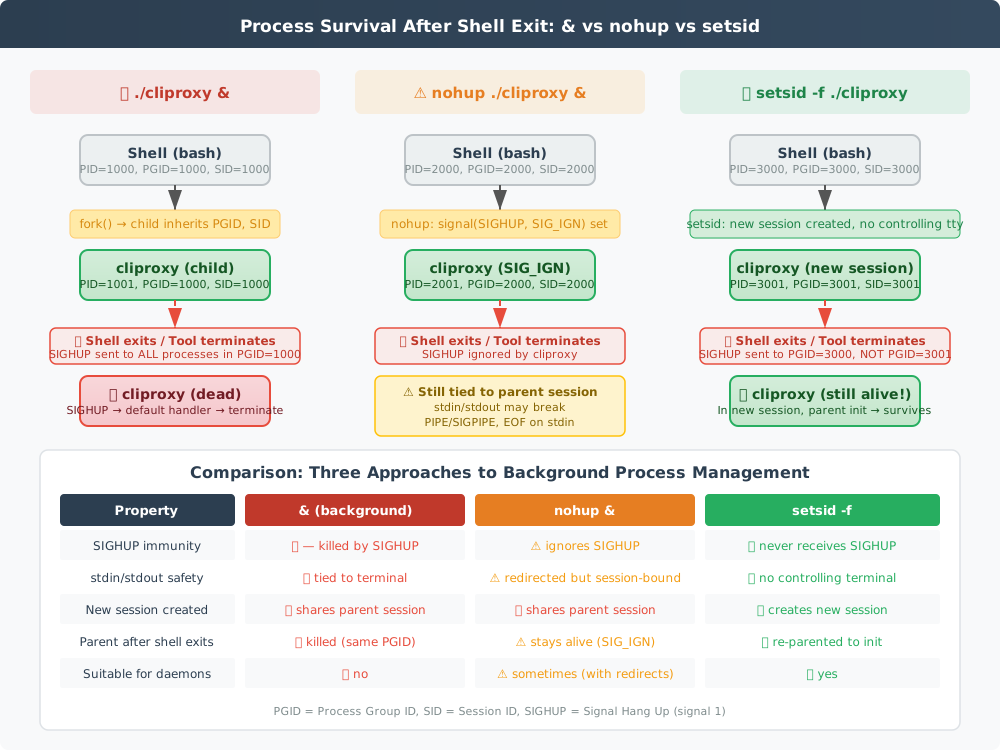
Figure 2: A side-by-side comparison of how & (background), nohup, and setsid differ in process group, session, and terminal relationship. This is the most important diagram in this article.
4. Root Cause Analysis: Why nohup Isn’t Enough
To understand this, we need to dive into the Linux process model: processes, process groups, and sessions.
4.1 Process Groups
Every process belongs to a process group, identified by PGID (Process Group ID). When you run a command (or a pipeline) in a shell, all related processes are placed in the same process group.
shell (bash, PID=1000, PGID=1000, SID=1000)
  └── cliproxy (PID=1001, PGID=1000, SID=1000)
4.2 Sessions
A session contains one or more process groups. The session leader is typically the login shell. When you log in via SSH, SSHD assigns a controlling terminal to your session.
4.3 SIGHUP Propagation
SIGHUP follows a two-level propagation path:
- When the terminal disconnects (SSH timeout, window close), the kernel sends SIGHUP to the session leader (usually the shell).
- The shell, upon receiving SIGHUP, broadcasts it to every process group it manages via
killpg(). - If a process hasn’t ignored SIGHUP, the default action is to terminate.
With nohup, step 3 won’t kill the process because signal(SIGHUP, SIG_IGN) is set. But the problem is in step 2—the shell sends SIGHUP at the process group level.
When you background a process with & (with or without nohup), the child process’s PGID equals the parent shell’s PGID. So when the shell receives SIGHUP and calls killpg(), every process in PGID=1000 is affected—including your background process.
An even more insidious issue is session binding. nohup only ignores the signal, but the process still belongs to the original session. When the session leader exits, the controlling terminal is destroyed. If the process tries to read or write to the now-destroyed terminal file descriptors, it may:
- Read EOF from stdin
- Receive SIGPIPE when writing to stdout/stderr
- Get EIO on certain I/O operations
4.4 The Automation Tool Factor
In interactive bash, the huponexit option is off by default. So an interactive shell exiting does not send SIGHUP to background jobs. This is why everything works fine when you test manually in a terminal.
But in automation tools (AI Agents, CI pipelines, Ansible, remote command executors), bash typically runs in non-interactive mode (e.g., via bash -c or SSH command execution). Non-interactive shell behavior differs, and the tool itself may forcibly clean up child processes upon exit—by sending signals to the process group or by directly killing them.
5. Confirmed Root Cause: SIGHUP Propagation Within the Same Process Group
Connecting all the evidence:
The cliproxy process, started with
nohup ./cliproxy &, had SIGHUP ignored—but it still shared the same process group and session as the parent shell. When the automation tool’s bash process exited, it sent SIGHUP to the entire process group. Although cliproxy ignored SIGHUP, the subsequent destruction of the controlling terminal, broken stdin/stdout, or disrupted parent-child wait chain caused it to exit abnormally. The fundamental issue was that the process lacked an independent session.
Here’s the crucial distinction between the protection mechanisms:
| Mechanism | What it does |
|---|---|
& |
Backgrounds the process, but same process group |
nohup |
Ignores SIGHUP, but same session |
disown |
Removes from shell’s job table; shell won’t actively kill on exit |
setsid |
Creates new session; fully detached from original terminal and process group |
The nohup + & combination works in simple scenarios, but when the parent is not a persistent process (e.g., temporary SSH session, CI job, AI Agent bash environment), it becomes unreliable.
6. The Fix: Using setsid to Create an Independent Session
Once the root cause was identified, the fix was remarkably simple:
setsid -f /root/CLIProxyAPI/cliproxy > /tmp/cliproxy.log 2>&1
The -f flag means “fork before executing setsid,” ensuring the calling process is not a process group leader (which is required by the setsid(2) system call—a process group leader cannot create a new session).
Verification:
# Start
setsid -f /root/CLIProxyAPI/cliproxy > /tmp/cliproxy.log 2>&1

# Confirm new session
ps -p $! -o pid,ppid,pgid,sid,cmd

# Expected output: PGID and SID both equal cliproxy's PID
# PID  PPID  PGID  SID  CMD
# 3001  1    3001  3001 ./cliproxy
# ^^^^       ^^^^  ^^^^
# PPID=1     PGID≠original  SID≠original
# (reparented (new process  (new session)
#  to init)    group)
Three key differences:
- PPID=1 (adopted by init), no longer the original shell
- PGID=3001 (new process group), no longer the original group (1000)
- SID=3001 (new session), no longer the original session (1000)
This means when the original shell exits, neither killpg(1000, SIGHUP) nor killpg(1000, SIGTERM) will affect cliproxy. It’s in a completely isolated process group (3001) and session (3001).
Post-fix verification:
curl -s -o /dev/null -w "%{http_code}" http://<DEV_HOST>:8317/management.html
# 200
Even after disconnecting SSH, closing the terminal, or letting the automation tool finish, the service stayed online.
7. Deep Dive: How setsid Works
The underlying system call is setsid(2). POSIX defines it to do three things:
- The calling process becomes the session leader of the new session.
- The calling process becomes the process group leader of a new process group.
- The calling process has no controlling terminal.
There is one important constraint: the calling process must not be a process group leader. This is why the setsid command forks first—the child process’s PID cannot equal its parent’s PGID, so the EPERM error won’t trigger.
The setsid -f flag performs this fork+setsid sequence. It’s equivalent to:
pid_t pid = fork();
if (pid == 0) {
    setsid();  // child creates new session
    execvp(argv[0], argv);  // execute target command
}
exit(0);  // parent (intermediate fork) exits immediately
This also explains why a setsid-launched process has PPID=1—the intermediate fork parent exits immediately, so the target process is adopted by init.
8. Broader Background Process Management Practices
Beyond setsid, there are additional practices worth knowing.
8.1 Redirect All Standard Streams
Even with setsid, always redirect stdin/stdout/stderr:
setsid -f ./cliproxy </dev/null >/tmp/cliproxy.log 2>&1
This ensures:
stdinwon’t accidentally read EOF from a closed terminalstdout/stderrgo to files instead of a potentially broken terminal
8.2 Use screen or tmux
For scenarios where you need interactive process management:
screen -dmS cliproxy-session ./cliproxy
These tools create persistent pseudo-terminal sessions. Even if you disconnect SSH, the process continues running inside the screen/tmux daemon, and you can reattach later.
8.3 Use systemd
For production environments, systemd is the recommended approach:
[Unit]
Description=CLIProxy API Server
After=network.target

[Service]
Type=simple
ExecStart=/root/CLIProxyAPI/cliproxy
Restart=always
RestartSec=5
User=root
WorkingDirectory=/root/CLIProxyAPI

[Install]
WantedBy=multi-user.target
systemctl daemon-reload
systemctl enable --now cliproxy
systemd handles not just lifecycle management but also auto-restart, logging (journald), resource limits, and dependency management.
8.4 Containerize
For cloud-native environments, containerize the service:
FROM debian:bookworm-slim
COPY cliproxy /usr/local/bin/
EXPOSE 8317
ENTRYPOINT ["/usr/local/bin/cliproxy"]
docker run -d --restart=always --name cliproxy -p 8317:8317 cliproxy
9. When Exactly Does nohup Fail?
Based on this debugging session, here’s a summary of nohup‘s适用范围 and failure conditions:
Scenario A: nohup Works Fine
- Started in an interactive terminal → terminal closed → process survives
- Simple long-running tasks (
nohup sleep 10000 &) - The process is itself a daemon that already calls
setsid()ordaemon()
Scenario B: nohup May Fail
- Started within an automation tool/CI runner: the tool may forcefully clean up child processes
- Non-interactive shell: bash running with
-cbehaves differently - Process needs ongoing I/O: processes that read/write to the terminal may die from SIGPIPE or I/O errors after terminal disconnect
huponexitenabled in shell: even interactive shells will send SIGHUP to background jobs on exit- Parent process is killed wholesale: in some cases, if the parent is SIGKILL’d (can’t be ignored), children may be cleaned up too
Scenario C: setsid Is the Better Choice
- Daemon processes that need to run for extended periods in automation environments
- Proxies or tunnels started on SSH jump hosts or bastion hosts
- Background services started in CI/CD pipelines for testing
- AI Agent tools (like Claude Code) executing startup commands that must outlive the tool itself
10. Troubleshooting Checklist: When a Background Process Vanishes
Next time you encounter a disappearing background process, follow this systematic approach.
Step 1: Confirm the process actually exited
# Check by PID directly (don't rely on fuzzy searches)
ps -p <PID> -o pid,ppid,pgid,sid,stat,cmd

# Check for exit reasons
dmesg | grep -i "out of memory\|killed process"  # OOM killer?
Step 2: Check how it was started
# Who is the parent?
ps -o ppid= -p <PID>

# PPID=1 means adopted by init—not inherently bad
# But if PPID is a short-lived process that already exited, investigate parent-child relationships
Step 3: Check signal handling
cat /proc/<PID>/status | grep -E "SigIgn|SigCgt|SigBlk"

# SigIgn bit 0 corresponds to SIGHUP
# If bit 0 is 1, SIGHUP is ignored
Step 4: Check process group and session
ps -p <PID> -o pid,ppid,pgid,sid,comm

# If PGID ≠ PID, not a process group leader
# If SID ≠ PID, not a session leader
# Both mean: shell exit could affect this process
Step 5: Check controlling terminal
ps -p <PID> -o tty

# If it shows ? or pts/0, it has a controlling terminal
# If ? and started via setsid, no controlling terminal—this is safe
Step 6: Check the automation environment
# Check parent process chain
pstree -s <PID>

# If it's a descendant of CI runner / AI Agent / ansible,
# consider these tools' cleanup behavior on exit
11. Q&A
Q1: What’s the biggest difference between nohup and setsid?
nohup only tells the process to ignore SIGHUP, but the process remains in the same session and process group. setsid creates an entirely new session, detaching the process from the original controlling terminal and process group. Simply put: nohup is a bulletproof vest; setsid is leaving the battlefield entirely.
Q2: How does disown compare to setsid?
disown is a bash built-in that only works with already-started background jobs in an interactive shell. It removes entries from the shell’s job table, preventing the shell from sending SIGHUP on exit. But disown cannot be used in non-interactive environments (like scripts), severely limiting its scope. setsid is an external command that works everywhere.
Q3: Why does the PPID become 1 with setsid?
Because setsid forks a child, which calls setsid() to create a new session and then executes the target program. The intermediate fork parent exits immediately, so the target process’s PPID is set to 1 (init). This is normal and expected—it’s exactly the mechanism that protects the process from the original shell.
Q4: Do I still need nohup with setsid?
No. A setsid-created process has no controlling terminal and cannot receive SIGHUP from the original session. However, you should still redirect stdin/stdout/stderr to files or /dev/null to prevent I/O errors from closed terminal descriptors.
Q5: Can setsid solve all background process problems?
No. setsid solves the specific problem of “process killed because parent session/process group exited.” If the process crashes on its own (bug, OOM, config error) or is explicitly killed by another tool, setsid won’t help. For production environments, combine it with systemd or container orchestration.
Q6: Why does nohup & work in interactive terminals but not in scripts?
Interactive bash has huponexit disabled by default, so it doesn’t send SIGHUP to background jobs on exit. Non-interactive bash and automation tools lack this protection. Additionally, interactive terminal file descriptors remain valid (returning EIO) after disconnect, while automation tools may close pipes entirely, causing SIGPIPE.
Q7: What does the (...) in (setsid cmd &) do?
The parentheses (...) create a subshell. (setsid cmd &) executes setsid cmd & inside a subshell. When the subshell exits, the setsid-created process has already been reparented to init, so it’s unaffected. Both this approach and setsid -f achieve the same result, but setsid -f is more concise.
12. Postmortem: A Terminal-Driven Bug
The most valuable lesson from this debugging session isn’t how useful setsid is—it’s this:
Don’t test non-interactive process behavior in an interactive terminal.
If you run nohup ./cliproxy & in a terminal, close the window, and it survives—that does NOT mean it will survive in CI, an AI Agent, or a remote command executor. The shell mode, job control, signal propagation, and file descriptor lifecycle are fundamentally different.
The minimal test that catches this class of issue:
# Simulate a non-interactive shell starting a background process
bash -c 'setsid -f /path/to/service > /tmp/service.log 2>&1'
# Verify the process survived
ps aux | grep service | grep -v grep
If this test passes, the process will survive in any environment.
References
- Linux
setsid(2)system call manual: https://man7.org/linux/man-pages/man2/setsid.2.html - Linux
credentials(7)— process credentials, UIDs, process groups, sessions: https://man7.org/linux/man-pages/man7/credentials.7.html nohupvssetsidvsdisowndetailed comparison: https://www.sobyte.net/post/2022-04/linux-nohup-setsid-disown/- Why
nohupbackground process is getting killed: https://unix.stackexchange.com/questions/446625/why-nohup-background-process-is-getting-killed - Baeldung: Guide to the
nohupCommand in Linux: https://www.baeldung.com/linux/nohup-command-tutorial - IBM:
nohuporsetsidto keep a process running after user disconnect: https://www.ibm.com/support/pages/nohup-or-setsid-keep-process-running-after-user-disconnect - Don’t hang up on me — SIGHUP debugging deep dive: https://ndeepak.com/posts/2016-07-30-sighup/
- CLIProxyAPI Management API documentation: https://help.router-for.me/management/api