DNS Answered in 1 ms and Sent Me to the Wrong Place: Three SmartDNS and AdGuard Home Traps
The misleading part of this incident was that DNS kept answering.
The service was running, its ports were reachable, domestic sites resolved, and some queries took zero or one millisecond. The returned addresses told a different story: several overseas names pointed to unrelated destinations. Switching to a second DNS entry did not fix them.
The eventual repair crossed three layers: explicit domain routing, a verified overseas DoH path, and a CONNECT target compatibility issue between SmartDNS 47.1 and the existing proxy. Cache cleanup and client checks came afterward.
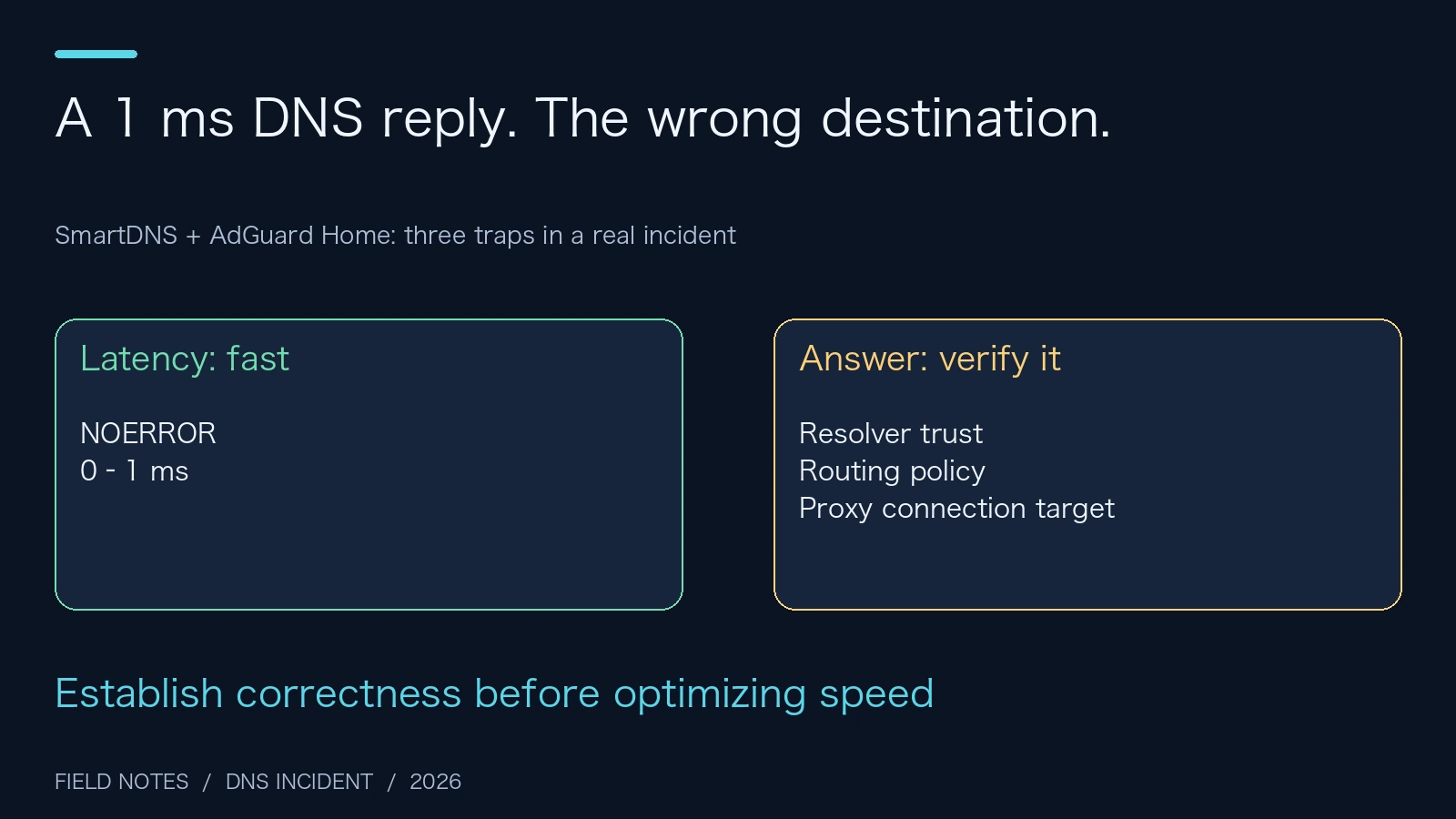
Figure 1. Original illustration. Latency measures performance; answer correctness needs its own evidence.
1. Find out who is answering before replacing resolvers
I previously wrote about troubleshooting AdGuard Home and DoH. This incident adds an important qualification: changing an upstream connection to HTTPS does not guarantee that the selected resolver will return a suitable, reliable answer for every name.
The environment was familiar home-lab territory. A router ran dnsmasq and SmartDNS. A separate Linux host ran AdGuard Home. Clients received both DNS entries, while an existing proxy ran elsewhere.
This article calls the router A and the filtering host B. Real device addresses, computer names, local DNS names, accounts, and private paths are omitted throughout. Ports, versions, configuration behavior, and acceptance counts come from the actual repair record. The diagrams describe the architecture after removing private identifiers.
Imagine a school with two information desks. One checks visitor rules; the other looks up classroom locations. Putting both phone numbers into a phone does not guarantee that every caller always tries the first desk and contacts the second only after a failure. Operating systems and applications can cache results, race requests, or select an entry themselves.
That is why the first step was to draw the actual resolution chain, rather than immediately edit the client’s DNS list.
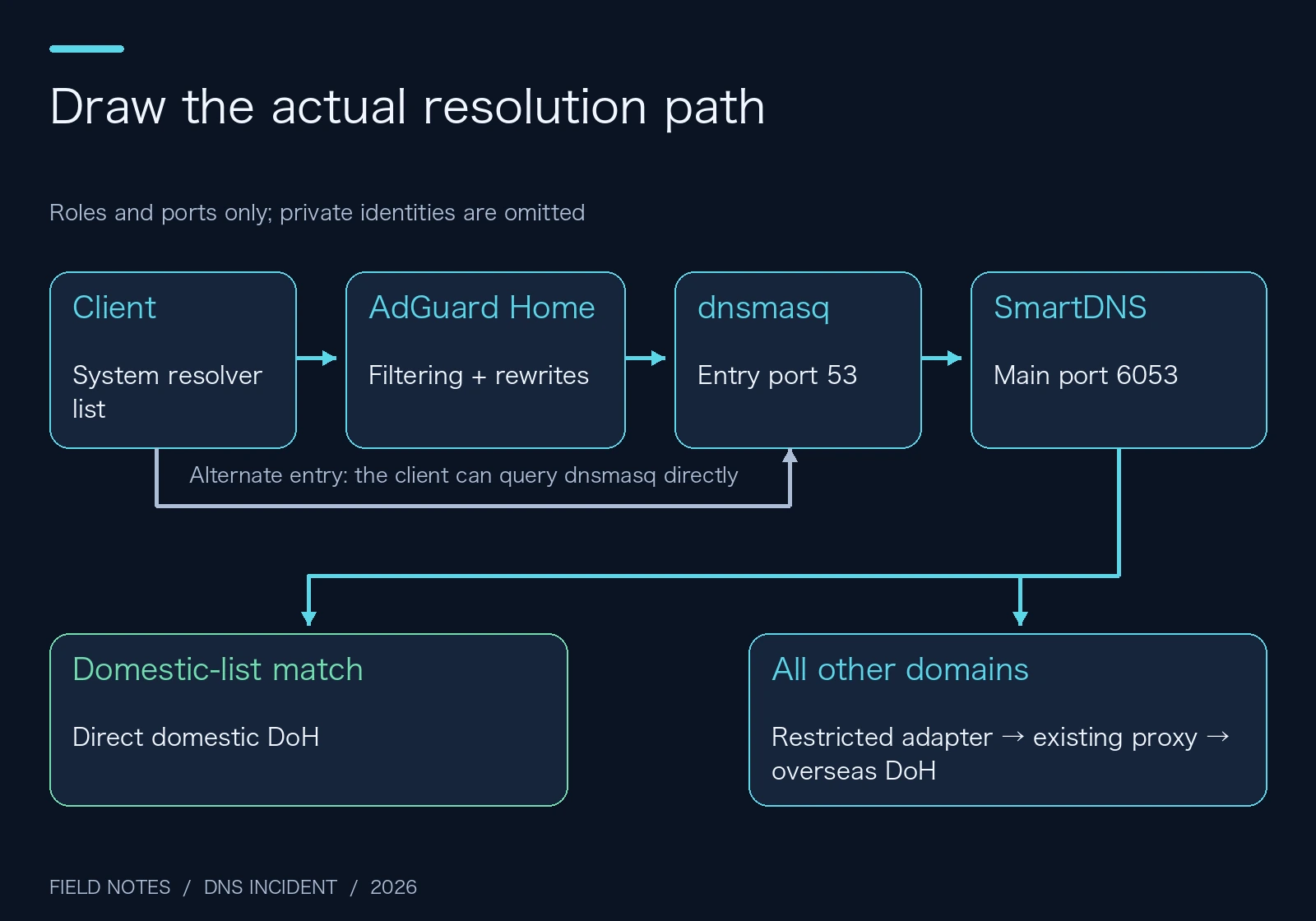
Figure 2. The main path and alternate entry. Roles describe responsibilities, without identifying real machines.
On the router, dnsmasq listened on port 53 and forwarded external resolution to local SmartDNS on port 6053. SmartDNS also exposed port 5335, assigned to the overseas group. AdGuard Home was another client-facing entry, responsible for filtering and static rewrites.
Processes, listeners, and forwarding configuration were working. That ruled out a simple startup failure. The next questions were more useful: which upstream received a particular name, and what answer came back?
2. Trap one: named groups without domain routing
The upstream configuration already contained china and oversea groups. Those labels suggested that domestic names would use the domestic group and overseas names would use the overseas group.
The generated configuration did not establish that behavior.
In SmartDNS, an upstream’s group labels, membership in the default group, and domain-based routing rules are separate controls. Adding -group china does not automatically remove that upstream from the default group. Nor can the main listener infer a routing policy from the English words used as group names.
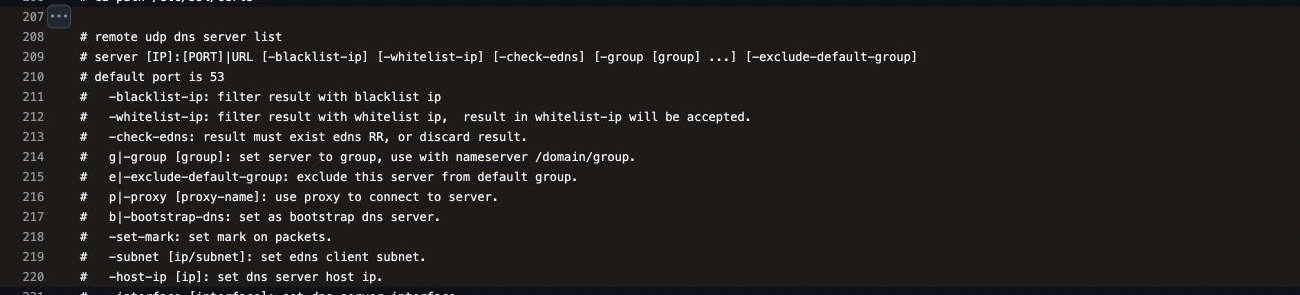
Figure 3. A cropped browser screenshot of the official configuration at the pinned source revision. Group membership and default-group exclusion have separate options.
Think of two cafeteria windows labeled “regular meals” and “allergy meals.” If the queue system still distributes everyone to either window, the signs alone do not establish the required policy.
That was the situation here. The main entry still mixed domestic and overseas upstreams. The second listener did select the overseas group, but its upstream connections were still plain UDP. Direct queries to those upstreams also produced abnormal results, so changing ports did not create a trustworthy alternative path.
The chosen policy was explicit: domestic-list matches use china; other queries use verified oversea upstreams. Domestic resolvers are excluded from the default group. Existing local resolution stays local instead of sending internal names outside.
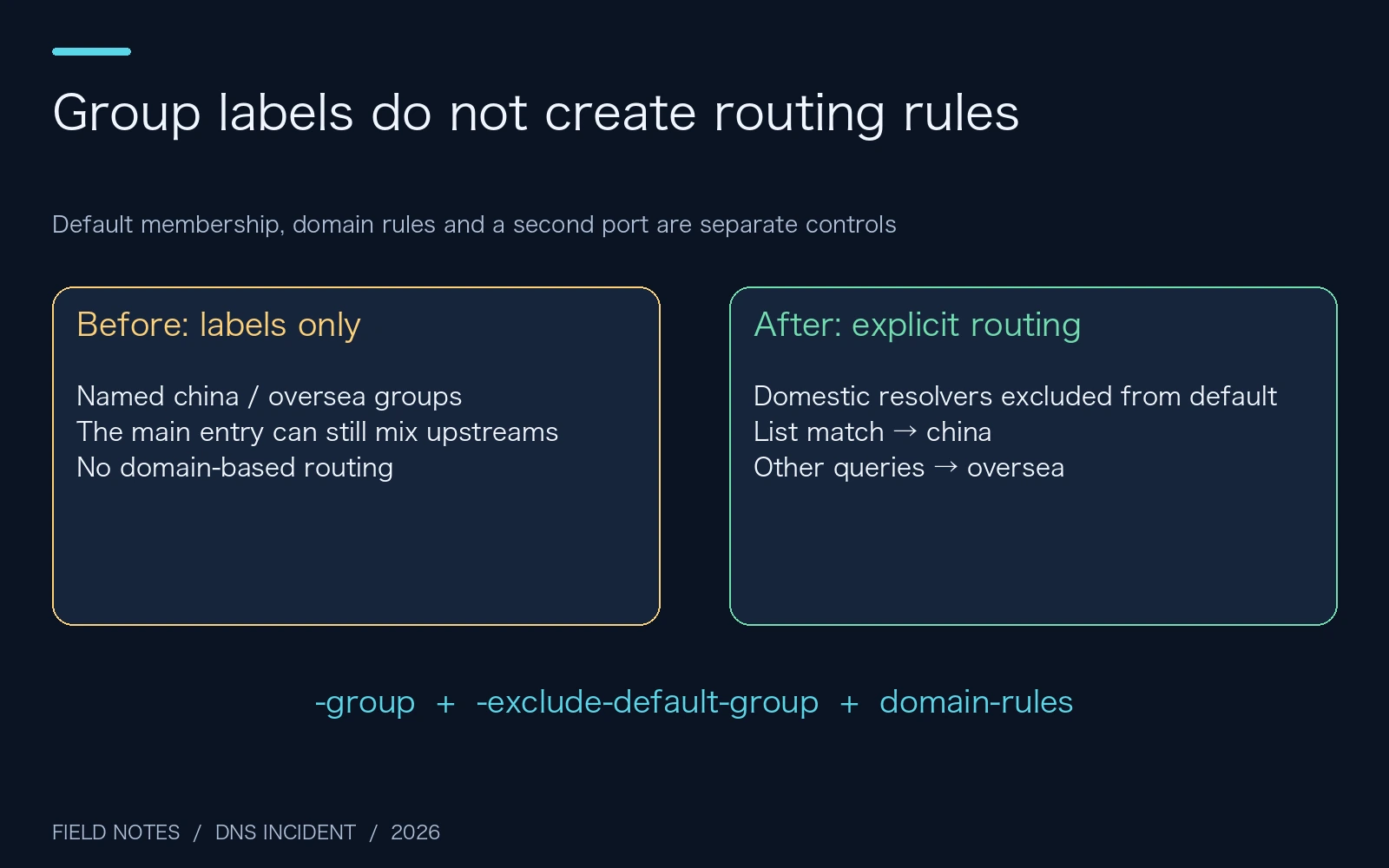
Figure 4. This deployment uses domestic-list matching with overseas resolution for remaining names. An unlisted domestic domain can consequently receive overseas CDN placement; the policy has a tradeoff.
A simplified configuration looks like this. The address placeholders must be supplied from private configuration; this is a structural example, rather than a complete configuration to overwrite a router with:
server-https https://dns.alidns.com/dns-query -group china -exclude-default-group -host-ip <DOMESTIC_DOH_ADDRESS>
server-https https://dns.google/dns-query -group oversea -proxy doh-proxy -host-ip <OVERSEAS_DOH_ADDRESS>

domain-set -name china-domains -file /etc/smartdns/domain-set/china-domains.list
domain-rules /domain-set:china-domains/ -nameserver china
The deployed profile also includes another domestic and another overseas DoH provider. Previous UDP records were disabled and retained for audit and rollback. Two old upstreams timed out in both rounds of direct testing and were removed from the active set.
The domestic list comes from the maintained dnsmasq-china-list project, converted to SmartDNS format. The installed list contained 109,797 entries. Its weekly update validates the download and entry count, preserves the previous version, and replaces the active file atomically. A failed update must not erase the last usable list.
3. Trap two: encrypted transport still needs a trustworthy respondent
Once plain overseas queries looked wrong, DoH was an obvious candidate. Successfully establishing HTTPS was only the beginning of its evaluation.
In this environment, domestic DoH services still returned abnormal results for some overseas domains. The evidence establishes that those answers were unsuitable for this use case. It does not identify the particular intermediary, provider, policy engine, or recursive-resolution step responsible for producing them.
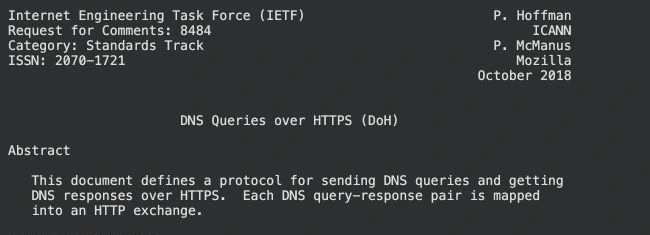
Figure 5. A genuine RFC 8484 screenshot. The standard maps DNS queries and responses into HTTPS exchanges.
A sealed envelope is a useful analogy. Encryption makes it harder for people along the route to open or alter your letter, and authentication helps establish who receives it. However, the recipient can still supply outdated information, apply a policy you did not expect, or obtain a problematic answer farther upstream. The envelope cannot correct the contents by itself.
Three checks therefore belong together:
- Confirm the intended connection path and successful certificate-chain and hostname verification.
- Examine DNS business status, record types, and answers in addition to the HTTP status.
- Compare against independent trusted evidence and the relevant application behavior.
NOERROR has a similarly limited meaning. It is a DNS response code, rather than a certificate of answer correctness. It also does not guarantee that the answer section contains the requested record type. Empty answers, SOA records, NXDOMAIN, and SERVFAIL require different interpretations.
Through the existing proxy, Google and Cloudflare DoH returned normal answers. A Google HTTPS control request returned 204 with certificate verification enabled. That established a usable overseas path for the next configuration step.
Domestic services continued to use directly reachable domestic DoH, retaining appropriate local CDN placement and independence from the overseas proxy. Overseas services used the separately verified path. This was an environment-specific result, rather than a universal provider ranking.
4. Trap three: curl succeeded while SmartDNS returned SERVFAIL
This was the most instructive part of the repair.
The proxy-backed DoH request worked in curl. An isolated SmartDNS instance using the same provider still failed for overseas queries, while domestic routing worked. Production DNS remained on its earlier configuration during these experiments, so the investigation did not depend on repeatedly disrupting the household network.
The decisive comparison concerned the CONNECT target presented to the proxy:
| Controlled condition | Result in this environment |
|---|---|
| DoH hostname supplied to the proxy | Successful query |
| Corresponding numeric target supplied to the proxy | Connection timeout |
| Native SmartDNS proxy path | Overseas SERVFAIL |
HTTP CONNECT can absolutely use numeric destinations. The specific observation was that this proxy path behaved differently for numeric and hostname targets. Proxy policy, routing, or implementation could explain that difference; the investigation did not establish which internal mechanism was responsible.
To identify what SmartDNS actually supplied, I inspected the Release47 implementation matching the observed behavior and pinned its source revision for reproducibility.
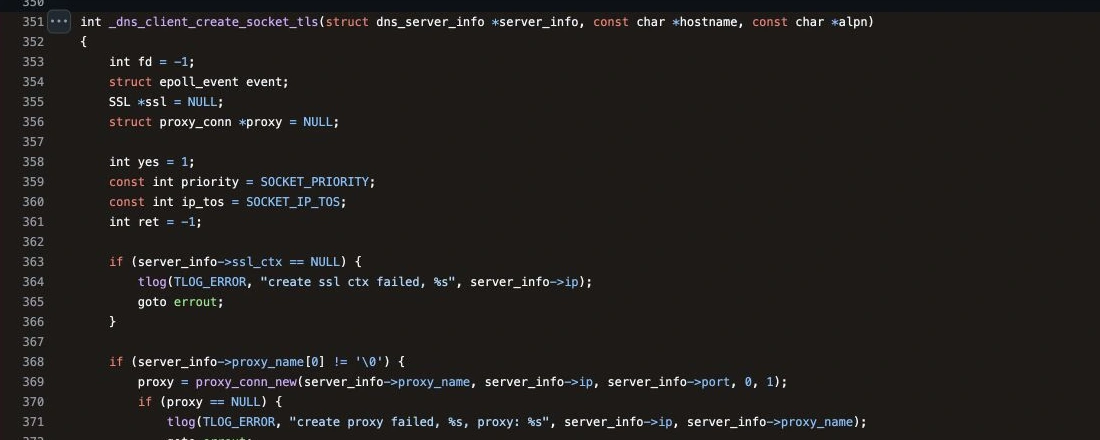
Figure 6. In the inspected client_tls.c implementation, proxy connection creation receives server_info->ip.
The relevant call can be shortened to:
proxy = proxy_conn_new(
    server_info->proxy_name,
    server_info->ip,
    server_info->port, 0, 1
);
Farther down the path, the HTTP proxy handshake constructs CONNECT from the target it receives.
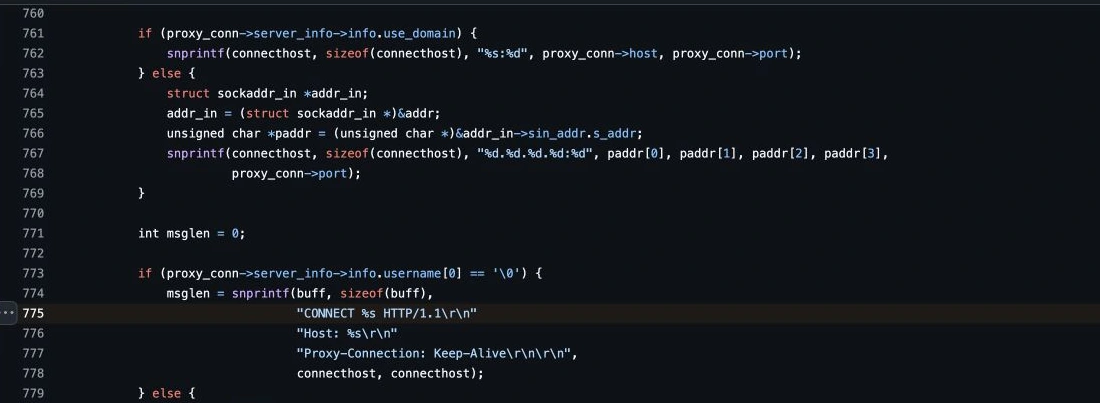
Figure 7. The same pinned revision’s proxy.c. A downstream encoding option cannot recover a hostname that the earlier call did not pass through.
This is why simply adding -use-domain did not resolve the incident. If a delivery form contains only a building number, selecting an envelope format intended for recipient names cannot reconstruct the missing name.
The scope matters. This conclusion concerns the observed SmartDNS 47.1 behavior, the inspected source path, and this proxy environment. Other proxies already accept numeric targets, and other SmartDNS releases deserve fresh verification. It would be misleading to present this adapter as a universal requirement.
5. A narrow adapter that preserves end-to-end TLS
I kept the router’s SmartDNS installation and added a small CONNECT adapter on the filtering host. It maps the configured numeric DoH endpoint targets back to their public service hostnames before connecting through the existing HTTP proxy.
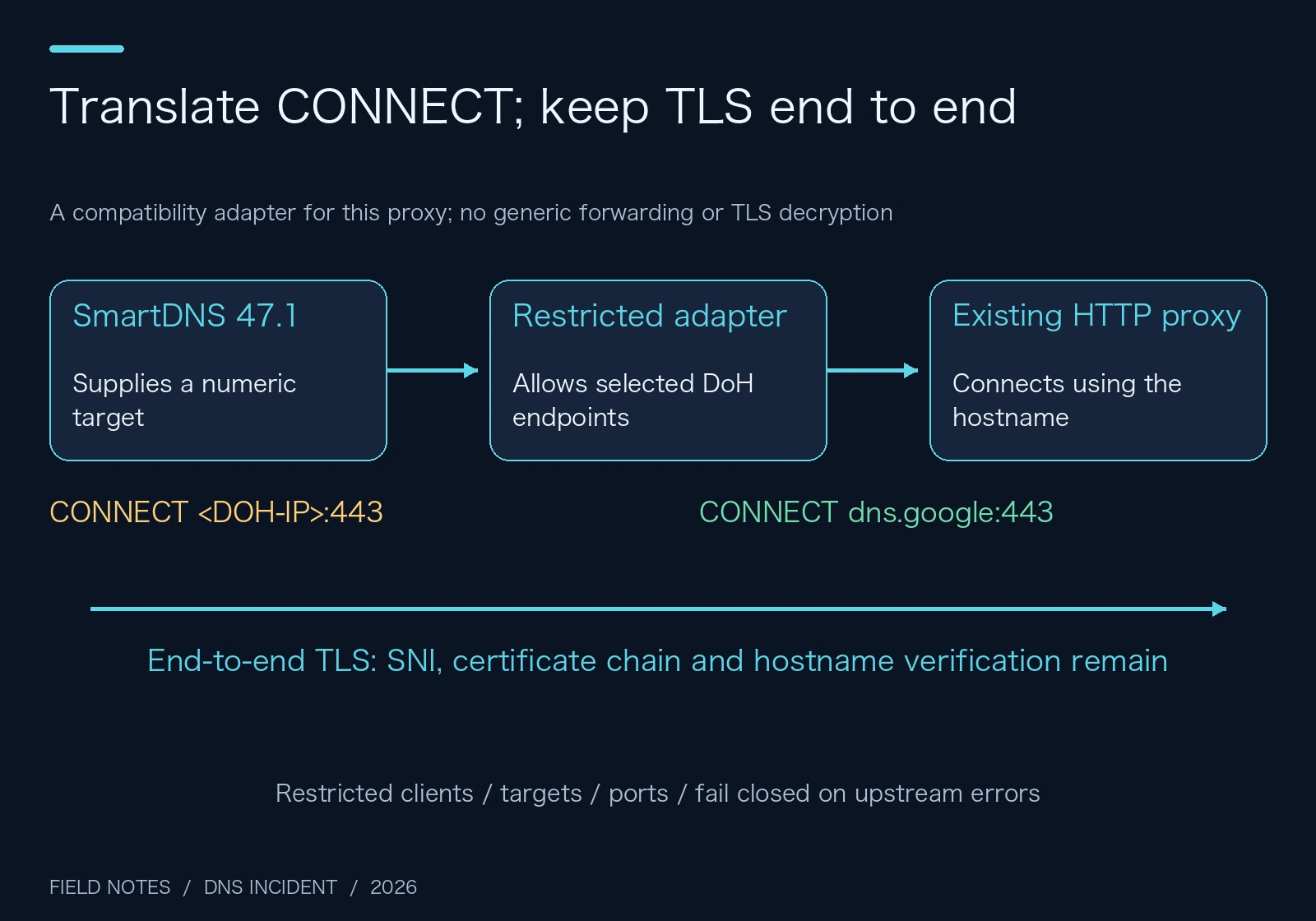
Figure 8. The adapter changes proxy connection targets. DNS content remains inside TLS between SmartDNS and the DoH provider.
The service accepts only designated source clients, configured DoH destinations, and the required destination port. It does not forward arbitrary websites. It runs under a systemd dynamic user and is enabled at startup. A request for an unauthorized destination returned 403.
Certificate and hostname verification remain enabled. The adapter neither creates certificates nor decrypts DNS, and clients do not install an additional root certificate.
A separate failure test used an isolated instance based on the final generated configuration. With its proxy unavailable, domestic names still resolved through the domestic group. New overseas queries failed instead of being silently sent to an unverified replacement upstream. Bounded serving of previously valid stale cache entries is a separate availability mechanism; it does not create a new untrusted resolver path.
There is a real operational cost: fresh overseas resolution now depends on the adapter and existing proxy being online. Startup configuration, restricted access, and rollback make that dependency manageable, but do not remove it. Where a proxy already supports the native numeric CONNECT path, keeping the simpler architecture is generally preferable.
6. AdGuard listeners, upstreams, and bootstrap DNS are different settings
AdGuard Home had been sending queries directly to domestic DoH providers and could therefore return the same problematic overseas answers. The filtering host also had a broken system resolver link pointing to an inactive resolver service.
After repair, AdGuard forwards external queries to the router’s unified resolution entry while retaining filtering and rewrites. The host resolver file was repaired without enabling another service that would compete with AdGuard for the DNS port.
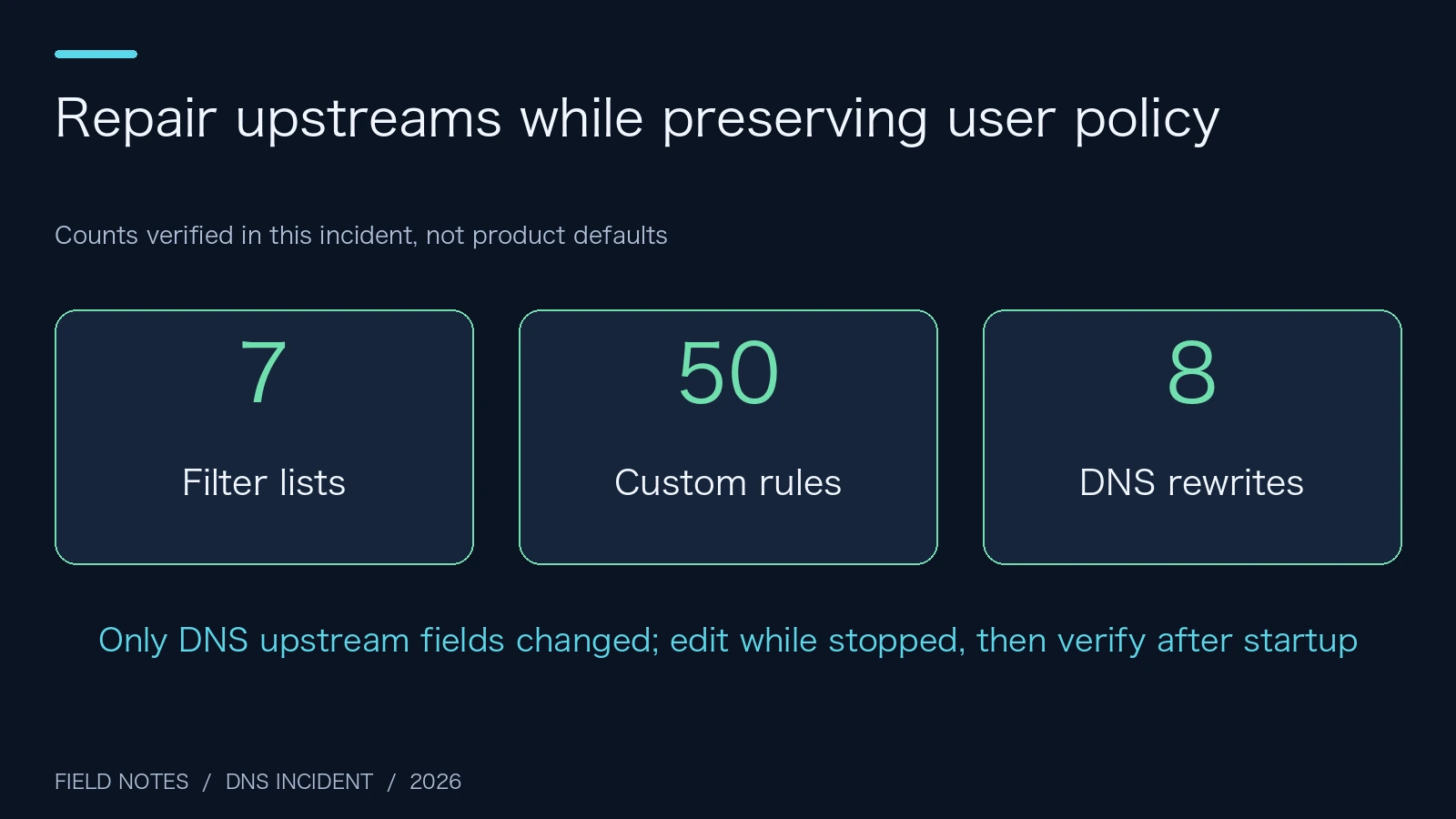
Figure 9. The actual preserved counts were seven filter lists, 50 custom rules, and eight rewrites. This is an incident summary, not a product-default screen.
Several settings are easy to confuse:
| Setting | Responsibility |
|---|---|
| Encrypted client-facing listeners | How clients connect to AdGuard |
upstream_dns |
Where AdGuard sends external questions |
bootstrap_dns |
How an upstream hostname is initially resolved |
fallback_dns |
Whether and where replacement resolution is attempted after upstream failure |
Enabling encrypted inbound DNS does not establish encrypted outbound upstream connections. Editing bootstrap DNS alone also does not redirect ordinary business queries to it.
AdGuard was stopped before editing and restarted before comparing configuration again. Apart from the relevant DNS upstream fields, its existing settings were preserved. Repairing a resolver should not discard filter subscriptions, user rules, or static rewrites.
Because clients still had two DNS entries, four local static records were also synchronized to the alternate entry. AdGuard retains its additional filtering role: querying the router directly bypasses that layer. Two DNS entries provide alternative access, but do not automatically provide identical filtering policies.
7. A repaired upstream does not erase old cache
The old configuration included both a fixed one-hour SmartDNS TTL and a one-hour minimum dnsmasq cache TTL, together with stale-cache serving. That combination can prolong the use of old results. If the cached answer is wrong, cache hits make repeated wrong answers look impressively fast.
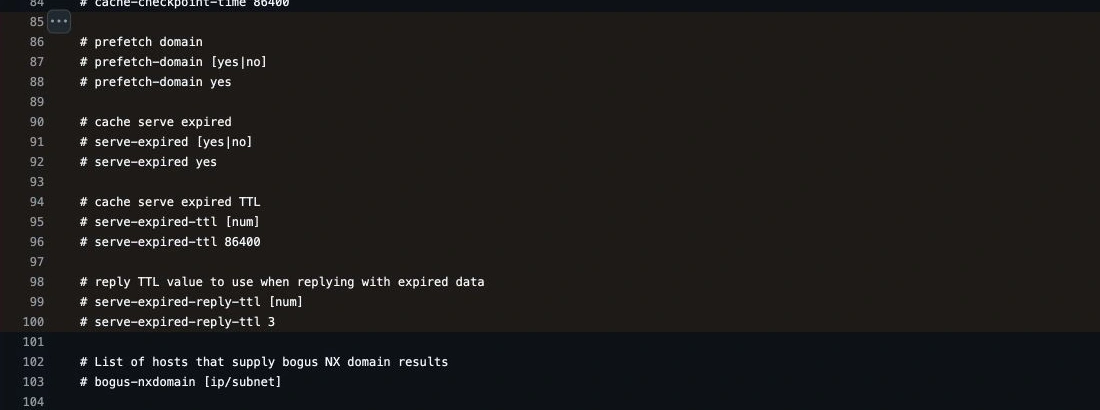
Figure 10. The maximum stale-serving period and the TTL returned with a stale reply are different controls.
Think of a classroom noticeboard displaying an old timetable. The school office may already have corrected its master schedule, while students keep reading the unchanged photocopy at the door.
The repair removed the forced one-hour TTL overrides and primarily honors upstream TTLs. Stale serving was bounded to one hour, with a 30-second stale reply TTL. Those values are a local availability-versus-freshness choice, rather than defaults everyone should copy.
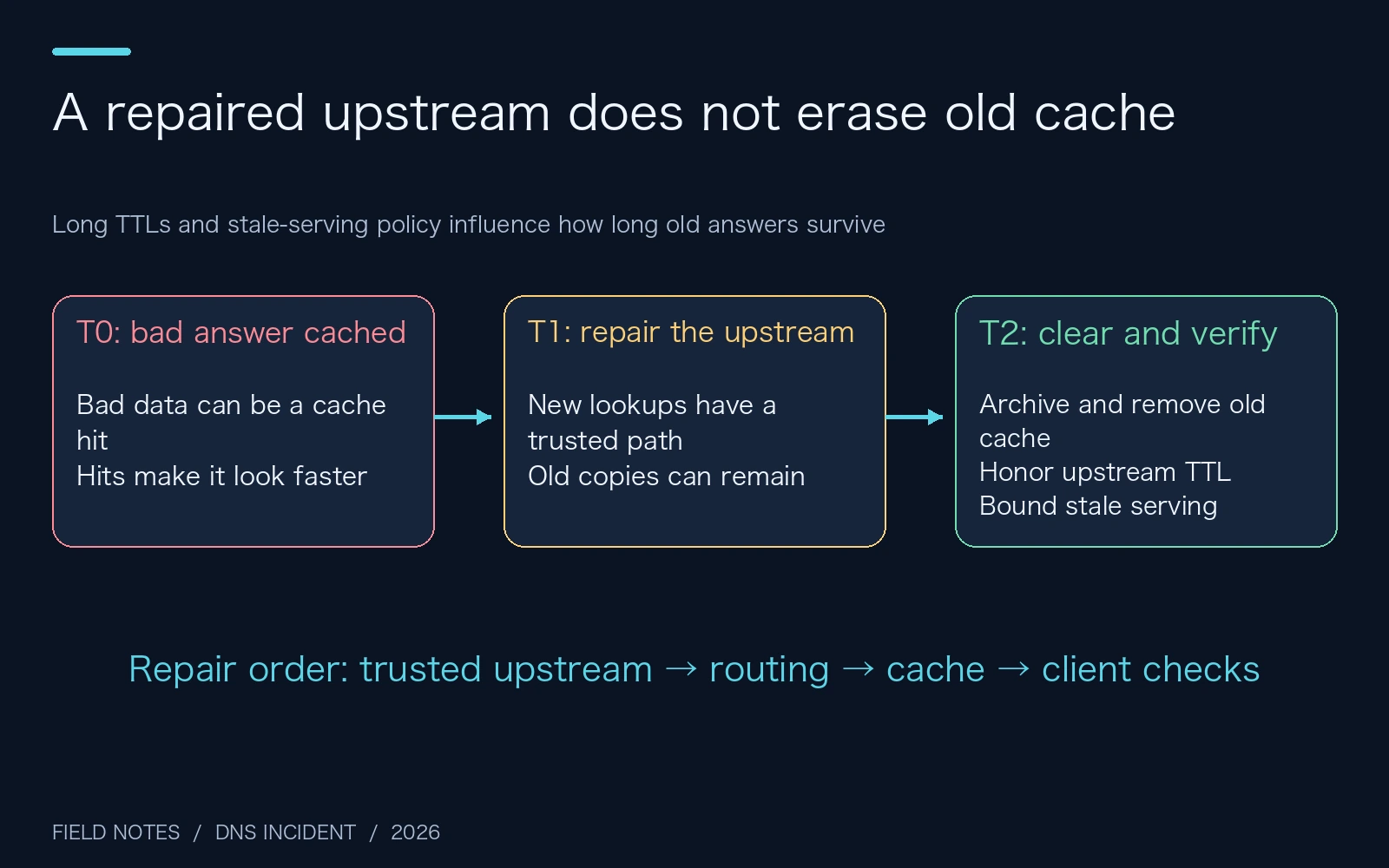
Figure 11. Cache cannot infer which old answer belongs to this incident. Cleanup and verification are operational responsibilities.
Persistent cache cleanup also has an ordering detail. Stop SmartDNS before moving or replacing the cache file. A running process can write its in-memory cache at shutdown; moving the file first may allow the process to recreate the old data afterward.
Finally, return to the client. Test both an explicitly selected DNS server and the operating system’s actual resolution path. Browser secure DNS, application caches, and proxy-side resolution introduce additional variables. A successful query to one chosen port establishes only that particular path.
8. Three-platform automation: audit, apply, verify, and roll back
The DNS Care Kit download contains Windows 11, Ubuntu 26.04, and macOS 27 entry points, complete source, a bundled domestic list, role-based settings, and rollback logic. The usage notes can be read before downloading the archive.
“One command” means one command after filling in your own private role configuration. The scripts do not call an LLM API, require a cloud automation service, download remote executable scripts, or pull new container images. They use native SSH to operate existing equipment and an existing proxy. DNS verification still contacts the selected DNS providers, because that network interaction is the function being tested.
The supported profile is deliberately specific: dnsmasq on port 53, SmartDNS on port 6053, and an Ubuntu filtering host with Python 3, Docker, a bind-mounted AdGuard configuration, and a working HTTP CONNECT proxy. The macOS launcher uses the system Bash, plutil, and OpenSSH, without requiring Python on the Mac. Ubuntu uses its Python 3 installation. Windows uses PowerShell and the Windows OpenSSH client component.
Method A: a person launches the automated workflow
After extraction, copy settings.example.json to settings.private.json and fill in local SSH aliases, device and proxy addresses, four DoH upstreams, and a trusted reference endpoint. Self-hosted DoH is supported. Reference queries use standard DoH wire messages instead of a provider-specific API. Keep that file private. SSH login and host-fingerprint verification should already work before running the kit.
The default mode audits without applying a configuration:
# Windows 11: process-scoped execution policy; no global policy change
powershell.exe -NoProfile -ExecutionPolicy Bypass -File .\windows-11.ps1 -Mode Audit
# Ubuntu 26.04
bash ./ubuntu-26.04.sh audit

# macOS 27
bash ./macos-27.command audit
For a matching topology, Apply verifies the reference DoH path, prepares endpoint pins, installs the restricted adapter, backs up and repairs SmartDNS, verifies the router, and only then changes AdGuard:
powershell.exe -NoProfile -ExecutionPolicy Bypass -File .\windows-11.ps1 -Mode Apply
bash ./ubuntu-26.04.sh apply
# Or:
bash ./macos-27.command apply
On failure, the launcher attempts to restore both original configurations and prints a run identifier. A lost SSH connection can prevent remote rollback, so the archive also exposes explicit recovery commands:
powershell.exe -NoProfile -ExecutionPolicy Bypass -File .\windows-11.ps1 -Mode Rollback -RunId RUN_ID
bash ./ubuntu-26.04.sh rollback RUN_ID
bash ./macos-27.command rollback RUN_ID
The kit’s compact check set contains 28 protocol and record checks, including a comparison of Google answers with address prefixes obtained through trusted DoH. Prefix consistency is a diagnostic clue and can be affected by CDN placement. It is not DNSSEC validation or a final proof of authenticity. The original incident’s broader 56-check acceptance run is a separate result.
The test record also states its limits. The macOS 27 and Ubuntu 26.04 audit paths were run on real machines, each passing 28 checks. The Windows entry underwent PowerShell parsing and four simulated workflow scenarios; Linux-hosted PowerShell testing is not presented as complete Windows 11 hardware certification. Apply is a parameterized implementation of this documented topology, not a universal profile for arbitrary routers and proxies.
Method B: let an existing agent operate the local kit
An existing local operations agent can read and execute the same files. No particular agent product or paid service is required. A practical task instruction is:
You are authorized to repair DNS on the two devices in settings.private.json.
Read the local README and source, identify the current OS, and run its Audit entry.
If the actual topology, reference DoH path and proxy behavior match this profile,
run Apply and verify both client-facing entries afterward.
Preserve backups, filters, custom rules and static rewrites.
Do not change DHCP, gateways, SSH authentication or proxy subscriptions.
Keep TLS certificate validation enabled and avoid unverified overseas fallback.
If the topology differs, retain the diagnosis and explain the mismatch without
executing configuration steps that do not apply.
On failure, use this run's rollback and verify restoration.
Keep private settings local; report roles, counts and redacted results only.
The benefit is a connected audit-change-verification-recovery workflow. Asking an agent to keep guessing a supposedly universal resolver address does not establish which part of the path is actually broken.
9. Acceptance means more than a running process
Final testing covered the router’s ports 53, 6053, and 5335, plus the filtering host’s port 53. It included domestic and overseas names, A and AAAA, UDP and TCP, TXT, HTTPS record types, and nonexistent names.
The existing HTTPS-record suppression policy was retained. Its response was checked against that policy; this is a separate concern from establishing an HTTPS connection to a website.
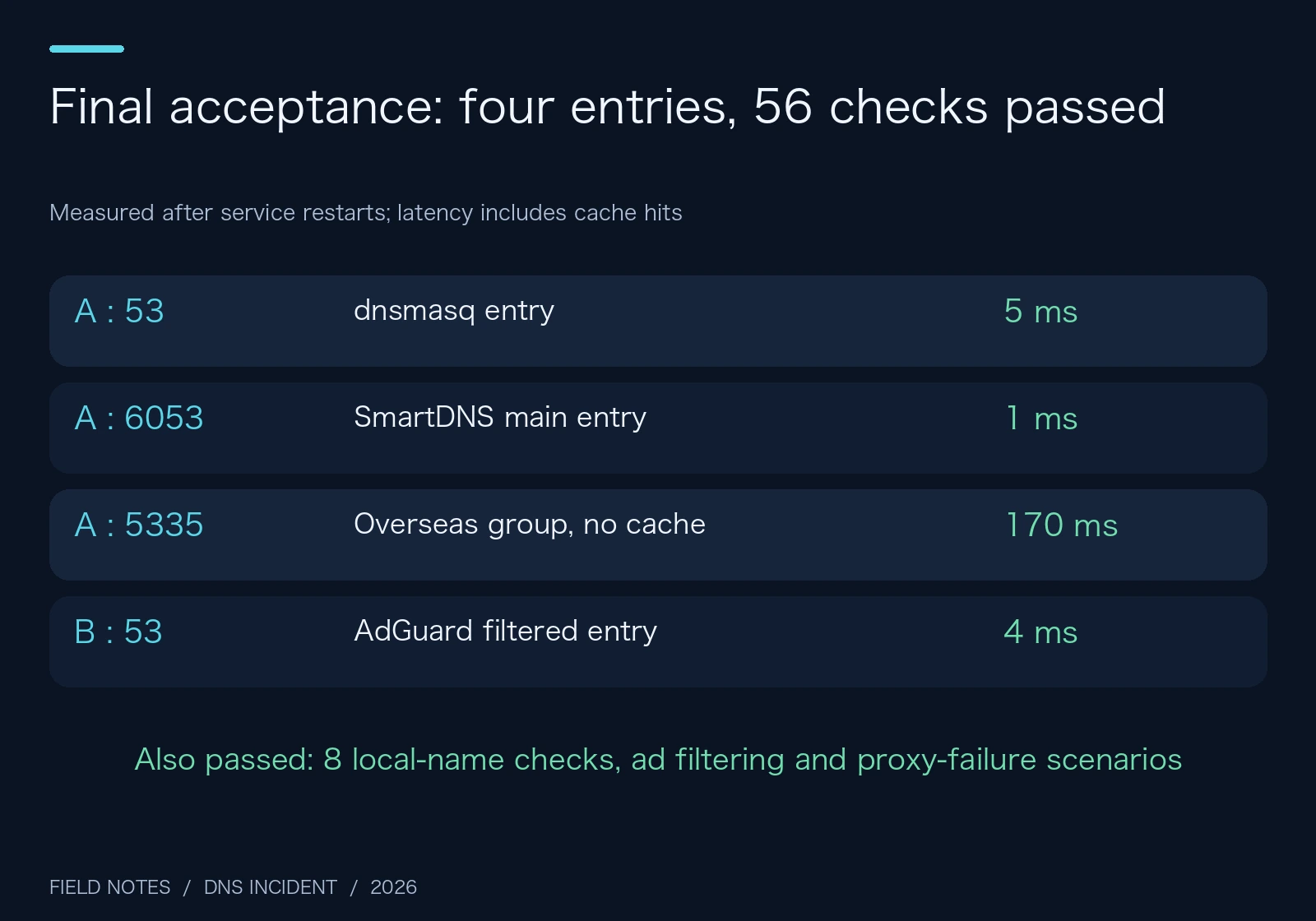
Figure 12. All 56 resolution checks passed after service restarts. Medians include cache hits and represent this snapshot, rather than provider benchmarks.
Eight local-record checks, an ad-filtering check, a proxy-failure scenario, and the client’s system resolver were also verified. Google IPv4 and IPv6 answers returned to normal, previous abnormal answers disappeared, and AdGuard settings were compared again. Temporary SmartDNS instances were stopped, leaving only the production instance.
No full-machine reboot was performed. The verified scope is actual behavior after service restarts and the relevant startup configuration. A full boot-order test can be scheduled in a maintenance window; it should not be claimed before it happens.
Questions that tend to come back
Would a single public resolver be simpler?
For a simple network, it can be. It still needs to be reachable and suitable for the names your applications use. Adding many upstreams does not automatically increase trust and can add racing answers, delay, and diagnostic variables.
Are multiple DNS entries always strict primary and backup?
Do not assume so. Operating systems, applications, browsers, and network state can affect selection. Entries with different routing or filtering policies can consequently produce different experiences. This repair aligned upstream routing and local static records while retaining AdGuard’s additional filtering layer.
Does DoH replace DNSSEC?
They address different layers. DoH protects the connection to the selected resolver. DNSSEC can establish verifiable DNS data when a zone is correctly signed and the validation chain is complete. Not every zone is signed, and enabling either mechanism does not eliminate all other checks.
Should clearing cache be the first repair step?
If the upstream path still returns abnormal answers, a clean cache can quickly fill with the same problem. Establish a trusted upstream and explicit routing before cache cleanup and client verification.
Does everyone need the adapter?
No. First compare hostname and numeric proxy targets in your environment. Keep the native path when it works. This adapter addresses an evidenced compatibility issue and introduces an additional service dependency.
Will correct DNS make every overseas site directly reachable?
No. Resolution is one step. Routing, proxy rules, TLS, HTTP, authentication, and the application itself have separate requirements. The repair concerns DNS correctness; it does not claim to bypass every network restriction.
References and image provenance
Five images are genuine browser screenshots, cropped from official material. The other seven are original diagrams with separate Chinese and English artwork. A drawn terminal window has not been presented as a real capture.
- Pinned SmartDNS source: TLS proxy connection creation
- Same revision: HTTP CONNECT target construction
- Same revision: group and stale-cache configuration
- RFC 8484: DNS Queries over HTTPS
- RFC 8767: Serving Stale Data to Improve DNS Resiliency
- Current AdGuard Home configuration knowledge base
- dnsmasq-china-list
Related reading: DNS evolution and modern hardening and home-network Bufferbloat troubleshooting. Across these incidents, a useful habit keeps returning: after finding a healthy-looking metric, follow a real request through the entire path.