Stop Worshipping Agent Frameworks: 12-Factor Agents as an Engineering Baseline
The short version
12-Factor Agentsis not an installable agent framework, and it is not a Skill for Codex, Claude, Cursor, or any other agent runtime. It is better understood as a set of engineering principles for the AI era. When a system made from a large model, a tool list, and a while loop reaches the familiar 70% or 80% quality bar but refuses to become production-grade, these principles tell you where to look: prompts, context, structured outputs, state, human approval, error compaction, control flow, and recovery.The best part is that it does not romanticize agents. It says, in effect, that reliable agents are mostly software. The LLM is powerful, but it should live inside a system that is observable, interruptible, recoverable, auditable, and testable.
All examples in this article use public projects, public links, and placeholders. No real server addresses, accounts, tokens, business configuration, or private network details are included. The figures are taken from the official humanlayer/12-factor-agents repository and are referenced under the project author’s CC BY-SA 4.0 content license statement. Code license details should be checked in the upstream repository.
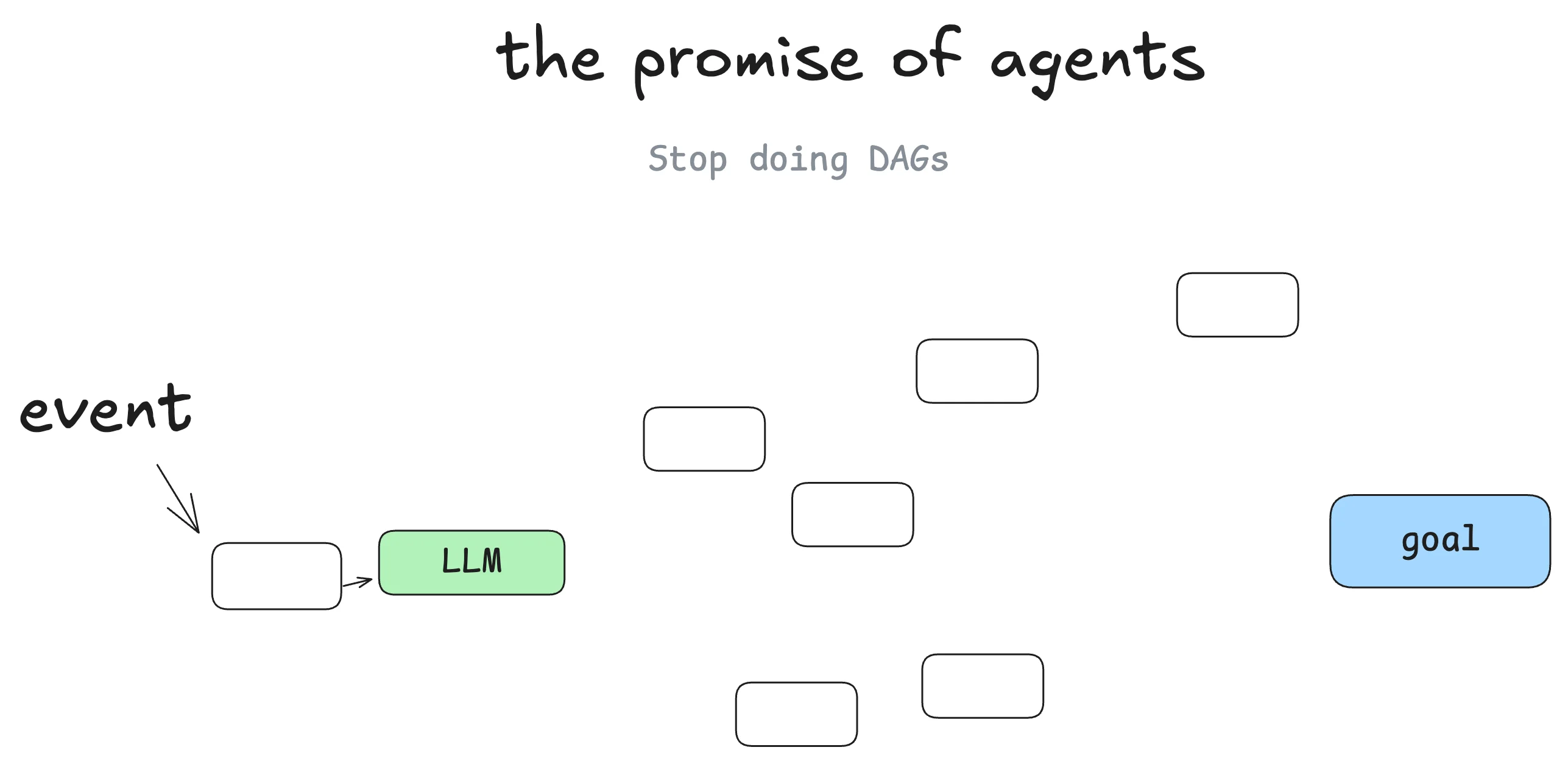
Figure 1: 12-Factor Agents explains the transition from fixed software paths to model-assisted path selection. Source: humanlayer/12-factor-agents.
1. Why Agent Principles Matter Now
The first instinct of many teams building agents is to choose a framework: LangChain, LangGraph, CrewAI, AutoGen, a RAG stack, a tool-calling wrapper, or a multi-agent platform. These tools are useful. They help teams build demos quickly, connect tools quickly, and make a workflow look agentic quickly.
The hard part begins when the agent meets real users, real data, real failures, real permissions, and real business consequences. At that point, the question is no longer which framework can start a loop. The question is whether the system is controllable.
Many agent projects stall in the same place. The demo works. The video looks good. Internal testing feels promising. Then production reality arrives. The model misses relevant context. Tool arguments are malformed. Error messages are repeated without insight. The agent hides business state inside conversation history. A step that should require human approval is treated as if the model can simply continue.
The dangerous reaction is to add more of everything: a larger prompt, a longer context window, more tools, more retries, more framework features. That may lift the success rate for a while, but it often turns the system into a black-box workflow engine. State lives in the context window. Control flow lives in the prompt. Error handling lives in logs. Human approval lives in chat messages. Nobody can reliably explain or recover the system.
This is where 12-Factor Agents is valuable. It moves the discussion from framework choice back to the design of LLM-powered software. The README states a view that matches production experience: good agents do not simply follow the pattern of “here is your prompt, here is a bag of tools, loop until done.” Good agents are mostly software, with LLM steps inserted at the points where they create leverage.
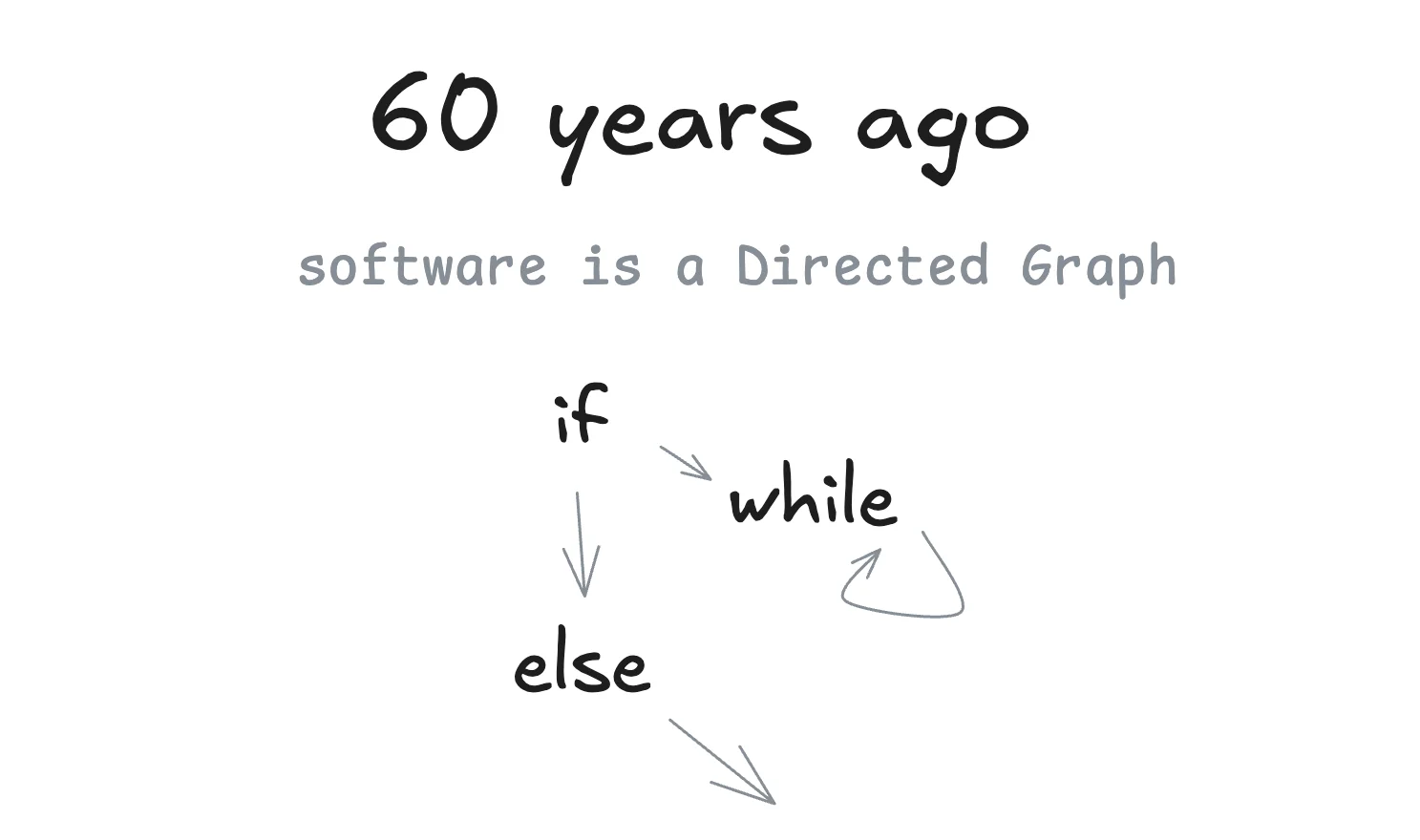
Figure 2: Traditional software can be viewed as a directed graph. This makes it easier to see why agents still need structure. Source: humanlayer/12-factor-agents.
2. The Symptom: Why Many Agents Stop at 80%
If you have built an agent for real users, several symptoms may sound familiar.
First, the context keeps getting longer, but the behavior does not become more stable. At the beginning, it feels natural to put everything into the prompt: user intent, system instructions, tool descriptions, chat history, retrieved documents, intermediate results, and raw logs. Soon the context becomes polluted. Stale information, repeated information, failed attempts, unrelated logs, and temporary guesses all compete for the model’s attention. The model is not necessarily weak. The input is messy.
Second, tool calling looks standardized, but the business meaning is unclear. A framework can make a tool call look clean: function name, JSON schema, parameters, and return values. But in a business system, calling a tool is not the goal. The goal is the state transition represented by that call. Sending an approval request, creating a support ticket, retrying a deployment, or asking a customer to confirm billing details are not ordinary function calls. They involve state, permission, auditability, rollback, idempotency, and responsibility.
Third, the prompt quietly takes over control flow. A common loop is easy to write: ask the model for the next step, execute the tool, append the result, repeat. This is excellent for a demo. It becomes fragile when the task has important business stages. It is hard to know why the model chose a path, and it is hard to insert deterministic safeguards at the right moments.
Fourth, error messages accumulate instead of helping. When a tool fails, many systems paste the entire error, stack trace, stdout, and stderr into the next model call. The model may then focus on the wrong detail. It may be distracted by library noise. It may keep retrying a path that should have been summarized and closed.
Fifth, human approval is treated as a chat patch instead of a first-class part of the system. Real agents often need to ask people: may I execute this command, contact this customer, approve this payment, or deploy this change? If asking a human is just a message in a conversation, approval records become incomplete and recovery becomes difficult.
All of these symptoms share a root cause: too much software engineering responsibility has been outsourced to the model and the framework. A model should handle language understanding, candidate decisions, structured proposals, and some fuzzy judgment. But state management, permission boundaries, control flow, error summarization, audit records, and user contact should not disappear into the context window.
3. What 12-Factor Agents Actually Is
12-Factor Agents is an open-source project started by HumanLayer. It is clearly inspired by the classic 12-Factor App, which gave teams a compact way to reason about cloud-native applications: configuration, dependencies, logs, processes, port binding, environment parity, and similar concerns. 12-Factor Agents applies the same style of thinking to LLM applications and agent systems.
At the time of writing, the repository has more than twenty thousand GitHub stars. That does not make the principles automatically correct, but it does show that the project speaks to a common engineering anxiety. Many teams want agents. Few want to hand their reliability story to a black box.
The twelve factors are:
- Natural Language to Tool Calls.
- Own your prompts.
- Own your context window.
- Tools are just structured outputs.
- Unify execution state and business state.
- Launch, pause, and resume with simple APIs.
- Contact humans with tool calls.
- Own your control flow.
- Compact errors into the context window.
- Small, focused agents.
- Trigger from anywhere and meet users where they are.
- Make your agent a stateless reducer.
These are not a mandatory architecture template. They are better used as a checklist. For each agent you build, ask: are prompts versioned and owned? Is context deliberately constructed? Are tool outputs structured? Can state be recovered? Are human approvals traceable? Are errors compacted? Is control flow owned by code? Is the agent focused enough to test?
If most answers are no, the system may not be an engineering system yet. It may only be a lucky chat script.
4. Four Shifts Hidden Inside the Twelve Factors
The full list is useful, but I find it easier to remember the project as four engineering shifts.
4.1 From Magic Prompts to Maintainable Prompts
Many teams initially treat prompts as configuration text. Someone gets a prompt working, stores it in an environment variable or a dashboard, and later someone else edits a few sentences. This is fine during a demo. It becomes a serious liability in a team.
Own your prompts does not mean writing longer prompts. It means admitting that prompts are code. If they are code, they need versions, review, tests, rollback, naming, structure, and ownership. You need to know what each prompt is for, what variables it receives, what output it must produce, and which cases it must handle.
A prompt should not be a giant string hidden inside a model call. It should live close to the system that depends on it. It should evolve with schemas, examples, tools, and tests. Otherwise, when production behavior changes, you cannot tell whether the cause is a model update, context drift, tool changes, or a one-line prompt edit.
4.2 From Context Piling to Context Construction
Own your context window is closely related to what many people now call context engineering. A long-context model gives you a bigger room. It does not clean the room for you.
Good context is constructed. It should include current user intent, necessary business facts, constraints, available tools, recent key events, recoverable state, compacted failures, and the open question the model is expected to answer. It should not automatically include every chat message, every raw log line, every tool response, and every unrelated document.
RAG, memory, scratchpads, and conversation history are different things. RAG retrieves external knowledge. Memory records durable preferences or facts. Scratchpads may contain intermediate reasoning or working notes. Conversation history is a record of interaction. They should not all be dumped into the model without filtering, ordering, and compression.
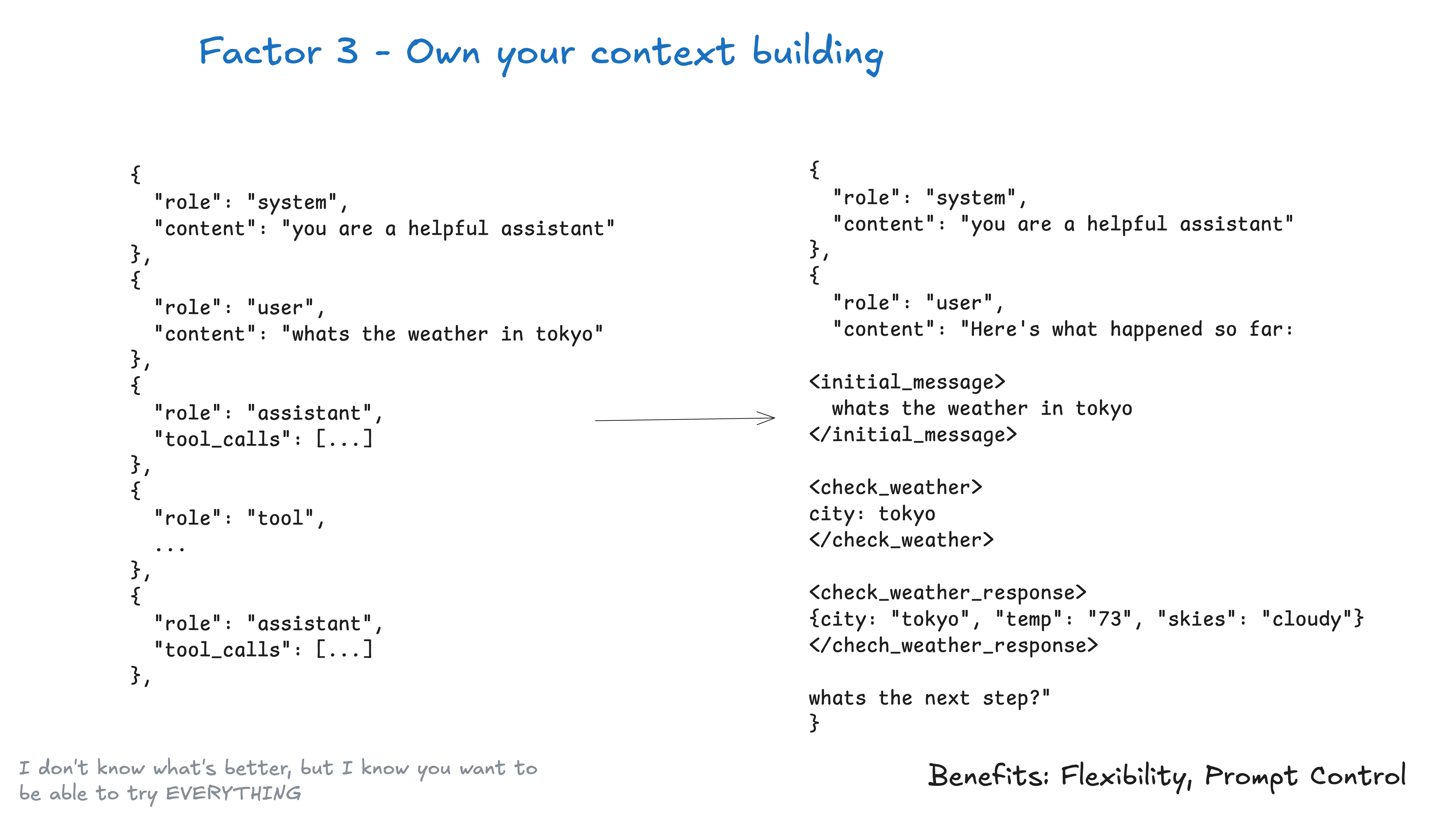
Figure 3: Owning the context window is one of the central ideas in 12-Factor Agents. Source: humanlayer/12-factor-agents.
4.3 From Tools as Functions to Tools as Protocols
Tool calling looks like function calling, but in an agent system it is closer to a protocol. The model does not execute the world directly. It emits structured intent. Your code validates that intent, applies deterministic rules, executes the action if allowed, and returns a controlled result.
This means tool schemas should not only be easy for the model to fill. They should express business boundaries. Which fields are required? Which fields require approval? Which values must come from the system rather than from the user? Which actions are idempotent? Which results should enter the next context window? Which errors should be shown to the model?
I like to think of a tool call as an application form written by the model for the software system. The form can be accepted, rejected, amended, queued, audited, retried, or sent for human approval. The model translates language into structured intent. The software decides whether and how to execute it.
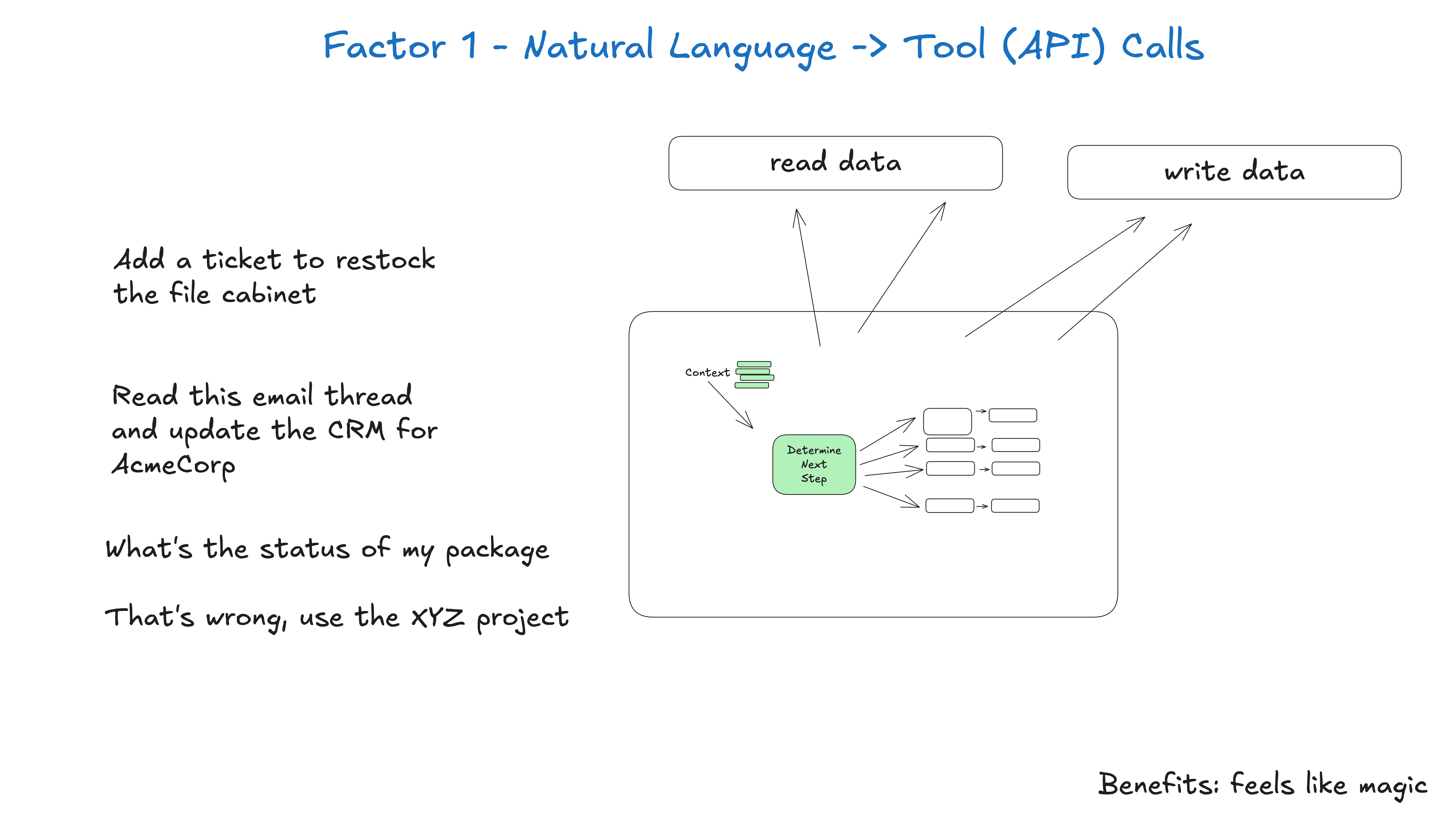
Figure 4: Natural language to tool calls should not mean handing execution power directly to the model. Source: humanlayer/12-factor-agents.
4.4 From Session State to Business State
Many agents cannot recover because state lives in the wrong place. Consider a deployment agent. A user requests a release. The model chooses a branch, checks CI, prepares a plan, waits for approval, deploys, watches metrics, and reports the result. That state should not exist only in chat history. It should be represented as business state: current phase, inputs, outputs, approver, failure reason, next action, retry count, and recovery point.
Unify execution state and business state captures this. Execution state is not merely an internal variable inside an agent framework. Business state is not a separate database record with no connection to execution. A reliable agent should unify them. The persisted state should be enough to continue execution. The execution process should produce state that the product, audit system, and user interface can understand.
This directly affects operations. If the agent process dies, can the task continue? If a user approves tomorrow, can the system resume? If a task fails three times, can you see where it failed? If a model version changes, can you replay old events? These are not prompt problems. They are state design problems.
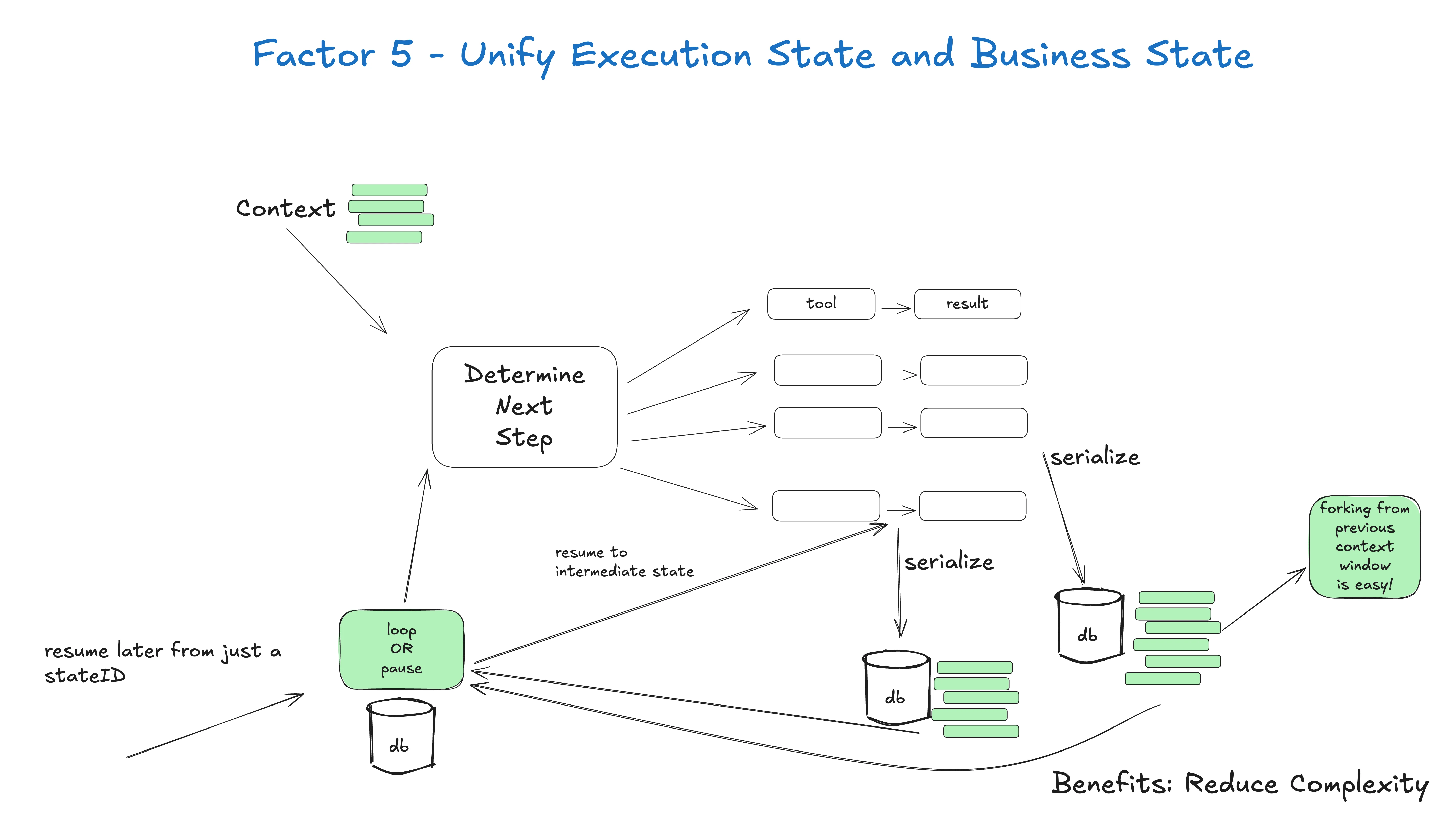
Figure 5: Unified state is a foundation for reliability. Source: humanlayer/12-factor-agents.
5. The Root Cause: We Amplify Uncertainty in the Wrong Places
The value of LLMs comes from uncertainty. They understand ambiguous language, handle incomplete information, propose options, classify intent, summarize evidence, and translate human goals into structured outputs. This uncertainty is a feature.
Reliable software, however, depends on determinism. Permission checks should be deterministic. Billing should be deterministic. Deployment gates should be deterministic. Idempotency keys should be deterministic. Audit trails should be deterministic. Recovery should be deterministic.
The challenge of agent design is not choosing between full determinism and full intelligence. The challenge is putting uncertainty in the right place.
Many fragile agents amplify uncertainty everywhere. User intent is uncertain. The prompt is uncertain. The context is uncertain. Tool selection is uncertain. State recording is uncertain. Error handling is uncertain. Recovery is uncertain. The resulting system is sometimes brilliant and sometimes absurd.
The essence of 12-Factor Agents is to contain that uncertainty. Let the model do what it is good at: understanding, classifying, proposing, generating structured candidates, and searching an open space. Let software do what it must do: state, permission, control flow, validation, execution, audit, and recovery.
This is why I view the project less as a tutorial and more as a baseline. It reminds us not to forget software engineering just because the system now speaks natural language.
6. How to Apply It: A Practical Health Check
If you already have an agent, you do not need to rewrite it immediately. Start with a health check.
6.1 Check Whether Prompts Are Manageable
Find every prompt in the system. Are prompts scattered across code, configuration, databases, dashboards, and temporary variables? Do they have versions? Does each prompt have a clear owner? Is there an output schema? Can it be regression-tested with fixed examples?
If not, the first step is not to change frameworks. The first step is to collect prompts into a repository or a clear configuration layer. Name them, document inputs and outputs, keep history, and attach representative examples.
6.2 Check Whether Context Is Constructed
Take one real task and print every model input. You will quickly see whether the context contains repeated history, old tool results, irrelevant logs, missing business facts, or stale failure attempts.
Then split context into sources: system rules, current user input, business state, retrieved knowledge, short-term history, and compacted errors. Each source should have a rule for entering the window and a size budget. Appending everything should not be the default.
6.3 Check Whether Tools Carry Business Semantics
List every tool and ask: is it idempotent? Can it be safely retried? Does it require permission or human approval before execution? If a tool mutates the outside world but has no idempotency key, approval record, or error classification, it should not be freely exposed to the model.
Tool results should also be controlled. The model does not need every byte of raw output. It needs decision-relevant summaries. “Payment gateway timeout; charge not confirmed; retry with the same idempotency key; maximum two retries remaining” is usually more useful than an eight-hundred-line trace.
6.4 Check Whether Control Flow Lives in Code
If the main loop is simply “model chooses next step, tool executes, result is appended, repeat,” be careful. The pattern is not always wrong, but important business paths should usually be controlled by code.
For example, a deployment agent may let the model draft a plan, classify risk, or summarize logs. But stages such as CI check, approval, deployment, metric observation, and rollback decision should be explicit states. The model can reason inside a stage. It should not freely skip the stage.
6.5 Check Whether Humans Are First-Class Participants
If the agent needs to ask a person, make that request a tool call and a state transition. The request body, approver, timeout, options, response, and recovery point should be recorded. When the person replies later, the system should resume from state, not from the memory of a live process.
6.6 Check Whether the Agent Is Small Enough
An agent that handles sales, support, billing, deployment, analytics, and notifications may look powerful, but it is hard to stabilize. Small, Focused Agents is not an argument for weak agents. It is an argument for clear boundaries. A focused agent is easier to test, easier to secure, easier to explain, and easier to recover.
7. A More Practical Agent Architecture
If I were designing a production agent using these principles, I would separate the system into several layers.
The first layer is the entry layer. Chat, web buttons, webhooks, scheduled jobs, email, and ticket systems can all trigger work. They should create standard events, not drive business logic directly.
The second layer is the state layer. Every task has a durable business record: task type, phase, input, output, approval, compacted error, retry count, and next action. State lives in a database or event stream, not in model memory.
The third layer is the context construction layer. Before each model call, the system builds context from state, current input, necessary documents, recent key events, and compacted errors. This is a testable function, not a dump of chat history.
The fourth layer is the LLM decision layer. The model emits structured candidates: a tool call proposal, extracted fields, a risk classification, a draft reply, or an error hypothesis. It does not directly modify the database or execute external actions.
The fifth layer is the tool execution layer. Code validates the model output, checks permission, idempotency, approval, and business constraints, then executes deterministic actions. Results become state updates and compact summaries.
The sixth layer is the human collaboration layer. When human judgment is required, the system sends a traceable request, pauses the task, waits for a response, and resumes from state.
The seventh layer is observability and replay. Model inputs, structured outputs, tool executions, state transitions, approvals, and compacted errors are recorded. When a production issue occurs, you can determine whether the problem came from context construction, model judgment, tool execution, or business state.
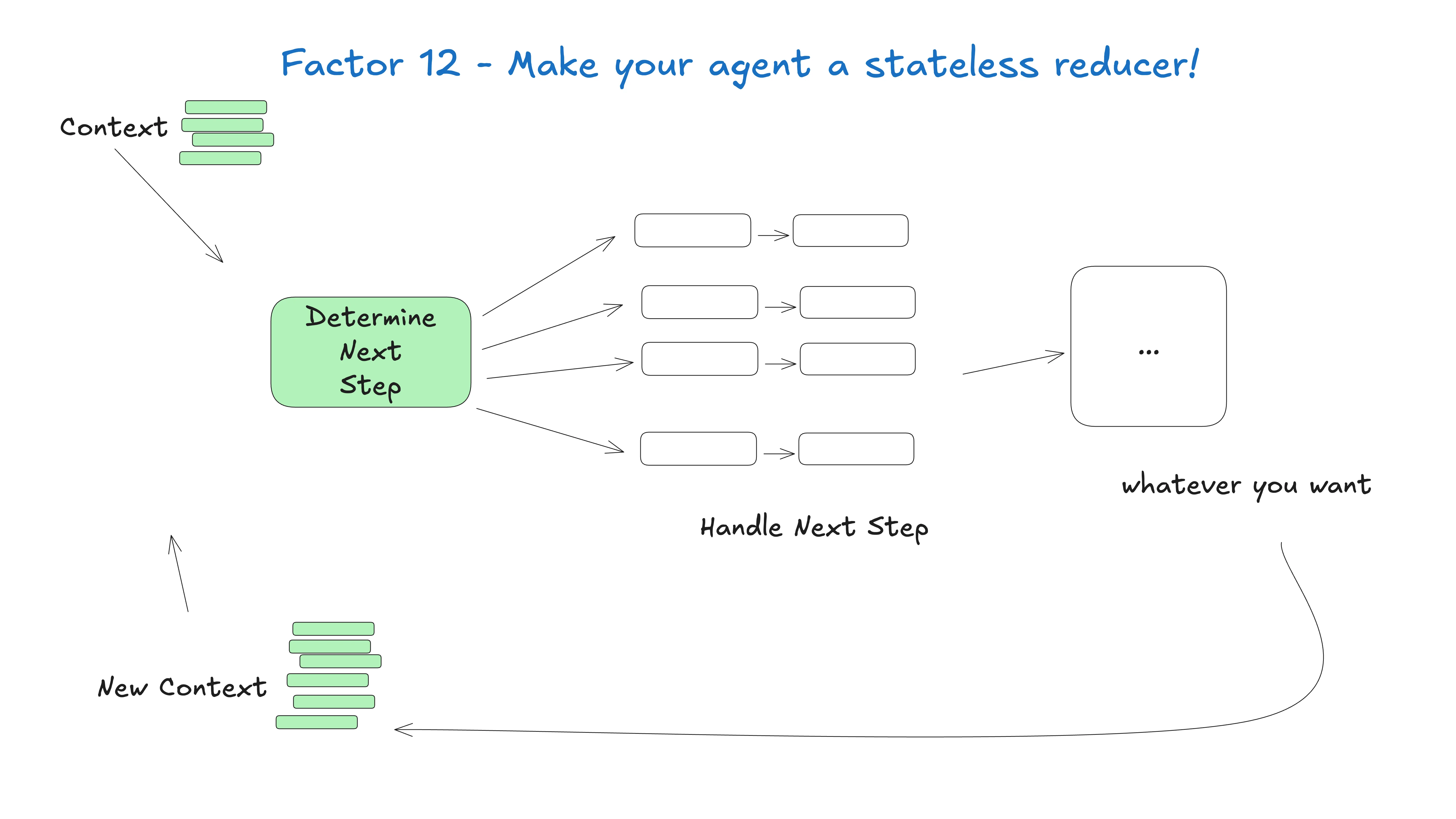
Figure 6: The stateless reducer framing makes recovery, replay, and testing much easier. Source: humanlayer/12-factor-agents.
8. Relationship to Skills, MCP, RAG, and LangGraph
These concepts are often mixed together, so it helps to separate them.
A Skill is closer to a capability package for a tool or agent. It may contain instructions, constraints, scripts, templates, and workflow knowledge. A Skill can make an agent better at a task, but it is not itself a general set of agent design principles.
MCP is closer to an open protocol for tools and context. It answers how model applications can connect to external resources, tools, data, and services. MCP is important, but it does not by itself define state design or control flow.
RAG solves retrieval. It helps the model access external knowledge. It does not automatically solve approval, idempotency, state recovery, or tool semantics.
LangGraph and similar frameworks can help teams model state and graph execution. They may be good implementation tools for these ideas, but the principles do not depend on any one framework.
That is why 12-Factor Agents sits above the tool layer. You can implement the ideas with LangGraph or without it. You can connect MCP or custom tools. You can use RAG or not. The key is to avoid confusing tools with principles and frameworks with architecture.
9. Q&A
Q1: If control flow lives in code, is the agent still intelligent?
Yes. Intelligence does not require losing control. A reliable agent should be intelligent in the right places: understanding requests, proposing plans, generating structured candidates, summarizing evidence, and handling ambiguity. Code-owned control flow simply means critical business paths are not left to free-form model wandering.
Q2: Does this mean frameworks are bad?
No. Frameworks can save time on messages, tool binding, state graphs, visualization, persistence, and retries. The problem is not using a framework. The problem is not knowing what the framework owns and what you still own. In production, you must be able to open the box.
Q3: Will long-context models make these principles obsolete?
No. A longer window lets you put in more information. It does not decide what matters. The longer the context, the more context governance matters. Otherwise, you have built a larger trash can.
Q4: Should every system be split into many small agents?
Not blindly. Splitting for its own sake adds coordination cost. One giant agent that owns everything is also risky. The better test is whether each agent has a clear responsibility, input, output, permission boundary, and failure mode.
Q5: Do personal projects need this much discipline?
Not always. A toy project can be loose. But if an agent modifies files, accesses accounts, spends money, sends messages, deploys services, or affects real users, it should at least have basic state, approval, logs, and error compaction.
Q6: Which three factors should I start with?
Start with Own your prompts, Own your context window, and Own your control flow. These three pull a system back from being a chat script into being engineered software. After that, add unified state, human approval, and error compaction.
10. Conclusion: The Scarce Resource Is Engineering Discipline
AI tools make it easy to believe that a stronger model, a longer context window, and more tools will naturally produce a reliable system. Production experience says otherwise. Stronger models make demos look closer to products. More tools blur boundaries. Longer context can hide the absence of state design.
12-Factor Agents is worth reading not because it offers a magic framework, but because it brings attention back to engineering discipline. Prompts must be owned. Context must be owned. Tool outputs must be structured. State must be unified. Control flow must be explicit. Errors must be compacted. Human participation must be part of the protocol. Agents should be small and focused. The whole system should be recoverable, replayable, and testable.
If you are building agents, do not treat the project as just another GitHub bookmark. Use it as an architecture review checklist. Compare your system against each factor. Find which parts are engineered, which parts work by luck, and which parts are missing entirely. The goal is not to score twelve out of twelve. The goal is to know why the agent is not reliable yet, and what to improve next.
The AI era does not remove software engineering. It makes software engineering more important. The more we put LLMs into real workflows, the more we need disciplined systems that keep uncertainty in the right place. 12-Factor Agents is not the final answer, but it is a clear and useful starting point.
References and Image Sources
- HumanLayer:
12-Factor Agents - Principles for building reliable LLM applications, https://github.com/humanlayer/12-factor-agents - Official 12-Factor Agents content directory, https://github.com/humanlayer/12-factor-agents/tree/main/content
- Official 12-Factor Agents image directory, https://github.com/humanlayer/12-factor-agents/tree/main/img
- The Twelve-Factor App, https://12factor.net/
- Anthropic:
Building effective agents, https://www.anthropic.com/engineering/building-effective-agents - Images in this article are taken from the official
humanlayer/12-factor-agentsrepository under the project’s CC BY-SA 4.0 content license statement; code licensing follows the upstream repository statement.