The Container Said Up 4 Weeks, the Site Said 530: How QUIC Quietly Knocked My Cloudflare Tunnel Offline
The confusing part of this outage was that everything I could see looked healthy.
The download site answered 200 in 8 ms from inside the LAN. The cloudflared container that publishes it said Up 4 weeks in docker ps. From the internet, though, the browser showed a single line, error code: 1033, with HTTP status 530.
The container was alive, but every tunnel connection inside it had dropped. The trigger was intermittent timeouts on the UDP 7844 egress that QUIC depends on. The amplifier was a two-year-old connector that tried to fall back to http2 and shut itself down instead.
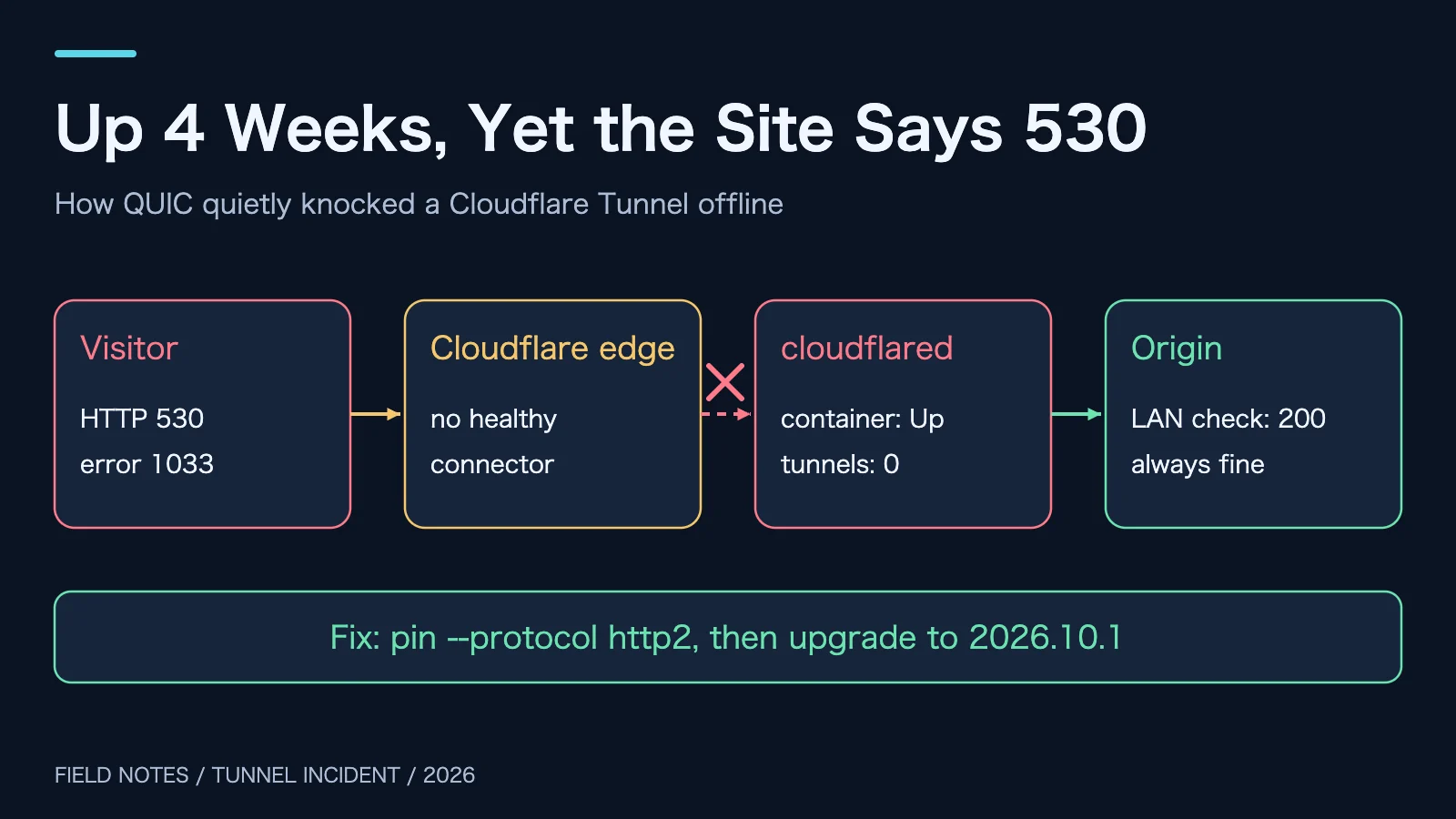
Figure 1: Original illustration. Only one of the four parts was broken, and it was the one that looked the healthiest.
1. Background: a download site published through a Tunnel
In Turn Home Services into Public HTTPS with Cloudflare Tunnel I described this setup: no public IP and no ports 80/443 on the router. A cloudflared connector inside the network dials out to Cloudflare, and public requests come back down that connection.
The broken service was a file download site running on one Docker host. cloudflared ran on a different VM managed by Portainer, deployed as a Docker Compose stack, with one tunnel serving several public hostnames.
I only use role names here: the “origin host” runs the download site and the “connector host” runs cloudflared. Private addresses, computer names, internal domains, the tunnel ID and the token are all omitted, and edge addresses in the logs are reduced to their network range. Timestamps, versions, log lines, and command behaviour come from the actual incident.
2. Symptoms: three “healthy”, one “broken”
What the incident looked like:
- Public request to the download site: HTTP 530 with a one-line body, error code: 1033, after about 5 seconds.
- Direct request to the origin port from the LAN: HTTP 200 in 8 ms.
- Origin container and connector container: both running, no restarts.
- A code hosting site on the same tunnel: also 530.
The last point matters most. Two unrelated services failing together means the shared piece is the problem, which is the tunnel.
Here is an everyday picture. cloudflared is the parcel depot at the gate of your neighbourhood, and the Cloudflare edge is the city hub. Every morning the depot dials four private lines to the hub. Parcels for the neighbourhood travel down those lines, and the depot hands them to your door. Your door stays open (origin 200) and the depot lights stay on (container Up). If all four lines are cut, the hub cannot deliver and returns the parcel to the sender with a note that says 1033.
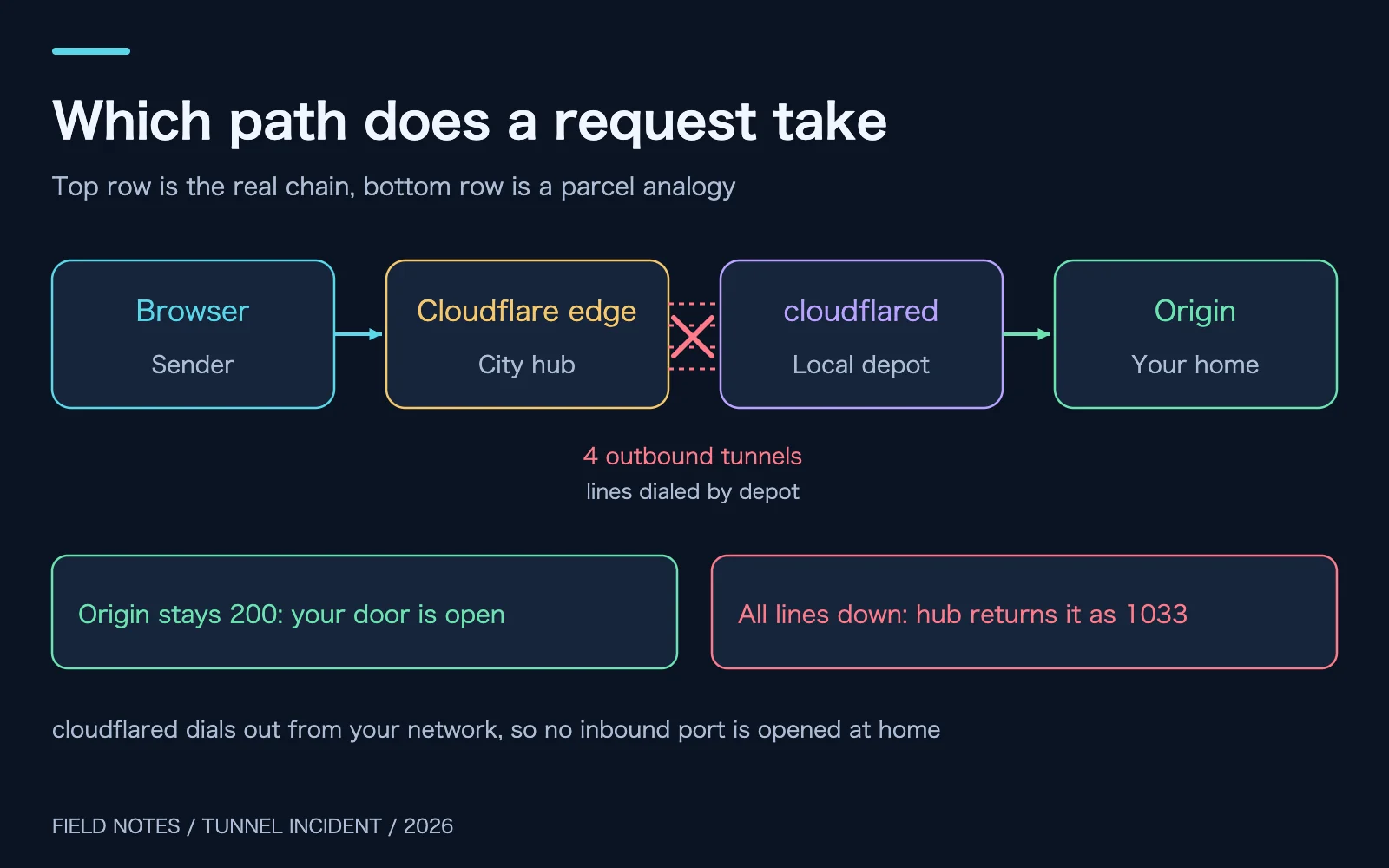
Figure 2: Original illustration. Connections are dialed outward from the LAN, which is why a Tunnel needs no inbound port.
3. What 530 and 1033 actually say
A 5xx code tempts people to restart the origin. This time that would have been wasted effort.
Cloudflare documents 530 as Cloudflare having trouble resolving the origin hostname, with a 1XXX error code in the response body that tells you where to look. In other words, 530 is the envelope and the real message is the note inside it.
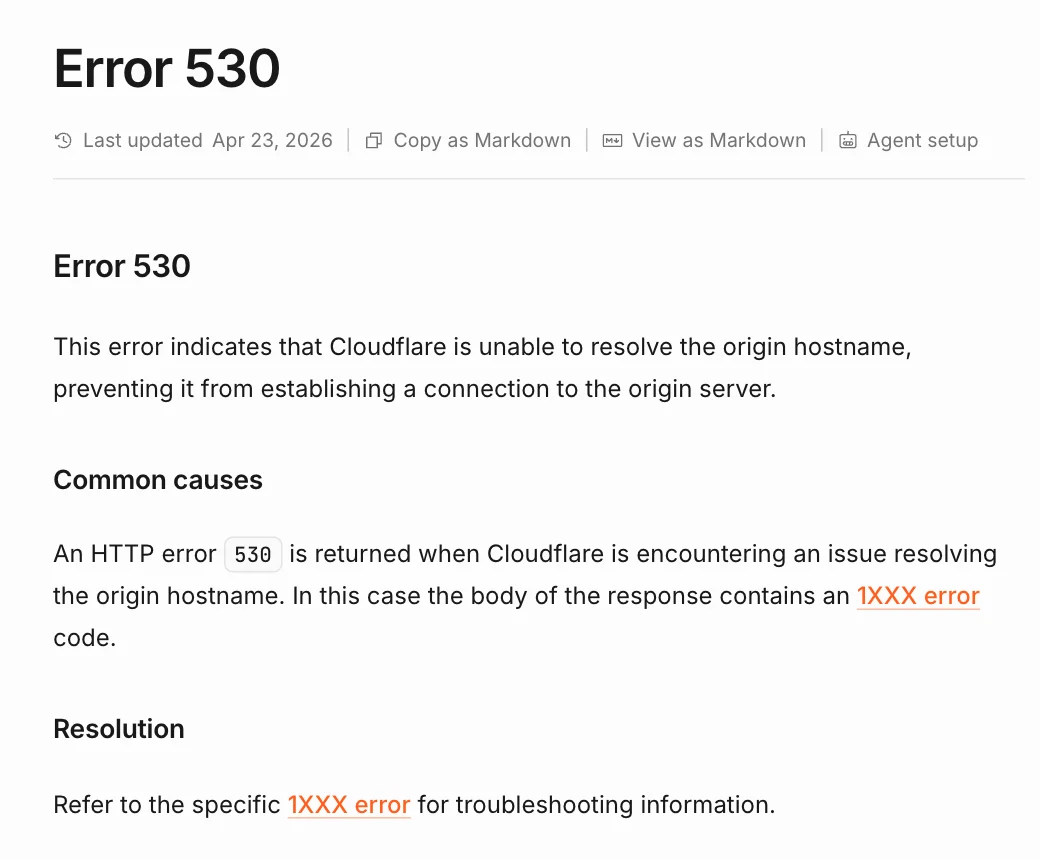
Figure 3: Real screenshot of the Cloudflare Error 530 documentation page. The 530 itself names no cause; the 1XXX code in the body does.
The note said 1033. The documentation is direct: a 1033 means your tunnel is not connected to Cloudflare’s network because Cloudflare cannot find a healthy cloudflared instance to receive the traffic. The status table is worth remembering too. Healthy means the tunnel serves traffic through four connections. Down means it was connected and no longer is, so check that the service is running and look for a powered-off machine, a crashed application, or recent network changes.
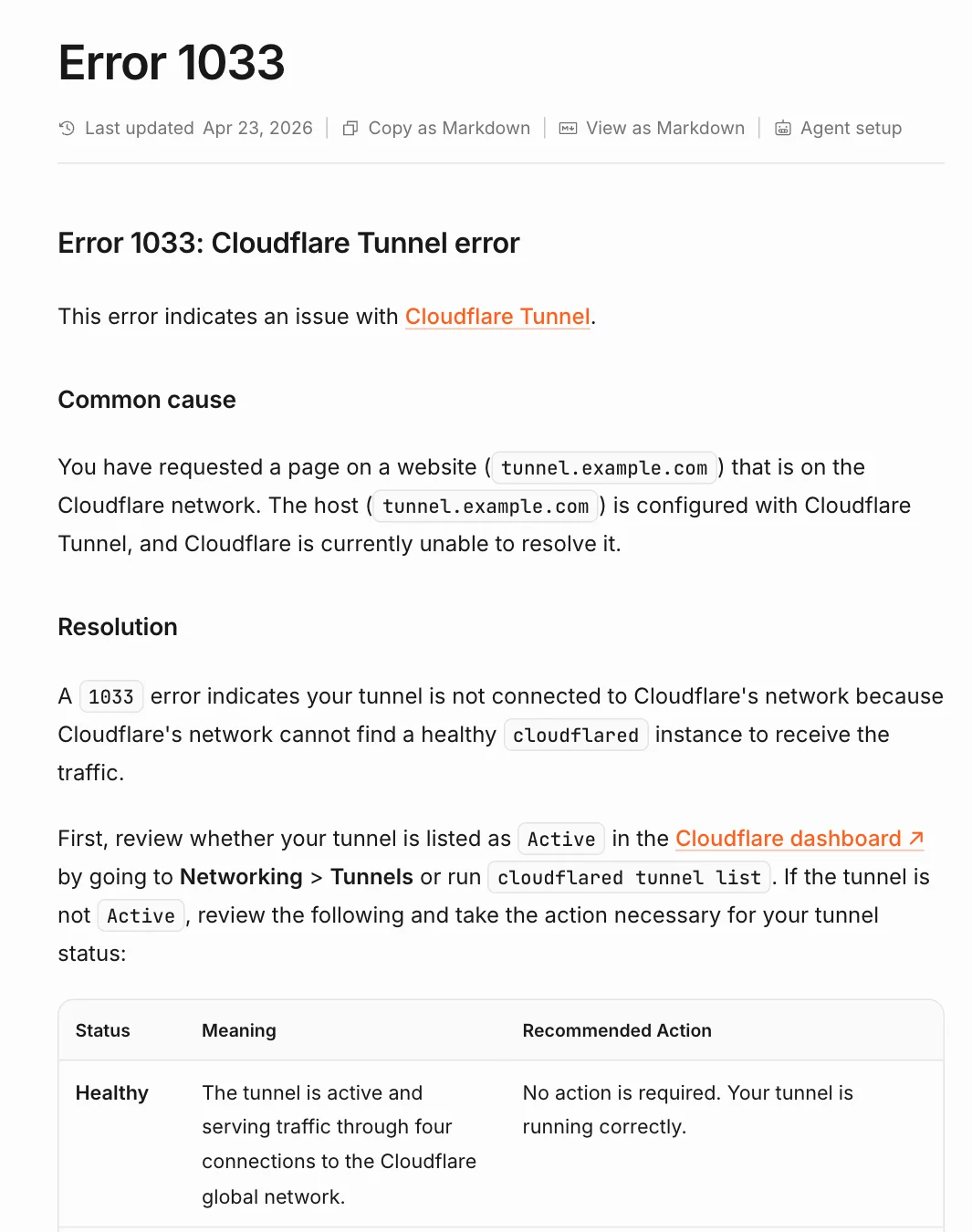
Figure 4: Real screenshot of the Cloudflare Error 1033 documentation page. Note that Healthy means four connections, which became my definition of fixed.
That settled the direction: leave the origin alone and go find cloudflared.
4. First trap: cloudflared was not where I thought it was
I logged in to the origin host and checked docker ps, systemctl, and ps. There was no cloudflared at all. That is common in a home lab: services pile up, and after a while nobody remembers which machine holds the tunnel.
The fix was plain: check every SSH-reachable machine in the internal ranges for a cloudflared process or container. It turned up on a Portainer VM as a Compose stack, status Up 4 weeks, restart policy always.
A lesson for next time: the tunnel details page in the Cloudflare dashboard usually shows the origin IP and hostname of each connector. Look there before sweeping the network.
5. The logs: the container lived, the tunnel died
docker logs told a clear story (all times UTC):
02:01:38 WRN Failed to serve quic connection error="timeout: no recent network activity" connIndex=0
02:01:38 WRN Connection terminated error="there are no free edge addresses left to resolve to" connIndex=0
02:01:42 ERR Failed to serve quic connection error="failed to accept QUIC stream: timeout: no recent network activity" connIndex=1
02:01:44 ERR Connection terminated error="failed to accept QUIC stream: timeout: no recent network activity" connIndex=1
In plain words: the QUIC connections timed out after a stretch with no network activity. One of them ran out of edge addresses while reconnecting, logged no free edge addresses left, and stopped trying. The process did not exit, so Docker saw nothing wrong and restart: always never fired.
That is how you get “container Up, zero tunnels”. A healthy container only proves the process exists, not that it is doing its job. The depot lights are on and the clerk is at the desk, but every phone line is dead.
Then I did the obvious thing and restarted the container. It got more interesting:
02:05:01 INF Starting tunnel ... Initial protocol quic
02:05:11 ERR Failed to serve quic connection error="failed to accept QUIC stream: timeout: no recent network activity"
02:05:12 WRN If this log occurs persistently, and cloudflared is unable to connect to Cloudflare Network with `quic` protocol,
         then most likely your machine/network is getting its egress UDP to port 7844 (or others) blocked or dropped.
02:05:12 INF Switching to fallback protocol http2
02:05:12 INF Tunnel server stopped
02:05:12 ERR Initiating shutdown error="failed to accept QUIC stream: timeout: no recent network activity"
02:05:13 INF Starting tunnel ... Initial protocol quic
The new process started with QUIC again and timed out after 10 seconds. cloudflared even printed the hint: if this persists, egress UDP to port 7844 is probably being blocked or dropped. It then announced the switch to http2, and the very next lines were Tunnel server stopped and Initiating shutdown. The process exited, Docker restarted it, and the new process began with QUIC again. Round and round.
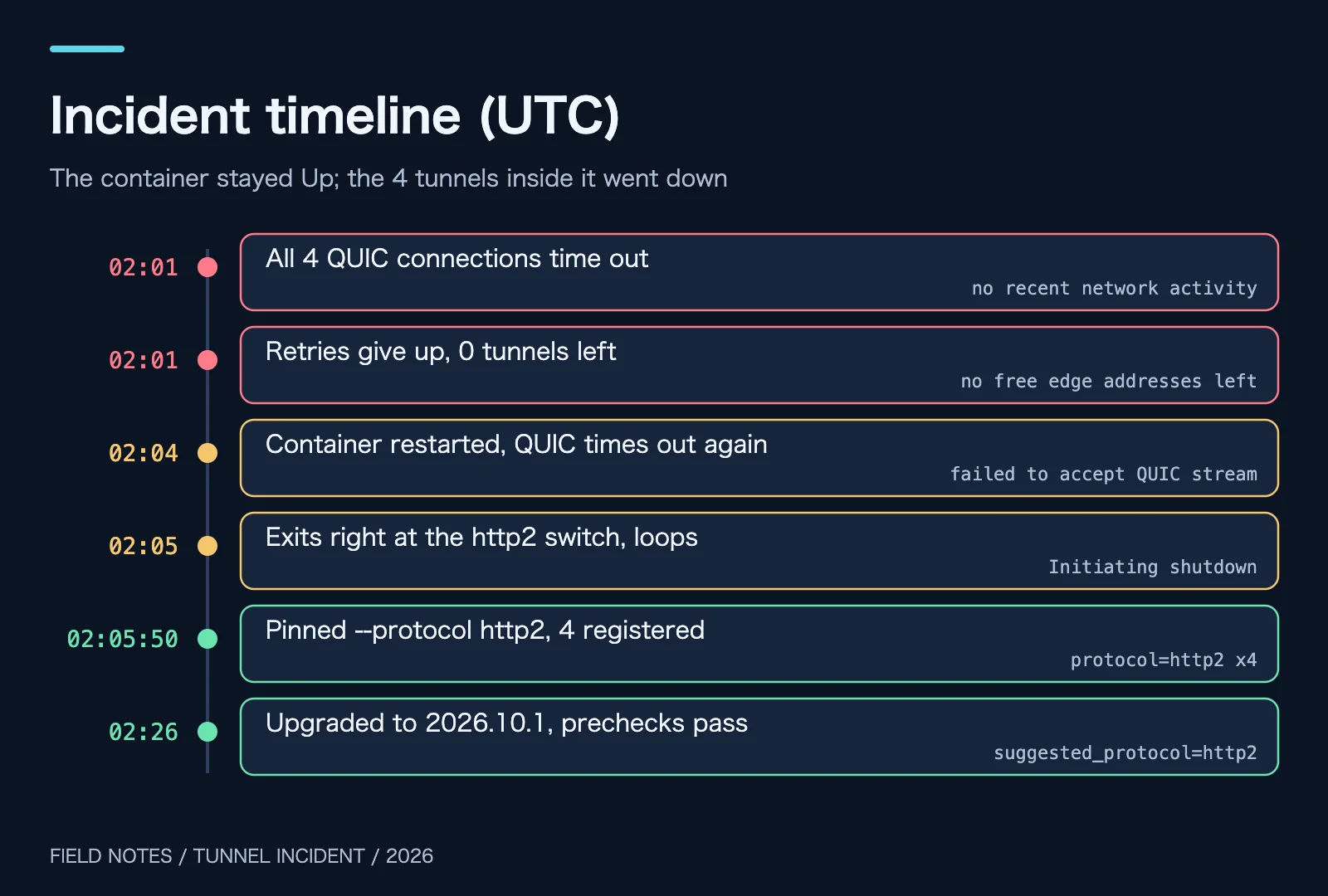
Figure 5: Original illustration with times from the incident logs. The first two steps are the silent drop; the middle two show that restarting did not help.
6. QUIC and http2: same port, two very different roads
To see why, you need to know that cloudflared has two ways of travelling to Cloudflare.
The firewall documentation is explicit: cloudflared connects to Cloudflare’s global network on port 7844, over UDP with the quic protocol and over TCP with the http2 protocol.
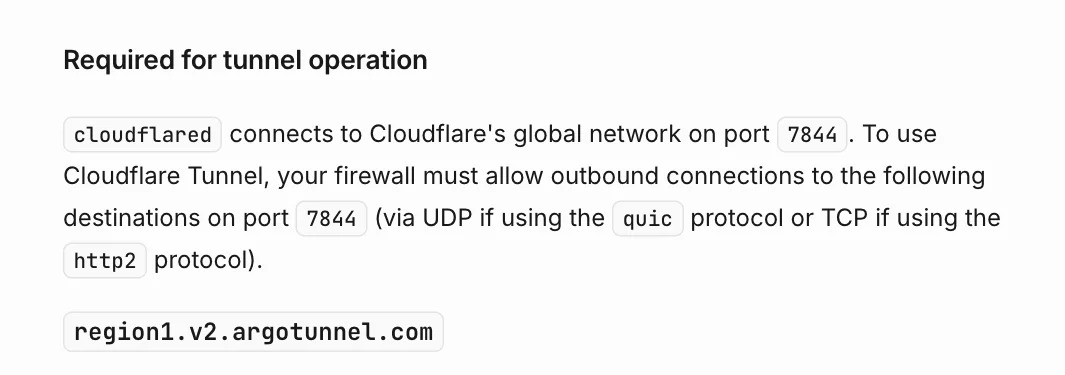
Figure 6: Real screenshot of the Cloudflare “Tunnel with firewall” documentation page. The edge address table below this paragraph was cropped out.
Another analogy. QUIC is the express toll lane on the highway: fast, and it survives network changes well, but only if the UDP highway is open. http2 is the local road: a little slower, but it runs over TCP, which almost every network allows and rarely closes without warning.
UDP has no built-in “hello, are you still there”. Routers, firewalls, and carrier equipment are often stricter with UDP sessions: shorter idle timeouts, more drops at peak hours, and policies that change over time. When QUIC hears nothing from its peer for a while, it declares the connection dead. That is exactly what no recent network activity means.
To be precise about the evidence: UDP was not permanently blocked. After the upgrade, the new connector’s startup prechecks reported UDP Connectivity as pass with a successful QUIC connection. The UDP egress was flaky, not closed. During the bad minutes QUIC could not connect; later it worked again. For a connector that must stay online, flaky is worse than closed, because the software keeps hesitating between the two roads.
7. Root cause: the network hiccupped and the old connector tripped over itself
Putting the evidence together, there are two layers.
The trigger: UDP 7844 egress from the connector host timed out intermittently, and all four QUIC connections dropped.
The amplifier: the connector was cloudflared 2024.6.1, two years old. It did try to fall back to http2 after QUIC failed, but in these logs the process exited right at that moment. In the first drop, it gave up reconnecting after exhausting edge addresses while the process stayed alive, so Docker never restarted it. The first behaviour meant restarting did not help; the second meant nobody noticed the tunnel was gone.
Why was the image so old? The Compose file said latest, but it pulled from a private registry that had since moved. The old address no longer existed, so the local latest stayed frozen in 2024. A latest tag only means “newest as of my last successful pull”.
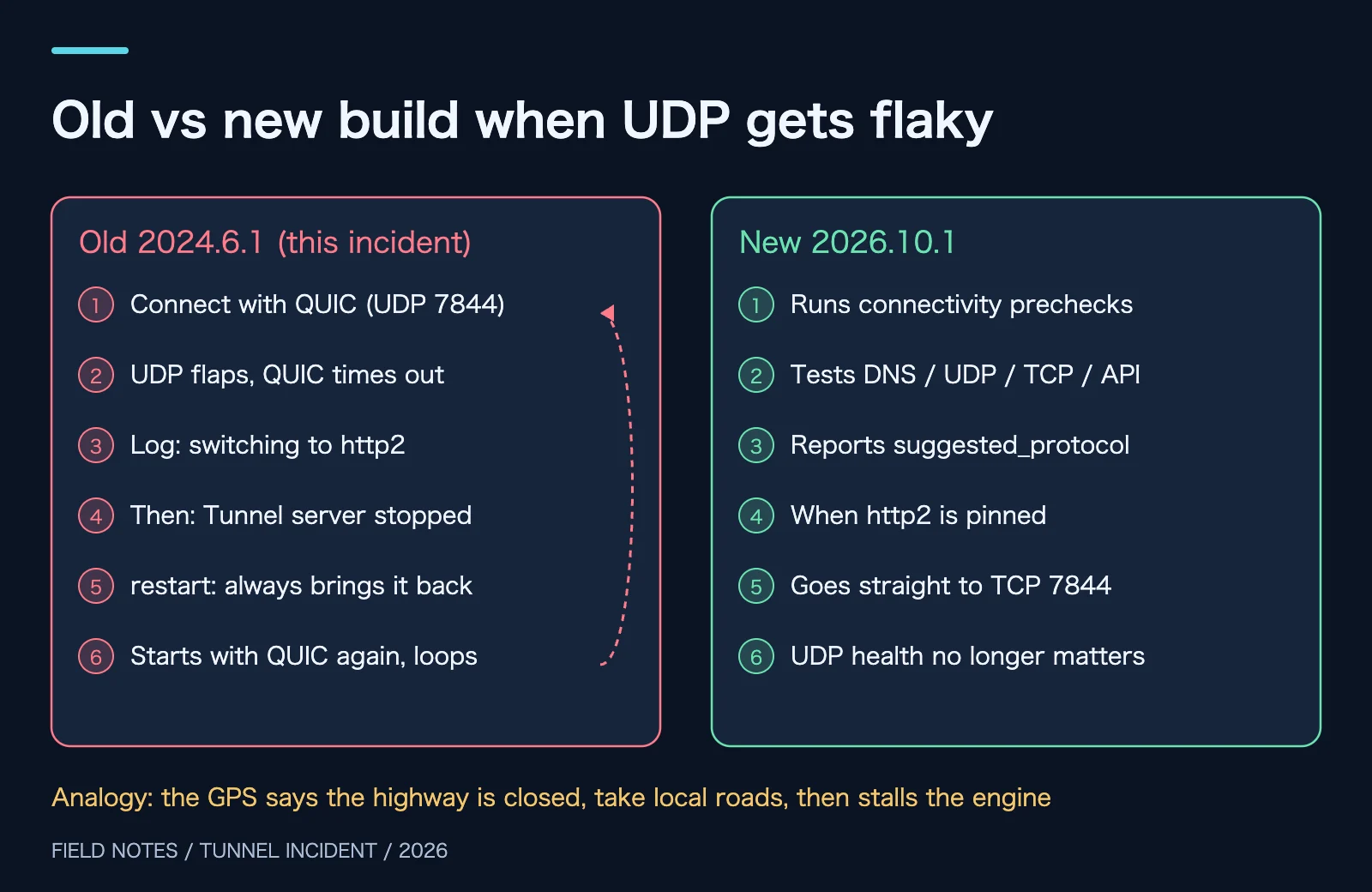
Figure 7: Original illustration. The left side follows this incident’s logs; the right side follows the precheck output in the new build’s startup logs.
8. The fix: stop the bleeding, then cure it
Step 1: pin the connector to http2
Cloudflare’s run parameters include protocol, with values auto, http2, and quic. The default is auto, which configures quic first and falls back to http2 if UDP connections cannot be established. The environment variable is TUNNEL_TRANSPORT_PROTOCOL.
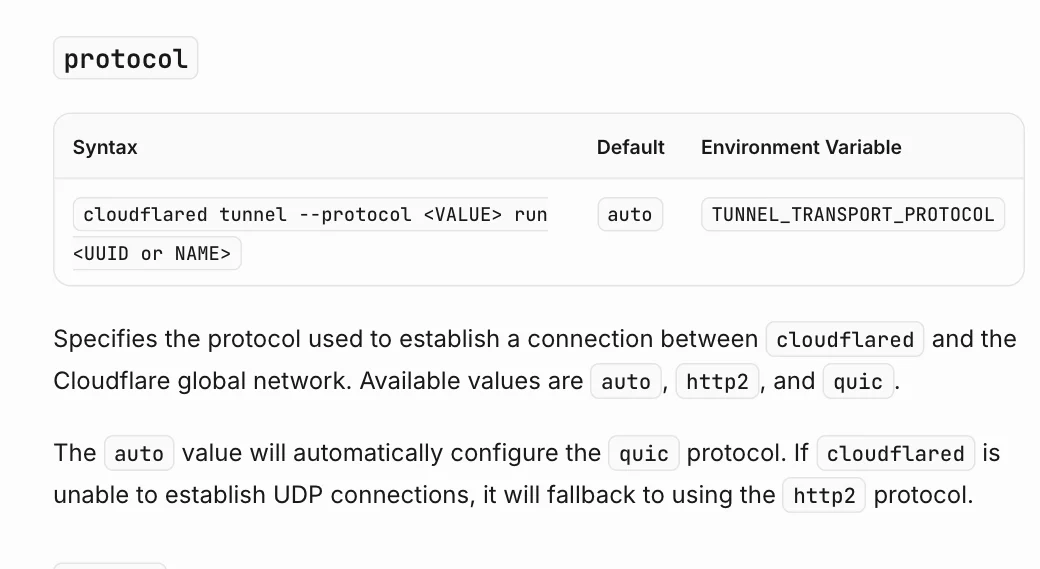
Figure 8: Real screenshot of the Cloudflare “Tunnel run parameters” page. auto means try QUIC first and see what happens.
Since UDP was unreliable, I stopped letting it go first and added –protocol http2 to the Compose command:
services:
  cloudflared:
    image: cloudflare/cloudflared:2026.10.1
    container_name: cloudflared
    command: tunnel --no-autoupdate --protocol http2 run --token <TUNNEL_TOKEN>
    restart: always
One detail trips up Portainer users. The compose path in the container labels, /data/compose/N/docker-compose.yml, is a path inside the Portainer container. On the host, the same file lives under Portainer’s data volume. Edit that copy, or the next redeploy from Portainer will overwrite your change with its stored version. Back it up first, then recreate with the same project name:
cp -p docker-compose.yml /root/cloudflared-compose.bak
docker compose -p cloudflared -f docker-compose.yml up -d
docker logs cloudflared 2>&1 | grep -E "Registered|protocol"
Within 10 seconds all four connections registered, every one with protocol=http2. The public site returned 200 and downloads worked again.
Cloudflare’s troubleshooting page also lists “test with protocol: http2” as a remedy for UDP idle timeouts in its “My tunnel randomly disconnects” section:
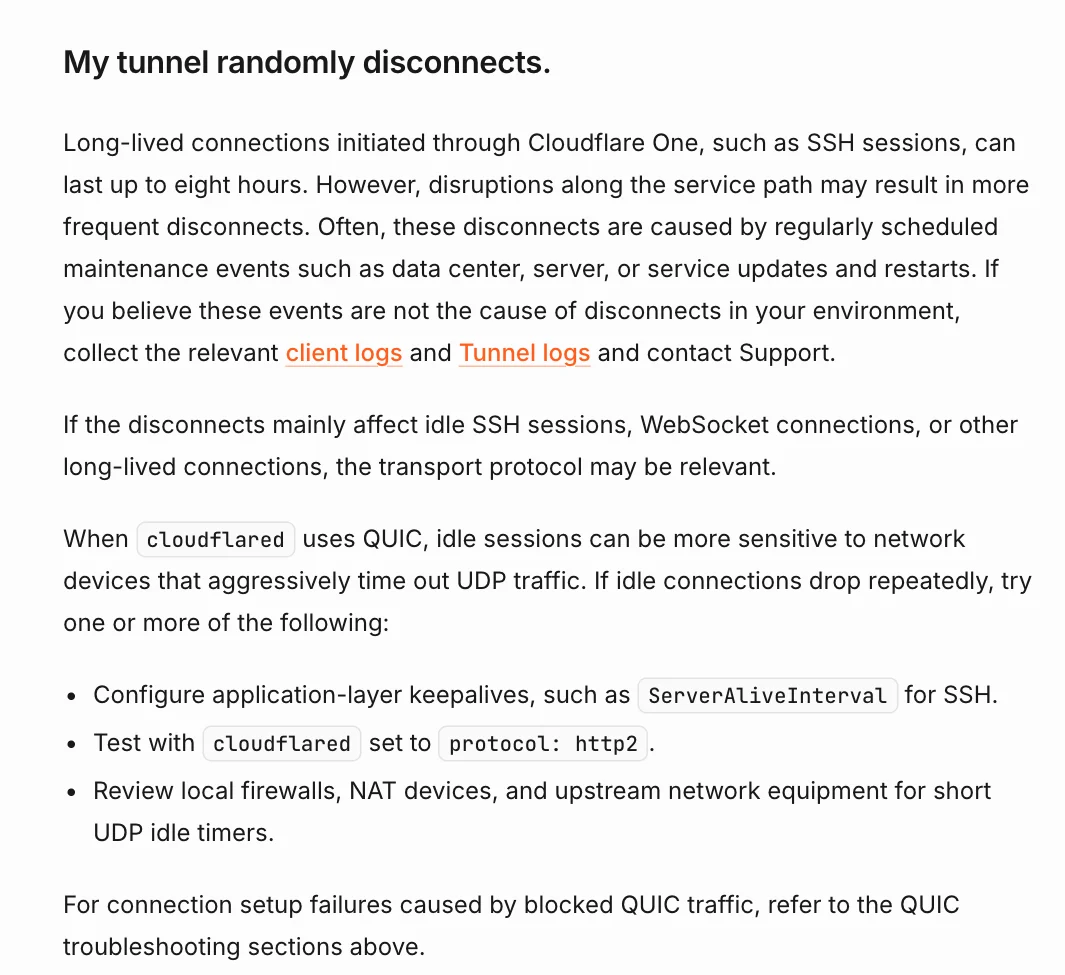
Figure 9: Real screenshot of the Cloudflare “Common errors” page. With QUIC, idle sessions are more sensitive to devices that aggressively time out UDP traffic.
Step 2: upgrade the connector and pin the version
With the bleeding stopped, the cure. The old private registry was unreachable and the new one returned 500 while pulling a layer, so I pulled cloudflare/cloudflared:2026.10.1 from Docker Hub through the registry mirrors already configured on the host.
The GitHub releases page shows 2026.10.1 as the latest at the time of writing:
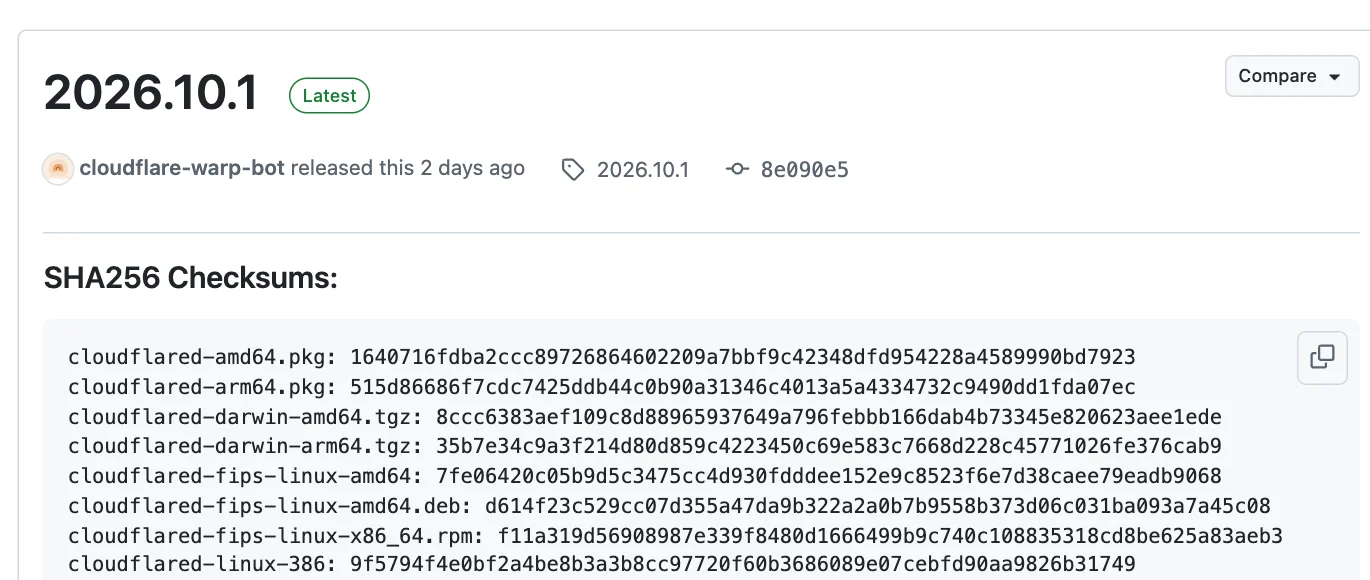
Figure 10: Real screenshot of the cloudflared GitHub Releases page. The listed SHA256 values are for the binaries inside the archives, not the archives themselves, so compare the right file.
I replaced latest with an explicit version. Next time an upgrade is one number, one pull, and one recreate, and there is no frozen latest to get stuck on.
The new build adds connectivity prechecks at startup. It tests DNS resolution, UDP, TCP, and the Cloudflare API, then reports a suggested protocol. With http2 pinned, it suggested http2. Even if someone removes –protocol later, the new build measures first instead of starting blindly with QUIC.
A warning you can safely ignore
The logs also contain failed to sufficiently increase receive buffer size, which looks alarming. Cloudflare’s troubleshooting docs say it is generally not impactful and can be ignored while troubleshooting. It comes from the quic-go library that cloudflared uses: the library tries to enlarge UDP buffers, but Linux allows only a small maximum by default. On high-bandwidth links you can raise net.core.rmem_max as the quic-go docs describe. It had nothing to do with this outage.
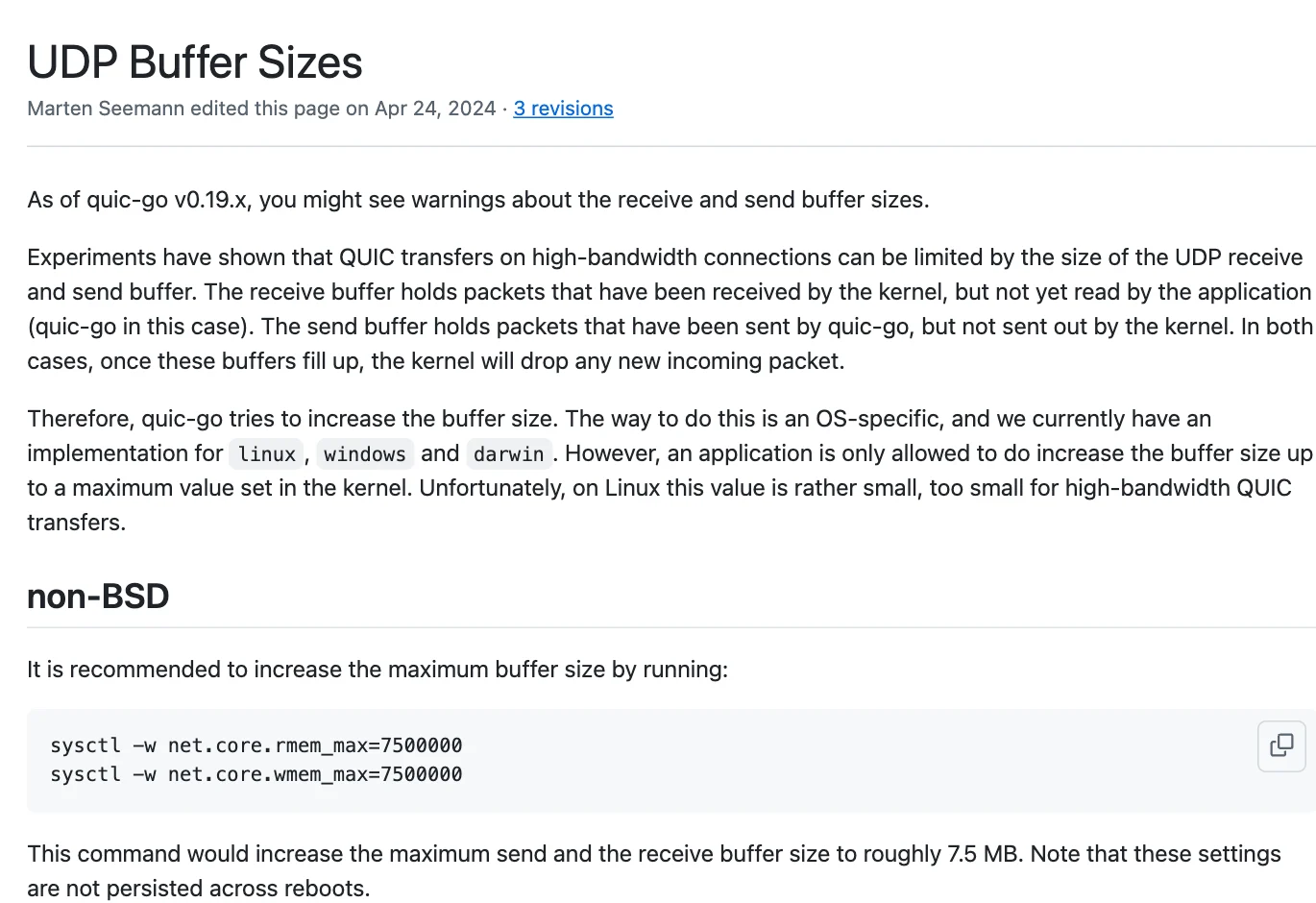
Figure 11: Real screenshot of the quic-go Wiki “UDP Buffer Sizes” page. The warning is a performance hint, not the cause of the drop.
9. One-command scripts: diagnose, pin http2, roll back on failure
So I never have to dig through logs like this again, I packaged the diagnosis and fix as the Tunnel Doctor kit, with entry points for Windows 11, Ubuntu 26.04, and macOS 27, plus a README. The scripts are also available individually: windows-11.ps1, ubuntu-26.04.sh, macos-27.command.
They use only built-in tools plus the Docker or cloudflared you already have. They call no cloud API, download no remote scripts, and never read or print the tunnel token (tokens in logs are replaced with <TOKEN>). Three kinds of deployment are recognised:
- Docker and Docker Compose containers, including Portainer stacks. The script translates Portainer’s internal compose path to the host path.
- systemd services on Ubuntu. A drop-in sets TUNNEL_TRANSPORT_PROTOCOL=http2 without touching the original unit.
- launchd services on macOS and system services on Windows 11. The script writes EnvironmentVariables in the plist or the Environment value in the service registry key.
Method 1: you start it, the script does the rest
Four modes: audit is read-only; apply pins http2; upgrade updates a compose-managed image; rollback restores a run. apply and upgrade back up first, wait for Registered tunnel connection after the change, and roll back automatically if it never appears.
# Windows 11: open PowerShell as administrator
powershell -NoProfile -ExecutionPolicy Bypass -File .\windows-11.ps1 -Mode Audit
powershell -NoProfile -ExecutionPolicy Bypass -File .\windows-11.ps1 -Mode Apply
powershell -NoProfile -ExecutionPolicy Bypass -File .\windows-11.ps1 -Mode Upgrade -Version 2026.10.1
powershell -NoProfile -ExecutionPolicy Bypass -File .\windows-11.ps1 -Mode Rollback -RunId RUN_ID
# Ubuntu 26.04
sudo bash ./ubuntu-26.04.sh audit
sudo bash ./ubuntu-26.04.sh apply
sudo bash ./ubuntu-26.04.sh upgrade 2026.10.1
sudo bash ./ubuntu-26.04.sh rollback RUN_ID

# macOS 27 (system LaunchDaemons need sudo, Docker Desktop does not)
bash ./macos-27.command audit
bash ./macos-27.command apply
bash ./macos-27.command upgrade 2026.10.1
bash ./macos-27.command rollback RUN_ID
Add –target NAME (-Target on Windows) to handle a single container or service. Audit output looks like this:
Edge reachability (TCP 7844 is used by http2, UDP 7844 by quic):
  [OK]   TCP region1.v2.argotunnel.com:7844 reachable
Docker container: cloudflared (running restart=0)
  image: cloudflare/cloudflared:2026.10.1  version: 2026.10.1
  [OK]   transport already pinned to http2
  [WARN] token is a command-line argument, visible in ps; prefer TUNNEL_TOKEN or --token-file
  [OK]   compose file: <portainer-data>/compose/3/docker-compose.yml
  log window: registered=4 quic_failures=0 origin_errors=172
Test coverage, stated plainly. The Ubuntu script ran end to end on Ubuntu 24.04 with Docker Compose v2: audit, apply for both command styles, a no-op second run, upgrade, a failed pull leaving files untouched, automatic rollback when registration fails, and manual rollback. Those tests used a separate throwaway tunnel, not the production connector. The systemd branch was not run against a real systemd cloudflared. The macOS script ran end to end against a user LaunchAgent: audit, apply, a no-op second run, automatic rollback, and manual rollback. The Windows script passed PowerShell 7.6 parsing and core function tests but was not run against a real Windows 11 service, so run Audit and read the source first.
Method 2: let a local agent configure it
If you use a local operations agent, hand it the extracted folder; agent-prompt.txt in the kit is the task brief. It is not tied to any agent product. In English:
You are authorized to inspect and repair the Cloudflare Tunnel connector (cloudflared) on this machine.
1. Read README.txt and the script for the current OS first; confirm what it does and does not do.
2. Identify the OS and run only the audit mode. Summarise: origin health, TCP 7844 reachability,
   connector version, whether the protocol is pinned, and whether the logs show QUIC timeouts.
3. Run apply only if the logs show QUIC/UDP failures or no Registered tunnel connection at all.
4. After apply, confirm 4 Registered tunnel connection lines (protocol=http2) and one public request that is not 530.
5. If the connector is over a year old, ask me which version to use, then run upgrade.
6. On failure, run rollback with the printed run id and audit again.
Constraints: never read, print, or rewrite the tunnel token; do not change Cloudflare routes; do not disable
certificate checks; do not touch unrelated containers or services; keep private IPs, computer names, and
internal domains out of the report.
10. Next time you see 530, check in this order
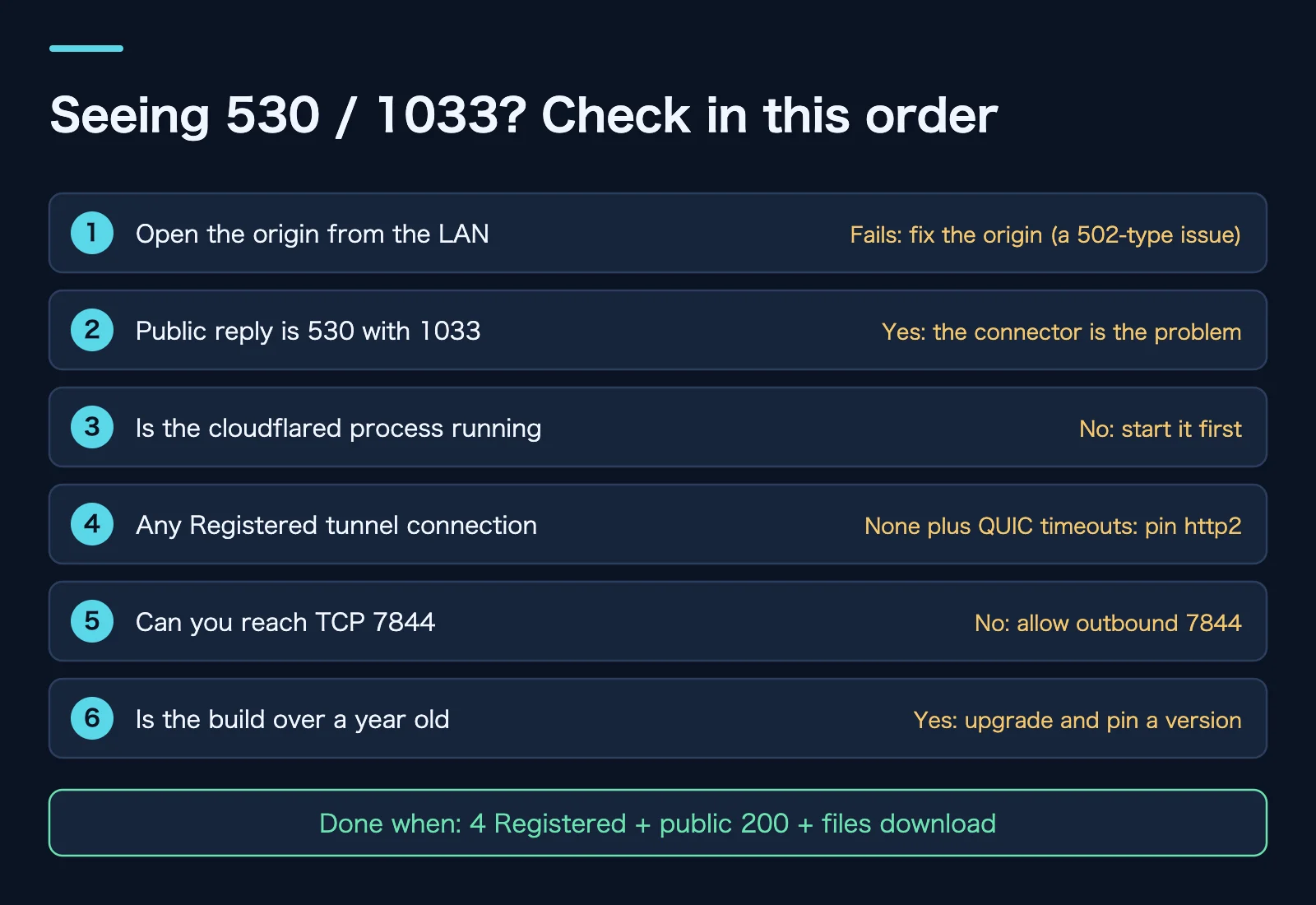
Figure 12: Original illustration. The first two checks take a minute and decide whether to look at the origin or the connector.
The heart of it is one sentence: 530 plus 1033 means check the connector, not the origin. If the connector is running, look for Registered tunnel connection in its logs. If there is none and QUIC timeouts fill the screen, pin http2. If TCP 7844 is blocked too, it is time to open outbound traffic on the firewall.
This incident also exposed a few loose ends:
- The tunnel token was a command-line argument, readable in plain text with ps on the host. Newer builds support –token-file, or you can pass TUNNEL_TOKEN as an environment variable.
- The same tunnel still routed an old hostname whose origin had been retired. The origin refused connections, and the logs filled with scanners probing for .php files. Delete routes you no longer use.
- Most of all, monitoring. Container Up is not tunnel online. Monitor whether the public URL works, or the registered connection count in cloudflared metrics.
Q&A: a few easy wrong turns
Is http2 slower?
For a personal download site or web pages, you will hardly notice. QUIC shines on weak or changing networks and handshakes faster. On a network where UDP is unstable, an http2 connection that stays up is faster than a QUIC connection that does not exist. One caveat from the docs: post-quantum key agreement is not supported with http2, so weigh that if your security requirements are strict.
Why not fix UDP 7844 instead of pinning the protocol?
If you can, great. But UDP flakiness on home networks is often out of your hands: carrier gear, or an upstream gateway’s session timeout policy. Pinning http2 swaps a dependency on something you cannot control for one that holds almost everywhere. Once UDP is proven stable, remove the flag and you are back on auto.
The container has restart: always, so why no recovery?
During the first drop the process did not exit. Docker’s restart policy watches whether the process is alive, not whether it works. After my manual restart it did restart repeatedly, but each run started with QUIC and exited at the same spot.
Would more cloudflared replicas prevent this?
They lower the risk. A tunnel can have several connector replicas on different machines, so one can carry on when another fails. If all replicas share the same egress, though, a UDP hiccup hits them all at once. Replicas handle a single machine failing; pinning the protocol handles a flaky exit. Do both.
Is the latest tag safe?
It works, as long as you know what it means: your local latest is “newest as of my last pull” and never updates itself. When you pull through a private registry or mirror, latest freezes the day that source disappears. Pin versions in production and change them on purpose.
Is 1033 always a connector problem?
Almost always. The docs mention one exception: if the tunnel shows Active, check that DNS points to the right tunnel address. On FedRAMP High accounts, a CNAME to the regular cfargotunnel.com domain returns 1033 even when the tunnel is healthy. Most personal accounts never see this.
References and image sources
The 7 real screenshots were captured from the original pages in a browser and cropped; tables containing full IP addresses were cut out. The other 5 images are original illustrations, provided in Chinese and English. Log excerpts come from the incident, with the tunnel ID, token, and private addresses removed.
- Cloudflare Docs: Error 530
- Cloudflare Docs: Error 1033
- Cloudflare Docs: Tunnel with firewall
- Cloudflare Docs: Tunnel run parameters
- Cloudflare Docs: Common errors
- quic-go Wiki: UDP Buffer Sizes
- cloudflared GitHub Releases
Related posts: Turn Home Services into Public HTTPS with Cloudflare Tunnel and Three SmartDNS and AdGuard Home Traps. Both incidents taught the same thing: when you see a green “healthy”, follow one real request end to end anyway.