The Portainer 500 Error That Wasn't the YAML — A Two-librespeed_default-Network Story
The short version
You update a stack in Portainer. The browser slaps you with a red
500 Internal Server Error. You assume the YAML is wrong, fix the indentation, swap the quotes, drop the image tag. You hit Update again. Same 500. And again. And again.The real culprit is buried at the deepest level of the HTTP response body:
network librespeed_default is ambiguous (2 matches found on name). Two networks with the same name exist in the same Docker engine—two IDs, twoCreatedtimestamps, twocom.docker.compose.config-hashlabels, but a single shared name. Compose asks the engine to look up that name; the engine refuses to pick between them;compose upfails; Portainer wraps the error as a 500 and returns it to your browser.The fix is embarrassingly simple: delete one of the two orphan networks (
docker network rm <id>or click Remove in Portainer’s Networks page), then re-run Update the stack with the exact same content. It just works.
This post is a real debugging session: a stack update that was supposed to be a 30-second mount-path change turned into a 1-hour investigation. All private details (internal addresses, registry URLs, volume paths, container names, credentials) have been replaced with <PLACEHOLDER>. Only public source code, official docs, and the error text itself are preserved.
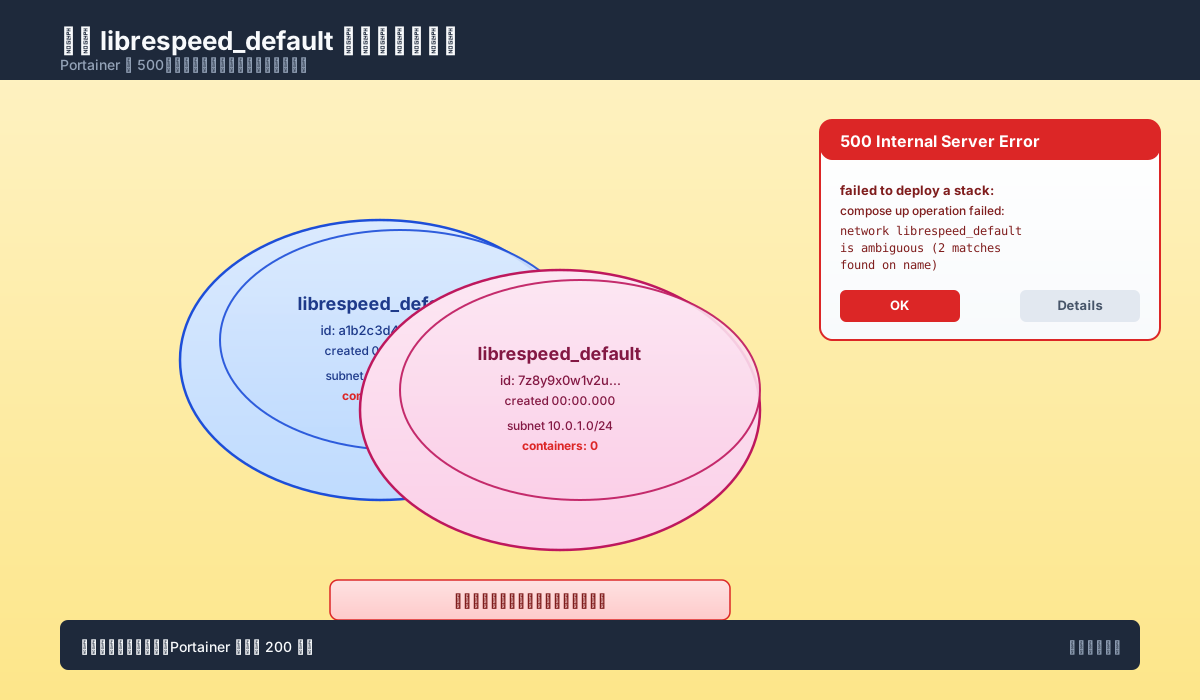
Figure 1: The author’s hero image. Portainer returns 500. The real story is that the engine has two networks sharing a single name.
1. Background: A “Harmless” Stack Update
The setup: a 24/7 home NAS, Portainer managing a dozen stacks, one of which is librespeed — the lightweight LinuxServer speedtest image. Nothing exotic.
The original compose file (anonymized):
version: '3'
services:
  librespeed:
    image: <REGISTRY>/linuxserver/librespeed:5.4.1
    container_name: librespeed
    restart: always
    environment:
      - PUID=1000
      - PGID=1000
      - TZ=Asia/Shanghai
    ports:
      - "8888:80"
    volumes:
      - /volume2/docker/Librespeed/config:/config
    stdin_open: true
    tty: true
The day came to move the config directory to a proper data volume, so I changed the mount path from /volume2/... to /volume1/... and dropped the image tag so it would track latest.
In Portainer UI:
- Go to Stacks → select
librespeed→ click Editor. - Paste the updated compose text.
- Click Update the stack.
- Browser immediately pops up a red
500 Internal Server Error.
Wait 30 seconds, refresh, click again. Still 500.
First instinct: “Did I typo the YAML?” So I copied the text out, ran yamllint, ran docker compose config — both passed. Reverted the changes. Still 500. Which is absurd.
2. Symptoms: Portainer 500, Container Nowhere to Be Found
From the user-facing perspective:
- The
librespeedstack showsStatus: 2(inactive) in Portainer; the Logs panel is empty. docker ps -ashows nolibrespeedcontainer at all. The new container was never created.- The 500 popup shows only one sentence — “failed to deploy a stack” — with no actionable next step.
Looking at the popup alone gives you no way forward. Open DevTools → Network → find that PUT request → look at the Response Body. You’ll see a JSON like this:
{
  "message": "failed to deploy a stack: compose up operation failed: Error response from daemon: network librespeed_default is ambiguous (2 matches found on name)",
  "details": "Failed to deploy a stack: compose up operation failed: Error response from daemon: network librespeed_default is ambiguous (2 matches found on name)"
}
That string is the entire smoking gun.
Figure 2 maps the call chain from your browser button down to dockerd:
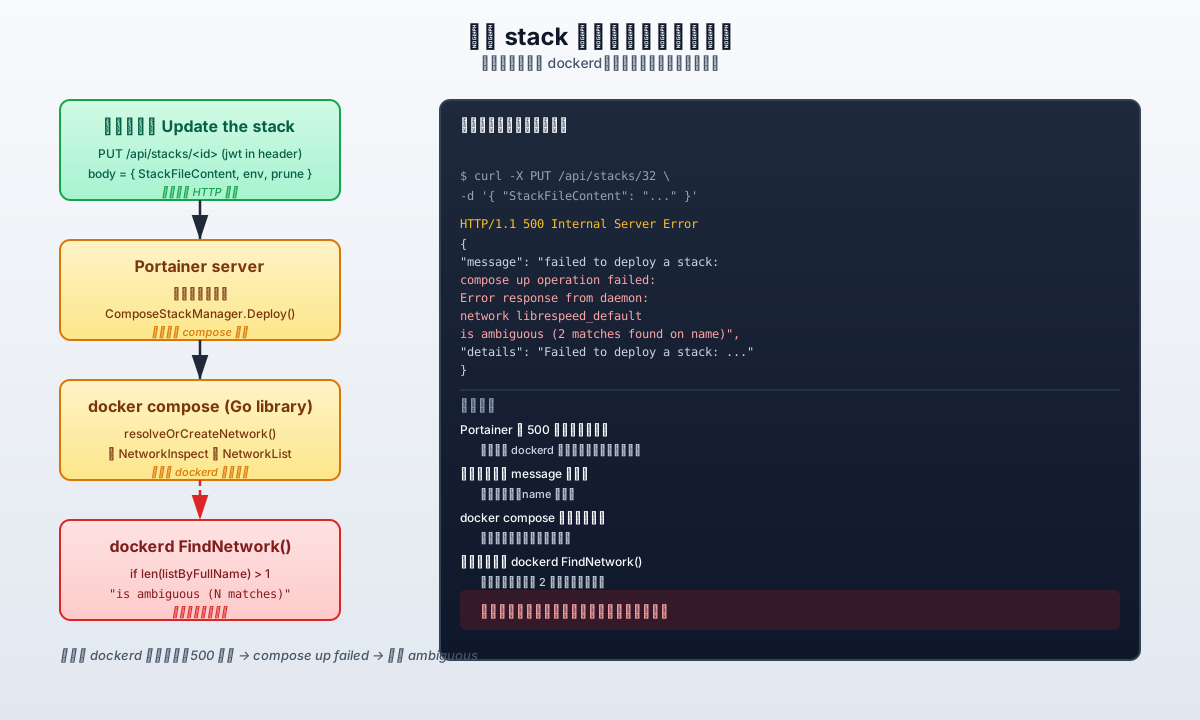
Figure 2: The five-layer call chain. The error bubbles up from dockerd; Portainer merely wraps it as a 500.
A few subtle things to note:
- Portainer really doesn’t do much. It just shoves
StackFileContentinto the docker compose Go library and callsComposeStackManager.Deploy(). It doesn’t parse or validate your compose. - docker compose also doesn’t do much. It parses the YAML, then talks to dockerd via the engine API to create networks, volumes, and containers. It trusts the engine’s errors.
- The actual error comes from dockerd itself — more specifically, from
FindNetwork()indaemon/network.go.
3. First Round: Was It the YAML?
Before any other investigation, rule out “you wrote it wrong.” Otherwise, every conclusion later is suspect.
3.1 Static validation with docker compose config
Save the Portainer text locally as docker-compose.yml:
docker compose config --quiet
# (no output = static syntax is fine)
--quiet mode only prints errors. No output means YAML parsing, field names, version field, and image resolution are all OK.
3.2 Expand it with docker compose config (no --quiet)
docker compose config
# outputs the fully-expanded YAML: ports, volumes, env, etc.
The output matches expectations: ports resolves to 8888:80, volumes is in host:container form, no warnings.
3.3 Check the response code in Portainer DevTools
PUT /api/stacks/<stack_id>?endpointId=<endpoint_id> HTTP/1.1 500
Status is 500, but the body has the full error. Portainer’s 500 doesn’t mean “I crashed” — it means “the engine threw an error, I wrapped it as 500 for you.”
Conclusion: YAML is not the problem. The error comes from somewhere in the orchestration chain.
4. The Pivot: That One “Ambiguous” Sentence
Look at the JSON body again. The error substance is:
network librespeed_default is ambiguous (2 matches found on name)
This sentence is brutally direct: there are 2 networks named librespeed_default in the engine; the engine can’t pick between them when compose asks “give me that one.”
But the first time you see it, you have questions:
- What does “name collision” even mean? Doesn’t
compose upcreate the network first and then start containers? How can names collide? - Why didn’t
docker compose downclean up the network? - Are these two stale networks from old failures, or is one of them brand new?
To answer these, you have to look at the network list on the engine.
5. Root Cause: Two librespeed_default Networks at Once
In Portainer’s Networks page, librespeed_default appears twice:
| NETWORK ID | NAME | DRIVER | SCOPE | CONTAINERS |
|---|---|---|---|---|
a1b2... |
librespeed_default |
bridge | local | {} |
7z8y... |
librespeed_default |
bridge | local | {} |
Same NAME, different NETWORK ID. Open their labels and you see:
"com.docker.compose.project": "librespeed",
"com.docker.compose.network": "default",
"com.docker.compose.config-hash": "aacc11d868e9..."
Two crucial observations:
Containers: {}is empty. Neither network has a container attached. They’re orphans.- Both have the same
config-hash. They were created from the same compose file in a tiny time window.
Now the Created timestamps:
a1b2...  Created: 2026-06-13T06:55:33.119070909+08:00
7z8y...  Created: 2026-06-13T06:55:33.119233258+08:00
Difference: 0.000162 seconds. This is almost certainly the same compose up call: the engine created two networks back-to-back, the second one didn’t get cleaned up, and the next compose up tried to look up the name and hit the ambiguous check.
Figure 3 reproduces the docker network ls output as it appeared on the engine:
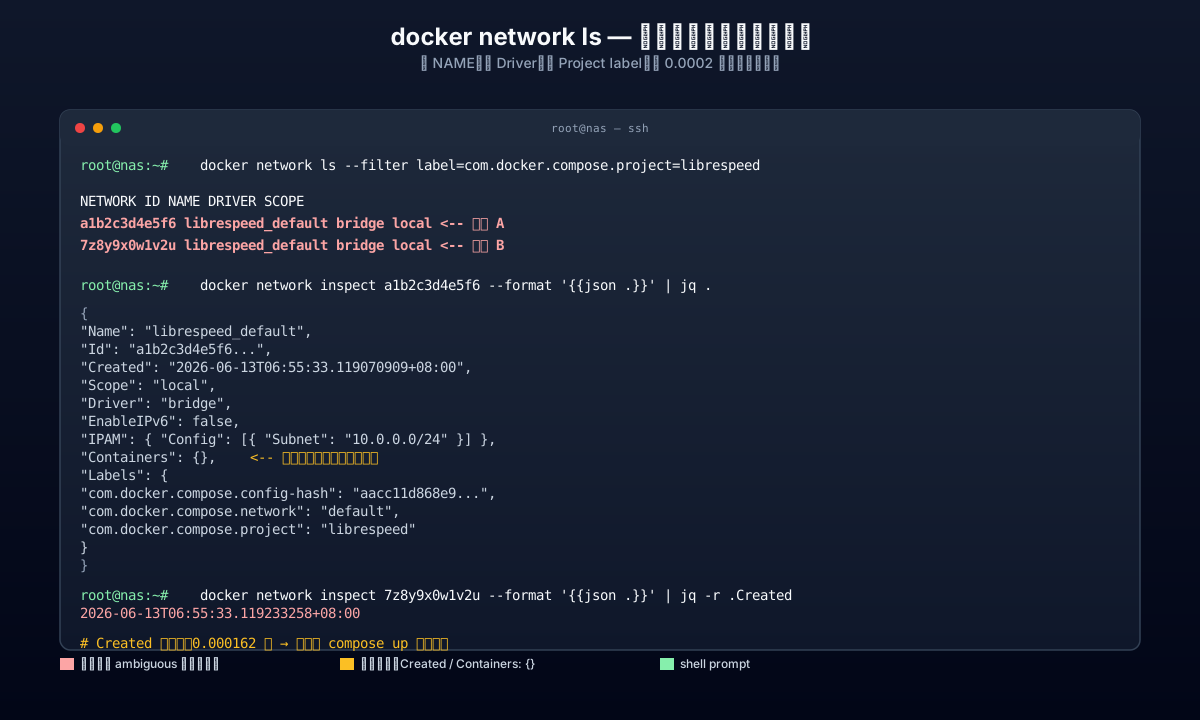
Figure 3: The two “orphan” networks. Same NAME, same Driver, same project label, same config-hash, but different IDs.
At this point, the root cause is clear: the Docker engine holds two networks sharing a single name; docker compose asks the engine to resolve the name; the engine refuses to pick, so compose up fails.
6. Why Does the Engine Say “ambiguous”?
To understand fully, open the moby source code (the open-source implementation of the Docker engine). In daemon/network.go, look at FindNetwork():
// FindNetwork returns a network based on:
// 1. Full ID
// 2. Full Name
// 3. Partial ID
// as long as there is no ambiguity
func (daemon *Daemon) FindNetwork(term string) (*libnetwork.Network, error) {
    var listByFullName, listByPartialID []*libnetwork.Network
    for _, nw := range daemon.getAllNetworks() {
        nwID := nw.ID()
        if nwID == term {
            return nw, nil
        }
        if strings.HasPrefix(nw.ID(), term) {
            listByPartialID = append(listByPartialID, nw)
        }
        if nw.Name() == term {
            listByFullName = append(listByFullName, nw)
        }
    }
    switch {
    case len(listByFullName) == 1:
        return listByFullName[0], nil
    case len(listByFullName) > 1:                     // ← we hit this branch
        return nil, errdefs.InvalidParameter(
            fmt.Errorf("network %s is ambiguous (%d matches found on name)",
                term, len(listByFullName)))
    case len(listByPartialID) == 1:
        return listByPartialID[0], nil
    case len(listByPartialID) > 1:
        return nil, errdefs.InvalidParameter(
            fmt.Errorf("network %s is ambiguous (%d matches found based on ID prefix)",
                term, len(listByPartialID)))
    }
    return nil, errdefs.NotFound(libnetwork.ErrNoSuchNetwork(term))
}
The lookup order is:
- Full ID match — return immediately if found.
- Full NAME match — collect everything where
nw.Name() == term. If exactly one, return it. - If ≥ 2 share the name, immediately error with
is ambiguous (N matches found on name), never pick. - Otherwise fall back to ID-prefix match; same ambiguity check applies.
The design is sensible: instead of letting the engine pick wrong, refuse and force the caller to clean up. The trouble is, the caller (docker compose) can’t self-heal once it sees this error.
7. What Is Compose Doing About It?
In pkg/compose/create.go, find resolveOrCreateNetwork():
// First, try to find a unique network matching by name or ID
res, err := s.apiClient().NetworkInspect(ctx, n.Name, ...)
if err == nil {
    inspect := res.Network
    if inspect.Name == n.Name || inspect.ID == n.Name {
        // Found, return inspect.ID
        ...
    }
}
// ignore other errors. Typically, an ambiguous request by name
// results in some generic `invalidParameter` error

// Either not found, or name is ambiguous - use NetworkList to list by name
nwList, err := s.apiClient().NetworkList(ctx, client.NetworkListOptions{
    Filters: make(client.Filters).Add("name", n.Name),
})
...
The comment is explicit: “name ambiguous” returns invalidParameter; compose sees it, gives up on lookup, and falls back to NetworkList.
But NetworkList uses substring match (not exact match). The result still has 2 networks. Compose then filters them client-side:
networks := slices.DeleteFunc(nwList.Items, func(net network.Summary) bool {
    return net.Name != n.Name
})
It removes anything where net.Name != n.Name. Logically, only exact matches should remain. But “exact match” still produces 2 results, so the function continues: it can’t find “the unique network with the correct project label,” or it finds 2 and doesn’t know which to use.
Either way, compose gives up on cleanup and propagates the engine’s ambiguous error verbatim. Portainer wraps it as 500.
Figure 4 puts the two source-code paths side by side:
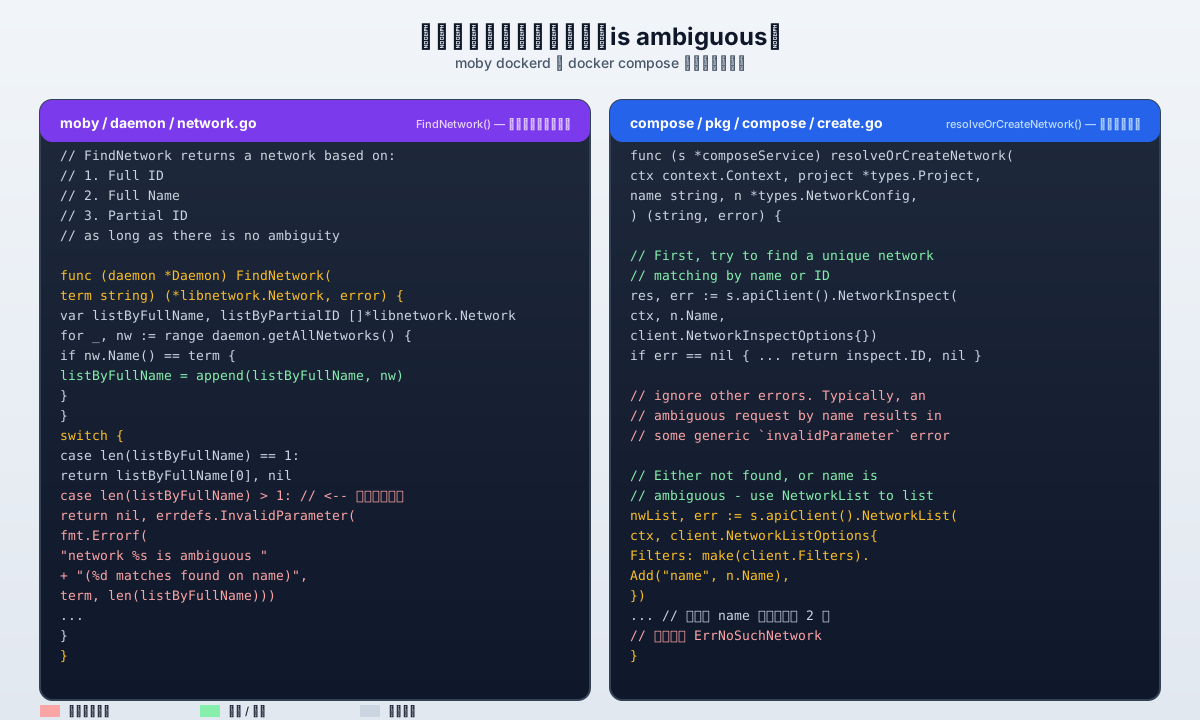
Figure 4: moby’s FindNetwork() and compose’s resolveOrCreateNetwork(). The engine throws the error but only reports; compose wants to catch it but can’t.
8. Postmortem: Where Do Orphan Networks Come From?
Once you know the root cause, the next natural question is: how did the orphans get there?
Looking at the code, when compose up runs it calls resolveOrCreateNetwork; if not found, it calls NetworkCreate. When the old network has a mismatched config-hash, it first calls removeDivergedNetwork() to delete the old one, then NetworkCreate() to build the new.
The most common causes of “twin” networks:
8.1 Startup Interrupted by SIGKILL
compose up is killed in the middle of network creation (OOM, Portainer retry, host reboot). The “delete old network” step never runs, but the new network has already been created. Next up finds 2 networks, neither has containers — both are orphans.
8.2 Concurrent compose up for the Same Project
If two compose up processes run at once (Portainer auto-retry + manual CLI, two replicas of a CI job, etc.), they both call NetworkCreate. NetworkCreate is supposed to return Conflict for an existing name, but in the very short “neither has created it yet” window, both succeed and you get two networks.
8.3 Repeated Retries After Portainer 500
This is the most common and most infuriating scenario:
- User clicks Update the stack in Portainer. Engine says ambiguous.
- Portainer returns 500.
- User immediately clicks again (and again, 5 or 6 times). Each click sends the same compose.
- Each click triggers another
resolveOrCreateNetwork→ fails. Failure does not clean up any existing orphan. - The orphan list keeps growing while the user keeps thinking the YAML is wrong.
8.4 Failed compose down
If compose down fails at the network-removal step (because the network still has lingering references, or because of an interrupted transaction), the next compose up sees “the old one is still there.” Combined with retry and orphaned-when-no-container cases, you get accumulation.
In my case, it was a combination of 8.1 + 8.3: the first mount-path update was interrupted and left an orphan; I then repeatedly clicked Update in Portainer, each click reproducing the 500, and nothing ever cleaned up the orphan.
9. The Fix: Delete the Orphan, Then Retry
Three steps: locate, delete, retry.
9.1 Locate the orphans
# List all networks whose project label is librespeed
docker network ls --filter label=com.docker.compose.project=librespeed

# Look at each one's Labels and Containers
docker network inspect <id1> <id2>
Key signs of an “orphan”:
Containers: {}(no container attached)Createdtimestamp is older (the older one is usually the leftover)com.docker.compose.config-hashmatches (they came from the same compose)- IPAM subnets differ (if IPAM isn’t even set up, the orphan never even got to attaching containers)
9.2 Delete one
# CLI
docker network rm <orphan_id>

# Or in Portainer UI
# Networks → select librespeed_default (the one with a different ID) → Remove
Never delete both at once. Delete one, verify the effect, then delete the other if needed.
9.3 Retry the Portainer stack update
Go back to the stack in Portainer, click Update the stack, with the same compose content. If all goes well, the response is HTTP/1.1 200 OK, the container starts automatically, port 8888 is bound.
$ curl -I http://<NAS_HOST>:8888/
HTTP/1.1 200 OK
Server: nginx
Content-Length: 10252
Figure 5 shows the full repair path:
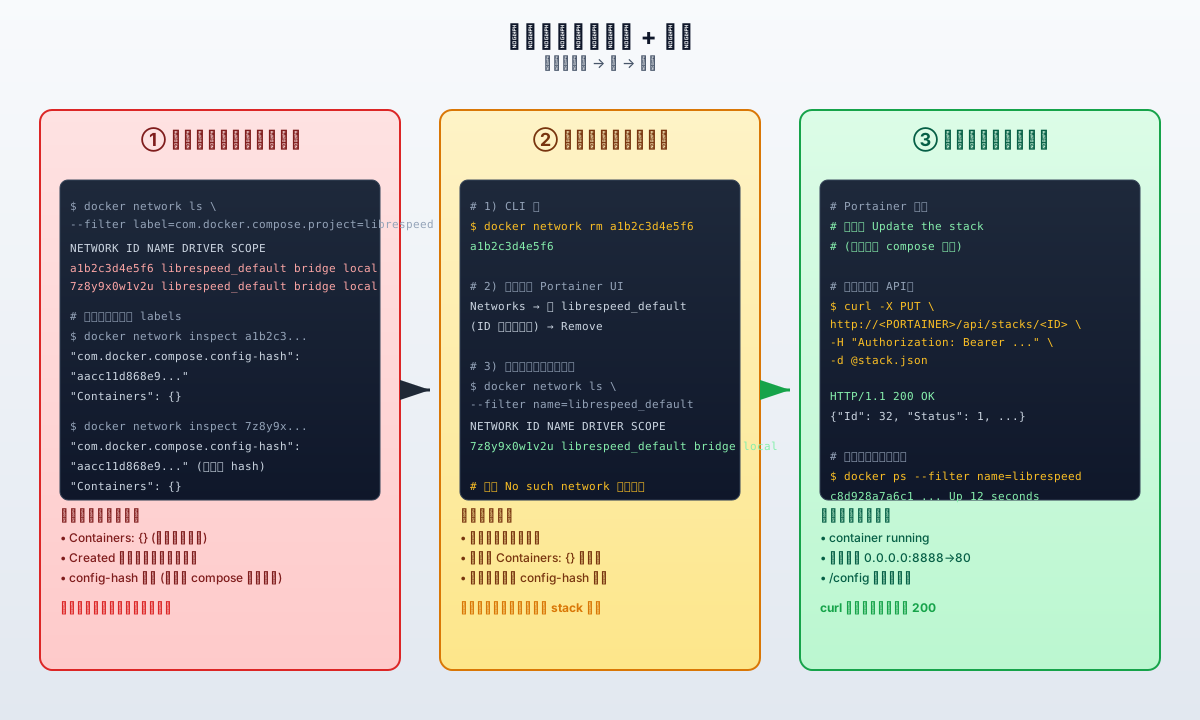
Figure 5: Locate orphan → delete → retry Portainer update. Three steps and you’re done.
10. Prevention: Four Reusable Techniques
Orphan networks are an “undefined behavior” of the compose/engine interaction. You can’t fully prevent them, but you can make them very easy to discover.
10.1 docker network prune
docker network prune
# or force-skip confirmation
docker network prune -f
network prune defaults to skipping the three system networks (bridge, host, none) and removes any custom network that has no container reference. Our orphan networks have no container reference, so prune will clean them up.
Add filters for more precision:
# only remove orphans older than 24h
docker network prune --filter "until=24h"

# only remove orphans with a specific label
docker network prune --filter "label=com.docker.compose.project=oldproject"
Caveat: if a stack has pre-created its network before bringing up containers (e.g. in a debug phase), prune will delete that too.
10.2 docker compose --remove-orphans
docker compose up --remove-orphans removes containers that the compose file doesn’t declare but that share the stack’s label. It manages containers, not networks. Still, enabling it reduces the “half-finished stack” residue.
10.3 COMPOSE_REMOVE_ORPHANS environment variable
export COMPOSE_REMOVE_ORPHANS=1
docker compose up -d
Equivalent to --remove-orphans. This env var also works for Portainer, as long as you set it in the stack’s environment.
10.4 Periodic inspection script
#!/bin/bash
# Find orphan networks under any compose project label
docker network ls --quiet --filter label=com.docker.compose.project \
  | while read net_id; do
      containers=$(docker network inspect "$net_id" \
                   --format '{{ len .Containers }}')
      if [ "$containers" = "0" ]; then
          echo "Orphan network: $net_id"
          docker network rm "$net_id"
      fi
  done
Run it via cron daily, or wire it into Prometheus alerting: alert when docker_network_orphans_total > 0.
10.5 Don’t Trust Portainer’s Top-Bar Stats
Portainer’s top bar often shows “all stacks healthy” — but it checks container counts, not network state. Orphan networks are not part of its health check. docker network ls is the only source of truth.
Figure 6 reproduces what the UI actually shows:
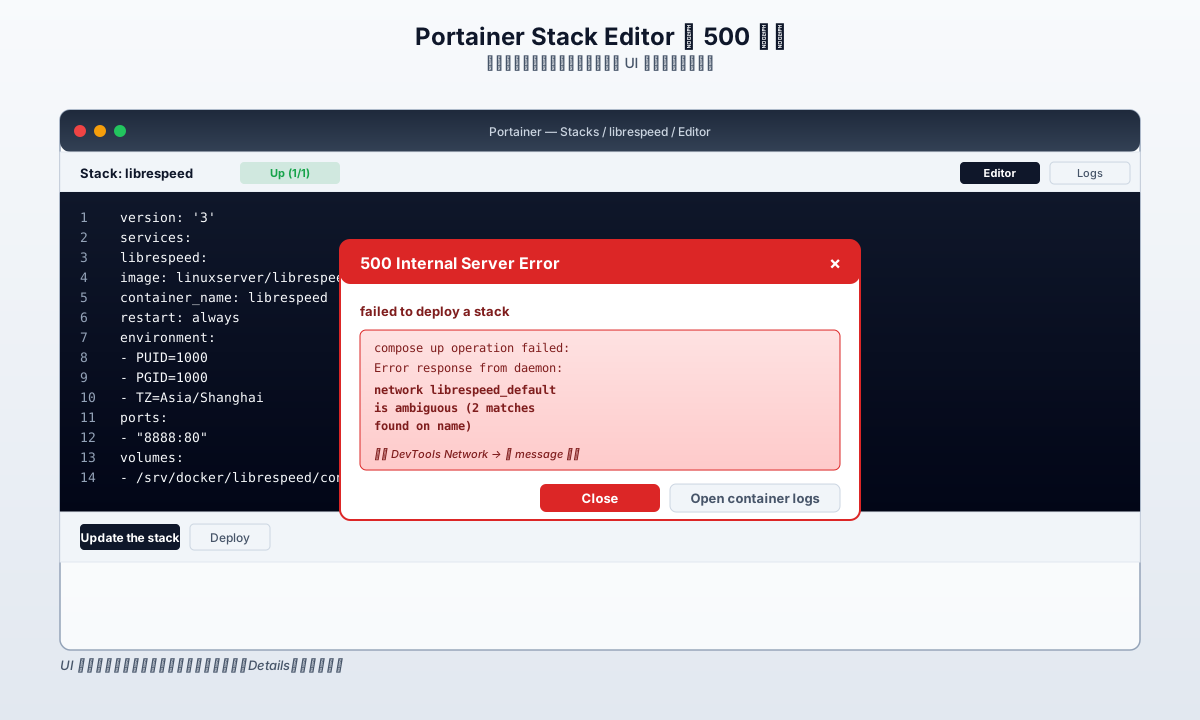
Figure 6: The 500 popup as it flashes on the Portainer UI. The real diagnostic info is hidden in Details or the DevTools Response Body.
11. Q&A
Q1: docker network ls shows two librespeed_default, but docker compose down says “network not found.” Why?
compose down filters networks by project label AND network label, only matching networks it “owns.” An orphan network’s labels might be slightly off (e.g. missing com.docker.compose.network=default), so down skips it. In other words, compose down does not clean up orphan networks — it only cleans up the resources it claims.
Q2: Is the 500 error Portainer’s bug?
No. Portainer’s 500 means “I called the layer below you, the layer below told me it failed, I wrapped that error as 500 and returned it to you.” The actual cause of the 500 is the engine’s is ambiguous error. Fix the engine layer, and Portainer naturally returns 200.
Q3: Will deleting an orphan network lose data?
No. A network is just a subnet definition plus a bridge; it doesn’t store business data. Business data lives on the mounted volumes, which are independent of networks. As an extra safety check, look at Containers: {} — an empty container map means the network carried no workload, so deletion has zero side effects.
Q4: docker compose config passes; why is it still 500?
config only tells you the compose text is syntactically legal. It can’t tell you whether the runtime environment has conflicts: duplicate network names, port collisions, unreachable images, missing volume paths. YAML validation ≠ successful deployment.
Q5: Can I completely avoid “ghost” networks?
Completely avoiding them is hard, because there’s a tiny time window between NetworkCreate and NetworkRemove in the engine. You can reduce the chance by:
- Running
docker network prune -fbefore each deploy. - Adding
--remove-orphanstoup. - Writing CI/periodic scripts that detect orphans.
- Don’t spam-click Update in Portainer — each retry is another
compose upthat makes things worse.
Q6: Both duplicate networks have containers attached. Can I delete them?
Not directly — docker network rm will say “has active endpoints.” You need to:
- Run
docker compose downfirst to stop the containers. - Or use
docker network disconnect <net> <container>to detach. - Then delete the network.
Q7: Beyond librespeed_default, what other networks can collide?
Any compose project has a <project>_default. Common collision scenarios:
- Reusing the same project name across dev/test environments.
- Include / merge across compose files that pick the same name.
- One-off stacks (e.g.
mynginx_20240601) that aren’t cleaned up after use.
Q8: Does Portainer 6.x still have this problem?
The engine layer hasn’t changed; is ambiguous is still thrown by dockerd. Portainer 6.x still wraps it as 500. This is docker engine behavior, not a Portainer bug.
Q9: Is there a safer alternative to docker network rm?
For an orphan (no containers), rm is safe. If you’re paranoid, you can docker network disconnect every endpoint first, then rm. Prune is also safer in that it won’t touch any network that still has a reference.
Q10: Can iptables show the network conflict?
No. iptables shows network rules, not network objects. To detect name collisions, you must use docker network ls + docker network inspect. The namespace table lives inside dockerd.
12. Postmortem: From 500 to Root Cause
The most valuable lesson from this debugging session is: I spent the first 30 minutes hunting the YAML, because 500 usually means “you wrote it wrong.” But Portainer 500 almost never comes from its own code — it’s just a shell.
If I had opened DevTools first and read the full 4-line JSON response, “is ambiguous (2 matches found on name)” would have immediately redirected my attention from the compose text to the engine’s network table. The next 90% of the time was spent confirming the cause and writing the fix script, not finding the problem.
The lesson is one sentence: When you see 500, the first thing to do is read the entire response body. Don’t trust the popup, don’t trust “try again,” don’t trust the green checkmark in Portainer’s top bar. The error is always in the longest string.
Don’t test non-interactive behavior in an interactive terminal. It sounds unrelated to today’s bug, but the logic is the same: what you can see as “normal” is often not what the engine is actually doing.
References
- moby source:
daemon/network.goFindNetwork()— where “is ambiguous (N matches found on name)” is thrown: https://github.com/moby/moby/blob/master/daemon/network.go - docker compose source:
pkg/compose/create.goresolveOrCreateNetwork()— “Either not found, or name is ambiguous” comment: https://github.com/docker/compose/blob/main/pkg/compose/create.go - docker compose source:
pkg/compose/create.goremoveDivergedNetwork()— config-hash mismatch handling: https://github.com/docker/compose/blob/main/pkg/compose/create.go - docker compose source:
pkg/compose/down.goremoveNetwork()—compose downnetwork cleanup logic: https://github.com/docker/compose/blob/main/pkg/compose/down.go - compose-spec:
06-networks.md—defaultnetwork andnamefield: https://github.com/compose-spec/compose-spec/blob/main/06-networks.md - compose-spec:
pkg/api/labels.go—com.docker.compose.projectandcom.docker.compose.config-hashconstants: https://github.com/docker/compose/blob/main/pkg/api/labels.go - Docker official docs:
docker network prune: https://docs.docker.com/reference/cli/docker/network/prune/ - Docker official docs: Networking overview: https://docs.docker.com/engine/network/
- Docker official docs: Compose networking: https://docs.docker.com/compose/networking/
- Portainer docs: Stacks and stack update: https://docs.portainer.io/user/docker/stacks