Take Back Your Remote Desktop: Deploying an All-in-One RustDesk Server Safely
The short version
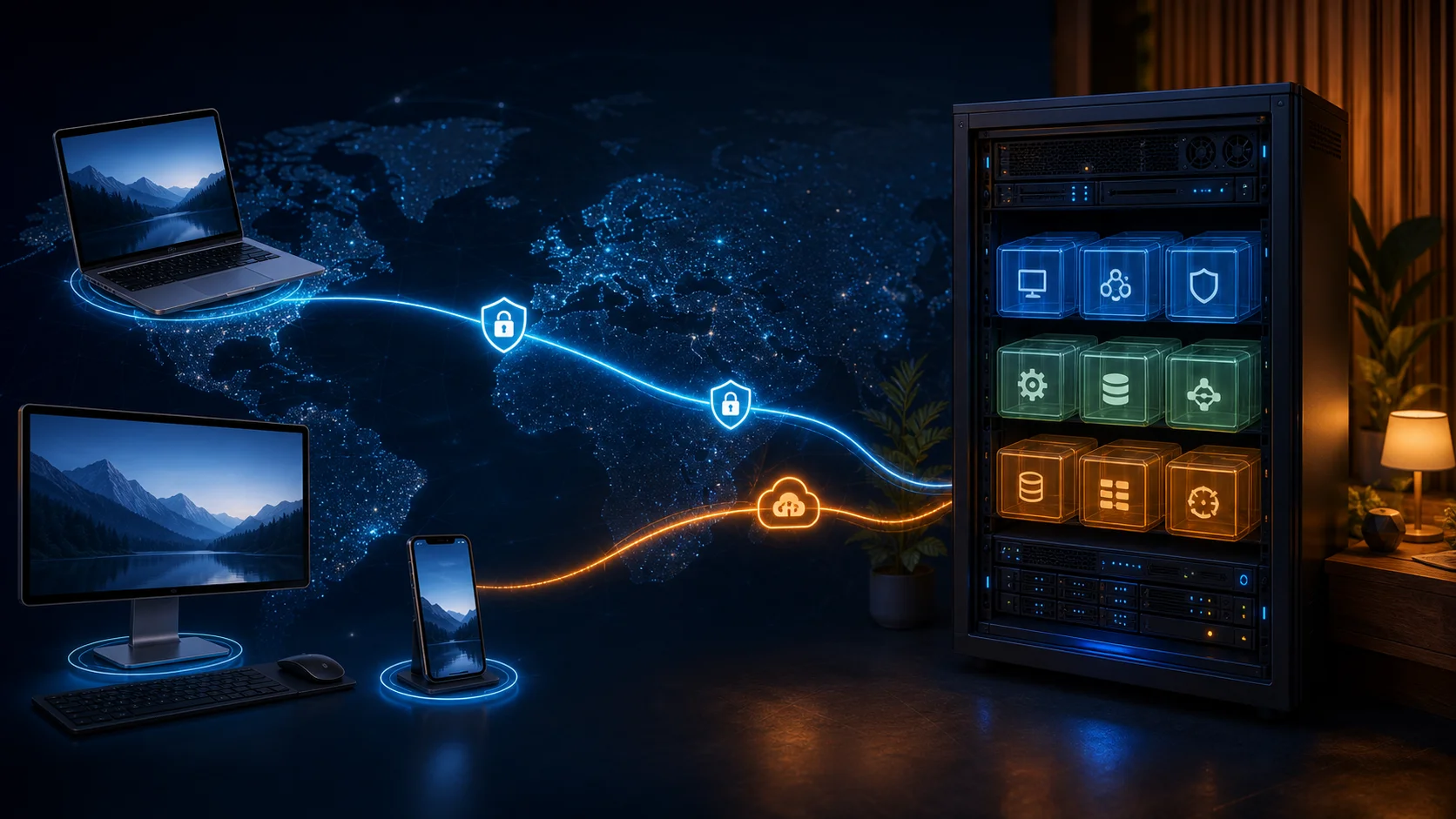
RustDesk is an open-source remote desktop application designed with self-hosting in mind. When two clients can reach each other directly, screen and input traffic can use a peer-to-peer path. When that direct path fails, a relay server forwards the encrypted traffic. Hosting the server yourself does not eliminate servers; it puts device registration, relay routing, keys, accounts, and logs back under your control.
This guide uses the community-maintained
lejianwen/rustdesk-server-s6image to place the RustDesk OSShbbsandhbbrservices together with a community API and web administration layer in one container. It is a convenient option for homes, labs, and small teams, but it is not an official RustDesk all-in-one distribution. Evaluate the community image, pin a tested tag or digest, back up its persistent data, and rehearse upgrades and rollbacks before treating it as production infrastructure.Every address in this article uses
example.com. No real IP address, private domain, hostname, device ID, account, key, token, cookie, or private registry is shown. The screenshots come from public official or community project pages.
Why self-host a remote desktop service at all?
A remote desktop tool looks simple from the outside: show another computer’s screen and send keyboard and mouse events back. In practice, it combines accounts, device discovery, NAT traversal, encryption, relay bandwidth, file transfer, clipboard handling, and elevated permissions. When one layer is unreliable, the experience quickly changes from “sitting in front of the machine” to “clicking through frozen glass.”
Commercial remote-access services are convenient, but they also define the account system, connection policy, concurrency limits, traffic route, and pricing. Self-hosting RustDesk is not an argument that those products should not exist. It is a way to keep an additional route under your control: you choose where the server runs, where relay traffic goes, when upgrades happen, and how long logs are retained.
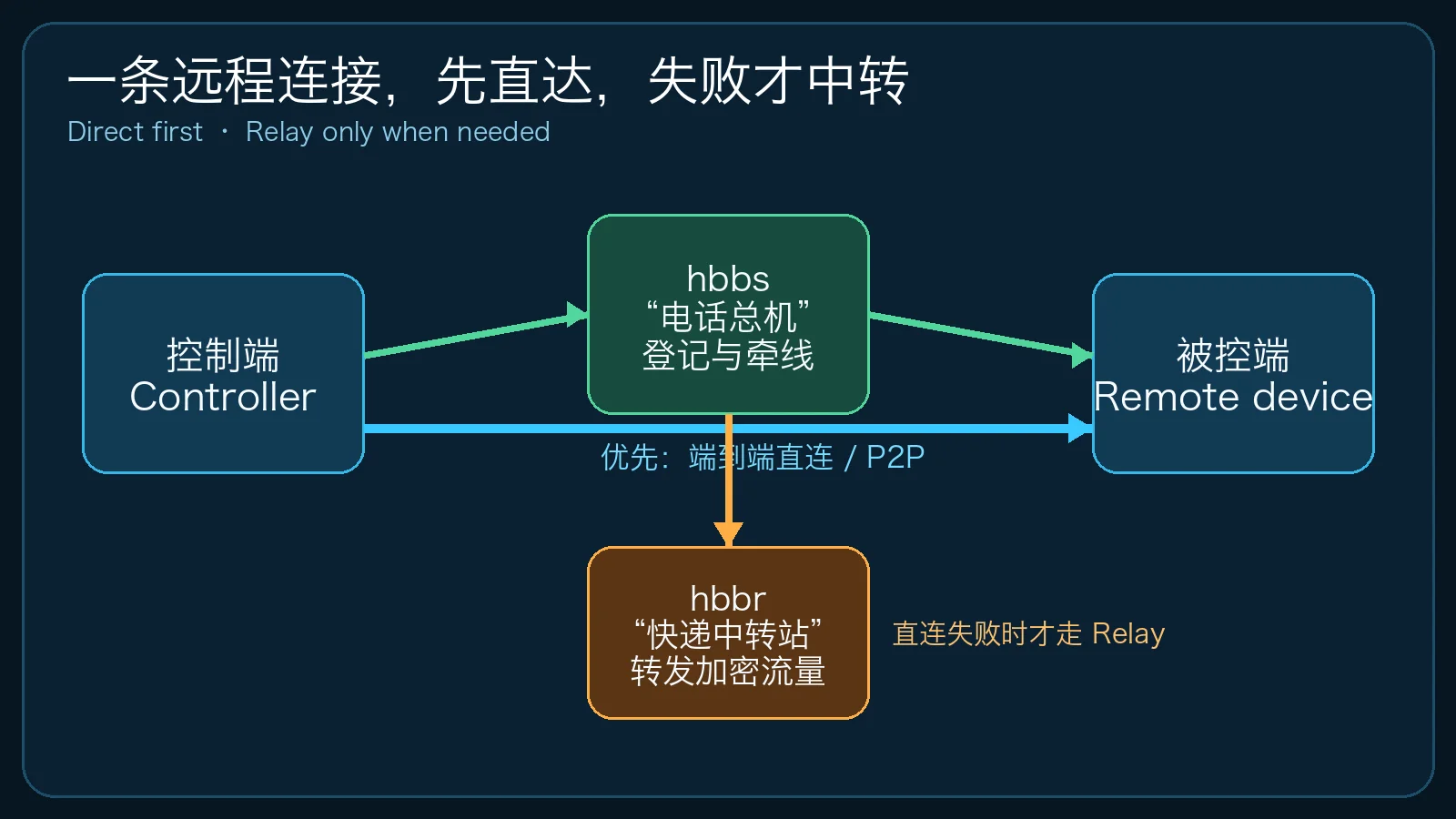
RustDesk publishes its client source and provides an open-source server project. The main repository describes it as an open-source remote desktop application designed for self-hosting. Its familiar interface is attractive to individual users; the ability to run the ID and relay services is the more important feature for operators.
Understand the connection first: it behaves more like a phone call than video streaming
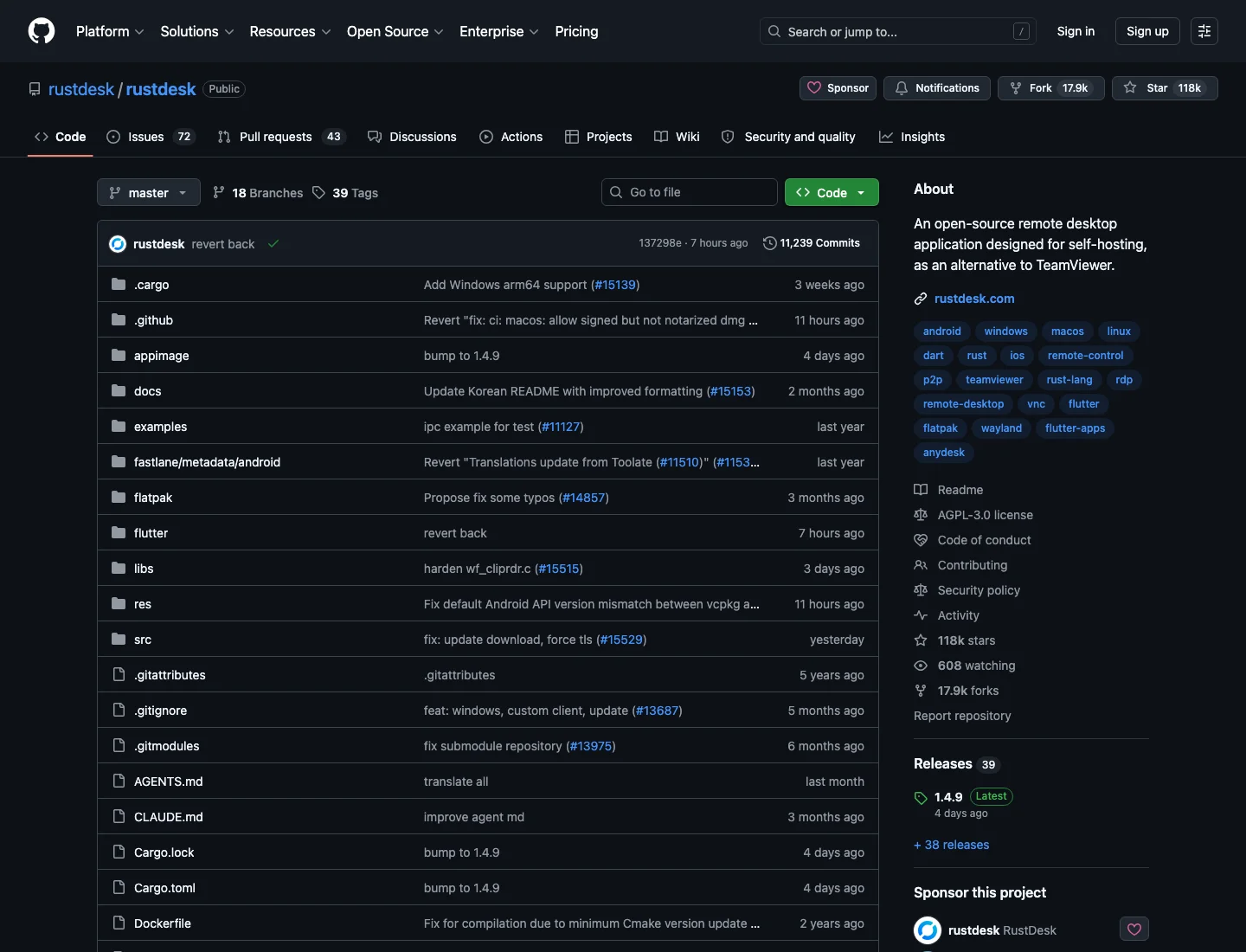
A frequent deployment mistake is to imagine the server as a video platform where every frame must be uploaded to the server and downloaded by the controller. RustDesk first tries to help the two endpoints connect directly.
Think of the process as making a phone call:
hbbsis the switchboard. Both devices register who and where they are. It handles IDs, heartbeats, NAT testing, and connection coordination.- If the controller and remote device can reach each other, they communicate directly after the switchboard introduces them. Screen and input traffic do not need to travel through the relay.
- If the network blocks a direct path,
hbbracts like a call-transfer desk or a parcel hub. Both sides connect to it, and it forwards encrypted traffic.
This distinction matters: a working relay does not prove that peer-to-peer connectivity works. A deployment can appear functional while every session consumes server bandwidth and adds relay latency.
Official server components versus the community all-in-one image
The RustDesk Server OSS core consists of two programs:
hbbsfor IDs, heartbeats, NAT tests, and connection coordination.hbbrfor relaying traffic when endpoints cannot connect directly.
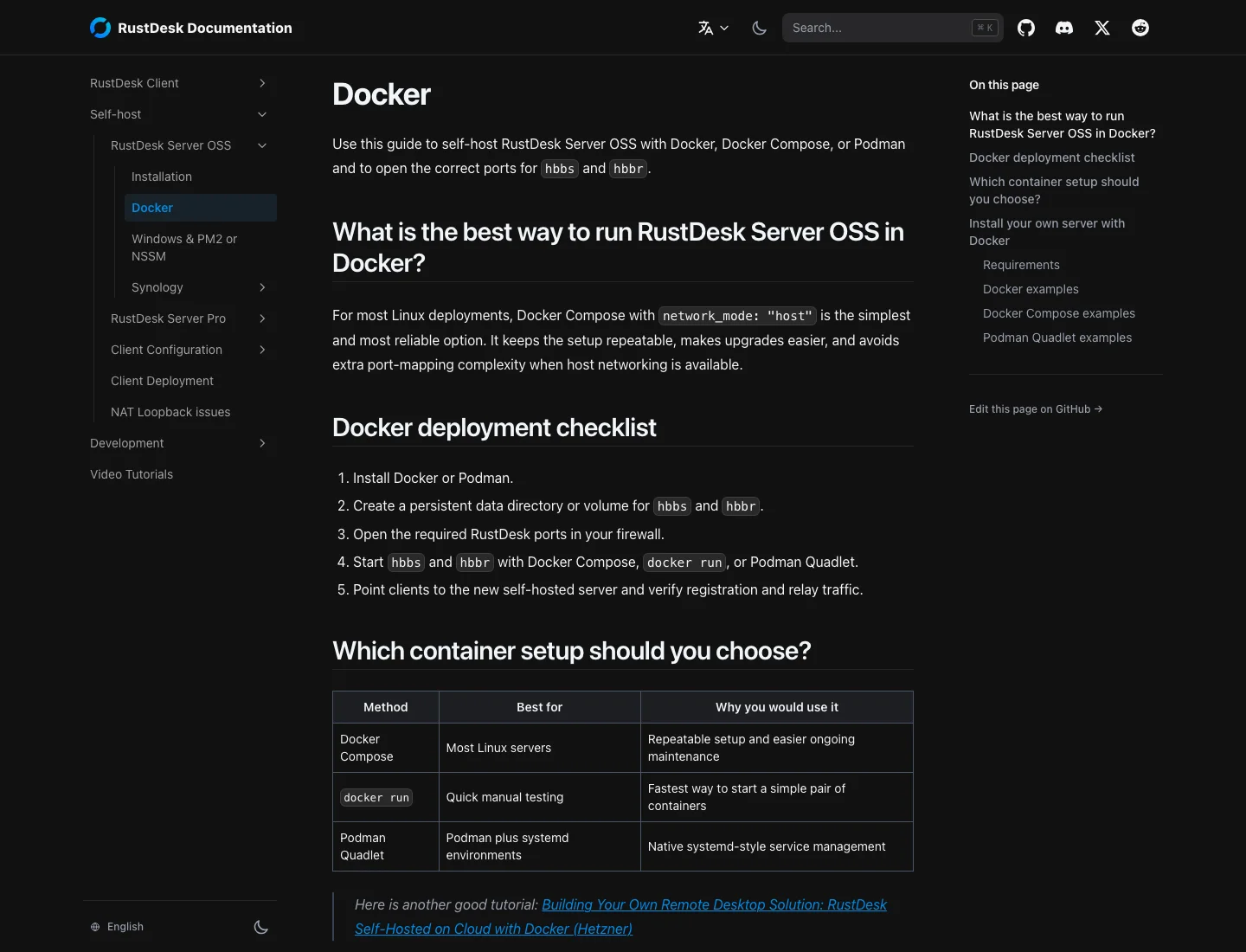
The official documentation recommends Docker Compose for most Linux deployments. Its checklist emphasizes persistent data, the correct firewall ports, starting both services, and pointing clients at the new server. Host networking can simplify Linux deployment; explicit port mappings are more portable across Docker Desktop on Windows and macOS.
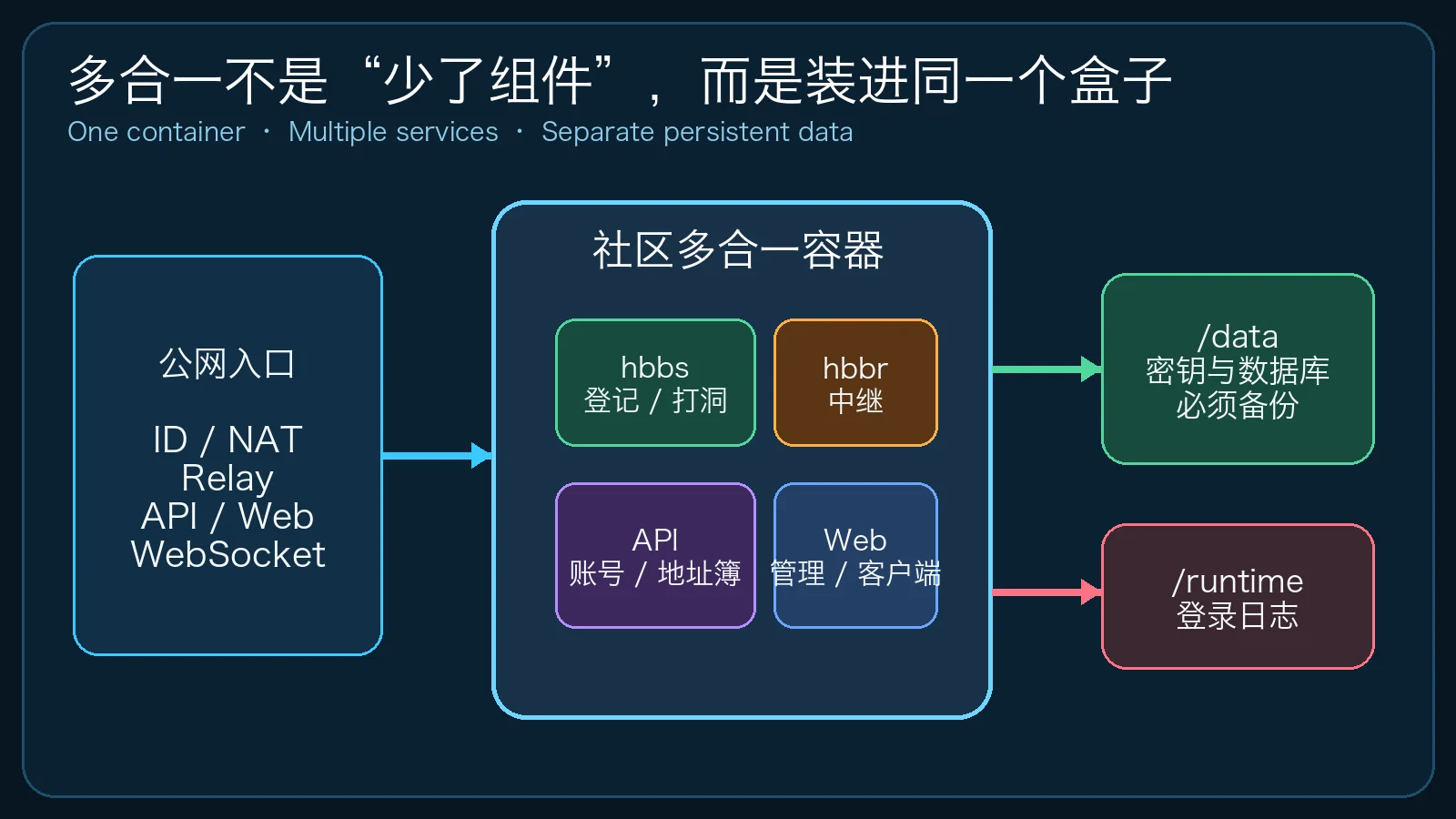
The community lejianwen/rustdesk-api project adds accounts, address books, a web administration interface, web clients, OIDC, and related API features. The rustdesk-server-s6 image places hbbs, hbbr, and that API/web layer inside one S6-managed container.
Imagine a switchboard, transfer desk, records room, and web office that previously occupied separate rooms. The all-in-one image moves them into one suite. The jobs still exist; their startup, logs, and lifecycle are simply managed together. The Compose file becomes shorter, but component upgrades are more tightly coupled and must be tested as one unit.
What the ports actually do
The common port roles are:
| Port | Protocol | Primary role |
|---|---|---|
21114 |
TCP | Community API, administration, or web entry point |
21115 |
TCP | NAT type testing |
21116 |
TCP + UDP | ID registration, heartbeat, coordination, and hole punching |
21117 |
TCP | Relay traffic |
21118 |
TCP | Web-client ID WebSocket support |
21119 |
TCP | Web-client relay WebSocket support |
Missing 21116/UDP is a classic error. A client may still register or connect occasionally when only TCP is open, while direct-connection success becomes much worse.
Another mistake is treating every port as an HTTPS website. API and WebSocket traffic can sit behind a reverse proxy that supports connection upgrades. Ports 21115, 21116, and 21117 carry native RustDesk traffic and are not normal URL paths. If they need proxying, use explicit layer-four TCP/UDP forwarding rather than an ordinary HTTP location block.
A privacy-safe Docker Compose example
The following configuration preserves the important structure of a working deployment but replaces all infrastructure details with example values. It uses explicit port mappings for cross-platform compatibility. Linux operators can evaluate host networking after understanding its security and routing implications.
services:
  rustdesk:
    image: lejianwen/rustdesk-server-s6:latest
    container_name: rustdesk-server-s6
    restart: unless-stopped
    ports:
      - "21114:21114/tcp"
      - "21115:21115/tcp"
      - "21116:21116/tcp"
      - "21116:21116/udp"
      - "21117:21117/tcp"
      - "21118:21118/tcp"
      - "21119:21119/tcp"
    environment:
      RELAY: rustdesk.example.com:21117
      ENCRYPTED_ONLY: "1"
      MUST_LOGIN: "N"
      TZ: Asia/Shanghai
      RUSTDESK_API_LANG: en
      RUSTDESK_API_ADMIN_TITLE: RustDesk Console
      RUSTDESK_API_RUSTDESK_ID_SERVER: rustdesk.example.com:21116
      RUSTDESK_API_RUSTDESK_RELAY_SERVER: rustdesk.example.com:21117
      RUSTDESK_API_RUSTDESK_API_SERVER: https://api.example.com
      RUSTDESK_API_RUSTDESK_WS_HOST: wss://ws.example.com
      RUSTDESK_API_KEY_FILE: /data/id_ed25519.pub
      RUSTDESK_API_APP_TOKEN_EXPIRE: 168h
    volumes:
      - ./data/server:/data
      - ./data/api:/app/data
      - ./logs:/app/runtime
Important details:
RELAY, the ID server, and the relay server must contain addresses that clients can actually reach, not internal container names.ENCRYPTED_ONLY=1rejects unencrypted connections and is a sensible long-term default.MUST_LOGIN=Nleaves remote connections independent from the community account system. Enabling mandatory login requires a coordinated JWT design and compatible clients, not a one-letter change./datacontains important server keys, while/app/datacontains API data. Containers are replaceable; these directories are not.latestis convenient for a guide. A production deployment should record and pin a tested tag or image digest.
Inspect before you remote into anything
Start the deployment and read its state:
docker compose pull
docker compose up -d
docker compose ps
docker compose logs --tail=200 rustdesk
Then confirm that the public key exists:
test -s ./data/server/id_ed25519.pub && cat ./data/server/id_ed25519.pub
Clients need the public key. Never copy the private key into a client, article, support ticket, or chat.
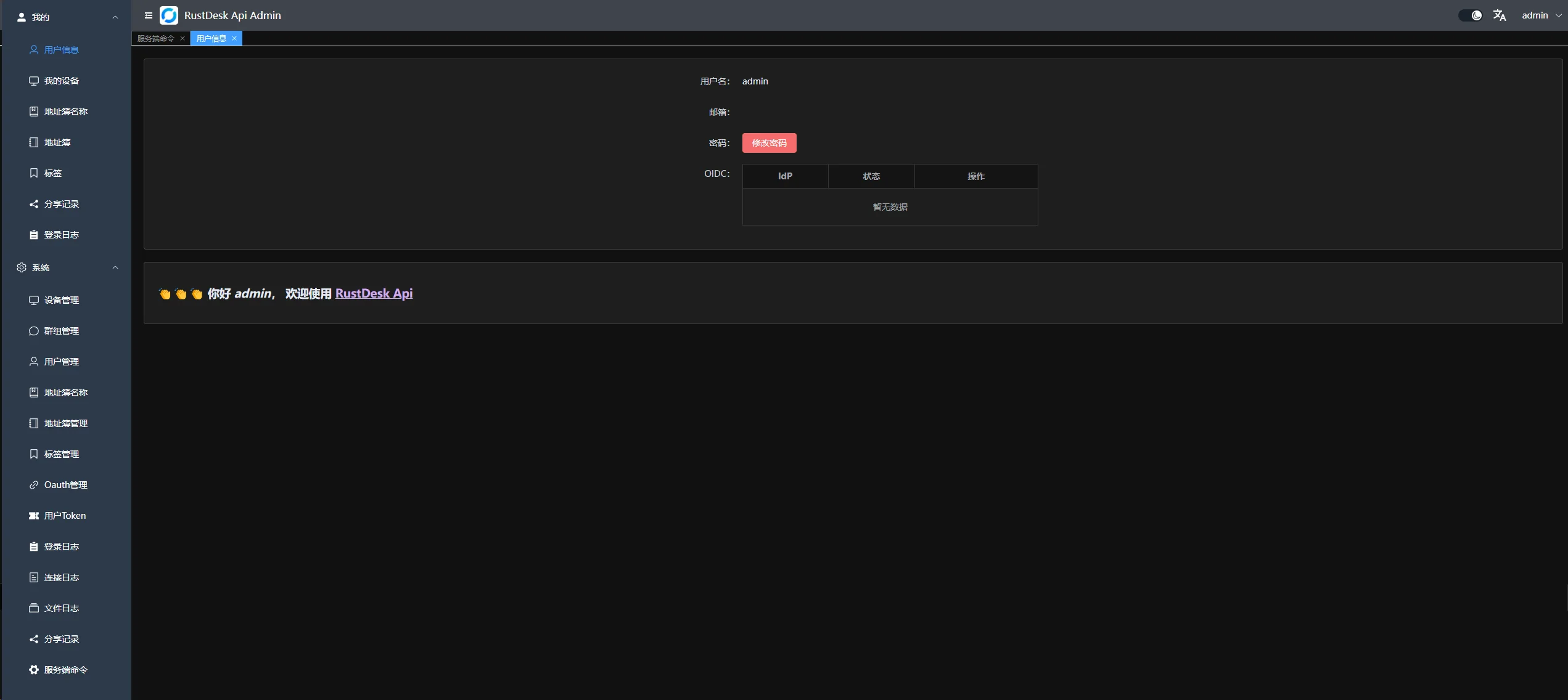
The community administration service may print initialization information during first startup. Change the initial password immediately, disable registration if it is not needed, and make sure address books, logs, and device pages are not exposed to an untrusted network.
Configure clients in a predictable order
Clients usually need three pieces of information:
- ID Server, such as
rustdesk.example.com:21116. - Relay Server, such as
rustdesk.example.com:21117. - Key, containing the text from
id_ed25519.pub.
If you use community accounts, address books, or a web client, configure the API server as well. A common error is placing the administration URL in the ID Server field or adding https:// to a field that only expects a host and port.
Test in this order:
- Register two desktop clients on different networks.
- Establish a session and identify whether it is direct or relayed.
- Test file transfer, clipboard, unattended access, and restart behavior.
- Only then add the web client, account synchronization, and reverse proxy.
This is like inspecting a new home: verify water, electricity, and the locks before debugging the smart speaker. Adding WebSocket and OIDC before basic connectivity works mixes unrelated failures together.
Symptoms, evidence, and root causes
The client never becomes ready
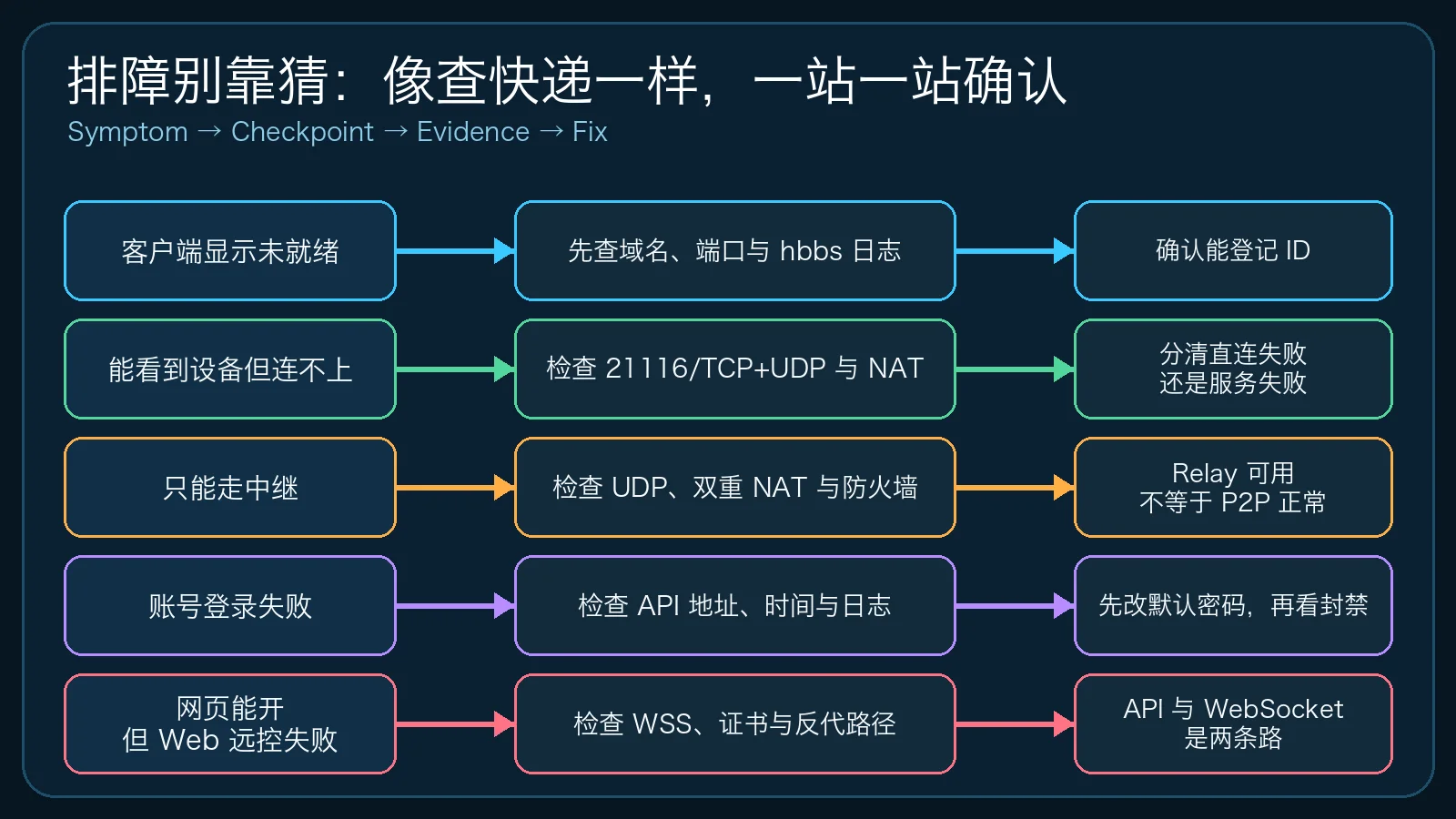
Check DNS, 21116/TCP, 21116/UDP, and the container logs. A working web page is not proof that the client has registered and maintained a heartbeat with hbbs.
Typical causes include stale DNS, a firewall that opened only TCP, a router forwarding to the wrong host, missing container port mappings, or a protocol prefix entered in the wrong client field.
The device is visible but the connection times out
Finding someone in a phone book does not mean the call has connected. Read both hbbs and hbbr logs and determine whether direct negotiation failed or the relay is unavailable too.
If relay works but direct connectivity does not, investigate UDP, double NAT, carrier-grade NAT, symmetric NAT, and enterprise firewall policy. A session eventually connecting is not evidence that P2P works.
Every session uses the relay
Confirm that 21116/UDP is reachable in both directions, then inspect router forwarding and layered routing. A home connection with routing enabled on both the provider gateway and a personal router is like a neighborhood with two gatekeepers who do not share a visitor list.
Some networks cannot provide reliable hole punching. Relay is not a failure in that situation; size the server bandwidth for real concurrency and place the server where latency is acceptable for both endpoints.
The administration page works but web remote control fails
An HTTP page loading only proves that the front door works. A web client also depends on WebSocket upgrades, certificates, Host and Origin handling, and proxy routing. A shopping mall’s front entrance can be open while its loading dock remains locked.
Inspect the WebSocket state in browser developer tools, reverse-proxy logs, certificate names, and RUSTDESK_API_RUSTDESK_WS_HOST. The API URL and WebSocket URL are related but not interchangeable.
Account login fails or users are suddenly rejected
Check server time, token expiry, CAPTCHA and ban policy, real-client address handling behind the proxy, and /app/runtime logs. If the proxy hides source addresses, every user can appear to come from one proxy IP. Banning that address is like a guard rejecting an entire bus because one passenger used the wrong ticket.
Security hardening: self-hosted does not mean secure by default
Self-hosting transfers responsibility; it does not finish the security work. At minimum:
- Change the initial administration password and do not reuse another system password.
- Open only required ports. Prefer a VPN, access control, or a trusted reverse proxy in front of administration pages.
- Keep encrypted-only mode enabled and verify that client keys match the server public key.
- Disable public registration when it is not needed; consider CAPTCHA, login throttling, bans, or Fail2ban.
- Back up
data/server,data/api, and required logs with restrictive permissions. - Record the current image digest, Compose file, environment, and rollback procedure before upgrades.
- Review authentication failures, unusual relay traffic, connection errors, and disk usage.
The container is a rented office and the image is its blueprint. Persistent data is the safe. You can rebuild the office from the blueprint; pulling the image again will not recover the safe’s contents.
One-click installers for three host platforms
The three installers generate the same privacy-safe Compose model. They do not upload configuration, discover the LAN, or call an additional management service. They still pull the community container image from a registry. Windows and macOS require Docker Desktop to be running; the Ubuntu installer can attempt to install Docker from the operating-system package repository.
Ubuntu example:
sudo bash install-rustdesk-ubuntu2604.sh \
  rustdesk.example.com \
  https://api.example.com \
  wss://ws.example.com
Windows 11 example:
.\install-rustdesk-windows11.ps1 `
  -PublicHost rustdesk.example.com `
  -ApiUrl https://api.example.com `
  -WsUrl wss://ws.example.com
macOS 26 example:
zsh install-rustdesk-macos26.zsh \
  rustdesk.example.com \
  https://api.example.com \
  wss://ws.example.com
Windows and macOS are useful for labs, demonstrations, or genuinely always-on desktops. For a public long-running service, prefer a Linux server with stable networking, backups, monitoring, and a defined update process.
Human-guided automation
If you do not want to run the downloadable installer directly, use a visible automated workflow:
- Create an isolated deployment directory and three persistent subdirectories.
- Save the parameterized
compose.yamland.env. - Run
docker compose configand inspect the expanded addresses. - Run
docker compose pull && docker compose up -d. - Check container state, logs, the public-key file, and listening ports.
- Configure clients from another network and test direct and relay paths.
- Change the initial password and create a backup before opening public access.
This resembles using an automatic washing-machine program after checking the pockets, detergent, and water supply. Automation handles repetition; the operator verifies the assumptions.
Agent-driven configuration
Deploy the community RustDesk all-in-one server on this machine.

Constraints:
- Begin with read-only checks of the OS, Docker, Docker Compose, occupied ports, and target directory.
- Never display or upload complete IP addresses, private domains, hostnames, keys, tokens, cookies, or passwords.
- Do not delete existing containers, networks, volumes, or firewall rules.
- Use the lejianwen/rustdesk-server-s6 image, but show the image name, plan, and rollback method before execution.
- Generate a parameterized compose.yaml and persist server data, API data, and runtime logs.
- Map both 21116/TCP and 21116/UDP.
- Run docker compose config before starting the service.
- After startup, check container state, recent logs, the public-key file, and listening ports.
- Never print the private key; report only the public-key path.
- Stop and report if a port is occupied, Docker is not running, or a service with the same name exists.

Target values:
- ID/Relay host: rustdesk.example.com
- API URL: https://api.example.com
- WebSocket URL: wss://ws.example.com
- Time zone: Asia/Shanghai
- Encrypted connections only
- Account login not mandatory by default

Finish with checklists for changing the administrator password, client ID/Relay/Key fields, external-network validation, backups, upgrades, and rollback.
An agent should automate inspection, generation, startup, and verification. It should not guess an address or overwrite a conflicting service merely to report completion.
Backup, upgrade, and rollback
Before upgrading:
docker compose ps
docker image inspect lejianwen/rustdesk-server-s6:latest --format '{{.Id}}'
tar -C . -czf rustdesk-backup-$(date +%Y%m%d-%H%M%S).tar.gz \
  compose.yaml .env data logs
Pull the new image and recreate the container:
docker compose pull
docker compose up -d
docker compose logs --tail=200 rustdesk
If validation fails, restore the Compose file, environment, and persistent data, then start the previously recorded image digest. Do not back up only the database and forget the server key. Clients trust that key; replacing it is like changing every lock in the building.
Q&A
Does a self-hosted RustDesk server require a public IP address?
Clients must be able to reach the server, but a home connection does not necessarily need a fixed public IPv4 address. A cloud server, reachable IPv6, port mapping, or an appropriate private-network overlay can work. Whatever method you choose, the address entered in the client must be reachable from its network.
Can I open only ports 21116 and 21117?
Basic desktop ID and relay usage may allow a smaller exposed surface, but NAT testing, administration, web clients, and WebSocket features involve other ports. Do not expose the entire table without understanding it, and do not close ports blindly either.
Why recommend Ubuntu while also providing Windows and macOS installers?
All three can run Docker, but “can run” and “is suitable for a public production service” are different claims. Windows and macOS scripts are convenient for testing and always-on home machines. Ubuntu more naturally supports headless operation, system services, firewalls, monitoring, and automated backups.
Is one container safer than three containers?
No. Fewer containers reduce operational entry points; they do not automatically reduce the attack surface. Security depends on image provenance, versions, configuration, exposed ports, passwords, logs, backups, and update speed.
Should mandatory login be enabled?
Teams that need centralized account auditing can evaluate MUST_LOGIN and JWT integration. A home deployment should first get encryption, keys, unattended-access passwords, and network access control right. Mandatory login is an authentication design, not an isolated toggle.
Final thoughts
The transferable lesson in a RustDesk deployment is not one Compose file. It is the layered connection model: hbbs helps endpoints find each other, P2P lets them communicate directly when possible, hbbr relays traffic when necessary, and the API/web layer provides accounts and administration.
The community all-in-one image puts those jobs in one container and lowers the initial setup barrier. It does not remove the operator’s responsibility for networking, security, backups, and upgrades. Understand the path before opening ports, validate desktop connectivity before adding web proxies, and back up keys and data before upgrading. That is how a self-hosted remote desktop becomes a dependable route you control instead of merely another container to maintain.