You Can SSH Out, but Not Back In: A Fail2Ban False Positive That Broke Reverse Access
Bottom line
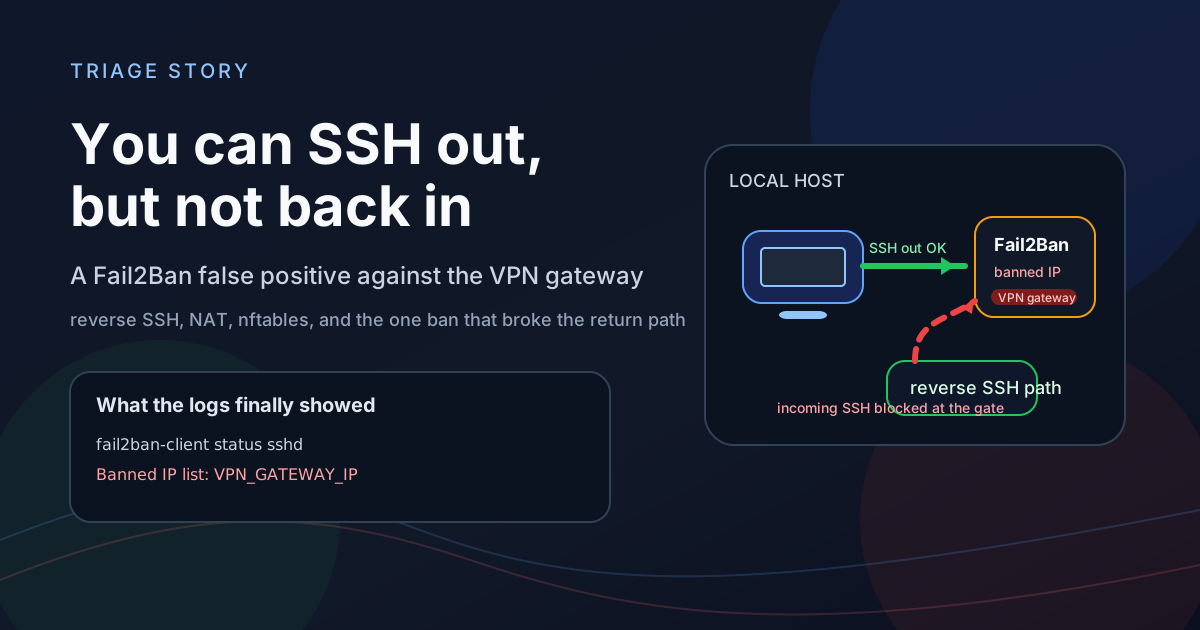
The symptom looked simple: I could SSH from the local machine into a remote internal host, but the reverse SSH path failed when the remote host tried to connect back.
sshdwas listening, the route table looked fine, and the failure still happened.The real root cause was not a broken SSH daemon.
Fail2Banhad banned the VPN gateway address that represented the return path. From the local machine’s point of view, the incoming SSH session did not appear to come directly from the remote host. It appeared to come from the gateway, so the ban cut off the whole reverse path.
1. Background: one direction works, the other does not
This kind of failure is easy to misread.
If I can SSH out from the local machine to the remote host, the immediate instinct is to assume the network is basically fine. If the remote machine cannot SSH back in, the next guess is often that the local sshd is broken.
That was the wrong mental model here.
What I observed was:
- The local machine could SSH into the remote internal host.
- The remote host could still “see” the local machine.
- But when the remote host tried to SSH back to the local machine, the connection was refused.
sshdon the local machine was still listening on port 22.- The service itself was healthy.
That combination tells you the bug is probably not inside SSH itself. It is more likely somewhere in the path around SSH: firewall policy, tunnel behavior, source-address rewriting, or a ban rule.
2. Symptom: Connection refused does not mean sshd is down
My first checks were basic:
ss -lntp | grep ':22'
systemctl status ssh
Both looked fine. The service was up and listening.
I also tested the reverse SSH path from the remote side and got Connection refused, not a timeout. That distinction matters:
timeoutusually suggests a silent drop somewhere in the path.refusedmeans someone actively rejected the connection.
So I shifted from “is the service running?” to “who is actively refusing the session?”
3. First pass: SSH itself was not the problem
To avoid getting trapped by assumptions, I checked three layers.
Listen state
ss -lntp | grep ':22'
SSH was bound correctly, not only on loopback.
Service logs
journalctl -u ssh -n 100 --no-pager
The logs showed normal accept/reject activity, which meant the daemon was alive and processing sessions.
Firewall state
This was the turning point.
The local machine had a Fail2Ban jail for SSH, and the ban list already contained the VPN gateway address. That was the address the local machine actually saw for the reverse path.
4. Analysis: why does the remote host look like the gateway?
This is the part that matters.
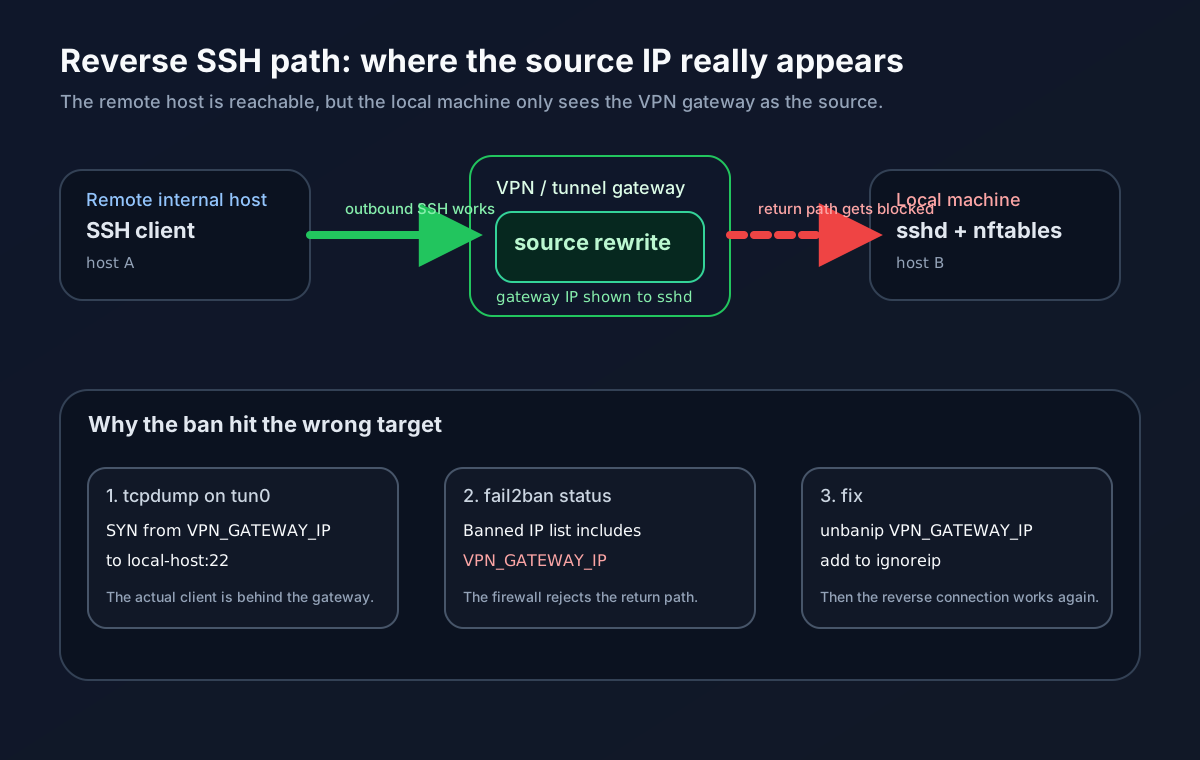
When traffic crosses a VPN, tunnel endpoint, or routed gateway, the local host does not always see the end host’s original address. It often sees the address of the gateway that forwards or terminates the path.
In this case, the reverse SSH session arrived at the local machine with the gateway address as the visible source. So even though a human would say “the remote host is connecting back,” the firewall saw “the gateway address is trying to SSH in.”
That matters because:
Fail2Banhad already seen enough SSH failures to trip its threshold.- It banned the gateway address.
- Once the gateway was banned, every session coming back through that path was blocked too.
So the failure was not really “the remote host cannot SSH back.” The actual failure was: the return path’s visible source address had been banned.
5. Root cause: Fail2Ban banned the VPN gateway
fail2ban-client status sshd confirmed the ban list contained the gateway.
That means:
sshdwas healthy.- The route to the remote host was not the issue.
- The reverse path was being rejected by firewall policy.
- The firewall policy was coming from
Fail2Ban.
This kind of issue is annoying because the logs are not dramatic. SSH does not crash. The route does not disappear. The client just sees a generic Connection refused and you need to infer the real cause from packet capture and ban state.
6. Fix: unban first, then whitelist precisely
The fix was straightforward once the cause was clear.
Step 1: unban the gateway immediately
fail2ban-client set sshd unbanip <VPN_GATEWAY_IP>
That restored the reverse connection right away.
Step 2: add the gateway to ignoreip
I updated /etc/fail2ban/jail.local:
[sshd]
ignoreip = 127.0.0.1/8 ::1 <VPN_GATEWAY_IP>
This is not the same as turning off protection. It is a targeted exception for a trusted intermediate address that represents the entire reverse path.
If you have multiple stable gateways, you can whitelist them one by one. Do not lazily ignore a huge subnet unless you have a clear reason to do so. Fail2Ban is still useful; it just needs to avoid banning the infrastructure that carries your legitimate admin traffic.
Step 3: reload the jail
fail2ban-client reload
After that, the reverse SSH path worked again.
7. Why this was hard to spot
It was hidden in three layers.
Layer 1: one-way access worked
Because outbound SSH was fine, it was easy to assume the path itself was healthy.
Layer 2: SSH was listening
The daemon and service manager were healthy, so the problem did not look like a service outage.
Layer 3: the ban target was not obvious
If you do not remember that a tunnel or VPN can rewrite the visible source address, you will not immediately suspect Fail2Ban.
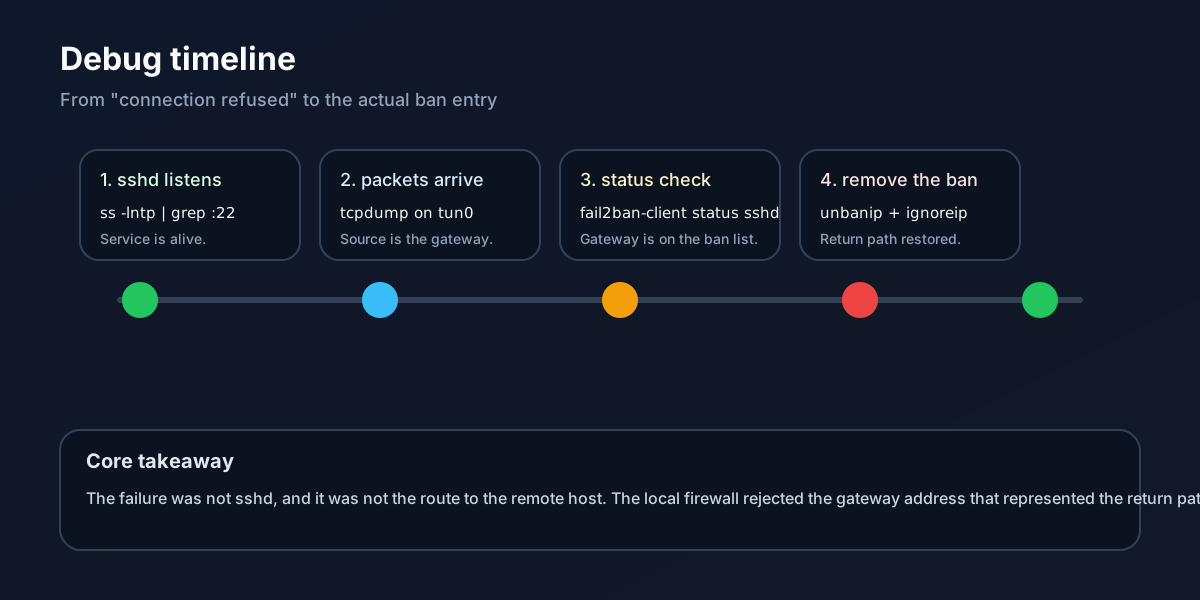
That is why I did not jump straight to configuration changes. I followed the evidence:
- Check listening sockets.
- Capture packets on the tunnel interface.
- Inspect the
Fail2Banjail state. - Only then change
ignoreip.
8. FAQ
Q1: Why was the client getting Connection refused instead of timing out?
Because the connection was not just disappearing. It was being actively rejected by firewall policy. That is why the error was refused, not a silent timeout.
Q2: Why not just disable Fail2Ban?
That would solve the symptom and remove the protection. A better fix is to keep Fail2Ban and whitelist the exact trusted gateway that represents the reverse path.
Q3: How do I avoid this in the future?
- Always determine the visible source address on the local machine.
- Treat VPNs, tunnels, and gateways as first-class path components.
- Review
fail2ban-client status sshdregularly. - Keep the whitelist narrow and explicit.
Q4: Is there a safer design?
Yes. If possible, isolate admin access on a dedicated management network and keep the gateway role separate from ordinary user traffic. The cleaner the network boundary, the easier it is to avoid false positives like this.
9. References
I used the following official references while writing this post:
10. Summary
The visible symptom was “the remote host cannot SSH back in.” The actual root cause was “the VPN gateway address on the return path was banned by Fail2Ban.”
The most useful lesson was not a single command. It was the debugging habit:
When SSH, routing, and service status all look fine, do not forget that an intermediate layer may be rewriting the source address and triggering a security policy against the wrong target.
Once I unbanned the gateway and added a precise ignoreip entry, the reverse path recovered. More importantly, I now understand the chain more clearly: not every connection that looks like it comes from the remote host is actually seen that way by the local firewall.