The Docker Container Is Running, the Port Is Dead: A Complete Walkthrough of a Silent Host-Bind Failure
TL;DR:
docker pssays everything is fine.docker inspect’sHostConfig.PortBindingsclearly says203.0.113.14:3001:3000. But on the host, nodocker-proxyis listening, the iptablesnat/DOCKERchain has no DNAT rule, andNetworkSettings.NetworksandPortsare both empty{}. This “container alive, port dead” state is what happens when libnetwork silently rolls back the endpoint creation because the target interface wasn’t up at attach time — and Docker doesn’t bother to tell you that the port publish never actually happened. The fix is a single 30-second command:docker network connect <net> <ctr>.
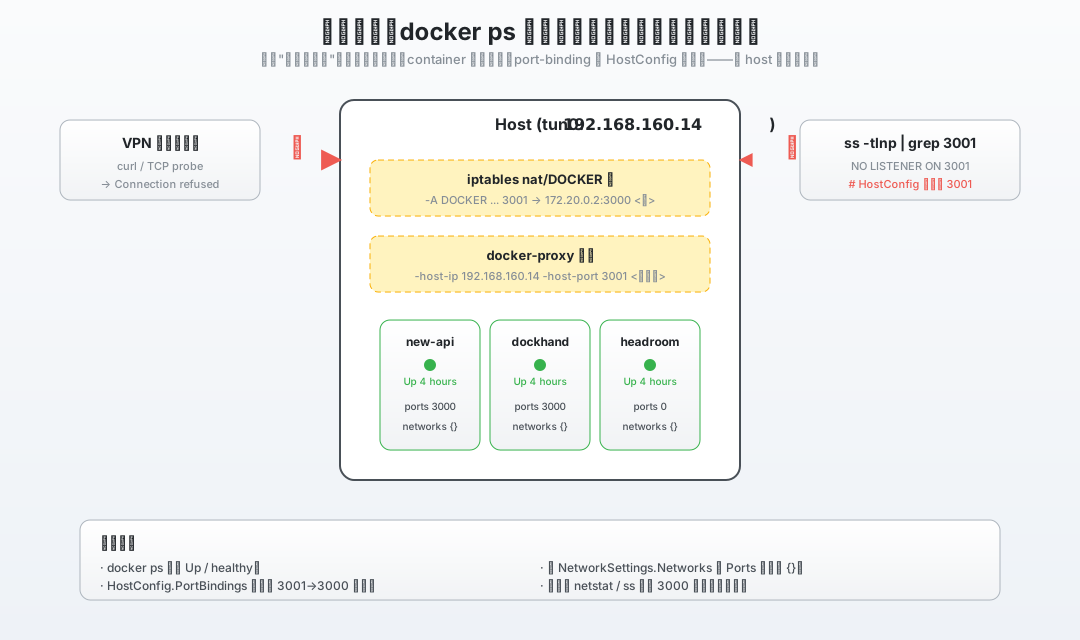
Figure 1: A textbook “half-alive” state — the container process is running, HostConfig still has the port binding, but no process on the host is listening on 3001.
1. Background: A Seemingly Impossible Outage
I run a small AI gateway on a public-facing server, with a stack of services managed by Docker Compose: new-api, dockhand, headroom, and a few others. Their compose.yaml looks like this:
ports:
  - "203.0.113.14:3001:3000"   # new-api
  - "203.0.113.14:3003:3000"   # dockhand
  - "203.0.113.14:3005:3000"   # headroom
That is, every container’s host port is bound to a fixed secondary IP on a side NIC — 203.0.113.14 is a secondary address configured on top of an auxiliary interface, and every external path (firewall whitelist, DNS, peer routing) keys off this IP.
On an unremarkable afternoon, I tried to reach http://203.0.113.14:3001/ from another node on the same network. I expected the new-api login page. I got:
curl: (7) Failed to connect to 203.0.113.14 port 3001
      after 0 ms: Couldn't connect to server
Not just 3001. I tried 3003 and 3005 too:
nc -z -v 203.0.113.14 3001   → Connection refused
nc -z -v 203.0.113.14 3003   → Connection refused
nc -z -v 203.0.113.14 3005   → Connection refused
Three ports were dead at the same time. This didn’t look like one container crashing on its own — it looked like a systemic problem on the host side.
But the weird part was docker ps:
NAME       STATUS                      PORTS
new-api    Up 4 hours                  ─
dockhand   Up 4 hours (healthy)        ─
headroom   Up 4 hours (healthy)        ─
The PORTS column is empty — no port mappings shown at all. Up 4 hours means they weren’t just freshly started. The containers were alive; they just couldn’t be reached from outside.
2. Investigation: Digging the “Invisible” State Out of the Host
Containers aren’t dead, ports aren’t mapped, and no host process is listening — this kind of “silent failure” is the worst category to debug. I dug the host state out in this order.
2.1 First, Curl Inside the Container to Rule Out a Dead Process
docker exec new-api curl -sS -m 5 -o /dev/null \
  -w 'HTTP %{http_code}\n' http://127.0.0.1:3000/
# HTTP 200
Port 3000 inside the container is fine. The process is fine; the suspicion falls entirely on the host side.
2.2 Is Anything Listening on the Host?
ss -tlnp | grep -E '3001|3003|3005'
# (empty)
Nothing is listening. This is a critical signal — a normal Docker port mapping starts a child process called docker-proxy that acts as a userland proxy, and you should always see it on the host. It’s not there. The proxy never started.
2.3 Are There Any NAT Rules in iptables?
iptables -t nat -L DOCKER -n -v
# Chain DOCKER (2 references)
#  pkts bytes target prot opt source destination
#  (no rules)
The DOCKER chain in the nat table is where Docker inserts DNAT rules for port mapping. It’s also empty.
Two key locations empty at the same time tell us: the port-mapping chain was skipped somewhere along the way.
2.4 Look Back at the “Two Fields” in docker inspect
docker inspect new-api --format '{{json .NetworkSettings}}'
# {
#   "SandboxID": "",
#   "SandboxKey": "",
#   "Ports": {},
#   "Networks": {},
#   "NetworkID": "",
#   "EndpointID": "",
#   "MacAddress": "",
#   "IPAddress": ""
# }
— Networks: {} and Ports: {} both empty.
But on the other side:
docker inspect new-api --format '{{json .HostConfig}}' | head -c 400
# {"Binds":["/docker/newapi_data/data:/data:rw"],
#  "NetworkMode":"newapi_data_default",
#  "PortBindings":{"3000/tcp":[
#     {"HostIp":"203.0.113.14","HostPort":"3001"}]},
#  "RestartPolicy":{"Name":"always",...}}
PortBindings is still there — “I want to map the container’s 3000 to 203.0.113.14:3001.” That intent is written clearly.
NetworkMode is still there — “I want to attach to the newapi_data_default bridge.”
HostConfig remembers everything, but NetworkSettings has already “forgotten.” This is the classic “intent vs. reality” mismatch — Docker wrote what it should do in HostConfig, but what it actually did is blank in NetworkSettings.
2.5 Did the Upstream Bridge Even Know About the Container?
docker network inspect newapi_data_default --format '{{json .Containers}}'
# {}
On the newapi_data_default bridge, Containers: {} — the bridge thinks no container is attached to it. But the container itself is running, can curl itself, and hasn’t restarted.
This means the attach action between the container and the bridge it declared never actually took effect — and Docker never explicitly told the user.
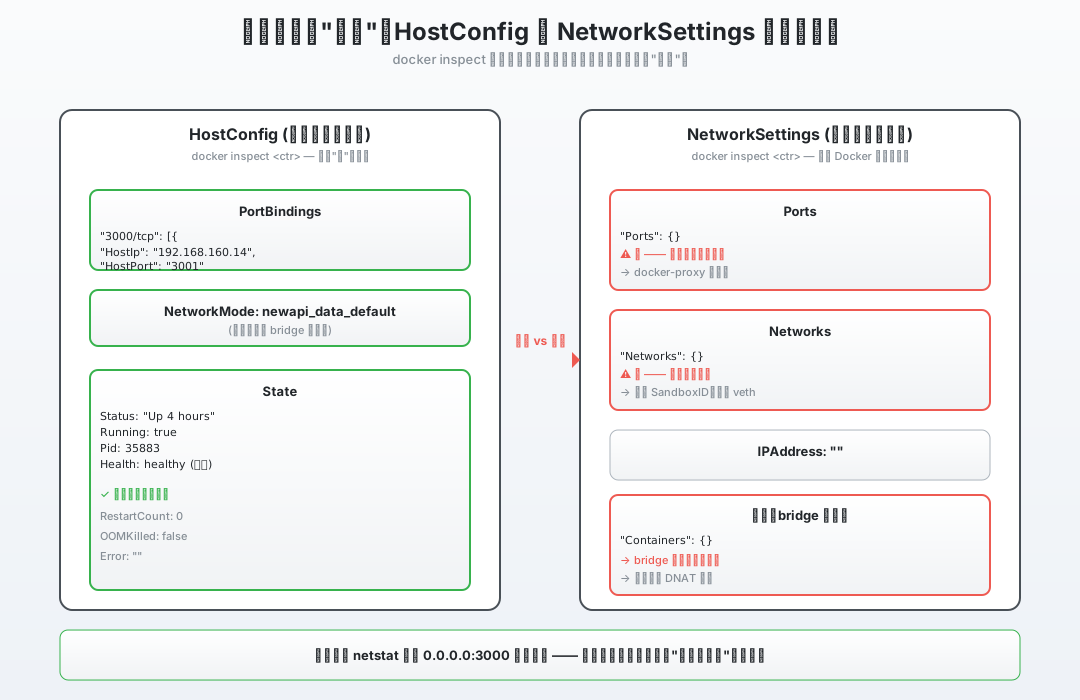
Figure 2: HostConfig on the left still has the full port mapping and network name. NetworkSettings on the right is empty {}. Intent is preserved, reality is lost.
2.6 Sweep the Other Containers — This Isn’t Isolated
for c in $(docker ps --format '{{.Names}}'); do
  nets=$(docker inspect $c --format '{{len .NetworkSettings.Networks}}')
  ports=$(docker inspect $c --format '{{len .NetworkSettings.Ports}}')
  printf '%-25s | networks=%s | ports=%s\n' "$c" "$nets" "$ports"
done

# dockhand   | networks=0 | ports=0
# new-api    | networks=0 | ports=0
# easytier   | networks=1 (host) | ports=0   ← this one is fine, it uses host network
# headroom   | networks=0 | ports=0
Three non-host-network containers all show networks=0, ports=0 simultaneously. The only thing they have in common is that each one’s HostConfig.NetworkMode points to a different custom bridge.
At this point the root-cause direction is locked in: the bridge network these containers were supposed to attach to never actually got the attach action to succeed.
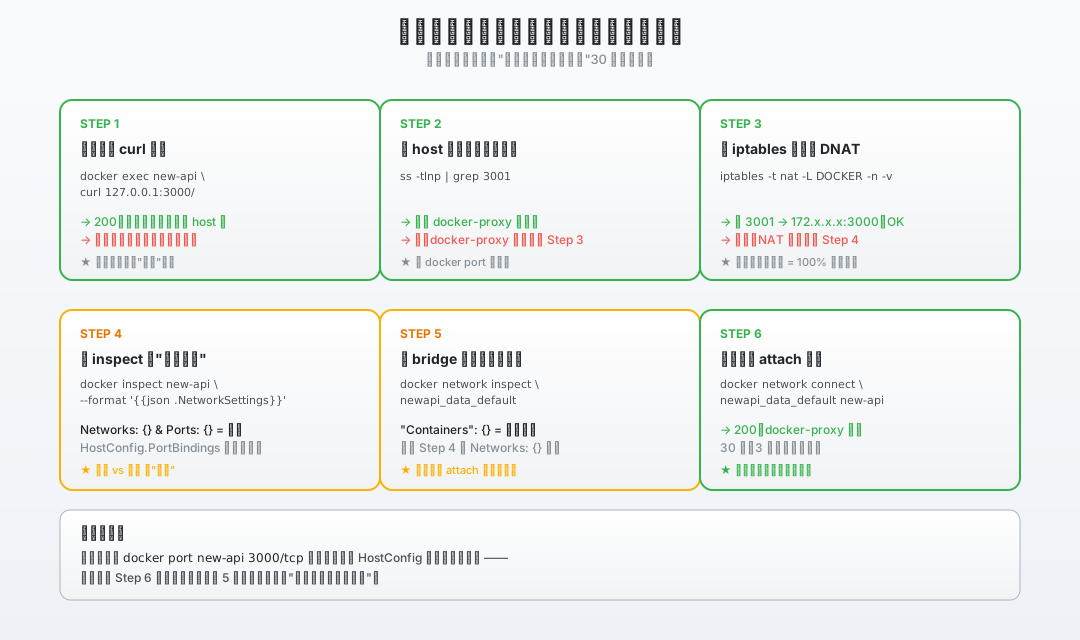
Figure 4: The six steps above compressed into a copy-paste checklist. Next time you hit a “container alive, port dead” mystery, 30 seconds is enough to localize.
3. Root Cause: A Silently Rolled-Back Endpoint Creation
Two questions left to answer:
- Why is the state inconsistent? (HostConfig has it, NetworkSettings doesn’t)
- Why did it hit three containers at the same time?
3.1 The Complete Publish Chain — Which Link Is Missing
For Docker to “expose” a container’s port, this chain has to run end-to-end:
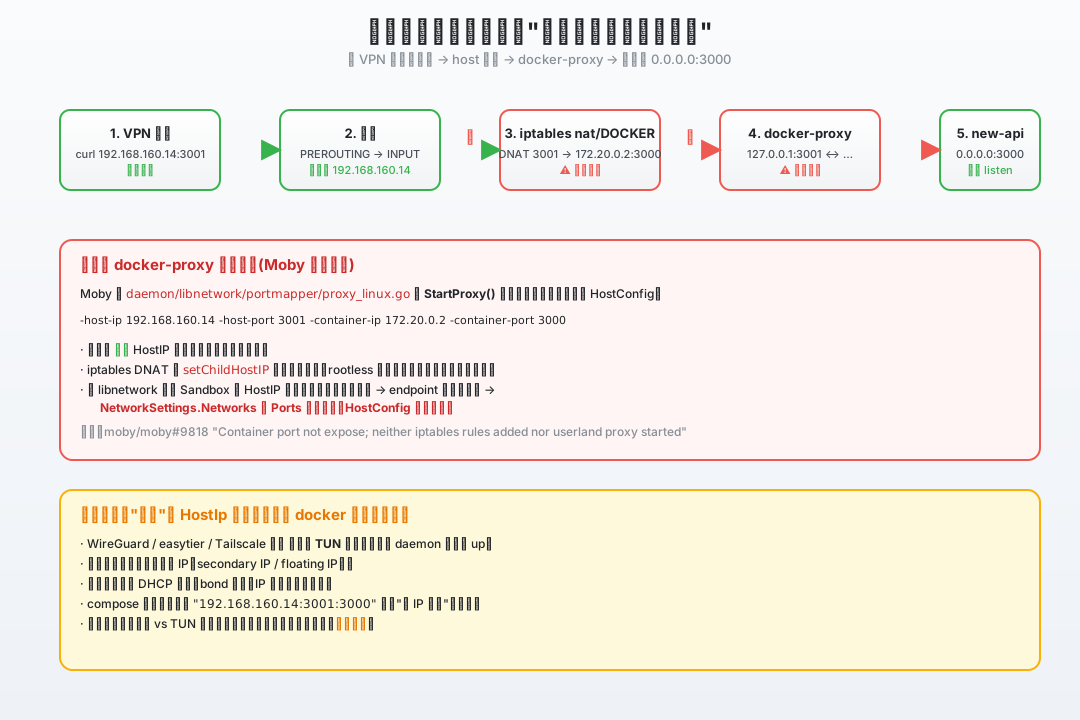
Figure 3: The full path from a VPN peer to new-api 0.0.0.0:3000. The two ✕ marks are the two links that broke in this incident.
Roughly:
- Inside the container: the
new-apiprocess listens on0.0.0.0:3000(fine); - libnetwork: create the network sandbox, attach the container to the
newapi_data_defaultbridge, assign it an internal IP like172.20.0.2; - Port mapping: for each
HostIp:HostPort, callStartProxyto launch thedocker-proxychild process; - iptables: insert a
DNAT 203.0.113.14:3001 → 172.20.0.2:3000rule in theDOCKERchain of thenattable; - Report-back: populate
NetworkSettings.PortsandNetworkSettings.Networks.
Step 5 is the “commit” step. The empty Ports: {} and Networks: {} mean: from step 1 to step 4, at least one of them was rolled back during sandbox creation. When libnetwork rolls back, it clears NetworkSettings.Networks and NetworkSettings.Ports, but it doesn’t touch HostConfig.PortBindings, which is why you see the state you see.
3.2 This Is a Long-Recognized Class of Bug
This isn’t speculation. Moby’s issue tracker has a stack of tickets with almost-identical titles:
- moby/moby#9818 “Container port not expose; neither iptables rules added nor userland proxy started” — a 2014 issue whose title is exactly this incident’s symptoms.
- moby/moby#44137 “docker network connect removes/resets dynamically published/exposed ports” — explicitly states that under certain conditions,
docker network connectcan “reset” port mappings. - moby/moby#52480 writes it directly: “the conflicting port goes silently unbound…
HostConfig.PortBindingsis preserved but never applied.” — intent preserved, reality abandoned. A textbook case.
Why didn’t docker-proxy start? Why weren’t iptables rules inserted? Why is NetworkSettings empty? It’s all the local rollback libnetwork does when sandbox creation fails.
3.3 The Common Cause: “What” Came Up Before Docker?
The key question: why did three non-host-network containers break at the same time? Because at the moment Docker tried to attach them, the interface they were supposed to bind to didn’t exist yet.
203.0.113.14 on my box is a secondary address on a side NIC — it’s not a NIC’s primary IP, but a ip addr add configuration on top of it. The NIC itself does not exist at boot:
- It’s created by a userland TUN service that runs after the system is up;
- Once the TUN service is up, the TUN interface comes up and
203.0.113.14gets attached; - Between these two events there’s an unavoidable race window — Docker’s daemon starts earlier than the TUN.
When Docker starts the container and tries to attach the bridge network, the target HostIp (i.e. 203.0.113.14) doesn’t exist on the host at that moment. In daemon/libnetwork/portmapper/proxy_linux.go, Moby’s StartProxy() does not verify that HostIP is bound to a host interface — it just passes the address straight to the docker-proxy child process as the -host-ip argument.
// proxy_linux.go (excerpt)
cmd := reexec.Command("docker-proxy",
    "-host-ip", p.Binding.HostIP,
    "-host-port", p.Binding.HostPort,
    "-container-ip", p.Binding.IP,
    "-container-port", strings.ToLower(p.Port),
)
Whether the proxy fails to start or iptables’ setChildHostIP decides the binding isn’t usable, libnetwork just rolls back the endpoint creation when it gets the error. The rollback clears the NetworkSettings fields for this attempt, but it doesn’t touch HostConfig, and it doesn’t report to the user that the port mapping never took effect.
The host process doesn’t exit, the container process doesn’t exit, the daemon keeps running — but the port never actually gets exposed from that moment on. Nobody raises an error.
The same class of problem appears in WireGuard, Tailscale, and eBPF-based VPN scenarios where the userland TUN tunnel comes up late. In moby/moby#39559 there’s literally a comment: “I’m moving the whole server into Docker with compose. Container A sets up WireGuard (using --net=host), and container B runs a DNS server on the IP that container A configured — but the daemon starts before WireGuard, so the port never binds.”
3.4 The One-Sentence Root Cause
When Docker attaches a container to a user-defined bridge network, if the configured
HostIpis not yet bound to any host interface at that exact moment, libnetwork silently rolls back the sandbox creation —docker-proxydoesn’t start, no iptables DNAT rule gets inserted,NetworkSettings.Networks/Portsget cleared, butHostConfig.PortBindingsstill says “I want this.” The container process is running, but the port is invisible to the outside world.
4. The Fix: One Command Brings the “Half-Alive” Back
Once you know the root cause, the fix is two steps.
4.1 The Stopgap: docker network connect
The most direct command — re-runs libnetwork’s attach flow, this time with the TUN already ready:
docker network connect newapi_data_default new-api
docker network connect dockhand_data_default dockhand
docker network connect headroom_default headroom
For each one you run, NetworkSettings refills from {} to the full structure, the docker-proxy child process gets spawned, and the iptables DOCKER chain gains the matching DNAT rule.
Side note:
docker network connectis an official command. The docs say: “You can connect a container to one or more networks. The networks need not be the same type.” (docs.docker.com) — that’s literally the action we need to redo.
After the fix:
ss -tlnp | grep 3001
# LISTEN 0  4096  203.0.113.14:3001  docker-proxy

curl -sS -m 5 -o /dev/null \
  -w 'HTTP %{http_code}\n' http://203.0.113.14:3001/
# HTTP 200
It’s back.
4.2 The Durable Fix: Make Docker Wait for the TUN
The one-liner above is firefighting. It will recur on the next reboot or the next TUN reconnect. To keep the host out of this state, fix the boot order.
Option A: systemd dependency (the cleanest)
Add an After= clause to docker.service to make systemd start Docker strictly after the TUN service:
[Unit]
After=network-online.target tun-up.service
Wants=network-online.target
network-online.target alone won’t catch “userland TUN still handshaking” — pair it with a small wait-online unit that polls ip -4 addr show.
Option B: Drop HostIp from compose, bind 0.0.0.0 (the most aggressive)
Change:
ports:
  - "203.0.113.14:3001:3000"
to:
ports:
  - "3001:3000"
Docker doesn’t pick an interface — it tries to bind on all available addresses. The cost is that you lose the “only this IP can reach me” isolation — you have to enforce that in the host firewall instead.
Option C: A boot-time probe + reconnect (the most robust belt-and-suspenders)
A small script that waits for the interface, then reconnects every container that lost its network:
#!/usr/bin/env bash
set -euo pipefail
# wait until 203.0.113.14 shows up
until ip -4 addr show | grep -q '203.0.113.14'; do
  sleep 1
done
# reconnect every container that's still in the half-alive state
for c in new-api dockhand headroom; do
  net=$(docker inspect "$c" --format '{{.HostConfig.NetworkMode}}')
  docker network connect "$net" "$c" || true
done
Hook it into systemd with After=docker.service.
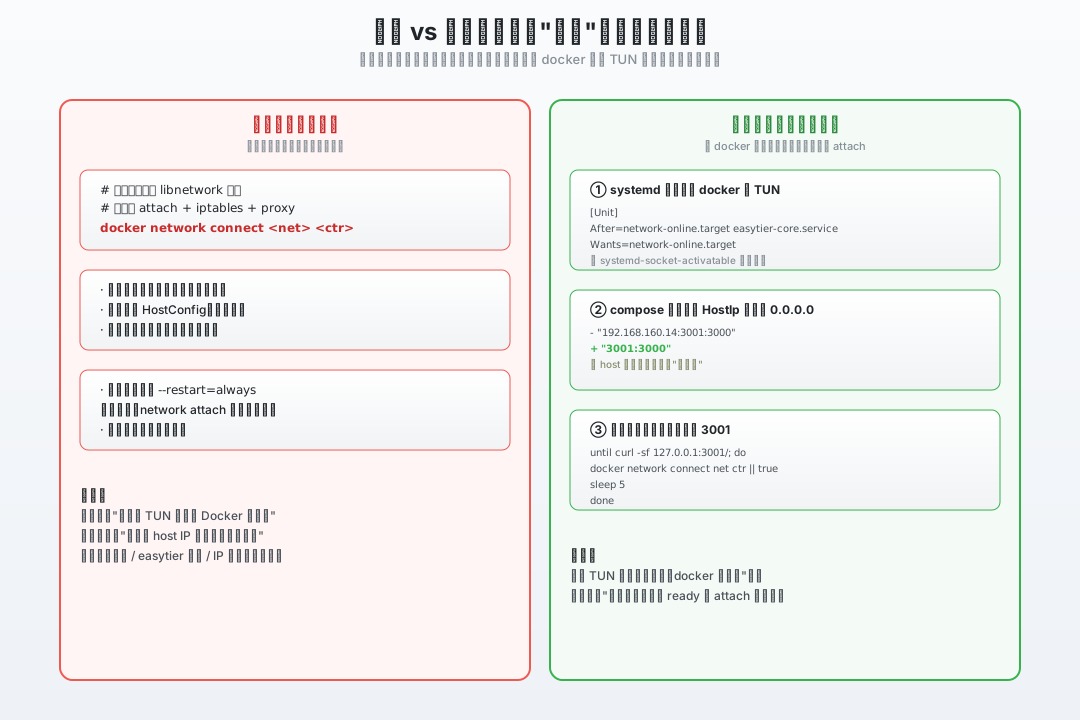
Figure 4: The left column (“stopgap”) is the 30-second docker network connect. The right column (“durable”) is making sure the interface is always ready before Docker tries to attach. They aren’t mutually exclusive — combine them for the best result.
4.3 Before vs. After (the Same docker inspect Command)
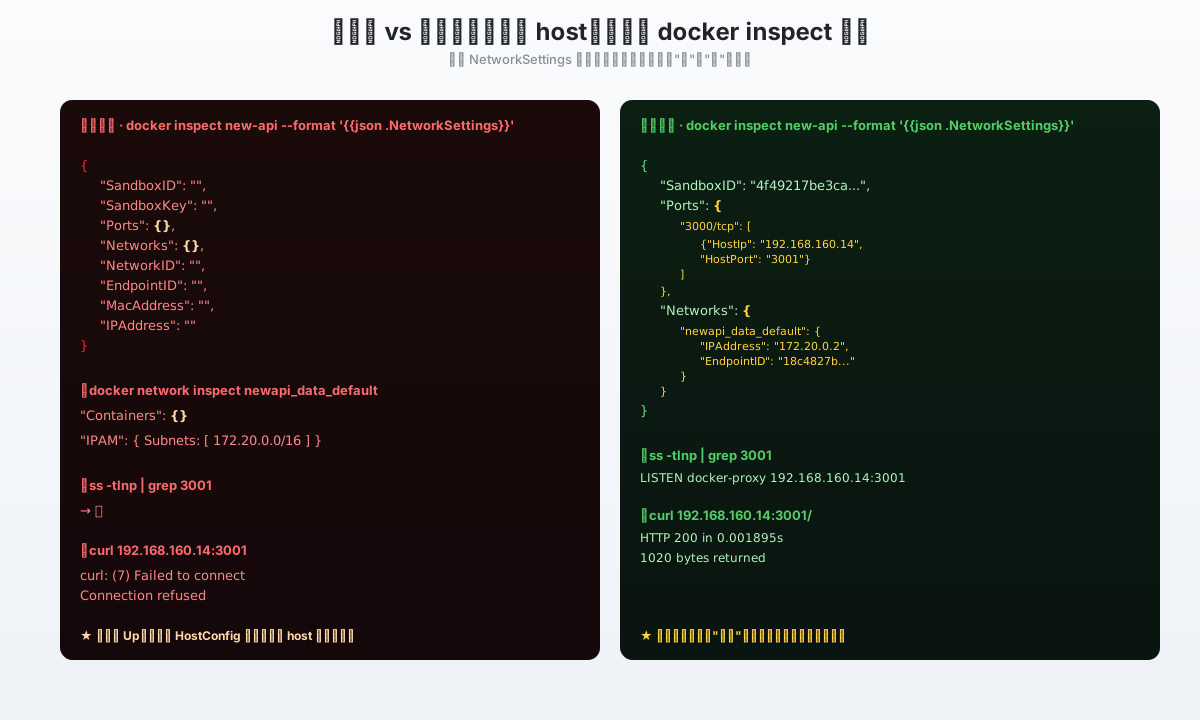
Figure 5: Before the fix, NetworkSettings is full of empty fields and ss shows no docker-proxy. After a single docker network connect, both fields fill up, the proxy appears, and curl returns 200.
5. Q&A
Q1. How do I tell apart “the container process is dead” from “the port isn’t published” in one glance?
A: Hitting <container-name>:<port> from the host doesn’t work — Docker networks don’t see the host’s network. The cleanest one-liner is to curl from inside the container:
docker exec <ctr> curl -sf 127.0.0.1:<port> && echo OK || echo DEAD
OK→ the process is fine, suspect the host side (continue with this post);DEAD→ the process is gone, look atdocker logs <ctr>instead — this isn’t a port-mapping problem.
Q2. Will docker restart Fix It?
A: Sometimes, but not reliably. In my testing, if the host IP is already up (the system has been running for a while), docker restart re-runs the sandbox creation and the port usually comes back. But if the host IP isn’t up yet, restart won’t make Docker “wait” — it goes through the same failure path and lands in the same half-alive state. So restart is a coin-flip; docker network connect is targeted treatment.
Q3. Why Doesn’t docker port <ctr> Show Anything?
A: docker port reads the NetworkSettings.Ports field. That field is empty in this failure mode — docker port showing empty is part of the symptom, not a diagnostic. To see the intent, use docker inspect <ctr> --format '{{json .HostConfig.PortBindings}}'.
Q4. Do I Have to Reconnect Each Container One by One?
A: Yes — each container needs its own docker network connect, there’s no batch subcommand. In practice three commands take 30 seconds. To save a few keystrokes, a for loop is enough:
for c in new-api dockhand headroom; do
  net=$(docker inspect "$c" --format '{{.HostConfig.NetworkMode}}')
  docker network connect "$net" "$c" || true
done
Q5. Is network-online.target Really Enough for the Durable Fix?
A: The default network-online.target only fires when systemd-networkd or NetworkManager thinks the main network is up. It doesn’t observe userland TUN/WireGuard interfaces on its own. In production, write a 1-2-line systemd unit that does ip -4 addr show | grep <vpn-ip> in a loop, and only start docker.service after that succeeds. That’s far more reliable than trusting the target.
Q6. Are There Other Failure Modes That Land in This Same “Half-Alive” State?
A: Yes — but they all share the same entry point: “the host IP was unreachable at the moment of attach”. A few more:
- Floating IP / elastic IP drifted, and Docker didn’t notice;
- Bonded NIC switched master, and the old master’s IP got released;
- DHCP renewal failed, IP was temporarily reclaimed and re-issued;
network_mode: hostcombined with-p— older Docker versions handled this inconsistently.
The diagnostic logic is identical: check HostConfig for “I want to do this”, check NetworkSettings for “I actually did this”. Mismatch = a rollback trace from libnetwork.
Q7. Did Docker 28+ Fix This Bug?
A: As of writing, Moby’s issue tracker has #51758 “PortBindings shows binding but NetworkSettings.Ports is empty” still being filed, with the matching fix in PR #52480 waiting to land. This is a long-standing corner case — understanding it beats waiting for it to be fixed.
6. Summary
The investigation path of this incident boils down to three things:
- Look at the two fields of
docker inspectseparately —HostConfigis “what I intend to do”,NetworkSettingsis “what I actually did”. A mismatch = half-alive. - Use
ssandiptables -t nat -L DOCKERto verify in reverse — nodocker-proxyprocess + no DNAT rule = 100% matches this scenario. docker network connectis the minimum stopgap action. The durable fix is changing the boot order so Docker runs strictly after the userland TUN.
Burn ss -tlnp and iptables -t nat -L DOCKER into muscle memory. Next time you hit a “container alive, port dead” mystery, 30 seconds to localize, three commands to recover.
References
- Moby source · daemon/libnetwork/portmapper/proxy_linux.go —
StartProxypassesHostIPstraight to docker-proxy as-host-ip - Moby source · daemon/libnetwork/portmappers/nat/mapper_linux.go —
setChildHostIPand the binding decision - Moby source · daemon/libnetwork/portmapperapi/api.go —
PortBinding/StopProxylifecycle - moby/moby #9818 — Container port not expose; neither iptables rules added nor userland proxy started — same-symptom ticket from 2014
- moby/moby #39559 — Container does not start (–restart always) at boot if port bind fails — closest known ticket to the TUN/WireGuard case
- moby/moby #44137 — docker network connect removes/resets dynamically published/exposed ports — port mapping reset under certain conditions
- moby/moby #51758 — PortBindings shows binding but NetworkSettings.Ports is empty — same class of issue still being filed in 2025
- moby/moby #52480 — connectToNetwork: keep Networks on failure — the matching fix PR
- Docker Docs — Networking overview (engine/network) — official description of
-pand firewall rules - Docker Docs — Docker with iptables (engine/network/firewall-iptables) — authoritative reference for the iptables
DOCKERchain - Docker Docs — Port publishing and mapping — details on the
HostIPform of-p - Docker Docs — docker network connect reference — the official “attach a container to a network” command
- Docker Blog — Docker Engine v28: Hardening Container Networking by Default — context for behavior changes in v28
- systemd docs — systemd.unit(5), After=/Wants= relationships